Business Challenge
#78 built traffic steering out of route tables by hand, and #79 showed what it costs to force everything through an inspection point. #81 handed the hub to Microsoft and deferred this. Routing intent is the managed answer to both: you declare where traffic should go, and the platform writes the routes.
“Routing Intent and Routing Policies allow you to configure the Virtual WAN hub to forward Internet-bound and Private… Traffic to an Azure Firewall, Next-Generation Firewall, Network Virtual Appliance, or security software-as-a-service solution deployed in the virtual hub.”
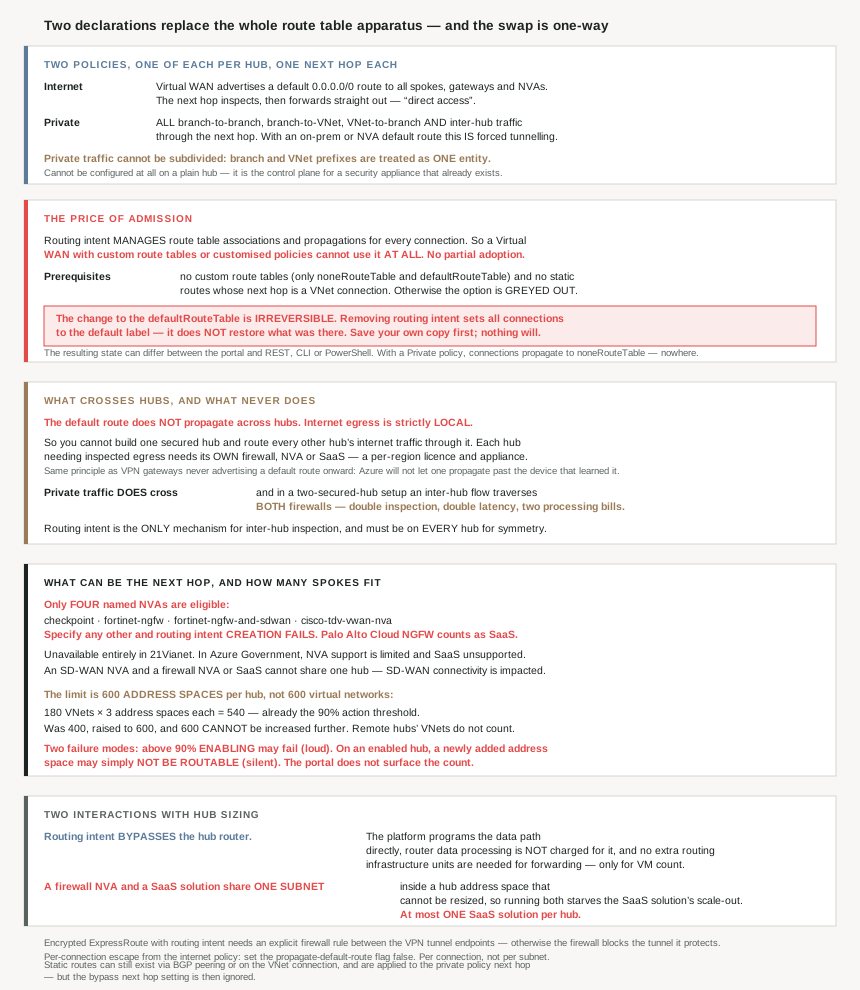
The declaration is deliberately coarse. There are exactly two policies and one of each: “Each Virtual WAN Hub can have at most one Internet Traffic Routing Policy and one Private Traffic Routing Policy, each with a single Next Hop resource.” And private traffic cannot be subdivided — “While Private Traffic includes both branch and Virtual Network address prefixes, Routing Policies considers them as one entity.”
What makes this an architecture decision rather than a switch is the price of admission, stated twice and worth reading twice:
“The modifications that Routing Intent makes to the defaultRouteTable is irreversible. If you remove routing intent, you'll have to manually restore your previous configuration.”
And: “Save a copy of your gateways, connections, and route tables prior to enabling routing intent. The system won’t automatically save and apply previous configurations.”
A documented rollback strategy whose first step is “take your own backup, because we will not” is unusually candid, and it is the single most important sentence on the page.
Architecture
The two policies, and what each actually does
| Internet Traffic Routing Policy | Private Traffic Routing Policy | |
|---|---|---|
| What it forwards | Internet-bound traffic from all branch and VNet connections | “all branch and Virtual Network traffic in and out of the Virtual WAN Hub including inter-hub traffic” |
| Mechanism | “Virtual WAN advertises a default (0.0.0.0/0) route to all spokes, Gateways, and Network Virtual Appliances” | All branch-to-branch, branch-to-VNet, VNet-to-branch and inter-hub traffic via the next hop |
| Next hop options | Azure Firewall, Third-Party Security provider, NVA, SaaS | Azure Firewall, NVA, SaaS |
| Access pattern | “direct access” — inspect, then straight out | Can produce “forced tunneling” with an on-premises or NVA default route |
That last cell connects this post to #79 precisely. The private policy plus a next hop that forwards to on-premises is forced tunnelling in the managed model — and it arrives without the Default Site, the PowerShell-only configuration, or the 0.0.0.0/0 traffic selectors that #79 had to deal with.
One prerequisite before any of it: “can’t configure Routing Policies if hub isn’t deployed with Azure Firewall, NVA, or SaaS solution”. Routing intent is not a routing feature you can use on a plain hub; it is the control plane for a security appliance that already exists.
What the platform does to your route tables
The mechanism is worth seeing explicitly, because it explains both the convenience and the exclusivity:
| Routing intent configuration | Associated route table | Propagated route tables |
|---|---|---|
| Internet | defaultRouteTable | default label (the defaultRouteTable of all hubs) |
| Private | defaultRouteTable | noneRouteTable |
| Internet and Private | defaultRouteTable | noneRouteTable |
Note the bottom two rows. With a private policy, connections propagate to noneRouteTable — they advertise their prefixes nowhere. That is how the firewall becomes the only path: not by adding a route to it, but by removing every route that would bypass it. It is the same technique #71's disablePeeringRoute preview uses in the customer-managed world, applied wholesale.
Why This Architecture Holds Up
Because it is mutually exclusive with everything #78 taught
The exclusivity is total, and the reason is that routing intent is not an addition to route management but a replacement for it:
“Routing Intent simplifies routing by managing route table associations and propagations for all connections… Virtual WANs with custom route tables and customized policies therefore can’t be used with the Routing Intent constructs.”
The prerequisites make that concrete: “There are no custom route tables deployed with the Virtual Hub. The only route tables that exist are the noneRouteTable and the defaultRouteTable”, and “You can’t have static routes with next hop Virtual Network Connection.” Fail either and “The option to configure routing intent is greyed out”.
So this is not a migration you can do incrementally. Everything #78 described — composing intents into one table, exempting a subnet, writing a next hop by hand — is the thing routing intent requires you not to have. There is no partial adoption and no coexistence.
Two escapes exist for the static-route case, and they are worth knowing because they preserve a capability rather than removing it: “you can use the BGP peering feature or apply static routes on the Virtual Network connection with ‘static route propagation’ enabled. Routes learnt via BGP or specified as a static route on a Virtual Network connection are applied to the next-hop resource specified in private routing policies.” So specific routes can still exist — they just have to arrive through the connection or through #80's protocol rather than through a table you wrote.
One silent interaction in that path, of the kind this series keeps finding: “For deployments where static routes are specified on a Virtual Network connection with propagate static routes enabled, the bypass next hop setting… is ignored and is considered to be set to bypass/equals.” A setting you configured, disregarded without warning.
Because the default route is the one thing that never crosses a hub
#81's headline benefit was the automatic full mesh — every hub connected to every other, no configuration. There is exactly one exception, and it is stated twice:
“Internet Traffic must egress through the local security solution in the hub as the default route (0.0.0.0/0) does not propagate across hubs.”
And for a mixed estate: “Branches and Virtual Networks connected to Hub 1 can’t access the Internet via a security solution deployed in the Hub because the default route… does not propagate across hubs.”
So you cannot build one secured hub and route every other hub's internet traffic through it. Each hub that needs inspected egress needs its own firewall, NVA or SaaS solution. For a multi-region estate that is a per-region licence and a per-region appliance, which is a cost shape worth establishing before the design is approved.
It is also the same principle #80 found in VPN Gateway, where VPN gateways don't advertise default routes to other BGP peers. Azure consistently refuses to let a default route propagate past the device that learned it — a safety property in both services, and a constraint on centralisation in both.
Private traffic behaves oppositely, and that has its own cost. In the two-secured-hub configuration the documented flow for Hub 1 VNets reaching Hub 2 VNets is “Hub 1 and 2 AzFW, NVA, or SaaS” — both firewalls. Inter-hub traffic is inspected twice, by two appliances, with the latency and the per-gigabyte processing of each. That is correct behaviour for symmetric inspection and it is not free.
Which is also why partial adoption does not work for inspection either: “Routing intent is the only mechanism in Virtual WAN to enable inter-hub traffic inspection… also requires routing intent to be enabled on all hubs to ensure traffic is routed symmetrically.”
Because the eligible appliance list is four names long
#77 listed five reasons to keep a customer-managed hub, and two of them were about network virtual appliances — control over how they are deployed, and “use of NVAs that aren’t supported by Virtual WAN”. This is that constraint made specific:
“NVAs can only be specified as the next hop resource for routing intent if they’re Next-Generation Firewall or dual-role NGFW and SD-WAN NVAs. Currently, checkpoint, fortinet-ngfw, fortinet-ngfw-and-sdwan and cisco-tdv-vwan-nva are the only NVAs eligible… If you attempt to specify another NVA, Routing Intent creation fails.”
Four names. Palo Alto's Cloud NGFW is supported too, “but is considered a next hop of type SaaS solution”, which matters because the SaaS path carries its own limits. If your security standard names a vendor outside that list, the decision between managed and customer-managed hubs is already made, and it was made by procurement rather than by networking.
Availability narrows it further by cloud:
| Cloud environment | Azure Firewall | NVA | SaaS |
|---|---|---|---|
| Azure Public | Yes | Yes | Yes |
| Azure Government | Yes | Limited | No |
| Azure operated by 21Vianet | No | No | No |
“Routing intent isn’t available in Microsoft Azure operated by 21 Vianet” at all. A global design cannot assume parity.
And one combination that is simply not available yet: “The ability to deploy both an SD-WAN connectivity NVA and a separate Firewall NVA or SaaS solution in the same Virtual WAN hub is currently in the road-map. Once routing intent is configured with next hop SaaS solution or Firewall NVA, connectivity between the SD-WAN NVA and Azure is impacted.” Note the failure mode — not a refusal, an impact on existing connectivity.
Because the spoke limit counts address spaces, not networks
The number looks generous and the unit is the trap:
“the maximum number of address spaces across all Virtual Networks directly connected to a single Virtual WAN hub is 600… applied individually to each Virtual WAN hub… Virtual Network address spaces connected to remote hubs are not counted.”
Microsoft's own worked example shows how fast that arrives:
| Hub | VNet count | Address spaces each | Total | Suggested action |
|---|---|---|---|---|
| #1 | 200 | 1 | 200 | Monitor |
| #2 | 150 | 3 | 450 | Monitor |
| #3 | 180 | 3 | 540 | Deploy a new Virtual WAN hub |
180 virtual networks is not many for a landing-zone estate, and at three address spaces each it hits the action threshold. The ceiling is also hard: the limit “was previously 400 and was adjustable via support case to 600. The 600 limit now applies automatically to all hubs and can’t be increased further”.
The two failure modes are worth separating, because one is loud and one is not:
- Enabling: “If the number… is close (greater than 90%) to the 600 limit, enabling or updating routing intent on the Virtual Hub may fail.” That is visible.
- Already enabled: “where Virtual Network address spaces exceeds the limit as a result of an operation such as a Virtual Network address space update, the newly connected address space might not be routable.” That is not.
So adding an address range to an existing spoke can produce a range that silently does not route. Microsoft's guidance is to act at 90 per cent — 540 of 600 — by deploying another hub rather than by negotiating the limit, and there is a PowerShell snippet on the page to count it because the portal does not surface the figure. An Azure Monitor metric for it is described as on the roadmap, which means today this is a number you have to go and compute.
Because it changes the hub sizing advice from #81
This is the most useful cross-reference in the post, and it refines something #81 said. That post explained routing infrastructure units as sizing both the hub router's throughput and its supported VM count. Routing intent splits those two halves apart:
“Virtual WAN programs the underlying Azure platform to route your… traffic in accordance with the configured routing policy and doesn’t process the traffic through the Virtual Hub router. This also means Virtual Hub router data processing isn’t charged for traffic routed via routing intent. As a result, you don’t need to allocate additional routing infrastructure units for data-plane packet forwarding… However, you might need to allocate additional routing infrastructure units based on the number of Virtual Machines.”
So on a hub with routing intent, the throughput column of #81's unit table stops describing your policy-routed traffic, the hub router's data processing charge stops applying to it, and the VM-count column still governs. Units become a capacity dimension for how many machines sit behind the hub rather than for how much traffic crosses it.
It also means #81's 1.5 Gbps single-flow ceiling, which is a property of the hub router, should not be read as a cap on policy-routed traffic — that traffic does not traverse the router. I have not seen a published per-flow figure for the routing-intent data path, so I am not going to supply one; the point is only that the router's number is the wrong number to quote here.
Because two security products do not fit in one hub
Routing intent permits different next hops for the two policies — “you can set the next hop for private routing policies to Azure Firewall in the hub and the next hop for internet routing policy to an NVA or SaaS solution” — which sounds like a clean separation of duties. The constraint is physical:
“Because SaaS solutions and Firewall NVAs are deployed in the same subnet in the Virtual WAN hub, deploying SaaS solutions with a Firewall NVA in the same hub can impact the horizontal scalability of the SaaS solutions as there are less IP addresses available for horizontal scale-out.”
And a hard count: “you can have at most one SaaS solution deployed in each Virtual WAN hub.”
That lands directly on #81's finding that the hub address space is immutable and that Azure Firewall alone needs /22 “to… allocate sufficient IP addresses to scale to maximum throughput”. Put a firewall NVA and a SaaS solution in one hub and they compete for the same finite pool, in a space that “can’t be modified after the hub is created”. The scale limit you hit is set by a decision made before either product was chosen.
Because encrypted ExpressRoute needs a rule for its own tunnel
#81 ended on the one capability only Virtual WAN offers: encrypting ExpressRoute traffic without the public internet. Combine it with routing intent and there is a prerequisite that is easy to miss because it is circular:
“Encrypted ExpressRoute… is supported in hubs where routing intent is configured if Azure Firewall is configured to allow traffic between VPN tunnel endpoints (Site-to-site VPN Gateway private IP and on-premises VPN device private IP).”
The private policy sends everything through the firewall — including the IPsec packets that carry the tunnel the policy is meant to protect. Without an explicit allow rule between the two tunnel endpoints, the firewall blocks the transport and the tunnel never establishes. A security control inspecting its own substrate is a pattern worth recognising, and it is the same shape as #79's finding that forced tunnelling SNATs away the source address the perimeter was deployed to read.
One related escape worth recording for the internet policy, since it is the only per-connection granularity on offer: the default route “is advertised to all connections to the hub… where the Propagate default route or Enable internet security flag is set to true. You can set this flag to false for all connections that shouldn’t learn the default route.” So exemption exists — per connection, not per subnet as in #79.
Key Architecture Decisions
| Decision point | Choose | Because |
|---|---|---|
| Before enabling routing intent | Export gateways, connections and route tables | The change is irreversible and nothing restores your configuration. |
| An estate with custom route tables | Decide: routing intent or custom tables | They are mutually exclusive, and the option is greyed out otherwise. |
| Static routes to a VNet connection | Move them to the connection, or to BGP | Those in the defaultRouteTable block routing intent entirely. |
| Expecting a partial migration | There isn’t one | No coexistence with customised policies. |
| One secured hub for the whole WAN | Won’t work for internet traffic | The default route never propagates across hubs. |
| Multi-region inspected egress | Budget an appliance per hub | Each hub must egress through its own local security solution. |
| Inter-hub traffic inspection | Enable routing intent on every hub | It is the only mechanism, and symmetry requires all hubs. |
| Costing inter-hub private traffic | Count two firewalls | Cross-hub flows traverse both hubs’ appliances. |
| A named third-party firewall | Check it against the four eligible NVAs | Anything else makes routing intent creation fail. |
| Palo Alto Cloud NGFW | Treat it as a SaaS next hop | Supported, but classified as SaaS rather than NVA. |
| A design spanning sovereign clouds | Don’t assume parity | Unavailable in 21Vianet; NVA limited and SaaS unsupported in Government. |
| SD-WAN NVA plus a firewall NVA | Separate hubs, or SD-WAN in a spoke with hub BGP peering | Together in one hub, SD-WAN connectivity to Azure is impacted. |
| Counting spoke capacity | Count address spaces, not virtual networks | 180 VNets with three ranges each is already 540. |
| Reaching 540 address spaces | Deploy another hub | That is the documented 90% action threshold, and 600 cannot be raised. |
| Adding an address range to an existing spoke | Check the hub’s total first | Past the limit, the new range may simply not be routable. |
| Tracking the address space count | Run the PowerShell snippet | The portal doesn’t surface it and the metric is on the roadmap. |
| Sizing routing infrastructure units with routing intent | Size for VM count, not throughput | Policy-routed traffic bypasses the hub router and isn’t charged by it. |
| Quoting the 1.5 Gbps single-flow figure | Not for policy-routed traffic | That is a hub router property, and this traffic doesn’t traverse it. |
| A firewall NVA and a SaaS solution in one hub | Expect contention for addresses | They share a subnet in a hub space that cannot be resized. |
| More than one SaaS solution per hub | Not permitted | At most one per Virtual WAN hub. |
| Encrypted ExpressRoute with routing intent | Allow the VPN tunnel endpoints through the firewall | Otherwise the firewall blocks the tunnel it is meant to protect. |
| Exempting a connection from the default route | Set its propagate-default-route flag false | The only per-connection granularity available. |
| ExpressRoute-to-ExpressRoute transit | Global Reach, or a support case | Circuit prefixes aren’t advertised between circuits otherwise. |
| Configuring through Firewall Manager | Rename existing routes to the convention | All defaultRouteTable routes must match private_traffic, internet_traffic or all_traffic. |
| Portal versus CLI or PowerShell | Expect a different end state | Documented to differ because of portal optimisations. |
| Enabling routing intent at all | Confirm a security appliance is already in the hub | It cannot be configured on a plain hub. |
Closing Thought
Routing intent is the cleanest expression of what the managed hub is for. Two declarations replace the whole apparatus #78 described — prefix matching, next hop types, per-subnet tables, the exemptions you remember to write. In exchange the platform takes over every association and propagation in the hub, which is why it cannot coexist with a single custom route table. It is not a feature you add; it is a different way of owning routing, chosen once.
The word to take seriously is irreversible. Enabling routing intent rewrites the default route table, removing it leaves every connection propagating to the default label rather than to whatever you had, and the documentation says plainly that nothing restores the old state. Most things in this series are reversible with effort; this one asks you to take your own backup because the platform will not keep one. That is the sentence to put in the change request.
The constraint most likely to decide the question for you, though, is neither of those. It is the four-name appliance list. #77 framed “NVAs that aren't supported by Virtual WAN” as an abstract reason to stay customer-managed; here it is checkpoint, fortinet-ngfw, fortinet-ngfw-and-sdwan, cisco-tdv-vwan-nva, and a creation failure for anything else. If the security standard was written before the network design, that list has already decided which hub model you are building.
#83 takes the appliance itself rather than the routing around it: network virtual appliances and high availability — what fails when a single NVA is the next hop for everything, and which of the available patterns actually survives losing one.
Official Azure Reference
- How to configure Virtual WAN hub routing policies — both policy types and their next hop options, the route table association table, the irreversibility and rollback strategy, the prerequisites, the cross-hub default route rule, the four eligible NVAs and cloud availability, the 600 address space limit with its worked example, the hub router bypass, and the encrypted ExpressRoute prerequisite
- About virtual hub settings — the default routing infrastructure units, the
/22requirement for Azure Firewall, and the immutable hub address space that the two-appliance contention lands on - Hub-spoke network topology in Azure — the customer-managed benefits, two of which concern NVA support and control
- Internet access patterns in Virtual WAN — direct access and forced tunnelling described in full (no claims drawn from it)
- Virtual hub BGP peering — the documented alternative to static routes in the default route table (no claims drawn from it)
- Connect a virtual network to a hub, bypass next hop IP — the setting routing intent ignores under static route propagation (no claims drawn from it)
Comments