Business Challenge
Two sentences from the EBS snapshot documentation, both correct, describing the same object:
“A snapshot is an incremental backup, which means that we save only the blocks on the volume that have changed since the most recent snapshot.”
“Each snapshot contains all of the information that is needed to restore your data (from the moment when the snapshot was taken) to a new EBS volume.”
A snapshot is logically complete and physically partial. You can restore any one of them without thinking about the others, and almost none of them owns the bytes it would restore. Every surprising thing about snapshot cost and snapshot deletion follows from that one gap.
The rule is stated plainly: “When you delete a snapshot, only the data that is referenced exclusively by that snapshot is removed.” And the consequence for your bill is stated just as plainly: “Because snapshots are incremental, deleting a snapshot might not reduce your data storage costs.”
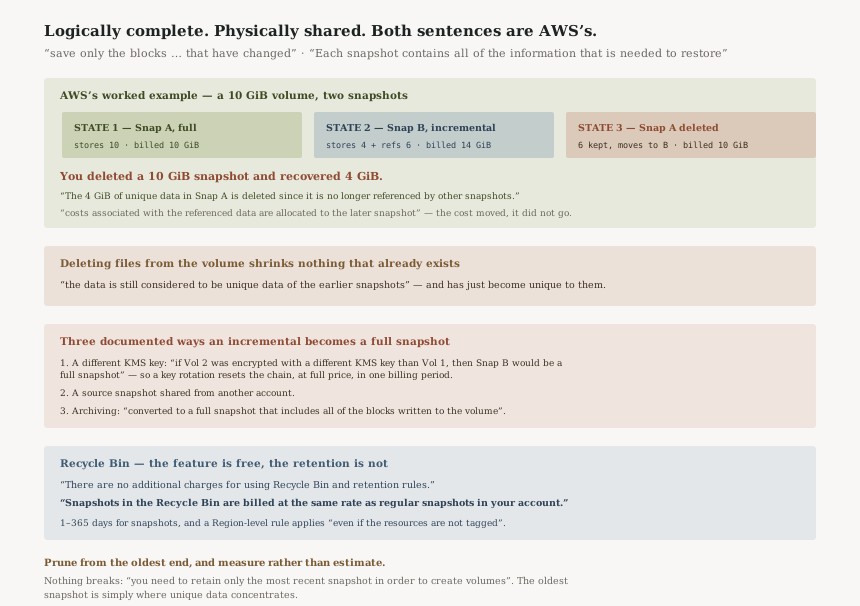
AWS works the example rather than leaving it abstract. A 10 GiB volume, two snapshots:
- Snap A is first, so it is full — 10 GiB stored, 10 GiB billed.
- 4 GiB changes. Snap B stores those 4 GiB and references the unchanged 6 GiB already in Snap A. Billed: 14 GiB.
- Delete Snap A. “Since the 6 GiB of unchanged data in Snap A is still referenced by Snap B, that data is retained and it is associated with Snap B. The 4 GiB of unique data in Snap A is deleted.” Billed: 10 GiB.
You deleted the 10 GiB snapshot and recovered 4 GiB. The other 6 did not go anywhere — it changed owner. AWS says so directly: “If you delete a snapshot containing data being used by a later snapshot, costs associated with the referenced data are allocated to the later snapshot.”
That last sentence is the one that breaks cost reports. Delete the big old snapshot and the newer snapshot gets more expensive. Per-snapshot cost attribution describes who is currently holding the bytes, not who caused them.
FixNever estimate a cleanup saving by adding up snapshot sizes. The only number that moves is the data unique to the set you are deleting, and the only safe way to find it is to delete and measure — or to delete a contiguous run from the oldest end. Blocks that later snapshots have since overwritten are, by the rule above, referenced only by the older snapshots — which is where a run deletion tends to pay.
This one catches teams who tidy a filesystem expecting the backups to follow:
“If data was present on a volume held in an earlier snapshot or series of snapshots, and that data is subsequently deleted from the volume later on, the data is still considered to be unique data of the earlier snapshots. Unique data is only deleted from the sequence of snapshots if all snapshots that reference the unique data are deleted.”
A snapshot is a point in time, so deleting a 200 GiB directory today changes what tomorrow's snapshot stores and changes nothing about yesterday's. Worse for the cleanup instinct: that 200 GiB has just become unique to the older snapshots, because no later snapshot references it any more. It will not go until every snapshot taken while the files existed is gone.
FixTreat a large deletion on a volume as an event with a snapshot-retention consequence, not a space saving. The bytes leave your bill when the last snapshot that saw them expires, which is a date your retention policy already decided.
Incremental is the default, not a guarantee. AWS names the conditions.
A different KMS key. Snapshots chain across volumes — a volume restored from Snap A and snapshotted again produces an incremental, and “Snap B is an incremental snapshot of Snap A, even though it was created from a different volume”. But that holds only under stated conditions: “if Vol 2 was encrypted with a different KMS key than Vol 1, then Snap B would be a full snapshot.” A key rotation that re-encrypts a volume resets the chain, and the next snapshot is a full one at full price.
A snapshot shared from another account. The same paragraph: if the source volume was owned by another account that took the snapshot and shared it, the next snapshot is full.
Archiving. “When you archive an incremental snapshot, it is converted to a full snapshot that includes all of the blocks written to the volume at the time that the snapshot was created.” So archiving the 2 GiB incremental from the three-snapshot example does not archive 2 GiB — it materialises the full volume state first. Archive tier is cheaper per byte and you may be moving a great many more bytes than the snapshot appeared to hold.
FixBefore archiving, work out what the snapshot would be as a full one, not what it reports as an incremental. Before a KMS key change, expect the next snapshot of every affected volume to be full, and schedule it somewhere you can afford it.
Architecture
What each snapshot owns, in AWS's own numbers
| State | What is stored | Billed |
|---|---|---|
| Snap A taken (10 GiB of data) | Full snapshot — all 10 GiB | 10 GiB |
| 4 GiB changes, Snap B taken | Snap B stores 4 GiB, references 6 GiB in Snap A | 14 GiB |
| Snap A deleted | 6 GiB retained and reassigned to Snap B; 4 GiB unique to Snap A removed | 10 GiB |
Extend it one more step and the three-snapshot case gives the same lesson from the other direction: “The total storage required for the three snapshots is 16 GiB total. This accounts for 10 GiB for Snap A, 4 GiB for Snap B, and 2 GiB for Snap C.” Three restore points, each individually complete, for 16 GiB rather than 32.
The chain is safe to prune from the old end
Two sentences remove the anxiety most people have about deleting from a chain: “the snapshot deletion process is designed so that you need to retain only the most recent snapshot in order to create volumes”, and “Deleting previous snapshots of a volume does not affect your ability to create volumes from later snapshots of that volume.”
There is no fragile dependency to preserve. You cannot break a later snapshot by deleting an earlier one; you can only fail to save as much as you hoped.
What stops a deletion
Several conditions block deletion outright, and the AMI one surprises people: “You can't delete a snapshot of the root device of an EBS volume used by a registered AMI. This consideration applies even if the registered AMI is deprecated or disabled.” Deprecating an AMI is a signal to humans, not a release of its storage.
A snapshot managed by AWS Backup cannot be deleted through EC2 either — that belongs to the vault and its lifecycle, which is #98's territory. And you cannot delete snapshots shared with you, only ones you own.
Recycle Bin: free feature, billed retention
“If you delete a snapshot that matches a Recycle Bin retention rule, the snapshot is retained in the Recycle Bin instead of being immediately deleted.” That is the protection, and it is the thing to understand before enabling it broadly, because two sentences on the pricing page sit next to each other:
“There are no additional charges for using Recycle Bin and retention rules.”
“Snapshots in the Recycle Bin are billed at the same rate as regular snapshots in your account.”
The feature is free; the retention is not. A deletion you meant still bills for the full retention period. And the period can be long — “EBS snapshots and EBS-backed AMIs: 1 - 365 days”, against “EBS volumes: 1 - 7 days”. The scope can be total, too: “Region-level retention rules … by default, apply to all of the resources (of the specified type) in the Region, even if the resources are not tagged.”
A Region-level rule for snapshots with a long retention is a sound protection against accidents and a quiet reversal of every intentional cleanup you run until it expires.
Why This Architecture Holds Up
Publishing the deletion arithmetic is unusually direct
AWS could have left “deleting a snapshot might not reduce your data storage costs” as the whole story. Instead the documentation walks three states with GiB figures and says where the retained data lands. That is a billing surprise explained before it happens, which is rare enough to notice.
Reassigning cost to the later snapshot is the only coherent choice
The bytes are shared, so somebody has to be billed for them, and the snapshots still referencing them are the later ones. The alternative — keeping a deleted snapshot on the bill as a phantom — would be worse. It does mean a per-snapshot cost breakdown is a statement about the present rather than about cause, and reading it as blame produces wrong decisions.
Needing only the most recent snapshot is what makes retention policies simple
Because no later snapshot depends on an earlier one for restorability, retention can be a date rule rather than a dependency graph. That is the design decision that lets Data Lifecycle Manager exist as something you configure rather than something you reason about.
Key Architecture Decisions
| Decision | Choose this | Because |
|---|---|---|
| Estimating a cleanup saving | Measure after deleting, from the oldest end | Snapshot size is what it holds, not what it would free — only unique data leaves |
| Recycle Bin scope | Tag-level rules for what matters | A Region-level rule applies “even if the resources are not tagged”, so it catches deliberate cleanups too |
| Recycle Bin retention | Days, not the 365-day ceiling | Retained snapshots are “billed at the same rate as regular snapshots”; the window only needs to outlast noticing a mistake |
| Archiving a snapshot | Price it as the full snapshot it becomes | Archiving “converted to a full snapshot” can move far more data than the incremental reported |
| Rotating a volume's KMS key | Expect the next snapshot to be full | A different key breaks the chain, and the cost lands in one billing period |
The audit worth running
Find your oldest snapshot per volume and ask what it is for. The oldest snapshot in a chain is where unique data concentrates, because everything it holds that later snapshots changed is referenced by nothing else. It is often the best cleanup candidate and the one most likely to be kept out of vague caution.
List every Recycle Bin retention rule and check its type. A Region-level rule you
forgot about is why last quarter's cleanup did not show up in the bill. The AWS-generated cost
allocation tag aws:recycle-bin:resource-in-bin is how you find what is sitting in there.
Reconcile snapshots against registered AMIs. Root-device snapshots of registered AMIs cannot be deleted even when the AMI is deprecated or disabled, so a deprecation sweep that did not deregister leaves storage behind with nothing pointing at the reason.
Closing Thought
The useful mental model is that a snapshot is a view over a pool of blocks rather than a copy of them. Each view is complete and independently usable, which is why restoring is simple. The blocks underneath are shared by whichever views still need them, which is why deleting is not.
Nearly every snapshot surprise resolves once those two layers are separated: a deletion that frees little, a cost that moves to a newer snapshot, a filesystem cleanup that changes nothing, an archive that is larger than the thing archived.
#99 was about a result that is accurate and smaller than it reads. This is about a number — snapshot size — that is accurate and measures something other than what you want to know. In both cases the documentation says so plainly, on the page that defines the thing.
Security & Identity — Amazon EBS snapshot lock: how it differs from a backup vault lock, what a locked snapshot still permits, and which operations the lock does not reach.
Official AWS Reference
- Amazon EBS snapshots — the definition of an incremental backup, the statement that each snapshot contains everything needed to restore, and the pricing note that deleting a snapshot might not reduce storage costs because data referenced by other snapshots is preserved
- How Amazon EBS snapshots work — the first snapshot always being full, size determined by data rather than volume, the three-snapshot worked example totalling 16 GiB, chaining across volumes, the KMS key and cross-account conditions that force a full snapshot, and the conversion to full on archive
- Delete an Amazon EBS snapshot — the worked deletion example and its GiB figures, the rule that only exclusively referenced data is removed, cost reallocation to the later snapshot, data deleted from a volume remaining unique to earlier snapshots, needing only the most recent snapshot to create volumes, and the conditions that block deletion including registered, deprecated and disabled AMIs
- Recycle Bin — retention on deletion, no additional charge for the feature, and retained snapshots billed at the same rate as regular snapshots
- How does Recycle Bin work? — tag-level versus Region-level retention rules, Region-level rules applying to untagged resources, and the 1 to 365 day retention range for snapshots against 1 to 7 days for volumes
Comments