Business Challenge
A retail e-commerce company migrated from VMs to containers two years ago. They chose EKS because the engineering blog posts they read were all about Kubernetes, and the senior architects wanted something "portable." Today they run 45 microservices on three EKS clusters. They have four platform engineers. Two of them spend most of their time on cluster operations: CoreDNS tuning, VPC CNI upgrades, kube-proxy compatibility, node group AMI patching, Cluster Autoscaler configuration drift.
The other team — a fintech startup — made the opposite call. They chose ECS with Fargate across 60 microservices. Their platform team of two handles task definition updates, service scaling policies, and ALB routing rules. When AWS releases a Fargate runtime update, they do nothing. Their two platform engineers ship product features.
Neither team made a wrong decision given their constraints at the time. But the retail team made a decision based on prestige and perceived portability, not operational fit. The fintech team made a decision based on what they actually needed to run.
Kubernetes is free. The cost is operational complexity: add-on lifecycle management, CNI debugging, control plane version upgrades, scheduler tuning, RBAC maintenance, and the hiring requirement for engineers who know all of it. EKS reduces this but does not eliminate it. ECS with Fargate eliminates it entirely for standard web workloads.
Architecture
ECS and EKS solve the same problem — running containers at scale — but at different layers of the stack. ECS is an opinionated AWS-native orchestrator. EKS is managed Kubernetes: the control plane is AWS-managed, but the add-on layer, the node management, and the Kubernetes API surface are yours to operate.
ECS: what AWS owns versus what you own
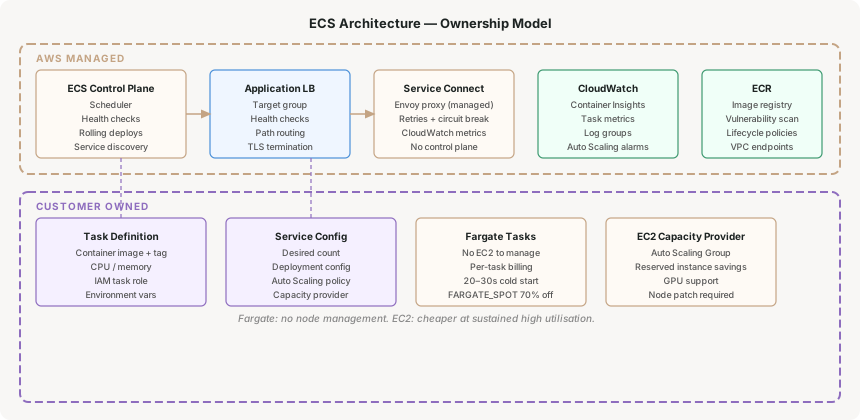
Task Definition
The unit of deployment in ECS. Defines container image, CPU/memory allocation, environment variables, port mappings, and IAM task role. Versioned — deploying means creating a new revision and updating the service to point to it. Analogous to a Kubernetes Pod spec, but simpler: no init containers, no pod security policies, no affinity rules unless you explicitly need them.
Service
The long-running abstraction that keeps N copies of a task running, registers targets with an ALB, handles rolling updates, and integrates with Auto Scaling. A service on Fargate means you never provision a node — specify vCPU and memory on the task, and AWS places it. On EC2 launch type, you manage the underlying instances through capacity providers.
Service Connect
ECS's native service mesh, released in 2022. Injects a proxy sidecar that handles service-to-service traffic with connection pooling, retries, and CloudWatch metrics — without you managing Envoy configuration files or a control plane. If your services talk to each other over HTTP/gRPC, Service Connect replaces the need for App Mesh or a self-managed Istio.
Capacity Providers
The abstraction between your services and the underlying compute. Fargate and FARGATE_SPOT are capacity providers — you pay per task, not per node. EC2 Auto Scaling Groups are also capacity providers, with managed scaling that adds instances when task placement fails. Mix them: run baseline tasks on EC2 reserved instances, burst tasks on FARGATE_SPOT at up to a 70% discount.
EKS: what AWS owns versus what you own
EKS manages the Kubernetes control plane — the API server, etcd, controller manager, and scheduler. Everything else is yours: worker nodes, CNI plugin, CoreDNS, kube-proxy, Cluster Autoscaler or Karpenter, load balancer controller, metrics-server, Fluent Bit or Fluentd, storage classes, RBAC policies, and the upgrade path for all of it.
A production-grade EKS cluster needs: VPC CNI (with custom networking if you run out of ENI IPs), CoreDNS, kube-proxy, AWS Load Balancer Controller, Cluster Autoscaler or Karpenter, EBS CSI driver, EFS CSI driver (if needed), Container Insights agent, and a secrets store CSI driver for Secrets Manager integration. Each has its own version matrix against the Kubernetes version. Upgrading the cluster means validating all of them.
Why This Architecture Holds Up
Operational complexity budget is finite
Every platform team has a fixed capacity for operational complexity. EKS consumes more of that budget than ECS. The question is whether the capabilities EKS provides — custom schedulers, DaemonSets, StatefulSets with persistent volumes, Kubernetes-native tooling (Helm, ArgoCD, Kyverno) — are worth the draw-down. For most web API workloads, they are not.
Portability is a real option cost
The most common justification for EKS is portability: "we might need to run on GCP or Azure later." This is worth interrogating. Moving from EKS to GKE requires rewriting your IAM roles (IRSA → Workload Identity), your load balancer annotations, your storage classes, your secrets integration, and your networking policies. The Kubernetes YAML is portable; the AWS-specific integrations are not. If multi-cloud is a real requirement in the next 18 months, EKS is the right call. If it is hypothetical, you are paying the complexity tax for an option you may never exercise.
ECS integrates natively with AWS services
ECS task roles give containers IAM credentials without any additional tooling — no IRSA configuration, no webhook, no service account annotation. ECS Service Connect gives you service-to-service observability without deploying a service mesh control plane. ECS integrates with CodeDeploy for blue/green deployments natively. These integrations exist in EKS, but they require additional components and configuration.
Key Architecture Decisions
Fargate removes node management entirely — no EC2 instances to patch, no capacity planning for node pools, no bin-packing optimisation. The tradeoff is cost and startup time. Fargate tasks cost more per vCPU-hour than equivalent EC2 instances, and cold start takes 20–30 seconds longer than a pre-warmed EC2 instance. For most web APIs this is irrelevant. For workloads with tight latency requirements on task startup, or workloads running 24/7 at high utilisation, EC2 capacity providers with reserved instances are cheaper.
Decision signalUse Fargate unless you have a specific reason not to. The operational simplicity is worth the cost premium for most teams. Switch to EC2 launch type when your compute cost analysis shows EC2 reserved instances are materially cheaper for your utilisation pattern.
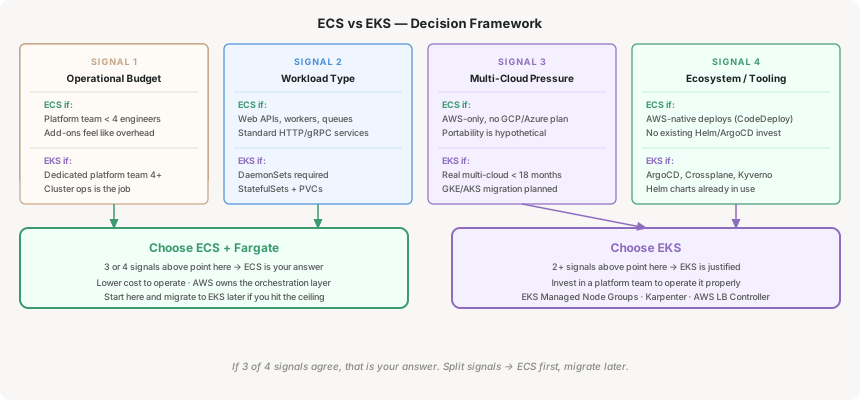
EKS is genuinely the better choice in four scenarios: (1) you have workloads that require DaemonSets — node-level agents that ECS has no equivalent for; (2) you run stateful workloads with complex storage requirements like StatefulSets with PVCs across multiple zones; (3) you have a dedicated platform team (4+ engineers) whose job is managing the platform, not shipping product features; (4) you have a real multi-cloud requirement, not a hypothetical one. If your situation matches two or more of these, EKS is likely the right call.
Concrete signalIf your workload list includes anything requiring node-level access (log agents, security scanners, network tools), that is a DaemonSet use case. ECS has no equivalent — you would run it as a sidecar on every task, which is less efficient and harder to update. One legitimate DaemonSet requirement tips the scale toward EKS.
ECS Service Connect handles service-to-service HTTP/gRPC traffic with retries, circuit breaking, and CloudWatch metrics. It is the right default for ECS — simpler than App Mesh, no control plane to manage, no Envoy version to pin. For EKS, the choice is between a lightweight option (AWS Load Balancer Controller + Kubernetes services) and a full service mesh (Istio, Linkerd, or AWS App Mesh). The full service mesh adds mutual TLS, fine-grained traffic policies, and distributed tracing — but also adds an Envoy sidecar to every pod and a control plane to operate.
Rule of thumbStart without a service mesh. Add one when you have a specific requirement — mutual TLS for compliance, canary routing at the traffic level, or distributed tracing that your APM tool cannot provide. Adding a service mesh to satisfy a vague "observability" requirement is premature complexity.
If you start on ECS and later determine you need EKS capabilities, the migration path is manageable — containerised workloads are already portable, and you are adding orchestration capability, not removing it. The reverse is harder: EKS-native tooling (Helm charts, ArgoCD applications, Kustomize overlays, custom operators) does not translate to ECS. Teams that start on EKS and want to simplify often find they have built significant Kubernetes-native tooling that is difficult to move away from.
ImplicationFor a greenfield platform, starting with ECS and migrating later is a lower-risk path than starting with EKS and discovering the operational overhead exceeds your team's capacity. The migration to EKS is a forward step; the migration from EKS is a backwards step against the grain of the tooling.
Tradeoffs and Alternatives
| Approach | Works well when | Breaks down when |
|---|---|---|
| ECS + Fargate | Web APIs, background workers, event-driven services; platform team under 4 engineers; no DaemonSet requirements | Node-level access required; complex stateful workloads; existing Kubernetes tooling investment too large to abandon |
| ECS + EC2 | High-throughput workloads with predictable traffic; GPU workloads; cost-optimised reserved instance baseline | Teams without the capacity to manage EC2 node lifecycle; workloads with spiky or unpredictable traffic patterns |
| EKS + Managed Node Groups | DaemonSet requirements; large platform teams; multi-cloud pressure; rich Kubernetes ecosystem tooling (ArgoCD, Crossplane, Kyverno) | Platform teams under 3 engineers; pure web API workloads with no complex scheduling requirements; cost-sensitive environments |
| EKS + Fargate | Serverless Kubernetes for batch jobs and stateless services; no node management desired with Kubernetes API | DaemonSets; stateful workloads with EBS; privileged containers; GPU workloads — all unsupported on EKS Fargate |
Reference: ECS Service with Fargate and Service Connect
A minimal ECS service configuration using Fargate with Service Connect enabled for service-to-service discovery:
resource "aws_ecs_service" "api" {
  name            = "payments-api"
  cluster         = aws_ecs_cluster.main.id
  task_definition = aws_ecs_task_definition.api.arn
  desired_count   = 3
  launch_type     = "FARGATE"

  network_configuration {
    subnets          = var.private_subnet_ids
    security_groups  = [aws_security_group.api.id]
    assign_public_ip = false
  }

  load_balancer {
    target_group_arn = aws_lb_target_group.api.arn
    container_name   = "payments-api"
    container_port   = 8080
  }

  service_connect_configuration {
    enabled   = true
    namespace = aws_service_discovery_http_namespace.main.arn

    service {
      port_name      = "http"
      discovery_name = "payments-api"
      client_alias {
        port     = 8080
        dns_name = "payments-api"
      }
    }
  }
}
With Service Connect enabled, other ECS services in the same namespace reach this service at http://payments-api:8080 — no service discovery client, no Route 53 lookup, no sidecar configuration required beyond the service definition.
Closing Thought
The ECS vs EKS decision is not a technical question with a universally correct answer. It is an organisational capacity question: how much operational complexity can your platform team absorb while still shipping product? ECS with Fargate is not a lesser version of EKS — it is a deliberate choice to let AWS own the orchestration layer so your team can own the product layer.
The teams that regret EKS adoptions are not the ones who needed Kubernetes capabilities. They are the ones who adopted it before they had the team size and operational maturity to benefit from those capabilities. The teams that regret ECS adoptions are the ones who hit a ceiling — DaemonSet requirements, complex scheduling, or a real multi-cloud requirement — that ECS genuinely cannot address.
The decision framework is simple: start with the four signals. If your operational complexity budget is low, workloads are standard web services, team is under four platform engineers, and multi-cloud is hypothetical — choose ECS. If two or more signals point the other way, choose EKS and invest in the platform team to operate it properly.
Security — KMS key hierarchy for multi-account encryption: how to design CMKs, key policies, and grants so that encryption is a platform service rather than a per-team implementation detail.
Comments