Business Challenge
A financial services firm has grown from five AWS accounts to fifty over two years. Each account was provisioned with its own set of IAM users — one per engineer, one per service team, one per contractor. Nobody planned it this way; it just happened as teams moved fast and the AWS account count grew faster than the identity strategy.
The result: over 1,000 IAM users spread across 50 accounts. When a senior engineer resigned last quarter, the security team spent three days tracking down and deactivating their access across accounts. Two accounts were missed. The auditor found them six weeks later during a quarterly review.
The pattern has four failure modes at scale:
- Offboarding latency — disabling access requires a manual action in every account. Miss one and the former employee still has console access.
- Access key sprawl — IAM users accumulate long-term credentials. Keys created "temporarily" persist for years unless someone actively rotates or deletes them.
- No central visibility — there is no single place to answer "what does this engineer have access to across all accounts?" You query each account's IAM separately.
- MFA inconsistency — MFA can be enforced per-account, but it requires a policy in every account. Accounts added later frequently miss the control.
Per-account IAM users are an architectural anti-pattern at multi-account scale, not a process problem. Even disciplined teams accumulate the failure modes above as account count grows. The fix is structural — centralised identity — not more rigorous manual processes.
Architecture
IAM Identity Center (renamed from AWS Single Sign-On in July 2022) is the control plane for human access across an AWS Organization. It sits in the management account, connects to your identity provider, and provisions IAM roles into every member account on demand.
Four core concepts
Permission Set
A reusable access policy that gets deployed as an IAM role into one or more accounts. Define it once — AdministratorAccess, ReadOnlyAccess, PlatformEngineer — and assign it to accounts. Identity Center creates and manages the IAM role; you never touch the target account's IAM directly.
Account Assignment
The join between a principal (user or group), a permission set, and an account. "Group platform-engineers gets PlatformEngineer access to accounts prod-001 and prod-002." Add an account to the organization and create assignments — no IAM user creation, no access key issuance.
Identity Source
Where users and groups are mastered. Three options: Identity Center's built-in directory (fine for small teams), external IdP via SAML 2.0 + SCIM sync (Okta, Microsoft Entra ID, Ping — recommended for enterprises), or Active Directory via AWS Directory Service. SCIM keeps group membership in sync automatically.
Access Portal
A single URL (your-org.awsapps.com/start) where engineers authenticate once and see only the accounts and roles they are assigned to. One click yields a console session or short-lived CLI credentials. No IAM user, no access key, no shared password.
Permission set → account assignment model
The assignment model is a three-way relationship: principal × permission set × account. A single permission set can be assigned to many accounts; a single account can have many permission sets; a single group can have different permission sets in different accounts. This lets you express your access model precisely:
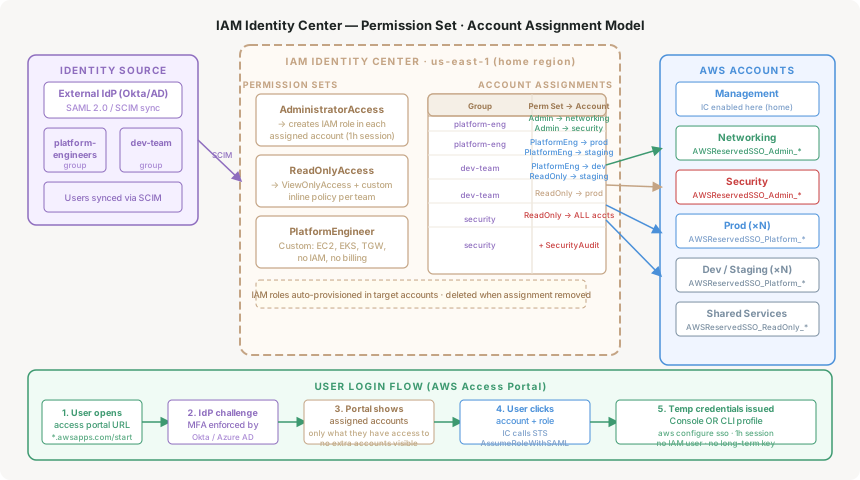
Define permission sets once
Create AdministratorAccess (maps to AWS managed policy), ReadOnlyAccess, and custom permission sets like PlatformEngineer (EC2, EKS, TGW full — no IAM write, no billing). Session duration defaults to 1 hour; extend to 8 hours for engineering roles that need longer working sessions.
Assign groups, not individuals
Assign IdP groups to permission sets and accounts, not individual users. Group membership in Okta or Microsoft Entra ID controls access — add an engineer to the platform-engineers group and they immediately get the right access to the right accounts, with no AWS console change.
Identity Center provisions the roles
When you create an assignment, Identity Center deploys the IAM role into the target account automatically. The role is named AWSReservedSSO_PermSetName_RandomSuffix — do not edit it directly. Identity Center owns the lifecycle; manual edits are overwritten on the next sync.
ABAC — Attribute-Based Access Control
Permission sets answer "who can access which accounts." ABAC answers a finer question: "what resources within an account can this person access?" Instead of creating a separate permission set for every team and every environment, ABAC embeds user attributes from your IdP as session tags and references them in IAM policy conditions.
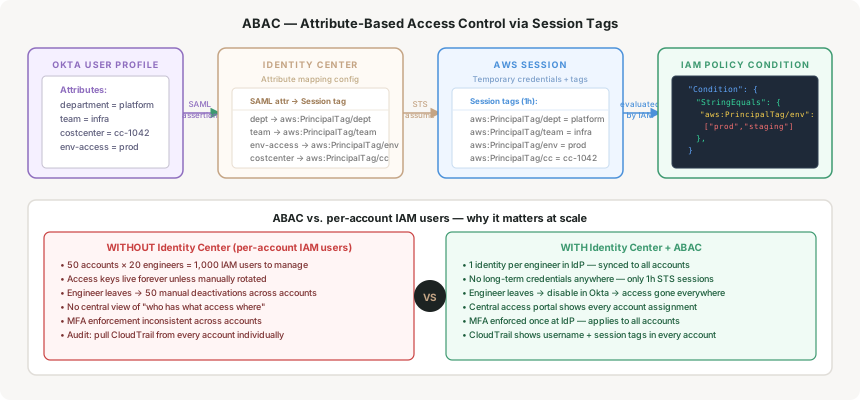
A concrete example: your tagging strategy tags every S3 bucket with Environment=prod or Environment=dev. Your data engineers have env-access=dev in Okta. The S3 bucket policy checks:
{
  "Condition": {
    "StringEquals": {
      "aws:PrincipalTag/env": "${s3:ExistingObjectTag/Environment}"
    }
  }
}
A data engineer with env-access=dev can access dev buckets but not prod buckets — without any change to their permission set, without creating a separate permission set, and without touching IAM in the target account. Add a new environment: tag the resources, and the policy automatically covers it.
Use permission sets to control which accounts a role can enter. Use ABAC to control which resources within an account the session can touch. Trying to express account-level segmentation through ABAC adds complexity without benefit — TGW route tables are already doing that work at the network layer.
Why This Architecture Holds Up
Offboarding in one place
Disable the user in Okta. SCIM sync removes them from all Identity Center groups, and no new session can be started in any account. That is the win: no manual action per account, and no possibility of missing one. The audit trail — CloudTrail in every account — shows the last session timestamp and what it did.
Be precise about what it does not do. Sessions already in flight are not revoked. A role session runs to the session duration configured on its permission set — one hour by default, but up to twelve — and the AWS access portal session is a separate clock that defaults to eight hours and can be set as high as 90 days. So the honest offboarding window is the longest session duration you have configured, not zero. That is the argument for keeping session duration short on the permission sets that matter, rather than for assuming the IdP switch is instantaneous.
No long-term credentials
Every console session and every CLI profile issued through Identity Center is a set of temporary STS credentials with a maximum lifetime of 12 hours (configurable per permission set, default 1 hour). There are no IAM access keys to rotate, no secrets to store, and no credential-based attack surface on the IAM user level.
MFA enforced once
MFA is enforced at the identity provider — Okta, Microsoft Entra ID, or the built-in Identity Center MFA. It applies to every account, every permission set, every CLI invocation automatically. You do not need an MFA enforcement SCP per account; the IdP is the single enforcement point.
CloudTrail attribution
Every API call made through an Identity Center session carries the username and session tags in CloudTrail's userIdentity.principalId field. In a traditional IAM user setup you get the IAM username — which is often something like john.smith-prod-002, a per-account artifact with no link to the canonical identity. With Identity Center you get AROAEXAMPLE:john.smith@company.com consistently across every account.
Key Architecture Decisions
The built-in directory is fast to set up and works well for teams under 20 people or AWS-only organisations with no existing IdP investment. For enterprises, connect your existing IdP — engineers log in with their corporate credentials, MFA policy is inherited from the corporate standard, and deprovisioning happens automatically when HR disables the account in the directory. The SCIM endpoint makes group sync near-real-time (minutes, not overnight batch jobs).
Decision signalIf your company already uses Okta, Microsoft Entra ID, or Ping for SaaS access, use the external IdP path. The SAML + SCIM setup takes a few hours and eliminates a second identity system to manage.
Teams tend to go in one of two wrong directions: either one AdministratorAccess permission set for everyone (too permissive), or one permission set per team per environment (too many — hard to maintain, easy to make inconsistent). The right approach is a small number of reusable permission sets based on job function: AdministratorAccess (break-glass only), ReadOnlyAccess, PlatformEngineer, DataEngineer, SecurityAudit. Use ABAC session tags to handle resource-level differentiation within those roles, not more permission sets.
Rule of thumbIf you have more than 10 permission sets, you are probably encoding environment or team context into role names rather than using ABAC. Five to seven permission sets covers most enterprise org structures.
The default session duration is 1 hour. This is appropriate for most access — it limits the blast radius of a stolen session token. For engineering roles that need sustained console or CLI access (deploying infrastructure, debugging a production incident at 2am), 1 hour causes friction. Set the permission set session duration to 8 hours for engineering roles. Break-glass administrator roles should stay at 1 hour or less — short-lived sessions on high-privilege roles are a meaningful security control.
Identity Center is for humans. CI/CD pipelines, Lambda functions, EC2 instances, and GitHub Actions workflows should use IAM roles with OIDC or instance profiles — not Identity Center permission sets. Identity Center was not designed for machine-to-machine authentication and adds unnecessary complexity there. The pattern: human access → Identity Center. Machine access → IAM roles with least-privilege inline policies and OIDC where possible.
Tradeoffs and Alternatives
| Approach | Works well when | Breaks down when |
|---|---|---|
| IAM Identity Center | Multi-account org, existing IdP, need central offboarding | Non-human identities; single-account setups where per-account IAM is simpler |
| Per-account IAM users | 1–3 accounts, no org, small team with stable membership | Account count grows beyond 5; any engineer turnover; audit requirements |
| IAM Identity Center + ABAC | Resource-level access control without permission set explosion; consistent tagging strategy already in place | Resources not consistently tagged (ABAC policy conditions silently allow or deny everything); teams not mature enough to maintain tag discipline |
| AWS IAM Roles Anywhere | On-premises workloads or third-party services that need temporary AWS credentials without an EC2/Lambda context | Human console access — this is a machine identity tool, not a human identity tool |
Closing Thought
The shift from per-account IAM users to Identity Center is not primarily a security improvement — it is an operational simplification that happens to improve security as a side effect. When access is centralised, offboarding is one action. When credentials are always temporary, rotation is not a process. When MFA is enforced at the IdP, it applies everywhere without per-account policy work.
The organisations that resist this change usually do so because the migration feels disruptive — existing automation uses IAM access keys, existing runbooks reference per-account usernames. That friction is real. But every month of delay adds more IAM users, more access keys, and more accounts to migrate later. The cost of migration scales with account count; the earlier you do it, the cheaper it is.
Start with read-only access for all engineers via Identity Center before you migrate administrative access. A ReadOnlyAccess permission set with a single account assignment per engineer has no blast radius and immediately gives you visibility into whether the access portal and IdP integration work correctly. Migrate elevated permissions account by account once the foundation is stable.
Containers — the ECS vs EKS decision framework for enterprises: when managed Kubernetes is the right call, when it is operational overhead you do not need, and the specific technical signals that should drive the choice.
Comments