Business Challenge
The previous post argued that the recording controls — an organisation trail, the Config recorder, GuardDuty — have to be on from an account's first minute, because the record they produce cannot be backfilled. Suppose that is done. Everything is delivered to a central bucket, in a dedicated account, versioned, encrypted, and backed up nightly to a second Region.
An auditor asks whether the audit trail could have been tampered with. The team says it is immutable. Every word in the sentence before this one is true, and none of them makes it immutable.
Versioning means an overwrite creates a new version rather than destroying the old one — until someone with the right permission deletes the version explicitly. The nightly backup means the data survives loss; it does not mean it survives editing, because a backup taken after tampering copies the tampered file faithfully, on schedule, and reports success. Encryption protects the data from being read, which is not the property under discussion. The dedicated account narrows who could do it, and does nothing about the people who administer that account.
The archive is durable, private and recoverable. Whether it is accurate is a separate question, and nothing in that list answers it.
A backup exists because things get lost — hardware fails, someone runs the wrong script, a Region has a bad day. An immutable log exists because someone might want the record to say something other than what happened. The first threat is indifferent to your data's contents; the second is about them. Controls built for one are not controls for the other, and the reason the confusion survives is that both produce a second copy.
Architecture
Three mechanisms, three guarantees. Getting the design right is mostly a matter of not expecting any of them to do another's job.
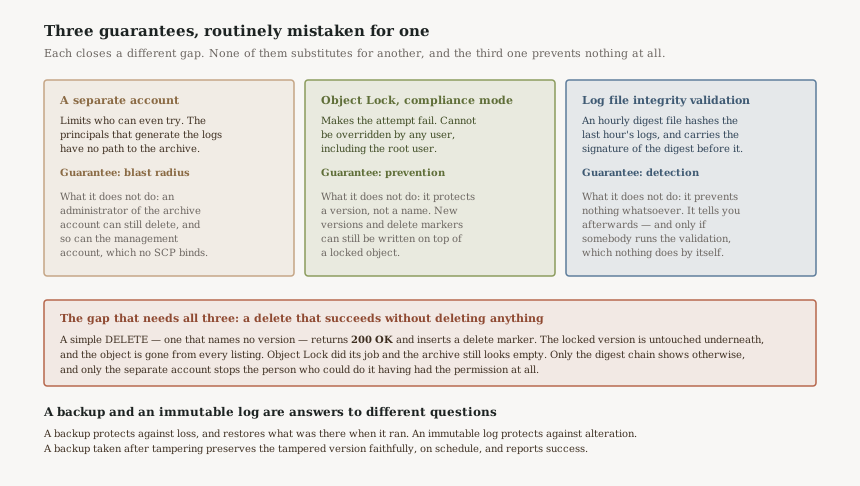
The separate account bounds who can try
This is the cheapest of the three and the one people already have. Delivering logs to a bucket in an account that no workload principal can reach means an attacker who compromises a production role has no path to the archive at all — they can generate log entries, and that is the extent of their relationship with it.
Its limit is precise: it does nothing about anyone who administers the archive account. And from the earlier post in this series, it does nothing about the management account either, since SCPs do not apply there. A separate account converts "anyone with production access" into "a much smaller list", which is real and is not the same as nobody.
Object Lock makes the attempt fail
S3 Object Lock can help prevent Amazon S3 objects from being deleted or overwritten for a fixed amount of time or indefinitely, using a write-once-read-many model. It works only in buckets that have S3 Versioning enabled, and the mode you choose decides whether it is a control or a convention.
In compliance mode, a protected object version can't be overwritten or deleted by any user, including the root user in your AWS account. Its retention mode can't be changed and its retention period can't be shortened. AWS states the consequence with unusual bluntness: the only way to delete an object under the compliance mode before its retention date expires is to delete the associated AWS account. That is the strongest guarantee AWS offers about anything, and it is worth understanding as a commitment you are making rather than a feature you are enabling.
In governance mode, an override is possible: you need s3:BypassGovernanceRetention and must explicitly include x-amz-bypass-governance-retention:true as a request header. That reads like a deliberate, two-factor act. It is not, and here is the detail that decides whether governance mode belongs in a log archive at all:
By default, the Amazon S3 console includes the x-amz-bypass-governance-retention:true header. If you try to delete objects protected by governance mode and have the s3:BypassGovernanceRetention permission, the operation will succeed. The explicit header is not a second gate for a console user; it is filled in on their behalf. For anyone holding that permission, governance mode is a click. It is a good control against accident and a poor one against intent.
Object Lock protects a version, not a name
This is the property most likely to produce a nasty surprise, and it follows from Object Lock being built on versioning. Retention periods and legal holds don't prevent new versions of the object from being created, or delete markers to be added on top of the object.
So the two delete paths behave completely differently. A permanent delete — one that names a version ID — returns an Access Denied (403 Forbidden) error, which is the control working. A simple delete, which names no version, returns a 200 OK response and inserts a delete marker in the bucket, and that marker becomes the current version of the object.
Think about what that looks like from the console. The locked data is entirely intact underneath, exactly as designed. The listing is empty. Nobody got an error. An archive that has been "deleted" this way and one that was never written to are visually identical until you look at versions, and the person who did it saw nothing but success.
Integrity validation detects, and only detects
CloudTrail log file integrity validation lets you determine whether a log file was modified, deleted, or unchanged after CloudTrail delivered it, built with SHA-256 for hashing and SHA-256 with RSA for digital signing.
The mechanism is a hash chain. Every hour, CloudTrail creates and delivers a digest file that references the log files for the last hour and contains a hash of each, and — the part that makes deletion detectable rather than merely modification — each digest file also contains the digital signature of the previous digest file if one exists. Remove an hour and the chain no longer joins up. That is what lets you assert positively that no log files were delivered to your account during a given period of time, which is a much stronger statement than "we found nothing".
It prevents nothing. And there is a sentence in the documentation that deserves to be read twice by anyone who has ticked this box: enabling log file integrity validation allows CloudTrail to deliver digest log files to your Amazon S3 bucket, but does not validate the integrity of the files. Turning it on produces evidence. Somebody still has to look at it, and nothing in AWS does that on your behalf.
Why This Architecture Holds Up
Each layer fails in a way the others cover
The delete-marker case is the clean illustration. The separate account makes it unlikely anyone has the permission; Object Lock guarantees the data itself survives; the digest chain is what reveals that anything happened. Remove any one and there is a real scenario left uncovered — an administrator with legitimate access, a version-targeted delete, or a tampering nobody ever notices.
Compliance mode moves the guarantee out of IAM
Almost every control discussed in this series is ultimately a policy evaluation, and policy can be changed by someone with permission to change policy. Compliance mode is not that. It is a property of the object, enforced by S3 regardless of what any policy says, and not even the root user is an exception. For the one dataset whose whole value is that it cannot be edited, moving the guarantee outside the permission system is the point.
The one-way doors are the right way round
After you enable Object Lock on a bucket, you can't disable Object Lock or suspend versioning for that bucket. Retention can be extended by anyone with the permission to set it but not shortened in compliance mode. Every irreversible step available here moves towards more protection and none towards less, which is the correct asymmetry for a control whose adversary may hold administrative credentials.
Key Architecture Decisions
Governance mode protects against accident. In a log archive the threat model explicitly includes intent, and the console's default bypass header means an insider with s3:BypassGovernanceRetention deletes by clicking. If the archive is the record you would rely on to investigate that person, governance mode is the wrong mode.
Compliance mode is genuinely irreversible — the only escape before expiry is deleting the account. So choose the retention period against your actual obligation rather than the largest number available, and test the whole pipeline in governance mode first, which AWS explicitly suggests as the way to validate settings before committing.
Object Lock already fails a version-targeted delete with 403. The gap is the simple delete that returns 200 and writes a delete marker, leaving an archive that lists as empty. Object Lock cannot close this, by design, because a delete marker is a new version rather than a modification of a locked one.
Concrete rulePut an explicit Deny on s3:DeleteObject and s3:DeleteObjectVersion for every principal except a named break-glass role, in both the bucket policy and an SCP over the archive account. Then alert on s3:PutObjectLegalHold and s3:PutObjectRetention too — legal holds can be freely placed and removed by any user who has the s3:PutObjectLegalHold permission, so a hold is not a substitute for retention.
The digest files are the evidence and they accumulate whether or not anyone reads them. AWS is explicit that enabling validation delivers digests but does not validate the integrity of the files. An organisation that enabled this in 2022 and has never run aws cloudtrail validate-logs has a hash chain nobody has checked, which is worth exactly as much as no hash chain until the day it is checked.
Run the validation on a schedule — daily over the previous day, weekly over the previous week — and alert on failure. That converts detection-in-principle into detection-with-a-latency you can state. Without it, "we would know" is a claim about a command nobody has run.
Object Lock brings constraints that are fine for an archive and obstructive anywhere else. S3 buckets with Object Lock can't be used as destination buckets for server access logs. Versioning cannot be suspended. Objects cannot be cleaned up early, so lifecycle policy becomes a cost projection rather than a lever.
ImplicationDo not put anything in this bucket you might later want to remove, and do not let it become the general log destination for convenience. The constraints are the product; the moment somebody needs an exception, the exception will be argued for on the archive rather than on a separate bucket that could simply have been created.
What each control actually guarantees
| Control | Guarantee | Stops a simple delete? | Would you know? |
|---|---|---|---|
| Versioning alone | Overwrites keep the old version | No | No |
| Nightly backup | Durability | No — and it copies the tampered state | No |
| Separate account | Fewer principals can try | Only for principals outside it | No |
| Object Lock, governance | Protection from accident | No — console supplies the bypass header | No |
| Object Lock, compliance | The data survives, root user included | Data survives; the listing still empties | No |
| Explicit deny on delete | The call fails | Yes | Via CloudTrail on the archive account |
| Integrity validation, run | Detection | No | Yes |
Reference: the two calls that matter
Object Lock can be enabled on an existing bucket now — by console, CLI, SDK or REST API — so an archive that predates this design does not need rebuilding. Note the second command is the one nothing runs for you.
# Default retention on the archive bucket. COMPLIANCE is irreversible
# for the objects it applies to — validate in GOVERNANCE first.
aws s3api put-object-lock-configuration \
  --bucket org-log-archive \
  --object-lock-configuration '{
      "ObjectLockEnabled": "Enabled",
      "Rule": { "DefaultRetention": { "Mode": "COMPLIANCE", "Years": 7 } }
   }'

# The step that turns evidence into detection. Schedule this.
aws cloudtrail validate-logs \
  --trail-arn arn:aws:cloudtrail:us-east-1:111122223333:trail/org-trail \
  --start-time 2026-09-02T00:00:00Z \
  --end-time   2026-09-03T00:00:00Z
The first command is a decision you cannot walk back for seven years. The second is the one that distinguishes an organisation that would notice from one that believes it would.
Closing Thought
"Immutable" is doing a lot of work in most conversations about log archives, and it usually turns out to mean durable. The two are easy to conflate because both produce extra copies, both cost storage, and both are satisfied by the same architecture diagram. They answer different threats, and only one of them is about an adversary who cares what the data says.
The three guarantees here are worth naming separately for the same reason the two policy types in an earlier post were: once you can say which one a given control provides, the gaps become obvious rather than requiring an incident to reveal them. A separate account bounds who can try. Compliance-mode Object Lock means the attempt fails. The digest chain means you find out. None of them is optional, and the last one is the only one that does not work by itself.
The question to ask of any archive: if someone with administrative access to it wanted the record to say something different, which control stops them, and which one tells me? If the answer to the second half is a command nobody has scheduled, the honest position is that you would not know.
Security & Identity — break-glass access: the role that exists to be used when everything else has failed, why it cannot depend on the identity provider, and how to make using it impossible to do quietly.
Official AWS Reference
- AWS Documentation — Locking objects with S3 Object Lock
- AWS Documentation — Configuring S3 Object Lock
- AWS Documentation — Validating CloudTrail log file integrity
- AWS Documentation — Validating CloudTrail log file integrity with the AWS CLI
- AWS Documentation — Retaining multiple versions of objects with S3 Versioning
- AWS Documentation — Working with delete markers
Comments