Business Challenge
Post #18 established that Azure RBAC is additive: effective permissions are the sum of the role assignments, and a narrower assignment lower down does not tighten a broader one above it. Post #19 noted that the NotActions list on a role definition is not a deny rule. Post #20 covered custom roles, which cannot subtract either.
There is exactly one mechanism that takes access away, and it sits at the front of the evaluation: Resource Manager retrieves every role assignment and deny assignment that applies to the resource, and if a deny assignment applies, access is blocked. Nothing a role grants survives it.
Which makes the next sentence the important one. You can't directly create your own deny assignments. Deny assignments are created and managed by Azure. Every deny assignment in existence today is system protected: created by Azure, not editable, not deletable by you.
That leaves one customer-facing route, and it is not in the RBAC surface at all. Specify deny settings when creating a deployment stack, and Azure creates a deny assignment owned by that stack. So the question "how do I stop this from being deleted" is answered in the infrastructure-as-code product rather than the access-control one — and the answer arrived alongside the retirement of the thing most estates were using for this before.
Azure Blueprints (Preview) is being retired on 31 January 2027, with a phased retirement that began on 31 July 2026. The recommended replacement is Deployment Stacks, with Template Specs alongside. That phased retirement is already in progress, which makes this the rare architecture topic with a date attached that has passed rather than one still ahead.
The deny assignment a stack creates exists at the stack's scope. So the decision that matters is not which mode to pick — it is where the stack is deployed. Put the stack in the same resource group as the resources it protects and the team with write access to those resources can edit the stack and remove the protection. Put it at the parent management group and they cannot.
Architecture
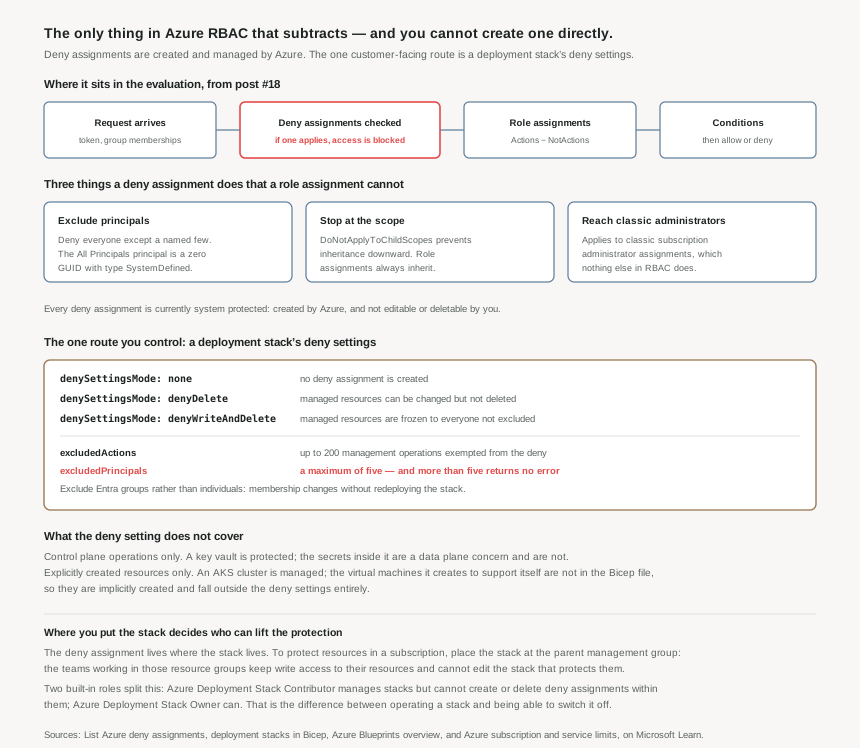
What a deny assignment is, and the three things it can do that a role assignment cannot
Structurally a deny assignment mirrors a role assignment: principals, permissions, a scope. It carries Permissions.Actions and Permissions.DataActions — at least one of the two is required — along with NotActions and NotDataActions to carve exceptions out of the deny. Then it diverges in three ways that are worth learning as a set, because each one exists to solve a problem role assignments structurally cannot:
- It can exclude principals.
ExcludePrincipalshas no counterpart in a role assignment. Combined with the system-defined All Principals — the zero GUID00000000-0000-0000-0000-000000000000with typeSystemDefined— it expresses "everyone except these", which additive grants cannot express at all. All Principals may be used only inPrincipals, never inExcludePrincipals. - It can refuse to inherit.
DoNotApplyToChildScopesstops the deny at its scope. Role assignments always flow downward; this is the only object in the hierarchy that can decline to. - It reaches classic subscription administrators. Deny assignments apply to classic subscription administrator assignments, which nothing else in Azure RBAC does.
A worked example from Microsoft's own output shows how these compose in practice: a stack-created deny assignment with Actions: {*/delete}, NotActions: {Microsoft.Authorization/locks/delete, Microsoft.Storage/storageAccounts/delete}, DoNotApplyToChildScopes: True, All Principals in Principals and one named user in ExcludePrincipals. Read it as: nobody deletes anything here, except locks and that storage account, except this one person, and none of it reaches child scopes.
Reading them is available to almost anyone — Microsoft.Authorization/denyAssignments/read is included in most built-in roles — and the portal exposes them on the Deny assignments tab of Access control (IAM). That is worth knowing because a deny assignment is the most likely explanation for an access failure that makes no sense against the role assignments, and it is on a tab most people have never opened.
Deployment stacks: the product that creates one
A deployment stack manages a group of Azure resources as a single, cohesive unit. You submit a Bicep file or ARM template; the stack tracks the resources it created as managed resources. It can be created at resource group, subscription or management group scope, and it needs Azure PowerShell 12.0.0 or later, or Azure CLI 2.61.0 or later.
Two independent behaviours come with it, and conflating them is the usual mistake.
actionOnUnmanage decides what happens to resources that leave the stack — when they are removed from the template, or the stack is deleted. The values are deleteAll, deleteResources and detachAll, and the default behaviour is to detach rather than delete. That is a lifecycle control and has nothing to do with permissions.
denySettingsMode decides what other people may do to those resources while the stack manages them, and this is the part that creates a deny assignment:
| Mode | Effect | When it is the right choice |
|---|---|---|
none | No deny assignment is created at all. | The stack is being used purely for lifecycle management, and normal RBAC governs who can change things. |
denyDelete | Managed resources can be modified but not deleted. | Shared platform infrastructure that teams legitimately need to reconfigure but must never remove. |
denyWriteAndDelete | Managed resources are frozen to everybody not excluded. | Anything whose configuration is the control — a hub firewall, a landing-zone network, a logging destination. |
Two refinements narrow the deny. DenySettingsExcludedAction exempts specific management operations, up to 200 of them. DenySettingsApplyToChildScopes extends the mode down to child resources — with denyWriteAndDelete and a SQL server in the template, that means no additional databases can be added under it either.
DenySettingsExcludedPrincipal accepts a maximum of five principals — and the documentation states plainly that specifying more than five does not return an error. A stack deployed with eight exclusions succeeds, reports success, and silently locks out three identities that were meant to be exempt. The documented remedy is also the better design: exclude Microsoft Entra groups rather than individuals, so who is excluded changes by updating group membership instead of redeploying the stack. Nested groups are worth testing before relying on them.
Two things the deny settings do not cover
Control plane only. The deny setting applies to control plane operations and not to data plane operations. A key vault created by the stack is protected from deletion; the secrets inside it are created through the data plane and are not managed by the stack at all. The same split post #18 and #19 kept returning to shows up here as a boundary on what the protection means.
Explicitly created resources only. The deny setting applies to explicitly created resources, not implicitly created ones. Microsoft's example is an AKS cluster, which creates supporting services including virtual machines that are not defined in the Bicep file. Those are implicitly created and fall outside the deny settings entirely — so a stack that looks like it protects a cluster protects the cluster object and not the estate it spawned.
Why This Architecture Holds Up
Stack placement is the access decision
Microsoft's guidance is explicit: to protect resources in a subscription, place the stack at the parent scope — the immediate parent management group. The documentation gives the reasoning rather than just the rule. A stack at subscription scope deploying into resource groups lets the development teams working there keep visibility and write access to their own resources while the stack stays isolated above them, which minimises the number of users who can edit the stack and change its deny assignment.
That is the whole design in one sentence. The deny assignment exists where the stack exists, so the people who can edit the stack are the people who can lift the protection. Deploying the stack next to the things it protects gives exactly the wrong set of people that power — and it does so invisibly, because the stack looks like just another resource in the group.
The two built-in roles are the operate/override split
Deployment stacks ship with two roles, and the distinction between them is the one worth using:
- Azure Deployment Stack Contributor — can manage deployment stacks, but cannot create or delete deny assignments within them.
- Azure Deployment Stack Owner — can manage stacks including their deny assignments.
A pipeline that updates a stack needs the first. The second is the ability to remove a control, and it belongs with whoever owns the control — which, following post #19's framing, makes it a privileged assignment worth treating as one.
The Blueprints migration is now a dated project
Blueprints packaged four artifact types — resource groups, ARM templates, policy assignments and role assignments — into a versioned, assignable unit, and preserved the relationship between what should be deployed and what was. That relationship is the thing deployment stacks reproduce, which is why they are the recommended migration target: blueprint artifacts are converted to ARM JSON templates or Bicep files used to define deployment stacks, with Template Specs covering the packaging half.
The dates are the actionable part. Phased retirement began 31 July 2026; full retirement is 31 January 2027. An estate still running blueprint assignments in September 2026 is inside the phased window with roughly five months left, and the migration is not a like-for-like swap: blueprints assigned policy and role assignments as first-class artifacts, whereas in a stack those become resources in a template.
Where this leaves management locks
There is an obvious question this post cannot fully answer, and it is the subject of the next one. Azure has another mechanism that prevents deletion — management locks — and the deny assignment example above pointedly excludes Microsoft.Authorization/locks/delete from its own deny. Two overlapping protections, different objects, different failure modes. #22 takes them on their own terms.
Key Architecture Decisions
The shape that works
| Decision | What to do | Why |
|---|---|---|
| Where to deploy the stack | At the parent scope of what it protects — the management group above the subscription | The deny assignment lives where the stack lives, so co-locating them hands the protected team the ability to remove the protection. |
| Choosing a mode | denyDelete for infrastructure teams must reconfigure; denyWriteAndDelete where the configuration is the control |
Freezing something teams legitimately tune produces exclusion requests until the exclusions defeat the deny. |
| Exclusions | Exclude Entra groups, never individuals, and keep the list under five | Five is the maximum and exceeding it returns no error. Group membership also changes without redeploying the stack. |
| Verifying protection | Attempt the denied delete, and check the Deny assignments tab on Access control (IAM) | Deny assignments are readable by most built-in roles, and they are the explanation for access failures that role assignments cannot account for. |
| Who can override | Azure Deployment Stack Contributor for pipelines; Owner only for the control's owners | Contributor cannot create or delete deny assignments. That boundary is the difference between operating a stack and switching it off. |
| Data and implicit resources | Protect data with data plane roles and implicit resources by other means | Deny settings cover control plane operations on explicitly created resources only. |
actionOnUnmanage |
Decide it deliberately; the default detaches rather than deletes | It is a lifecycle setting, unrelated to the deny settings, and deleteAll on a stack managing resource groups removes everything in them. |
| Blueprints | Inventory assignments now and plan the migration to stacks and template specs | Phased retirement began 31 July 2026 and full retirement is 31 January 2027. |
Closing Thought
Deny assignments are the most powerful access-control object in Azure and the one nobody manages directly. That combination is deliberate and, on reflection, correct: an object that overrides every grant in the system is not something to hand out as a general-purpose tool, and the estates that would reach for it most are the ones that would misconfigure it worst.
What Azure offers instead is narrow and specific. Package resources into a stack, declare that they should not be deleted or changed, and let the platform create the deny assignment on your behalf, owned by the stack, removed when the stack is. The protection is a property of how the resources are managed rather than a separate access rule somebody has to remember exists.
The catch is that the security of the arrangement rests entirely on a deployment choice that does not look like a security decision. A stack is deployed to a scope, the way any resource is. Choose the scope the resources live in and the protection is a suggestion. Choose the scope above it and the protection is real. Nothing in the tooling flags the difference, and it is the only part of this worth getting right the first time.
#22 takes the other deletion guard: management locks, CanNotDelete and ReadOnly — how they inherit, why ReadOnly breaks more than people expect, and how they interact with the deny assignments this post described.
Comments