Business Challenge
#104 ended on a gap: a tag policy governs the shape of tags that exist, so the resource with no tags is not non-compliant — it is unevaluated. The remedy AWS documents is a different service and a one-word query:
“To find untagged resources in your account, use AWS Resource Explorer with a query that uses
tag:none.”
That works, and it is the right instrument. The care is in knowing which of two answers you are getting, because Resource Explorer will return results either way.
“These indexes come in two types: Resource Explorer-owned indexes that provide immediate partial results, and user-owned indexes that provide complete results with automatic updates.”
Which you get is decided by a permission rather than a setting. With the read-only managed policy
“you can immediately search in partial results”. For the other
kind: “For complete resource inventory with automatic updates, you'll
also need the iam:CreateServiceLinkedRole permission.”
So the completeness of your inventory depends on whether anyone who has ever opened Resource
Explorer in that account happened to hold a role-creation permission. It is sticky once it happens
— “After the service-linked role is created in your account by any user, subsequent
users only need the permissions in the AWSResourceExplorerReadOnlyAccess managed
policy to get complete results” — which means the state of your tooling is a
function of who logged in first.
Before trusting an untagged-resource count, verify that Resource Explorer is using user-owned indexes with complete discovery enabled rather than returning immediate partial results. Confirm the required service-linked role exists, check which resource types are indexed and which accounts and Regions are in scope, and allow for eventual consistency. A complete index means complete discovery within Resource Explorer's supported scope — not an exhaustive inventory of every AWS resource.
The scope of partial results is given in a parenthesis, and it is worth reading slowly:
“you can immediately search in partial results (all tagged resources and supported untagged resources created after the immediate resource discovery release).”
Tagged resources: all of them. Untagged resources: the ones created after a particular release. For a query whose entire purpose is finding untagged resources, the population at risk of being absent is the untagged resources that have existed longest — which in a tagging programme is precisely the backlog you are trying to size.
The failure is quiet in the way this series keeps finding. A tag:none search in
partial mode returns a number. It is a real number. It is not the number you asked for, and
nothing in the result distinguishes the two.
Treat a tag:none count from an account without the service-linked role as a lower bound, and say so wherever the figure is reported. With the role it is a better bound rather than a guaranteed total, because the answer is still bounded by the resource types Resource Explorer indexes and by the accounts and Regions in scope. A bound is useful; a bound presented as a total is how a tagging programme gets sized wrong at the start.
Out of the box you are searching one Region. “you can search across multiple AWS Regions by enabling cross-Region search with a single click or API call to select an aggregator AWS Region”, and across accounts it is more: “Organizations can set up multi-account search by enabling trusted access and using AWS CloudFormation deployment.”
Three different scopes, then, each with its own enablement: this Region, all Regions, all accounts. An untagged-resource count is meaningless until you know which of the three produced it.
And the aggregated view is not instantaneous: “Resource Explorer, like many other AWS services, is eventually consistent”, with the example given being “Resource Explorer finding a resource in one AWS Region, and replicating that to the AWS Region that contains the aggregator index for the account.”
FixRecord the scope and the timestamp next to any inventory figure. 4,812 untagged resources is not a fact; 4,812 untagged resources across 14 accounts and all Regions, aggregated in eu-west-1, as of Tuesday is one.
Architecture
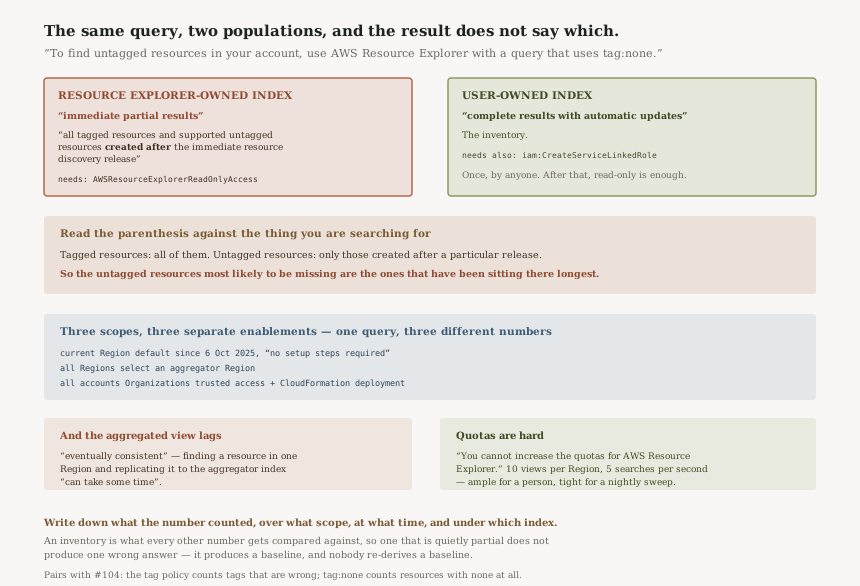
The same query, two populations
| Resource Explorer-owned index | User-owned index | |
|---|---|---|
| AWS's description | “immediate partial results” | “complete results with automatic updates” |
| Covers | All tagged resources, plus untagged ones “created after the immediate resource discovery release” | The inventory |
| What you need | AWSResourceExplorerReadOnlyAccess |
Also iam:CreateServiceLinkedRole, once, by anyone |
| How the result is labelled | It is not | |
The last row is the architectural point. Two instruments with different calibration return the same shape of answer to the same question, and the difference is not in the output.
Three scopes, three enablements
| Scope | What it takes |
|---|---|
| Current Region | Nothing — “enabled by default in your AWS account with no setup steps required” since 6 October 2025 |
| All Regions | “a single click or API call to select an aggregator AWS Region” |
| All accounts | “enabling trusted access and using AWS CloudFormation deployment” |
Being on by default is a genuine improvement — the old version needed an index created in every Region before it could answer anything. It also means the service now returns results in accounts nobody configured, which is the condition under which a partial answer is most likely to be taken at face value.
What it costs, which is not nothing
“There are no charges to search for resources by using AWS Resource Explorer, including creating views, completing setup in AWS Regions, or searching for resources.” Then the qualifier: “In the process of building your resource inventory, Resource Explorer calls APIs on your behalf that may result in charges.”
The search is free; the indexing calls other services on your behalf. For most estates this is noise. It is worth knowing before someone enables complete indexing across several hundred accounts and then goes looking for what changed in the bill.
The quotas are fixed, and one of them bounds automation
“You cannot increase the quotas for AWS Resource Explorer.” Two matter: “Number of views in an AWS Region | 10” and “Maximum Search operations per second | 5”.
Five searches a second is ample for a human and tight for a nightly sweep that walks every account. Any tagging-compliance automation built on this needs to be paced, and it cannot be given more room by asking.
Why This Architecture Holds Up
Returning partial results beats returning nothing
The alternative design — refuse to answer until an index exists — is what the service used to do, and it meant the common case was an empty console and a setup task. Giving immediate partial answers makes the tool useful on first contact. The cost is that the two modes are indistinguishable at the point of use, which is a documentation problem more than a design one.
Gating the complete-indexing model on a service-linked role is consistent
A complete, continuously updated inventory means the service acting on your behalf across services,
and that needs a role. Gating it on iam:CreateServiceLinkedRole is the ordinary AWS
pattern and the right one. What it produces is the slightly odd property that an account's tooling
quality is set by the permissions of whoever got there first.
Being honest about eventual consistency matters here specifically
A search service that quietly lagged would be worse than one that says so, because the whole point of an inventory is that you compare it against something. Naming the aggregator replication delay in the overview rather than a footnote lets you decide how fresh a figure has to be before you act on it.
Key Architecture Decisions
| Decision | Choose this | Because |
|---|---|---|
| Before reporting an untagged count | Confirm complete indexing is in use, then state the scope it covers | Without the service-linked role you have “partial results” and no indication of it; with it you have complete discovery within Resource Explorer's supported scope, which is not the same as every resource |
| Scope of any inventory figure | State Region scope, account scope and timestamp | Three different enablements produce three different numbers from one query |
| Organisation-wide tagging audit | Trusted access plus the CloudFormation deployment, once | Per-account searching will not aggregate and will not be comparable |
| Automating the sweep | Pace it under five searches per second | The quota is hard — “You cannot increase the quotas” |
| Relationship to tag policies | Use both: the policy for shape, this for presence | Neither sees what the other does |
The audit worth running
Run tag:none in two accounts you know differ — one long-established, one
recent — and compare the shape of the answers. If the old account returns
suspiciously few untagged resources, you are probably looking at partial results, and the oldest part
of your estate is the part missing.
Then check the aggregator Region is set and is the one your reporting expects. A figure aggregated in a Region nobody looks at is a figure that will be recomputed differently by the next person.
Finally, put the two numbers side by side. The tag policy compliance report from
#104 counts resources whose tags are wrong; the
tag:none count finds resources with no tags at all. Neither is the tagging programme's
size on its own, and the sum is the first honest estimate of it.
Closing Thought
The pattern that runs through this fortnight of posts is a control or a tool that is precisely described and quietly narrower than its name. A tag policy that does not require tags. A block that does not revoke. A lock that defends existence and not readability. This one is the measuring instrument, and it has the same property: two calibrations, one output format.
What makes it worth the attention is where it sits. An inventory is the thing every other number gets compared against, so an inventory that is quietly partial does not produce one wrong answer. It produces a baseline that makes every subsequent comparison wrong in the same direction, and nobody re-derives a baseline.
The fix is small and it is a habit rather than a configuration: write down what the number counted, over what scope, at what time, and under which index. Three of those four are free to record and the fourth takes one API call.
Cost & Governance — AWS cost allocation tags: why activating a tag key changes nothing about the past, how long activation takes to appear in billing data, and what user-defined and AWS-generated keys each cover.
Official AWS Reference
- What is AWS Resource Explorer? — the two index types and their descriptions, the scope of partial results, the
iam:CreateServiceLinkedRolerequirement for complete inventory and its stickiness once created, default enablement from 6 October 2025, the aggregator Region for cross-Region search, Organizations trusted access for multi-account search, eventual consistency and the aggregator replication example, and the pricing note that indexing calls other APIs on your behalf - Finding untagged and mistagged resources for your organization with Resource Explorer — the
tag:nonequery AWS directs you to for finding untagged resources - Quotas for Resource Explorer — the statement that the quotas cannot be increased, ten views per Region, and five search operations per second
- Search query examples — further reading on query syntax beyond
tag:none; no claims in this post are drawn from it
Comments