DynamoDB can now load S3 data straight into an existing table, on a path that uses none of the table's capacity. That headline is true and precisely scoped. The considerations page then lists four things your table is connected to that still feel the write, and in three of them what you lose is visibility.
“The writes run on a separate path and consume none of the table's read or write capacity, so your application traffic sees no impact from these bulk put items.”
Executive summary
“Bulk put items loads data from Amazon Simple Storage Service (Amazon S3) into an existing Amazon DynamoDB table.” The distinction from the feature it resembles is stated directly: “Import from Amazon S3 creates a new table from data in Amazon S3, while bulk put items writes into a table that already exists.”
That is the gap it fills. Until now, getting a large S3 dataset into a live table meant your own ingestion pipeline competing with production traffic for capacity, or an import into a new table and a cutover.
What changed
A write path that bypasses table capacity, with per-item conditions, a managed retry loop and a failure report: “The report lists items that were not written and the reason for their failure.” Items land progressively — “Items become available for reading as they're written” — so there is no atomic switch-over and no point at which the table is half-updated and hidden.
The default behaviour is the one to notice first: “When no condition expression is specified on a record, the item is written unconditionally, overwriting any existing item with the same key.” Safety is per item and opt-in.
Architecture
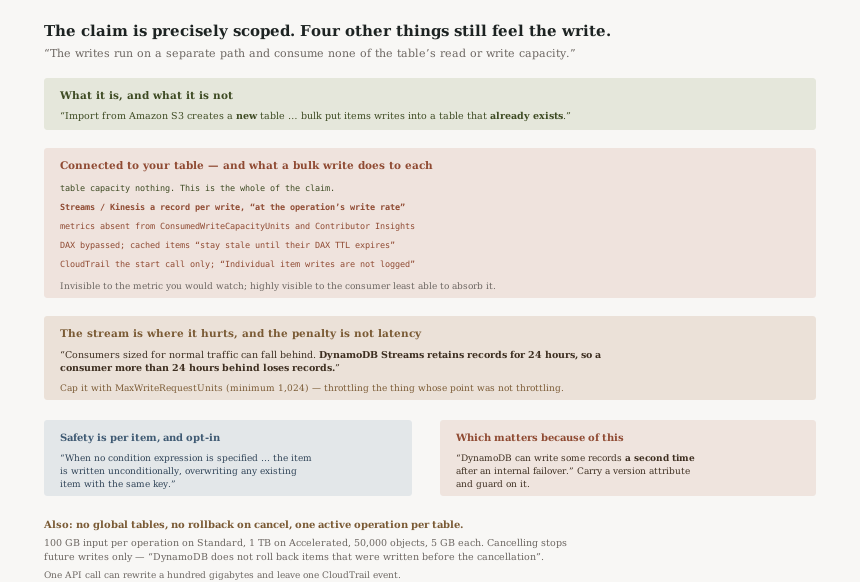
What the capacity claim covers, and what it does not
| Connected to your table | What a bulk write does |
|---|---|
| Table read/write capacity | Nothing — “consume none of the table's read or write capacity” |
| DynamoDB Streams / Kinesis | “every bulk write produces a stream record, delivered at the operation's write rate” |
ConsumedWriteCapacityUnits, Contributor Insights |
Nothing appears — “because they do not consume capacity” |
| DAX | Bypassed — “items cached in DAX stay stale until their DAX TTL expires” |
| CloudTrail | The start call only — “Individual item writes are not logged” |
| GSIs and LSIs | Updated automatically; each index write is metered independently |
Rows two to five are the post. The operation is invisible to the metric you would watch, invisible to the audit trail at item level, stale to the cache in front of the table — and highly visible to the one consumer least able to absorb it.
The stream is where this actually hurts
“Consumers sized for normal traffic can fall behind. DynamoDB Streams retains records for 24 hours, so a consumer more than 24 hours behind loses records.”
A write path that deliberately ignores your table's capacity ceiling will outrun a Lambda consumer
provisioned for ordinary traffic, and the penalty for falling far enough behind is not latency but data
loss on the stream. AWS gives the control in the same paragraph: use
MaxWriteRequestUnits in the StartBulkPutItems call
“to cap the bulk operation's write rate and protect downstream consumers”. The
minimum you can set is “1,024”.
Note which way that trades. The feature's selling point is that it does not throttle itself to your table; the safe way to run it on a streamed table is to throttle it anyway.
Idempotency is per item, and failover makes it matter
“During an operation, DynamoDB can write some records a second time after an
internal failover.” Combined with the unconditional default, that is a documented path to a
bulk write overwriting a newer application write. AWS spells out the remedy: carry a version attribute
and use a condition such as attribute_not_exists(#v) OR #v < :new so a repeated write
cannot replace newer data.
Conditions are the same language you already know —
“Condition expressions use the same syntax, operators, and functions as
PutItem” — and attribute_not_exists(pk) gives insert-only
semantics.
The sizes, and the one that is not a size
Standard takes “100 GB” of input per operation and Accelerated “1 TB” — roughly ten times, in DynamoDB's binary units. Either way, “Input objects per operation | 50,000” and “Size of each input object | 5 GB”.
The quota that shapes scheduling rather than sizing is “Active bulk put items operations per table | 1”. One table, one operation at a time, so a nightly refresh and an ad-hoc backfill on the same table are a queue, not a race.
Business value
The pipeline you no longer write is the value. A daily catalogue refresh into a live table has historically meant a Lambda or Glue job, a concurrency setting tuned against production capacity, retry handling, and a dead-letter path — all of it bespoke, all of it competing with user traffic.
Per-item conditions are what make it safe to re-run. An insert-only load that skips what already exists turns a backfill from a careful one-shot into something you can repeat after a failure without reasoning about what got through.
Security considerations
The audit trail is coarse.
“AWS CloudTrail logs the StartBulkPutItems call with the event name
StartBulkOperation … Individual item writes are not logged.”
One API call can rewrite a hundred gigabytes of table data and leave one CloudTrail event. If your
controls assume per-item write auditability, this path does not provide it.
The caller's own credentials reach S3. DynamoDB uses the caller's credentials rather
than a service principal, so the human or role starting the job needs the bucket access directly —
and the permission check continues during the run. Losing dynamodb:BulkPutItems or KMS
access mid-operation ends it FAILED, with items already written left in place.
Condition-check report records contain the existing item. If you write the output report
to a bucket in another account, the bucket owner can read the oldImage of items that failed
their condition — which is table data leaving in the error report.
Cost considerations
No table capacity is consumed, but the writes are metered for the bulk operation, and index writes count too. The billing rule for failures is worth knowing before a large conditional load: “Items rejected by validation before a table write is attempted are not billed as table writes. Items that reach the table and fail a condition check are billed.”
So an insert-only refresh of a mostly-unchanged catalogue pays for the skips. That is reasonable — the condition was evaluated at the table — and it means the cost of a repeatable load is closer to the full load than to the delta.
Operational considerations
Global tables are excluded.
“Bulk put items does not support global tables.” You cannot start one on a table
that is part of a global table, and you cannot add a replica while an operation is running. AWS's
alternative is the ordinary one: BatchWriteItem or PutItem.
Cancelling is not undoing. “Items already written to the table remain in place and are immediately readable. DynamoDB does not roll back items that were written before the cancellation.” There is no transaction here; stopping the job stops future writes only.
Watch the operation, not the table. Since bulk writes do not appear in
ConsumedWriteCapacityUnits, use DescribeBulkOperation and the S3 output for
progress and failures.
Tradeoffs
| What you gain | What it costs |
|---|---|
| Loads that never compete with production for table capacity | Loads that are invisible in the table's capacity metrics |
| No ingestion pipeline to build, retry or monitor | A stream consumer that can be outrun, with 24-hour retention as the loss boundary |
| Per-item conditions, so loads are repeatable | Condition failures are billed, and the default is an unconditional overwrite |
| One API call instead of millions | One CloudTrail event instead of millions |
Implementation guidance
Decide the condition expression before the first run, not after. The default overwrites.
attribute_not_exists(pk) for insert-only, or a version guard for conditional overwrites, is
the difference between a repeatable job and a destructive one.
If the table has a stream, set MaxWriteRequestUnits. Work out what your
consumer sustains and cap the operation below it. The 24-hour retention is the deadline, not a buffer.
If the table is behind DAX, plan the staleness. Cached items will not reflect the load until their TTL expires, and nothing invalidates them for you.
Keep input buckets in the table's Region. A cross-Region bucket bills data transfer and an impaired Region stalls the operation until it times out.
Hold the caller's permissions for the whole run. Revoking mid-flight ends the operation failed, with partial data in the table.
Best practices
Carry a version attribute on every item in the input and guard on it. It costs a field and it removes the entire class of problem created by failover re-writes landing on top of newer application data.
Read the output report every run, not only on failure. It is the only per-item record that exists, and CloudTrail will not supply one later.
Treat one operation per table as a scheduling constraint in whatever orchestrates your loads, rather
than discovering it as a ResourceInUseException.
Who should adopt this and when
Adopt now if you maintain a custom S3-to-DynamoDB loader against a live table. This replaces it with a managed path that cannot starve your application of capacity.
Adopt carefully if the table has Streams, Kinesis or DAX attached. All three still see the load, or fail to, and each needs a decision before the first run.
Not available for global tables, which remains BatchWriteItem territory.
Key takeaways
No capacity is not no impact. The claim is specifically about the table's read and write capacity; Streams, DAX, metrics and CloudTrail all behave differently.
The stream is the real constraint. Every bulk write emits a record at the operation's rate, and a consumer more than 24 hours behind loses them.
The default is a destructive overwrite. Insert-only and version-guarded semantics are per-item opt-ins.
It writes into an existing table — that is the whole difference from Import from S3, which creates a new one.
Official AWS references
- Amazon DynamoDB now supports bulk put items — the announcement, the Standard and Accelerated tiers, and Region availability
- Working with bulk put items — the separate write path that consumes no table capacity, the distinction from Import from Amazon S3, items becoming readable as they are written, per-item condition expressions using PutItem syntax, the unconditional overwrite default, and the failure report
- Bulk put items considerations, quotas, and permissions — stream records at the operation's write rate and the 24-hour retention boundary, absence from ConsumedWriteCapacityUnits and Contributor Insights, DAX bypass, CloudTrail logging the start call but not item writes, no global table support, repeated writes after internal failover, no rollback on cancellation, and the billing rule for condition-check failures
- Quotas in Amazon DynamoDB — the bulk put items quotas: 100 GB Standard and 1 TB Accelerated input per operation, 50,000 input objects, 5 GB per object, one active operation per table, and a minimum MaxWriteRequestUnits of 1,024
- Bulk put items output and reconciliation — further reading on the report format; no claims in this post are drawn from it
Comments