Business Challenge
#60 covered which streaming service to pick. This is the cost lens on the same ground: what the choice actually bills for, and where the latency floor sits.
The usual framing is a trade between latency and cost, with volume as the driver. Two documented facts change the shape of it.
The quota page states the pricing model directly, which pricing pages rarely do: “Firehose ingestion pricing is based on the number of data records you send to the service, times the size of each record rounded up to the nearest 5KB (5120 bytes).”
So a 100-byte event is billed as 5,120 bytes — over fifty times its own size. Shrinking that event to 50 bytes saves nothing. Batching two events into one record halves the bill.
AWS gives the worked example: “if the total incoming data volume is 5MiB, sending 5MiB of data over 5,000 records costs more compared to sending the same amount of data using 1,000 records.” Same bytes, different bill.
FixOptimise record count, not payload size. The rounding unit makes small events the expensive case.
Firehose buffers before delivering, and the dial has a documented floor: “The buffer interval hints range from 60 seconds to 900 seconds.”
One minute to fifteen. If your requirement is sub-minute, Firehose is not a slow option to tune — it is unavailable, and you are running Kinesis Data Streams with a consumer application you operate yourself.
That is the real step in the curve. It is not gradual: there is a managed, cheap, 60-second-minimum tier, and below it a tier where you own the consumer.
FixWrite the latency requirement down in seconds first. Sixty is the line that decides the architecture.
On-demand Advantage reads like a free upgrade: “Data ingest, data retrieval, and extended retention usage across all on-demand streams are at least 60% lower than in On-demand Standard”, and “there's no longer a fixed charge for each stream.”
Then the condition: “Enabling On-demand Advantage commits the account to at least 25MiB/s of data ingest and 25MiB/s of data retrieval across all on-demand streams.” Under-use it and “you'll be charged the difference as a shortfall.”
And it is account-level with a lock-in period: “a minimum period of 24 hours before you can disable the mode.” A serverless-shaped product with a floor, a shortfall charge and a cooling-off period is a reserved-capacity deal.
FixMeasure sustained ingest and retrieval against 25 MiB/s each before enabling. Below it you pay for air.
Architecture
The curve has a step in it, and the step is at sixty seconds.
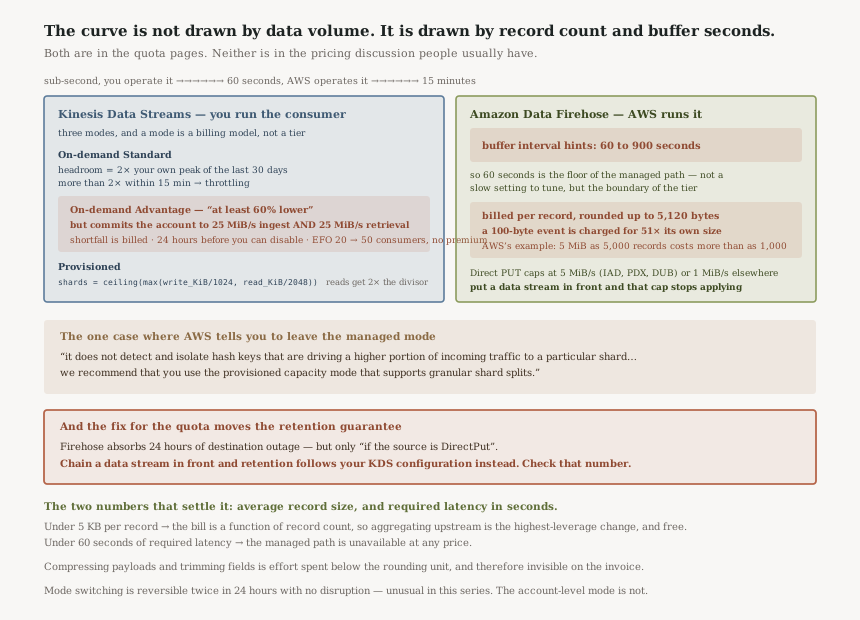
Three Kinesis modes, and they are not three prices
“A mode determines how the capacity of a data stream is managed and how you're charged for the usage of your data stream.” That sentence is the whole point — the mode is a billing model, not a performance tier.
On-demand Standard “accommodates up to double the peak write throughput observed in the previous 30 days”, which is a useful and under-appreciated guarantee: your headroom is a function of your own history. The matching warning is that “write throttling can occur if your traffic increases to more than double the previous peak within a 15-minute duration.”
Provisioned has an actual formula, which is rare enough to quote:
number_of_shards = ceiling(max(incoming_write_bandwidth_in_KiB/1024,
      outgoing_read_bandwidth_in_KiB/2048))
. Note the asymmetry — reads get twice the divisor,
because a shard offers 2 MB/s out against 1 MB/s in.
This inverts the usual assumption that the serverless mode is strictly better. “In the on-demand mode, Kinesis Data Streams splits the shards evenly when it detects an increase in traffic. However, it does not detect and isolate hash keys that are driving a higher portion of incoming traffic to a particular shard. If you are using highly uneven partition keys you may continue to receive write exceptions. For such use cases, we recommend that you use the provisioned capacity mode that supports granular shard splits.” So skew is the one case where you are told to leave the managed mode — and it is the case Service-Managed Partition Keys addressed by removing the key entirely, at the cost of ordering.
Where the rounding unit actually bites
The 5,120-byte unit is benign for anything log-shaped and brutal for anything event-shaped. A 2 KB application log line rounds to one unit and wastes 60% of it. A 100-byte IoT reading rounds to the same unit and wastes 98%.
Which means the aggregation you do before Firehose is worth more than any compression you do inside it,
and PutRecordBatch is the lever — it “can take up to 500
records per call or 4 MiB per call, whichever is smaller”. That is batching for the API quota;
packing several events into one record is what changes the bill.
There is a second, quieter version of the same trap on the far side of the pipeline: “If the increased quota is much higher than the running traffic, it causes small delivery batches to destinations. This is inefficient and can result in higher costs at the destination services.” Raising a Firehose quota speculatively makes your S3 object count go up and your query performance go down — the small-files problem #31 was about, arriving from a quota setting.
Why This Architecture Holds Up
Chaining the two removes a quota entirely
Direct PUT into Firehose is capped: “500,000 records/second, 2,000 requests/second, and 5 MiB/second” in the three largest Regions, and “100,000 records/second, 1,000 requests/second, and 1 MiB/second” elsewhere — a fivefold regional difference worth knowing before you design for one Region and deploy in another.
Put a data stream in front and the cap disappears: “When Kinesis Data Streams is configured as the data source, this quota doesn't apply, and Amazon Data Firehose scales up and down with no limit.”
That is the argument for the two-service pipeline rather than the one-service one, and it is a capacity argument rather than a feature argument. You are buying the stream's elasticity, and paying for the stream.
“Each Firehose stream stores data records for up to 24 hours in case the delivery destination is unavailable and if the source is DirectPut.” Twenty-four hours of destination outage absorbed with no work from you. But read the condition: if the source is DirectPut. Chain a data stream in front — the thing the previous section recommends — and that guarantee moves: “If the source is Kinesis Data Streams (KDS) and the destination is unavailable, then the data will be retained based on your KDS configuration.” So the fix for the throughput quota changes who owns the retention window, and a 24-hour default on the stream is the number to check.
Consumer count is a pricing dimension, not just a limit
Enhanced Fan-Out “supports adding up to 20 consumer applications” on the standard modes. On-demand Advantage raises that to “up to 50 consumers per stream” and removes the surcharge: “Enhanced fan-out data retrievals also do not have a price premium compared to the standard data retrievals in this mode.”
So for a stream fanning out to many independent consumers, the commitment can pay for itself twice over — on the 60% discount and on the removed EFO premium. That is the case where Advantage is genuinely the right answer rather than a trap, and AWS says so: it suits accounts that “need many fan-out consumers, or operate with hundreds of data streams.”
Mode switching is reversible, within limits
“For each data stream in your AWS account, you can switch between the on-demand and provisioned modes twice within 24 hours… Switching between modes doesn't cause any disruptions to your applications.”
Twice a day, no disruption, is unusually generous — most of the decisions in this series have been one-way. The exception is the account-level one: On-demand Advantage needs 24 hours before it can be turned off, and “you must first remove any warm throughput” from the streams that carry it.
Key Architecture Decisions
| Decision | Choice | Reasoning |
|---|---|---|
| Cost optimisation target | Record count, not payload size | Billing rounds each record up to 5,120 bytes. |
| Sub-minute latency | Data Streams with your own consumer | Firehose's buffer interval floor is 60 seconds. |
| 60 seconds to 15 minutes | Firehose, buffer tuned | The managed path, and the whole documented interval range. |
| On-demand Advantage | Only above 25 MiB/s sustained, both ways | Shortfall is billed, and the mode locks for 24 hours. |
| Many fan-out consumers | On-demand Advantage | 50 consumers instead of 20, and no EFO price premium. |
| Skewed partition keys | Provisioned, not on-demand | On-demand splits shards but does not isolate hot hash keys. |
| Above the Direct PUT quota | Chain a data stream in front | The Direct PUT cap stops applying entirely. |
| Destination outage tolerance | Check which source you use | 24 hours is the DirectPut guarantee; with KDS it follows your stream retention. |
The two numbers that settle it
Average record size, and required latency in seconds. Those two place you on the curve before any discussion of volume or service preference.
Under 5 KB per record, your bill is a function of how many records you emit, so aggregation upstream is the highest-leverage change available — and it is free. Under 60 seconds of required latency, the managed path is not an option at any price. Everything else is tuning.
Closing Thought
Cost-lens posts usually end with a break-even. This one ends with a rounding unit, because that is where the money actually goes: 5,120 bytes per record whether the record is 5,000 bytes or fifty.
It is a good example of a cost structure that does not reward the intuitive optimisation. Compressing payloads, trimming fields, shortening keys — all of that is effort spent below the rounding unit and therefore invisible on the invoice. Emitting half as many records is the change that matters, and it is usually a batching change in the producer rather than anything in the pipeline.
The latency floor has the same quality. Sixty seconds is not a performance characteristic to be tuned around; it is the boundary between a service you configure and a service you operate. Knowing which side of it you are on is a one-sentence answer, and it decides most of the rest.
Data & Analytics — the next unwritten roadmap entry. Items 21 to 33 are already published as posts #30 through #60, so the series continues past this block rather than revisiting it.
Official AWS Reference
- Amazon Data Firehose quota — the 5 KB rounding unit, the 60-to-900-second buffer interval range, Direct PUT quotas and the 24-hour retention guarantee
- Choose the right mode to stream in — the three Kinesis modes, the On-demand Advantage commitment, the shard formula, and why on-demand cannot isolate a hot key
- What is Amazon Data Firehose — buffer size and buffer interval as the two delivery controls
Comments