Business Challenge
#114 ended on what the Essentials log class gives up, and subscription filters were on that list. They are the mechanism for getting log events out of CloudWatch Logs as they arrive: “You can use subscriptions to get access to a real-time feed of log events from CloudWatch Logs and have it delivered to other services such as an Amazon Kinesis stream, an Amazon Data Firehose stream, or AWS Lambda for custom processing, analysis, or loading to other systems”, usually within “less than three minutes” of ingestion.
Most estates have one feeding a SIEM, a data lake or a detection pipeline, and treat it as plumbing that either works or obviously does not. The documented behaviour is more specific than that, and the specifics decide whether a bad day costs you latency or costs you events.
The whole reliability contract is in one note, and it has two halves that behave in opposite directions.
“If the destination service returns a retryable error such as a throttling exception or a retryable service exception (HTTP 5xx for example), CloudWatch Logs continues to retry delivery for up to 24 hours.”
That is generous. A Kinesis stream at capacity, a Lambda being throttled, a Firehose having a bad hour — the events wait, and arrive late. Twenty-four hours of retry is more patience than most hand-written forwarders have.
Then the other half:
“CloudWatch Logs doesn't try to re-deliver if the error is a non-retryable error, such as AccessDeniedException or ResourceNotFoundException. In these cases the subscription filter is disabled for up to 10 minutes, and then CloudWatch Logs retries sending logs to the destination. During this disabled period, logs are skipped.”
Read the two named examples again, because they are not exotic.
AccessDeniedException is a role whose policy was tightened, a destination resource
policy that stopped trusting your account, a KMS key whose grant changed.
ResourceNotFoundException is a stream deleted and recreated by a redeploy, or an
environment torn down and rebuilt. These are the two most ordinary mistakes in the whole
mechanism, and they are the ones with no retry.
The failure is also cyclical rather than terminal. Disabled for up to ten minutes, retried, failing again, disabled again — a permissions problem left unnoticed for a day is a day of ten-minute holes. And the log group itself is unaffected: every event is still in CloudWatch Logs, queryable, exactly as if nothing happened. Only the copy that was supposed to reach your SIEM is missing.
FixAlarm on DeliveryErrors per subscription filter, treating any sustained non-zero value as an incident rather than a blip — it is “the number of log events for which CloudWatch Logs received an error when forwarding data to the subscription destination”, and it carries a FilterName dimension so one alarm can name the broken filter. Then make the destination's permissions part of whatever change process touches the destination, because the failure mode of getting that wrong is loss rather than a backlog.
The delivery guarantee is stated plainly and is easy to skim past: “Subscription filters ensure at least one time delivery of events, while duplicate events may occasionally occur.”
At-least-once is the right guarantee for this job, and it has consequences the consumer owns. Anything counting events out of a subscription is counting an upper bound. Anything keyed on this log line arrived, therefore do X must tolerate doing X twice. A detection rule that pages on the third occurrence of a pattern can page on a redelivery.
The shape of delivery is unguaranteed too: “Subscription filters might batch log events to optimize transmission and reduce the amount of calls made to the destination. Batching is not guaranteed but is used when possible.” So a Lambda destination may receive one event or many, and a consumer that was tested against batches will one day see singletons, and vice versa.
And the payload has a fixed, slightly awkward encoding:
“When log events are sent to the receiving service, they are compressed with the gzip
format. AWS Lambda receives the data base64 encoded in the awslogs.data field.” Worth
knowing before writing the handler, and worth remembering when the destination's own size limits
are measured on the compressed payload — ForwardedBytes is
“the volume of log events in compressed bytes forwarded to the subscription
destination”.
One more interaction that changes what gets matched at all: with transformation in play, “the filter pattern is compared to the transformed versions of the log events”. A filter pattern written against the raw log will quietly match nothing once a transformer reshapes the events.
FixWrite the consumer to be idempotent on a stable key from the log event rather than on arrival, and handle one-to-many batch sizes in the same code path. Treat the subscription's event count as an upper bound, and reconcile against IncomingLogEvents on the log group when a number has to be defensible. If the log group has a transformer, write and test filter patterns against transformed output.
This one is not a subtlety; AWS leads its own page with it: “There is a risk of causing an infinite log recursion with subscription filters that can lead to a large increase in ingestion billing in both CloudWatch Logs and your destination, if not prevented.”
The mechanism: “This can occur when a subscription filter is associated with a log group that receives log events as a result of your subscription delivery workflow.” The documented example is a Firehose destination writing to S3, a Lambda triggered by those S3 objects, and a subscription filter applied to that Lambda's own log group — each invocation producing logs that are forwarded, landing in S3, invoking the function again.
The second-order case is the one that catches careful people: “If the Lambda function is attached to a VPC with flow logs enabled for CloudWatch Logs, then the VPC's log group can cause a log recursion as well.” Nobody thinks of a VPC flow log group as part of a log delivery pipeline, and in that topology it is.
The remedy is exclusion rather than detection: “We recommend that you don't apply subscription filters to log groups that are a part of your subscription delivery workflow. For account-level subscription filters, use the selectionCriteria parameter in the PutAccountPolicy API to exclude these log groups from the policy.” With one piece of help built in: “Log events produced by a Lambda destination's log group will not be forwarded back to the Lambda function for an account-level subscription filter policy.”
Note the scope of that protection. It covers the Lambda destination's own log group, under an account-level policy. It does not cover the Firehose-to-S3-to-Lambda topology above, and it does not cover the VPC flow log case.
FixBefore attaching an account-level subscription filter, write down every log group your delivery path itself produces — the destination function, anything it invokes, and the VPC flow logs of the network it runs in — and exclude them with selectionCriteria. AWS names the service categories to check: “Amazon EC2 with Fargate”, “Lambda”, “AWS Step Functions” and “Amazon VPC flow logs that are enabled for CloudWatch Logs”.
Architecture
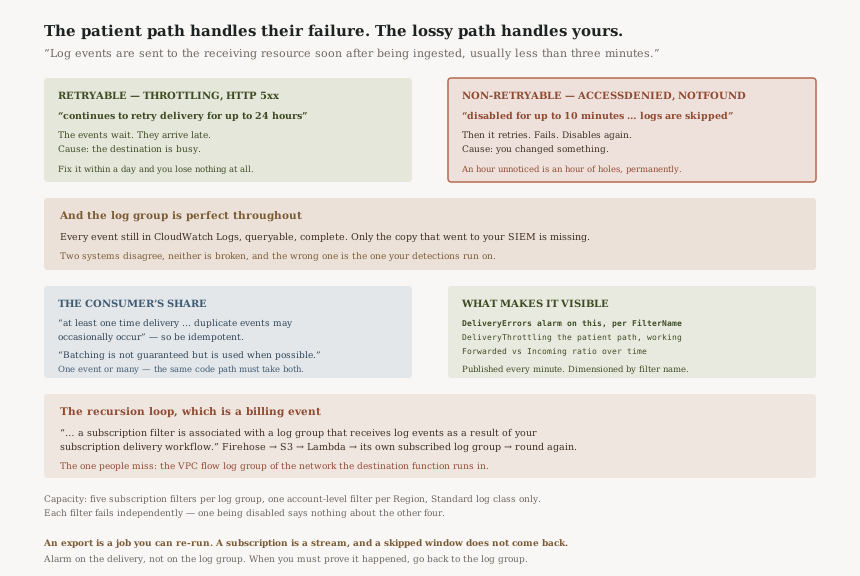
The two error paths
| Retryable | Non-retryable | |
|---|---|---|
| Examples | Throttling, “HTTP 5xx for example” | AccessDeniedException, ResourceNotFoundException |
| What CloudWatch Logs does | Retries “for up to 24 hours” | Disables the filter “for up to 10 minutes”, then retries |
| What happens to events in the meantime | They wait | “logs are skipped” |
| Outcome if you fix it in an hour | Everything arrives, late | An hour of holes, permanently |
| Typical cause | The destination is busy | You changed something |
The last row is the uncomfortable one. The patient path handles the failure you do not control; the
lossy path handles the failure you caused. That is not perverse — retrying an
AccessDeniedException in a tight loop would be worse for everyone — but it does
mean the blast radius of a routine IAM or deployment change is measured in missing log events.
What the metrics can tell you, and how fast
| Metric | What it counts |
|---|---|
DeliveryErrors | “log events for which CloudWatch Logs received an error when forwarding data to the subscription destination” |
DeliveryThrottling | “log events for which CloudWatch Logs was throttled when forwarding data” |
ForwardedLogEvents | “log events forwarded to the subscription destination” |
ForwardedBytes | “log events in compressed bytes forwarded” |
IncomingLogEvents | “log events uploaded to CloudWatch Logs” |
All of them arrive at a usable cadence — CloudWatch Logs “sends to Amazon CloudWatch every minute” — and the delivery metrics carry “LogGroupName, DestinationType, FilterName, PolicyLevel”, so an alarm can identify the individual filter rather than telling you that something somewhere is failing.
The pairing worth building is ForwardedLogEvents against
IncomingLogEvents. One is what the log group received, the other is what left for the
destination. A gap between them is the shape of a delivery problem even when no error is being
recorded, and it is the only view that treats skipped events as an absence rather than as an event
that was never counted. One caution on precision: a subscription filter's whole job is to select a
subset, so the two numbers are not meant to be equal — it is the ratio over time that
is informative, not the difference.
One operational gotcha in the dimension itself: “The subscription filter name is automatically converted by CloudWatch to ASCII and any unsupported characters get replaced with a question mark”. A filter named with anything outside ASCII will not be findable in metrics by the name you gave it.
How many, and where they can exist
“Each account can have one account-level subscription filter per Region. Each log group can have up to five subscription filters associated with it.” And the class restriction from #114: “Subscriptions are supported only for log groups in the Standard log class.”
Five per log group is a fan-out budget, and each one is an independent delivery with its own destination, its own permissions and its own failure state. One filter being disabled for ten minutes says nothing about the other four. That is a feature when a SIEM feed and a data lake feed are meant to be independent, and a trap when a team assumes the subscription is fine because the dashboard they looked at belongs to a different filter.
The single account-level filter per Region is the opposite shape: one policy reaching many log groups, which is why its exclusion list is the thing that matters most about it.
Subscription, export, or scheduled query
| Subscription filter | Export to S3 | Scheduled query | |
|---|---|---|---|
| Timing | “usually less than three minutes” | A job you run | On your schedule |
| Failure of a run | Retry for 24 hours, or skipped | Re-run it | Next execution |
| Guarantee | At-least-once, duplicates possible | Whatever the range holds | The query's result set |
| Essentials log class | Unsupported | Supported | Supported |
The reliability difference is the one worth internalising. An export is a job over a range: if it fails, the data is still in the log group and you run it again. A subscription is a stream: a window it skipped is a window you cannot re-request through the subscription at all. The documentation points at the alternative directly — “For batch processing and analysis of log data on a schedule, consider using Automating log analysis with scheduled queries”.
Why This Architecture Holds Up
Not retrying a non-retryable error is correct, even though it loses data
An AccessDeniedException will not succeed on the next attempt, and a service that
hammered a destination it has no permission to call would turn one misconfiguration into a
denial-of-service against your own account. Backing off for ten minutes and trying again is the right
engineering answer. What the design asks of you in return is that you watch the error metric, which
is why that metric exists with a per-filter dimension.
At-least-once is the honest guarantee for a real-time feed
Exactly-once across a service boundary requires coordination that would cost the latency the feature exists to provide. Saying “at least one time delivery … while duplicate events may occasionally occur” puts the deduplication where it can actually be done, in a consumer that knows what its own idempotency key is.
Documenting the recursion risk beats detecting it
A loop between a log group and its own delivery path is indistinguishable, from inside the service,
from a genuinely chatty workload. Rather than guess, AWS documents the topology, names the services
that commonly sit in delivery paths, and provides selectionCriteria to exclude them. The
one case it can detect unambiguously — a Lambda destination's own log group under an
account-level policy — it handles for you.
Key Architecture Decisions
| Decision | Choose this | Because |
|---|---|---|
| Monitoring the feed | Alarm on DeliveryErrors per FilterName |
Non-retryable errors skip logs rather than queueing them, and nothing else reports it |
| Second signal | Track ForwardedLogEvents against IncomingLogEvents |
A collapsing ratio shows delivery stopping even when errors are not being recorded |
| Changing a destination's permissions or name | Treat it as a change to the log pipeline | AccessDeniedException and ResourceNotFoundException are the two documented lossy cases |
| Consumer design | Idempotent, batch-size agnostic | At-least-once with duplicates, and “Batching is not guaranteed” |
| Evidence that must be complete | Export or scheduled query, not a subscription | A skipped window cannot be re-requested through the subscription |
| Account-level filters | Write the selectionCriteria exclusions first |
Recursion is a billing event, and the built-in protection covers only the Lambda destination's own log group |
| Fan-out beyond five destinations | Fan out at the destination instead | A log group supports up to five subscription filters |
| Filter names | ASCII only | Unsupported characters become a question mark in the metric dimension |
The audit worth running
List every subscription filter in the account and check each has an alarm naming it.
This is the highest-value item here. A filter with no DeliveryErrors alarm is a feed
whose silence you cannot distinguish from a quiet log group.
Check whether any filter's destination has been recreated since the filter was
written. A deleted and recreated stream or function is the ResourceNotFoundException
case, and it fails in ten-minute cycles indefinitely.
Map your delivery path and compare it against your account-level filter's exclusions. Specifically: the destination function's log group, anything it invokes, and the flow logs of the VPC it runs in.
Confirm every consumer tolerates duplicates and variable batch sizes. Both are documented behaviours, not edge cases, and a consumer that assumes otherwise is correct only until the day it is not.
Check filter names for non-ASCII characters. A five-minute check that decides whether your alarms can find the filter at all.
Closing Thought
Five posts have now circled the same question from different sides: when a monitoring system says
nothing, what does that mean? An alarm in INSUFFICIENT_DATA. A canary whose silence has
two causes. A query that ran before the logs arrived. An index that only covers what came after it.
A log class that removes the reading apparatus.
Subscription filters give the sharpest version of it, because here the silence is somewhere else entirely. The log group is perfect — every event present, queryable, complete. The gap is in the copy that went to the SIEM, and the thing that produced the gap was a permissions change somewhere outside the logging system. The two systems disagree, neither is broken, and the one that is wrong is the one your detections run on.
So the rule for this primitive is about where the truth lives. CloudWatch Logs holds the record; the subscription holds a copy that is at-least-once on a good day and lossy in ten-minute cycles on a bad one. Alarm on the delivery, not on the log group. Treat destination permissions as part of the log pipeline's change surface. And when the question is can we prove this happened, go back to the log group, which never skipped anything.
Operational Excellence — CloudWatch Logs account-level policies: how one policy reaches every log group in a Region, what selectionCriteria can and cannot express, which policy wins when an account-level and a log-group-level policy disagree, and why the exclusions are the part you have to write yourself.
Official AWS Reference
- Real-time processing of log data with subscriptions — the destinations and the under-three-minute delivery, the one account-level filter per Region and five filters per log group, the 24-hour retry for retryable errors against the up-to-10-minute disable during which logs are skipped for non-retryable ones, the at-least-once guarantee with possible duplicates, the unguaranteed batching, gzip and base64 encoding, the transformation interaction, the Standard log class restriction, and the pointer to scheduled queries for batch analysis
- Monitoring with CloudWatch metrics — the
DeliveryErrors,DeliveryThrottling,ForwardedLogEvents,ForwardedBytesandIncomingLogEventsdefinitions, theirLogGroupName,DestinationType,FilterNameandPolicyLeveldimensions, the per-minute publication, and the ASCII conversion of filter names in the dimension - Log recursion prevention — the infinite recursion risk and its billing consequence, the Firehose-to-S3-to-Lambda example, the VPC flow log case, the recommendation not to subscribe log groups in the delivery path, the
selectionCriteriaexclusion mechanism, the services to consider excluding, and the built-in protection for a Lambda destination's own log group under an account-level policy - Log classes — further reading on the Standard class requirement for subscriptions, covered in full in #114; no claims in this post are drawn from it
- Confused deputy prevention — further reading on the source account and ARN conditions for cross-account subscription destinations; no claims in this post are drawn from it
- Cross-account cross-Region subscriptions — further reading on delivering a subscription to a destination in another account or Region; no claims in this post are drawn from it
Comments