Business Challenge
Azure Load Balancer does not read your traffic. It does not terminate TLS, inspect headers, or know what a request is. It operates “at layer 4 of the Open Systems Interconnection (OSI) model”, hashes a tuple, and forwards the packet — “pass-through load balancing for ultralow latency”, scaling “up to millions of flows”.
That makes it the cheapest and fastest thing in the load balancing family, and it means everything you can actually configure comes down to two questions: which tuple decides where a flow goes, and who is eligible to receive it. The second one is the health probe, and it is where this service surprises people.
The first thing to know is that one of the decisions you may still be preparing to make no longer exists.
“On September 30, 2025, Basic Load Balancer was retired… Azure Load Balancer offers two current SKUs: Standard and Gateway.”
Gateway is the NVA-chaining SKU that #83 covered as one of the four appliance designs. For ordinary inbound load balancing there is now exactly one SKU, and the interesting part is what the retirement leaves behind: the documentation is still largely organised as a Standard-versus-Basic comparison, so a reader researching this today is handed a decision table for a choice that cannot be made.
Architecture
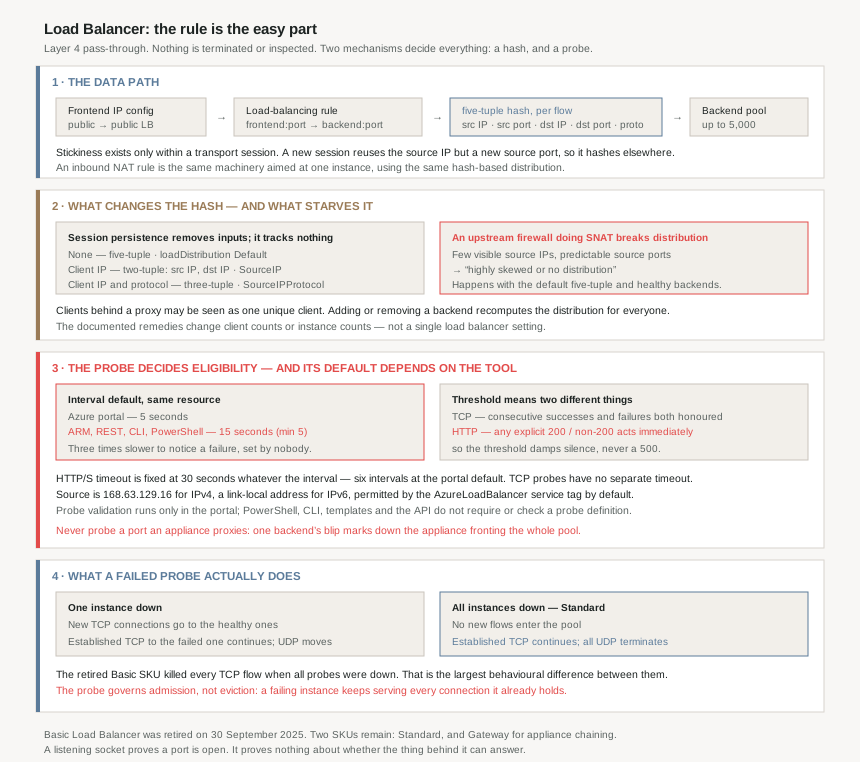
The rule, and the tuple underneath it
A load-balancing rule is a mapping, not a policy: it “maps a frontend IP configuration and port to multiple backend IP addresses and ports” and distributes to all instances in the pool. An inbound NAT rule is the same machinery aimed at one instance — “port forwarding uses the same hash-based distribution as load balancing”.
Underneath both is the five-tuple hash: source IP, source port, destination IP, destination port, protocol. The consequence that matters operationally is stated plainly:
“The algorithm provides stickiness only within a transport session. When the client starts a new session from the same source IP, the source port changes and causes the traffic to go to a different backend instance.”
So anything stateful on the backend is already broken by default, and the fix — session persistence — works by removing inputs from the hash rather than by tracking anything.
Distribution modes
| Mode | Tuple | Portal name | REST API |
|---|---|---|---|
| Hash based (default) | five-tuple | Session persistence: None | "loadDistribution":"Default" |
| Session persistence | two-tuple — source IP, destination IP | Client IP | SourceIP |
| Session persistence | three-tuple — adds protocol | Client IP and protocol | SourceIPProtocol |
Switching between them is free — “There's no downtime when switching from one distribution mode to another” — but the cost is distribution quality: “using source IP affinity distribution mode can cause an uneven distribution of traffic. Clients that run behind proxies might be seen as one unique client application.”
The three-tuple mode exists for a specific reason worth knowing, because it looks arbitrary otherwise: it “solves an incompatibility between Azure Load Balancer and Remote Desktop Gateway”, and it lets a client hold a TCP control channel and a UDP data channel on the same backend — the media-upload pattern.
The failure mode that is not yours
This is the paragraph I would put in front of anyone debugging an unevenly loaded pool, because it points at a device that is not the load balancer and not the backend.
“When there is limited variation in source IP addresses and ports… In scenarios where intermediate devices (such as firewalls performing SNAT) reduce the number of visible source IP addresses and assign source ports in predictable patterns, the available variation in traffic flows can be significantly limited… This may result in highly skewed or no distribution across backend instances.”
Note that this happens with the default five-tuple, with session persistence set to None, with a correct rule and healthy backends. The hash has not failed; it has been starved of inputs by something upstream. #79's forced tunnelling and #83's appliance designs both put exactly such a device in the path, and neither suggests it changes load distribution downstream.
The documented remedies are telling, because none of them is a load balancer setting: increase the number of clients, change the number of intermediate device instances, or change the number of backends — “to break the hashing symmetry”.
Why This Architecture Holds Up
Because the probe's default depends on which tool created it
Every load-balancing rule requires a probe, and the probe is the only thing deciding eligibility. Its most important knob has two different defaults:
“The health probe attempts to check the configured health probe port every 5 seconds by default in the Azure portal, but you can set it to another value. When you deploy through ARM templates, the REST API, the Azure CLI, or PowerShell, the default interval is 15 seconds (minimum 5 seconds).”
Three times slower to notice a failure, for the same resource, decided by whether a human clicked or a pipeline deployed. In an estate where the portal is used for the first build and Terraform for everything after, that difference arrives silently during the migration to infrastructure-as-code — the configuration is “unchanged” because nobody ever set the value.
The timeout does not scale with it. HTTP and HTTPS probes carry a fixed 30-second timeout, which at the portal default is six probe intervals and at a 120-second interval means the probe fails at 30 seconds having never reached its own interval. TCP probes have no separate timeout at all: they “fail once the configured probe interval duration is passed and the next probe is sent”.
Because threshold means different things to TCP and HTTP
The threshold reads like a single concept — “the number of times a health probe will need to succeed or fail consecutively” — and then applies asymmetrically:
| Probe | How the threshold behaves |
|---|---|
| TCP | Honoured both ways. At threshold 2, two consecutive successes before traffic arrives; two consecutive failures before it stops. |
| HTTP / HTTPS | “Explicit responses will immediately mark the probe as up or down for 200 and non-200 responses, and will effectively reset the threshold.” The threshold applies only when the probe times out with no response. |
So a threshold configured to damp flapping does nothing against an application returning a transient 500 — that instance is out on the first bad response. The threshold protects against silence, not against errors. If your application can emit a brief 503 under load, the damping you think you configured is not there.
There is a counterweight, and it is undocumented in its specifics: “If the health probe fluctuates, the load balancer waits longer before it puts the backend endpoint back in the healthy state. This extra wait time protects the user and the infrastructure and is an intentional policy.” A flapping instance is penalised by an amount Azure does not publish.
Because the probe source is a fixed address with five jobs
168.63.129.16 now makes its fifth appearance in this run: the health probe source in #83, an addressing restriction in #88, a forbidden forwarding destination in #90, the resolver that answers in #94, and here as the thing that decides whether your backends exist.
Three operational consequences, all stated as prohibitions:
- “Don't configure your virtual network with the Microsoft owned IP address range that contains 168.63.129.16” — the collision breaks probing. This is the same restriction #88 raised from the addressing side.
- “It isn't recommended to block the Azure Load Balancer health probe IP or port with NSG rules. This is an unsupported scenario and can cause the NSG rules to take delayed effect” — so the obvious way to drain an instance is explicitly not supported, even though the same page suggests exactly that for testing a probe failure.
- The
AzureLoadBalancerservice tag permits it by default, which is why probes usually work without anyone configuring anything — and why a tightened NSG baseline can take a whole pool down.
IPv6 is the asymmetry: IPv6 probes source from a link-local address instead, and a dual-stack load balancer needs its own NSG rule for the IPv6 probe to function. Another entry in this series' running list of IPv6 gaps.
Because probing an appliance through itself cascades
The NVA case from #83 gets its specific warning here, and the failure is not local:
“Don't translate or proxy a health probe through the instance that receives the health probe to another instance… any probe response from a single virtual machine marks down the appliance. This configuration can lead to a cascading failure of the application… Probe the health of the appliance itself.”
The mechanism is worth stating because it inverts the usual intuition: probing a deeper dependency feels more thorough, and here it couples the appliance's liveness to something behind it, so one backend's blip removes the appliance that fronts all of them.
The multi-NIC corollary catches NVAs too: “ensure you respond to the probe on the interface you received it on”, which may need source NAT per interface inside the appliance.
Because the portal validates probes and the API does not
“A probe definition isn't mandatory or checked for when using Azure PowerShell, Azure CLI, Templates, or API. Probe validation tests are only done when using the Azure portal.”
That is the fourth tooling disagreement this series has hit in fifteen posts, after the CLI's inability to express all four privateEndpointNetworkPolicies values in #91. The pattern is consistent enough to plan around: the portal is the validating client, and anything deployed as code is accepted more literally than a human would be.
Paired with the different default interval, the practical reading is that a load balancer built by pipeline is both less validated and slower to detect failure than the same load balancer built by hand — unless both values are set explicitly, which is the actual advice.
Because “all probes down” is the one behaviour the retirement changed
The single largest difference between the retired SKU and the current one is what happens at total failure:
| Scenario | TCP | UDP |
|---|---|---|
| Single instance probes down | New connections go to remaining healthy endpoints; established connections to that endpoint continue | Existing flows move to another healthy instance |
| All instances probe down — Standard | No new flows; established TCP flows continue, given more than one backend instance | All existing UDP flows terminate |
| All instances probe down — Basic (retired) | All existing TCP flows terminated | All existing UDP flows terminate |
Standard fails open for flows already established, which is usually what you want and is occasionally not: an instance that is failing its probe because it is unhealthy keeps serving every connection it already has. The probe controls admission, not eviction. If you need connections actually moved off an instance, the probe is not the mechanism — the documented lever is draining via the probe response and then waiting for idle timeout or application closure.
Because the limits are shaped around flows, not instances
| Standard Load Balancer limit | Value |
|---|---|
| Load balancers per subscription | 1,000 |
| Frontend IP configurations | 600 |
| Rules (Load Balancer + Inbound NAT) per resource | 1,500 |
| Rules per NIC, across all IPs on the NIC | 300 |
| Derived: a NIC's rule allowance against one load balancer's | 1,500 ÷ 300 = one fifth |
| Backend pool size | 5,000 |
| IP configurations per load balancer, all pools | 20,000 |
| Backend IP configurations per frontend | 10,000 |
| Backend IP configurations across all frontends | 500,000 |
| Derived: fully loaded frontends to reach that ceiling | 500,000 ÷ 10,000 = 50 |
| HA ports rules | 1 per internal frontend |
| Global load balancer backend pool | 300 |
The one to notice is the global tier: a cross-region load balancer's backend pool caps at 300 against a regional pool's 5,000. Global load balancing is not a bigger load balancer; its backends are regional load balancers, and the ceiling reflects that.
HA ports is the other constraint with design consequence — “protocol set to All and port set to 0”, one per internal frontend, internal only, and the only configuration in which this service forwards ICMP at all.
Key Architecture Decisions
| Decision | Choice | Why |
|---|---|---|
| SKU | Standard — there is no alternative | Basic was retired on 30 September 2025. Gateway is for NVA chaining, not for ordinary inbound load balancing. |
| Probe interval | Set it explicitly, never inherit the default | The portal defaults to 5 seconds and ARM, REST, CLI and PowerShell default to 15 — a threefold difference in detection time decided by the deployment tool. |
| Relying on probe threshold to damp flapping | Only for TCP probes | An explicit non-200 marks an HTTP probe down immediately and resets the threshold; it applies only to timeouts. |
| HTTP probe interval above 30 seconds | Avoid | The HTTP/S timeout is fixed at 30 seconds, so a longer interval means the probe always fails at 30 seconds without completing an interval. |
| Probe port on an appliance | Probe the appliance itself, never a port it proxies | A proxied probe couples the appliance's health to a backend behind it, and one blip marks down the appliance fronting the whole pool. |
| Draining an instance by blocking the probe in an NSG | Don't — fail the probe from the application | Blocking the probe IP or port with NSG rules is documented as unsupported and can make NSG rules take delayed effect. |
| Session persistence | Default to None; use the tuple modes only for a named requirement | Fewer hash inputs means coarser distribution, and proxied clients collapse into one. Three-tuple exists for RD Gateway and for paired TCP control with UDP data. |
| Uneven distribution with default settings | Look upstream before tuning the load balancer | An intermediate device doing SNAT starves the five-tuple of variety; the documented remedies all change client or instance counts, not load balancer configuration. |
| Expecting probes to move existing connections | They don't | Standard keeps established TCP flows alive even when all probes are down. The probe governs admission; eviction needs idle timeout or the application closing the flow. |
| Dual-stack load balancing | Add an explicit NSG rule for the IPv6 probe | IPv6 probes source from a link-local address rather than 168.63.129.16, and the IPv6 probe needs its own rule to function. |
| Virtual network addressing | Never use the range containing 168.63.129.16 | It collides with the probe source and breaks the scenario — the same address constraint this series met from the DNS side. |
| Cross-region load balancing at scale | Plan against the 300 global backend pool limit | A regional pool holds 5,000; the global tier holds 300, because its backends are regional load balancers rather than machines. |
Closing Thought
The things that go wrong with this service are almost never the rule. The rule is a mapping, it is declarative, and it either exists or it does not. What goes wrong is the two mechanisms either side of it: a hash whose quality depends on traffic nobody on the Azure side controls, and a probe whose semantics shift depending on protocol, tool and SKU.
That is why the same symptom — traffic arriving unevenly, or not at all — has causes in completely different places. An upstream firewall doing SNAT, a probe interval that silently tripled when the deployment moved to Terraform, an HTTP 503 that bypassed the threshold entirely, an NSG baseline that stopped permitting the probe source, a probe pointed at a port the appliance proxies. Each produces a pool that looks correctly configured in the portal.
The probe does not move traffic off a failing instance; it only stops new traffic arriving. A backend that fails every probe keeps serving every connection it already holds until the application closes it or the idle timeout fires. Health, here, is a statement about admission — not about what is currently being served.
Which is also the strongest argument for the application generating its own probe response rather than letting a TCP handshake stand in for health. A listening socket proves a port is open. It proves nothing about whether the thing behind it can answer.
Official Azure Reference
- Azure Load Balancer health probes — probe protocols and SKU behaviour, the portal-versus-API default interval, the fixed HTTP/S timeout, threshold semantics per protocol, the 168.63.129.16 source and service tag, the NVA proxy warning, portal-only probe validation and the blocked HTTP probe ports
- Azure Load Balancer SKUs — the full Standard versus Basic comparison, the retirement date, backend types and endpoints, probe-down behaviour, secure-by-default, management operation times, the SLA, and the Global VNet Peering, NAT Gateway, Private Link and Global tier support rows
- Azure Load Balancer components — frontend IP configurations, backend pools, load-balancing rules, inbound NAT rules, HA ports as protocol All and port 0, and the limitations covering ICMP, private endpoints, fragments and availability sets
- Azure Load Balancer distribution modes — the five-tuple and its contents, the two- and three-tuple session persistence modes with their portal and REST names, the SNAT-starvation note, and the pool-change rehash
- Azure subscription and service limits — the Standard, Gateway and Basic Load Balancer limit tables
- What is Azure Load Balancer? — the layer 4 model, public versus internal, the retirement notice, the Zero Trust and NSG posture, and the capability list
- High availability ports overview — the HA ports rule in detail, for further reading (no claims drawn from it)
- Upgrading from Basic Load Balancer — the migration path for anything still on the retired SKU, for further reading (no claims drawn from it)
Comments