Business Challenge
Post #61 argued that chunking decides what a RAG system can ever find. This is the next decision down: where the resulting vectors live.
Three AWS services will hold them, their storage costs differ by a lot, and the choice usually gets made on that difference. That is the wrong axis. The price gap is not a discount — it is buying a different query profile.
S3 Vectors is explicit about where it belongs: “S3 Vectors is ideal for workloads where queries are less frequent.”
Its latency figure has the same shape — “subsecond latency for infrequent queries and as low as 100 milliseconds for more frequent queries”. That is a sentence about a storage system, not a search engine, and the word doing the work is infrequent.
Sub-second is fine for a nightly enrichment job or an internal knowledge base. Put it under a user-facing search box at scale and the number that was acceptable becomes the product.
FixPick on query frequency first. Storage cost is the consequence, not the criterion.
S3 Vectors allows a “Dimension value per vector: 1 to 4,096”. The OpenSearch Serverless vector engine “can accommodate 16,000 dimensions” — nearly four times as many.
For most current text embeddings this is not binding. It becomes binding the moment somebody picks a high-dimension or multimodal model, and at that point it is not a tuning decision: the store simply cannot hold the vectors.
Aurora sits differently again — the dimension is written into the schema
(vector(1024), vector(1536)), so it is a
migration rather than a setting.
Fix the embedding model before the store. It constrains the store, not the other way round.
S3 Vectors allows “Total metadata per vector: Up to 40 KB” but “Filterable metadata per vector: Up to 2 KB”.
Only one twentieth of the budget can be filtered on. And the default works against you here: “all metadata is filterable unless you explicitly specify it as non-filterable”, so the 2 KB ceiling is the one you hit first, by default, while 38 KB sits unused.
OpenSearch has no equivalent split — filtering, “full-text search, advanced filtering, aggregations, geospatial queries” all operate on the same document.
FixMark metadata non-filterable deliberately. The default spends the scarce budget first.
Architecture
The three are easiest to read as points on one axis, with a documented path between two of them.
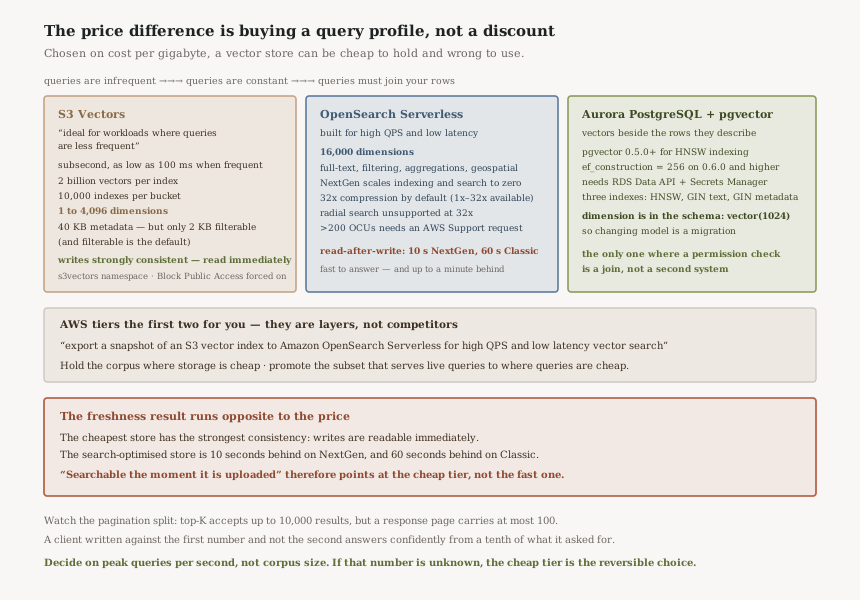
AWS tiers two of them for you
The most useful sentence in the S3 Vectors documentation is about OpenSearch, not about S3: “Optimize vector storage costs while continuing to use OpenSearch API operations… You can also export a snapshot of an S3 vector index to Amazon OpenSearch Serverless for high QPS and low latency vector search.”
That reframes the decision. These are not two vendors competing for the same workload; they are two tiers with a supported path between them. Keep the corpus where storage is cheap, promote the subset that serves live queries to where queries are cheap.
It also means the choice is less irreversible than it looks — provided the vectors start in the cheap tier. Starting in the expensive one and migrating down is not a documented path.
The freshness result runs the opposite way to the price
This is the part I did not expect. “Writes to S3 Vectors are strongly consistent, which means that you can immediately access the most recently added data.”
The search-optimised store does not offer that. NextGen vector collections have a
“read-after-write latency (refresh_interval) of 10
seconds”, and on Classic collections “the refresh interval for indexes on
vector search collections is 60 seconds.”
“A document must be searchable the moment it is uploaded” is an ordinary product requirement. It points at the cheap store, not the fast one — because the fast one is fast at answering and up to a minute behind at knowing. A RAG system over a live wiki hits this immediately: the edit is saved, the user asks about it, and the index has not refreshed. Nothing errors, and the answer is simply out of date.
Aurora is the one whose constraints are not about vectors
pgvector's requirements are precise and mostly about version:
“You must enable the pgvector extension… and use version
0.5.0 or higher” for HNSW indexing, with
“ef_construction to 256 for pgvector 0.6.0 and
higher version that use parallel index building.”
The operational surface is wider than the other two: a knowledge base on Aurora also needs “RDS Data API” and “A user managed in AWS Secrets Manager”, plus separate GIN indexes for text and for metadata. Three indexes, not one.
What you get for that is the thing neither of the others offers: the vectors are in a transactional database, next to the rows they describe, joinable in one query. If the retrieval has to respect a permission that lives in a table, that is not a nice-to-have.
Why This Architecture Holds Up
Write throughput is a real ceiling on the cheap tier
The S3 Vectors limits are generous on size and specific on rate: “Up to 2 billion
vectors” per index, but “Combined PutVectors and
DeleteVectors requests per second per vector index: Up to
1,000” and “Combined vectors inserted and deleted per second per
vector index: Up to 2,500.”
Two billion vectors at 2,500 writes per second is a long initial ingestion. The batch APIs matter here
— “Vectors per PutVectors API call: Up to 500”
— and so does planning the backfill as a job rather than a script.
“Top-K results per QueryVectors request: Up to 10,000” but “Results per page in a QueryVectors response: Up to 100.” Ask for a thousand neighbours and you get a hundred, plus a token. A client written against the first number and not the second silently processes the first page and reports a confident answer from a tenth of the results it asked for — the same failure shape as #61's hierarchical chunking tell, where correct behaviour looks like retrieval failing.
The compression default is doing more than saving money
In NextGen collections “all indexes are created with advanced 32x compression technique by default”, overridable to “1x, 2x, 8x, 16x, or 32x”.
It is a default with a functional consequence: “Radial search isn't supported on NextGen vector indexes that use 32x compression.” A capability is switched off by a setting nobody chose, and it will be discovered when somebody tries to use it.
S3 Vectors is not S3, for access control purposes
“S3 Vectors uses a different service namespace than Amazon S3: the
s3vectors namespace.” An existing S3 policy grants nothing here,
and an SCP written against s3:* does not constrain it.
In the other direction the default is unusually firm: “All Amazon S3 Block Public Access settings are always enabled for vector buckets and cannot be disabled.” One of the few AWS settings with no override, which is the right call for a store whose contents are a lossy encoding of your private documents.
Key Architecture Decisions
| Decision | Choice | Reasoning |
|---|---|---|
| Primary axis | Query frequency | S3 Vectors states its own fit: "ideal for workloads where queries are less frequent". |
| Large corpus, occasional queries | S3 Vectors | 2 billion vectors per index, and you pay for storage rather than capacity. |
| User-facing search | OpenSearch Serverless | Built for high QPS, and brings full-text, aggregations and geospatial alongside. |
| Retrieval that joins to rows | Aurora pgvector | The only one where a permission check is a join rather than a second system. |
| Read-your-writes required | S3 Vectors | Strongly consistent, against a 10-second refresh on NextGen and 60 on Classic. |
| Embedding model | Decide before the store | 4,096 dimensions on S3 Vectors against 16,000 on OpenSearch; Aurora writes it into the schema. |
| Filterable metadata | Opt out explicitly | All metadata is filterable by default, and filterable is capped at 2 KB of the 40 KB. |
| Growth path | Start cheap, export up | Snapshot export to OpenSearch Serverless is documented. The reverse is not. |
The measurement that settles it
Queries per second, at peak, from the workload you actually have — not the corpus size, which is the number everyone quotes. A hundred million vectors queried twice an hour and a hundred thousand queried fifty times a second are different architectures, and only the second one is a search problem.
If that number is unknown because the system is not built yet, the cheap tier is the reversible choice: it has a documented export path upward, and being wrong costs a migration that AWS supports rather than one you invent.
Closing Thought
Vector storage is priced as if it were storage, which invites a storage decision — compare cost per gigabyte, pick the low number. The gigabytes are rarely the expensive part. The queries are.
What the documentation actually offers is three query profiles: one built for a corpus that is asked occasional questions, one built for a corpus that is asked constant questions, and one built for a corpus whose questions need to touch your relational data. The prices follow from that, and reading them in the other direction produces a system that is cheap to hold and wrong to use.
The freshness figures are the reminder that the ordering is not a simple ladder. The cheapest store here has the strongest consistency guarantee of the three, and the one optimised for fast answers is the one that can be a minute behind. Cheap, fast and fresh are three axes, and no service is last on all of them.
AI & ML — guardrails, PII and prompt injection in production: what Bedrock Guardrails actually evaluates, where a filter sits relative to the model, and why input filtering and output filtering fail in different ways.
Official AWS Reference
- Working with S3 Vectors and vector buckets — the query-frequency positioning, strong consistency, and the OpenSearch export path
- S3 Vectors limitations and restrictions — dimensions, metadata budgets, write rates and the top-K pagination split
- Working with vector search collections — 16,000 dimensions, NextGen scale-to-zero, compression defaults and refresh intervals
- Using Aurora PostgreSQL as a Knowledge Base for Amazon Bedrock — pgvector versions, HNSW indexing and the surrounding requirements
Comments