In This Post
- What changed
- Why AWS built this
- Architecture
- Business value
- Security considerations
- Cost considerations
- Operational considerations
- Tradeoffs
- Implementation guidance
- Best practices
- Who should adopt, who should wait
- The trap: an access point pins the recovery point
- Key takeaways
- Official AWS references
Executive summary
AWS Backup can now expose an S3 recovery point through an S3 access point, so you read backup data with ordinary S3 calls — GetObject, HeadObject, ListObjectsV2, ListObjectVersions — without initiating a restore.
It works for snapshot and continuous (point-in-time) recovery points, in standard vaults and logically air-gapped vaults, including recovery points shared to another account through AWS Resource Access Manager or a restore access backup vault. Access is strictly read-only.
There is one genuinely clever behaviour worth knowing: for a continuous recovery point you choose the point-in-time view with AccessPointInTime, and while the access point exists that view stays readable even after the timestamp falls outside the 35-day retention window. An investigation opened on day 30 does not lose its evidence on day 36.
And one trap. While any access point is active, AWS Backup pauses lifecycle transitions and blocks deletion of that recovery point. Access points have no expiry and nothing reaps them. Leave one behind and your retention policy quietly stops being enforced on that backup — with no error, and no obvious place to look.
What changed
Reading anything out of an AWS Backup recovery point previously required a restore job: choose a destination, wait for it to complete, then look at the result. That is the correct operation when you actually want the data back. It is a poor fit when you want to look at it.
A backup access point removes the wait. You create one against a specific recovery point; AWS Backup provisions an S3 access point on your behalf and hands you its alias and ARN. From then on the backup behaves like a read-only bucket.
What you can and cannot call
| Supported | Not supported |
|---|---|
GetObject, HeadObject, GetObjectAttributes, GetObjectTagging, GetBucketLocation, ListObjects, ListObjectsV2, ListObjectVersions |
Every write: PutObject, DeleteObject, CopyObject, all multipart operations. Also GetObjectAcl, GetObjectRetention, GetObjectLegalHold. |
That last group is easy to skim past and matters for compliance work. You can read an object and its tags, but you cannot read its ACL, retention setting or legal hold through an access point. If your audit question is about those, you still need a restore.
Where it works
- Recovery point types: snapshot and continuous (PITR).
- Vaults: standard and logically air-gapped.
- Cross-account: recovery points shared via RAM, or reachable through a restore access backup vault under Multi-Party Approval.
- S3 only. No other AWS Backup resource type supports access points.
Why AWS built this
Because three common tasks were all being served by an operation designed for a fourth.
- Targeted recovery. Someone deleted one file. Restoring a bucket to get one object back is absurd, but it was the mechanism available.
- Compliance sampling. An auditor wants to confirm that a particular record existed on a particular date. That is a read, not a recovery, and it should not require provisioning storage.
- Forensic investigation. After an incident you want to compare what a bucket held before and after. Restoring both to compare them is slow, expensive, and creates two more copies of data you are already worried about.
- Validating the backup itself. "Are our backups actually any good?" is a question most teams answer once a year, if that, precisely because the only way to check was a full restore.
All four wanted read access. Restore gives you a copy, and a copy has to be paid for, secured, and eventually cleaned up. Access points give you a view instead.
Architecture
The model is a chain of two resources: a backup access point in AWS Backup, which provisions an S3 access point that your tools actually call.
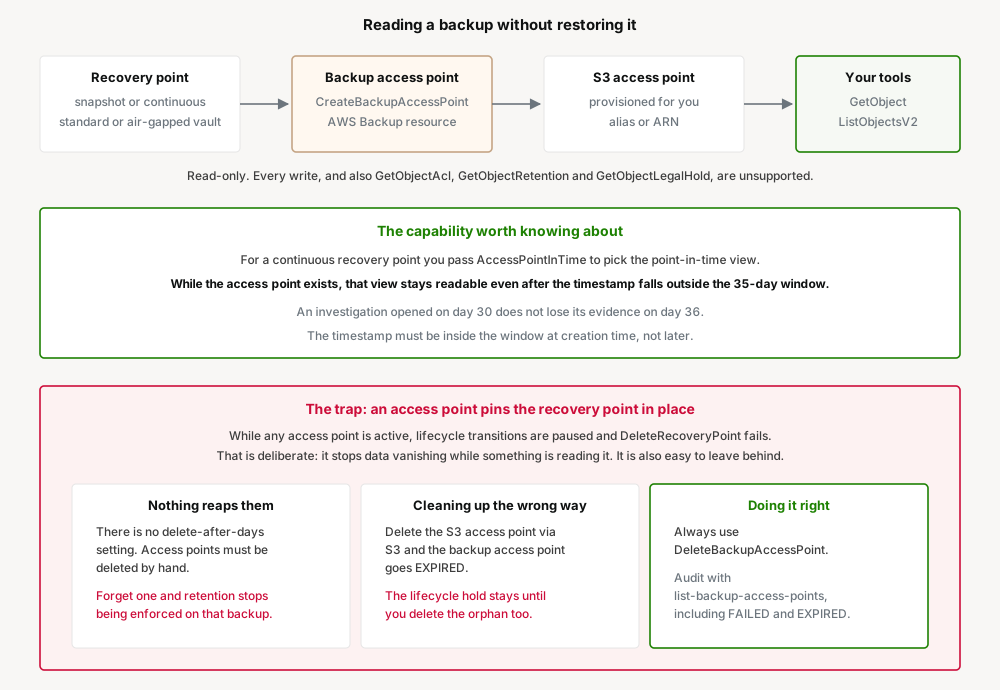
The two-resource chain matters
You create and delete the backup access point; AWS Backup manages the S3 access point underneath. They are not interchangeable, and treating them as one thing is what produces the orphan described at the end of this post.
Creation is asynchronous. The backup access point goes CREATING, then AVAILABLE, at which point DescribeBackupAccessPoint returns the S3 alias and ARN you use with S3 APIs. Call an S3 API too early and you get 409 InvalidBucketState.
Point-in-time views outlive the retention window
This is the most useful thing in the feature and it is stated almost in passing in the documentation. For a continuous recovery point you pass AccessPointInTime to pick which moment you want to see. The timestamp must be inside the 35-day continuous retention window at the time you create the access point. After that:
As long as the access point exists, that point-in-time view remains readable, even once the timestamp has aged past the retention window.
Practically: an incident on 1 July, discovered on 30 July, investigated into September. Create the access point while the timestamp is still in range and the evidence stays available for as long as you need it. Without that, the investigation would race the retention clock.
It also means an access point is a deliberate, indefinite hold on data — which is the same mechanism as the trap. The capability and the footgun are the same behaviour seen from two directions.
Access control has two layers
By default the S3 access point is created without an access point policy, and access is governed purely by the caller's IAM permissions. You can optionally attach a policy to grant read access to other principals, restrict by source IP or VPC endpoint, or require MFA. An access point policy only ever grants what the underlying data source already allows, and account-level Block Public Access still applies.
Business value
Recovery time for single-file restores collapses. The most common real recovery request — one file, one object, one prefix — goes from a restore job to a GetObject.
Backup validation becomes something you can automate. A scheduled job can open an access point, list objects, checksum a sample, and delete the access point. That converts "we assume our backups are good" into a test that runs.
Forensics without making more copies. Investigating an incident no longer requires restoring potentially compromised data into a live bucket, which is both faster and a smaller security problem.
Auditors can be given scoped, read-only access. An access point with a policy naming their role, on one recovery point, reading only what they need — rather than a restored copy someone has to remember to delete.
Air-gapped vaults stay useful. Access points work against logically air-gapped vaults and across accounts via RAM, so the isolation does not have to mean the data is hard to inspect.
Security considerations
Read-only is enforced by the service, not by policy. Every write operation is unsupported at the access point level. That is a genuinely strong property: an access point cannot be used to alter backup data even if someone attaches a permissive policy to it.
An access point is a new door to your backups. Backups are usually the most sensitive copy of data you hold, and one of the least routinely accessed. Creating a durable read path to them deserves the scrutiny you would apply to any other access grant — particularly since it does not expire.
Scope the operator permissions deliberately. The managed policy is AWSBackupAccessPointOperatorAccess. Note that creating an access point also requires s3:CreateAccessPoint, and attaching a policy requires s3:PutAccessPointPolicy — so this is not purely an AWS Backup permission.
RAM sharing grants access-point creation by default. Worth checking if you own a logically air-gapped vault: the RAM permission AWSRAMPermissionBackupVaultReadOnly includes backup:CreateBackupAccessPoint. A recipient account can therefore create its own read path into your vault. Vault owners who do not want that must add a vault access policy that denies the action.
Revocation is clean. If a vault is unshared or a restore access backup vault is deleted, access points created by the formerly authorised account move to DISASSOCIATED and S3 calls through them fail. Lifecycle protection is also released, assuming no other access points remain.
Status changes are auditable. AWS Backup emits CloudTrail events, EventBridge events and SNS notifications for access point creation, deletion and failure. Use the EventBridge events — they are the practical way to notice an access point that has been sitting open.
Cost considerations
AWS did not publish a specific charge for backup access points, and I could not verify one, so there is no figure here. Standard S3 request pricing applies to the calls you make through the access point. Confirm on the AWS Backup and S3 pricing pages before modelling.
The saving is a restore you did not run. A restore writes a full copy into a bucket: storage charges until someone deletes it, request charges to create it, and the engineering time to do both. For an investigation touching a handful of objects, an access point avoids all of it.
The cost risk is the one nobody budgets for: retention that stops being enforced. This is the important line in this section. A forgotten access point pauses lifecycle on its recovery point indefinitely. That backup is never expired, never transitioned, and keeps accruing storage charges — while your backup plan reports that it is doing its job. On a large S3 recovery point that is a real number, and it grows quietly.
Storage class interactions still apply underneath. AWS Backup's S3 documentation notes that reads against objects backed up from Glacier Instant Retrieval, Standard-IA or One Zone-IA incur retrieval charges. Reading a large backup through an access point is still reading data.
Operational considerations
Five per recovery point, including the dead ones. The limit is five access points per recovery point per account, and FAILED and EXPIRED ones count. Hitting LimitExceededException when you appear to have none active usually means old failures were never cleaned up.
Names live in the S3 namespace. An access point name must not collide with existing S3 access points in the same Region and account: lowercase, no underscores, 3–50 characters. After deleting one, reusing the same name too quickly returns ConflictException — so scripts that create and destroy an access point with a fixed name will fail intermittently. Use a unique suffix.
Some object keys are simply unreachable. Objects named . or .., or with keys starting ./ or ../, containing /./, /../ or consecutive slashes, or ending in /., /.. or /, return InvalidKey through a backup access point. They are in the backup and restorable — just not readable this way. If your data came from a filesystem sync, some of these almost certainly exist.
The recovery point must be in a usable state — AVAILABLE, STOPPED or COMPLETED — or creation fails with InvalidParameterValueException.
While you are here, check EventBridge on your buckets. Unrelated to access points but directly relevant to whether your backups are current: AWS Backup's S3 continuous backups depend on the bucket's EventBridge notification setting. If it is turned off, S3 stops publishing object events, the continuous recovery window silently stops advancing, and AWS Backup generates no alert or job failure. Snapshot backups keep running, which makes it harder to notice. AWS suggests the Config rule s3-event-notifications-enabled or a CloudTrail rule on PutBucketNotificationConfiguration.
Tradeoffs
Against a restore. A restore gives you a real, writable copy with full metadata — ACLs, retention, legal hold — and no lifecycle side effects. An access point gives you a fast read-only view with a subset of metadata and a hold on the recovery point. Use restore when you need the data back; use an access point when you need to look.
Against S3 Versioning for single-object recovery. If the object was deleted or overwritten recently and versioning is on, the previous version is right there in the bucket. That is faster and simpler than anything involving AWS Backup. Access points matter when the version has aged out, the bucket itself is gone, or the copy you need is deliberately isolated in a vault.
Against granting read access to the source bucket. For auditing current state, read the bucket. Access points are for auditing a point in time you no longer have.
The metadata gap is the real limitation. No ACLs, no retention, no legal hold through an access point. For compliance work that turns on exactly those attributes, this does not replace a restore, and the announcement does not make that obvious.
Implementation guidance
Prerequisites
AWSBackupAccessPointOperatorAccess, or the equivalentbackup:*BackupAccessPoint*actions pluss3:CreateAccessPoint,s3:GetAccessPoint,s3:DeleteAccessPoint, ands3:PutAccessPointPolicyif you attach a policy.- A recovery point in
AVAILABLE,STOPPEDorCOMPLETEDstate. - For a continuous recovery point, a target timestamp inside the 35-day window now.
- An access point name that is unique in the S3 access point namespace for the Region and account.
Create it, pinning a point in time
aws backup create-backup-access-point \
  --recovery-point-arn "arn:aws:backup:us-east-1:123456789012:recovery-point:rp-1234567890abcdef0" \
  --name "incident-4471-jul01" \
  --access-point-metadata '{"AccessPointInTime": "2026-07-01T12:00:00Z"}'
Wait for AVAILABLE, then get the S3 alias
aws backup describe-backup-access-point \
  --access-point-arn "arn:aws:backup:us-east-1:123456789012:accesspoint/incident-4471-jul01"
The response carries S3AccessPointAlias and S3AccessPointArn. Use either as the bucket name in ordinary S3 calls.
Read it like a bucket
aws s3api list-objects-v2 \
  --bucket "incident-4471-jul01-abc123-ext-s3alias"

aws s3api get-object \
  --bucket "incident-4471-jul01-abc123-ext-s3alias" \
  --key "path/to/my-file.txt" \
  recovered-file.txt
Clean up properly — this is the step that gets skipped
aws backup delete-backup-access-point \
  --access-point-arn "arn:aws:backup:us-east-1:123456789012:accesspoint/incident-4471-jul01"
Audit what is still open
Run this on a schedule. It is the only way to find access points nobody remembers creating:
aws backup list-backup-access-pointsAnd for a recovery point you cannot delete:
aws backup list-backup-access-points-by-recovery-point \
  --recovery-point-arn "arn:aws:backup:us-east-1:123456789012:recovery-point:rp-1234567890abcdef0"
Best practices
- Delete the access point in the same runbook step that finishes the investigation. Nothing else will.
- Never delete the underlying S3 access point directly. Always use
DeleteBackupAccessPoint. - Audit open access points on a schedule with
list-backup-access-points, and alarm on any older than your investigation window. - Name access points after the reason they exist — a ticket or incident number — so an orphan identifies its owner.
- Use a unique suffix in automation to avoid
ConflictExceptionon recently deleted names. - Subscribe to the EventBridge events for access point creation and deletion.
- If you own a logically air-gapped vault, decide deliberately about RAM.
AWSRAMPermissionBackupVaultReadOnlylets recipients create access points unless you deny it. - Do not plan compliance evidence around ACLs, retention or legal hold. Those are unreadable through an access point.
Who should adopt, who should wait
Adopt
- Teams whose most common recovery request is one file or one prefix. This is the case it was built for.
- Anyone doing incident forensics on S3 data, especially where restoring a compromised copy into a live account is unattractive.
- Teams who have never actually verified a backup is readable, because the only way to check was a full restore.
- Organisations handling audit requests about historical state.
Wait
- Anyone whose audit questions are about ACLs, object retention or legal hold. Unreadable this way.
- Teams without a cleanup discipline. A forgotten access point silently suspends retention, which is worse than not having the feature.
- Cases where S3 Versioning already answers the question — simpler and faster.
- Anyone needing to write to or modify backup data. Read-only, enforced.
- Non-S3 resources. S3 only.
The trap: an access point pins the recovery point
This deserves its own section because the mechanism is a feature, the failure is silent, and the thing it breaks is data retention — which is usually a compliance obligation rather than a preference.
While one or more access points exist for a recovery point, AWS Backup pauses scheduled lifecycle transitions and blocks deletion. DeleteRecoveryPoint returns an error. You can still change the lifecycle setting, but it will not be enforced until every access point is gone.
That behaviour is correct. Data should not evaporate while an application is reading it. The problem is what surrounds it.
Access points have no expiry. The documentation is explicit: there is no delete-after-days setting, and they must be deleted manually. Nothing in AWS Backup will reap one for you, no matter how long it has been idle.
So the failure is ordinary. An engineer creates an access point during an incident at 2am, gets what they need, and moves on. The recovery point it points at is now exempt from lifecycle. Your backup plan still reports success. Your retention policy still says 30 days. That one recovery point stays forever, accruing storage cost, and nothing anywhere reports a problem — because from the service's point of view, nothing is wrong.
Cleaning up the wrong way makes it worse. If you delete the underlying S3 access point directly through S3 APIs, the backup access point moves to EXPIRED — and the lifecycle protection remains in place until you delete the orphaned backup access point as well.
This is the sharp edge. Someone tidying up unfamiliar S3 access points does the obvious thing, sees the S3 resource disappear, and reasonably concludes it is dealt with. The hold survives, now attached to a resource that no longer appears where they were looking.
Three habits make this a non-issue:
- Deletion belongs in the same runbook step as the work. Not a follow-up ticket.
- Always use
DeleteBackupAccessPoint. Never the S3 API. - Audit on a schedule.
list-backup-access-pointsacross accounts, alarming on anything older than a few days. This is the only control that catches the 2am case, and it is the one worth building before you use the feature in anger.
None of this makes the capability less good. It makes it a capability with a lifecycle, and lifecycles need owners.
Key takeaways
- Read S3 backup data with standard S3 calls — no restore. Snapshot and continuous recovery points, standard and air-gapped vaults, cross-account via RAM.
- Read-only, enforced by the service. Every write operation is unsupported.
- ACLs, retention and legal hold are not readable through an access point. Compliance work about those still needs a restore.
AccessPointInTimepins a point-in-time view that stays readable after the 35-day window passes, as long as the access point exists.- An active access point pauses lifecycle and blocks deletion of its recovery point.
- Access points never expire. Nothing reaps them. A forgotten one silently suspends retention.
- Deleting the S3 access point directly leaves the hold in place, with the backup access point stuck in
EXPIRED. - Limit of 5 per recovery point, including
FAILEDandEXPIREDones. - Some object keys —
.,.., consecutive slashes, trailing slash — returnInvalidKeyand are unreachable this way. - RAM sharing grants
backup:CreateBackupAccessPointby default; deny it in a vault policy if that is not what you want.
Official AWS references
- AWS Backup for Amazon S3 now supports direct access to backup data
- Access points, AWS Backup Developer Guide
- Amazon S3 backups, AWS Backup Developer Guide
- Restore S3 data using AWS Backup
- Continuous backups and point-in-time recovery (PITR) — the 35-day maximum retention window
- Logically air-gapped vaults
- Multi-party approval for logically air-gapped vaults
- Managing access to shared datasets with access points
- AWSBackupAccessPointOperatorAccess
- AWS Config rule: s3-event-notifications-enabled
- AWS Backup pricing
Comments