Business Challenge
A payments team gets paged: their Lambda function is throttling. Requests are being dropped, and the CloudWatch graph shows the function pinned flat at 400 concurrent executions. The obvious reading is that the account is out of capacity, so someone opens a quota increase request.
The account is not out of capacity. The account-wide limit is 1,000 and total usage is sitting around 350. There are roughly 600 unused units at the moment the function starts dropping requests. The function is throttling because of a setting added six months earlier to make sure it never throttled: a reserved concurrency of 400.
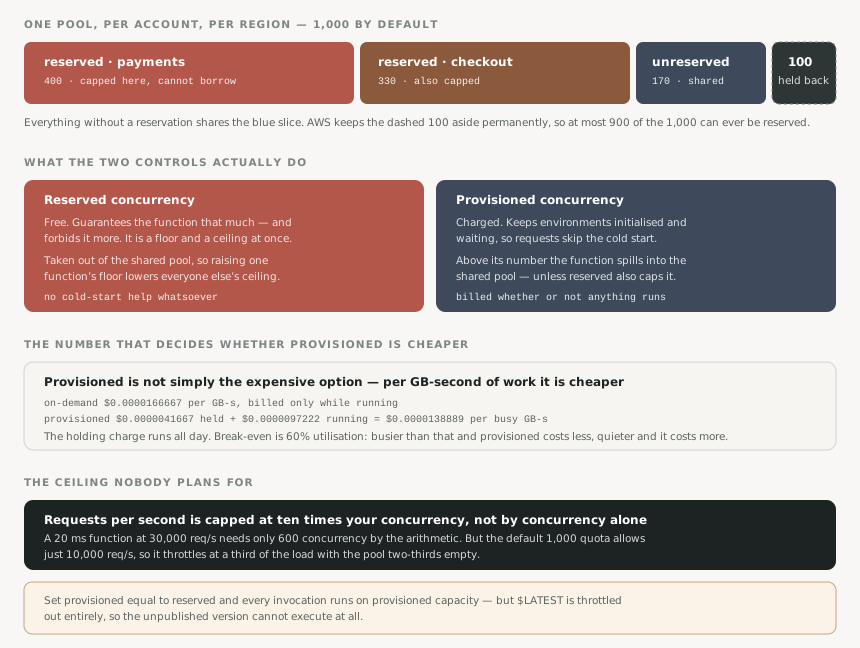
The name suggests a guarantee, and it is one. It is also a hard cap. AWS states it plainly: reserved concurrency “acts as both a lower and upper bound” — it reserves that capacity exclusively for the function while also preventing it from scaling beyond that limit. A function with reserved concurrency cannot use the unreserved pool at all, however empty that pool is.
So the setting that protects a function from its neighbours also protects the neighbours from it, and nobody reads it that way when they type the number in.
FixRead it as “this function gets exactly this much, ever”. Size it to peak plus headroom, not to today’s average.
Reservations are not additional capacity. They are carved out of the same 1,000, and AWS is explicit that configuring reserved concurrency counts towards your overall account concurrency limit. Two functions reserving 400 each leave 200 for everything else in that Region — every cron job, every S3 trigger, every API handler nobody thought about.
Worse, the reservation is held whether or not it is used. A function reserving 400 and peaking at 60 is not being efficient; it is holding 340 units that no other function can touch. AWS calls this out directly: if the function does not use the concurrency, you are effectively wasting it.
FixTreat the 1,000 as a budget with a running total. A reservation is a withdrawal from a shared account, not a request for more.
There is a floor under the shared pool. Lambda always holds back 100 units for functions that do not reserve any, so on a default account the most you can reserve across every function combined is 900. Raise the account limit to 2,000 and the ceiling becomes 1,900 — the 100 is permanent, not proportional.
This is the number that turns a tidy allocation spreadsheet into a failed API call. Four functions at 250 each looks like exactly 1,000 and is refused.
Fixaws lambda get-account-settings reports UnreservedConcurrentExecutions — what is genuinely still allocatable, not what the arithmetic suggests.
Concurrency is not the only quota. Lambda enforces a requests-per-second limit of ten times your concurrency quota — 10,000 req/s on a default account. For anything slower than 100 ms the concurrency limit binds first and this never comes up. Below 100 ms it binds first, and the arithmetic that says you have room is wrong.
AWS’s own worked example: a 20 ms function at 30,000 req/s needs a concurrency of just 600. Well inside the 1,000 limit — and it throttles anyway, at a third of the offered load, with 400 units unused. The fix is a concurrency increase to 3,000, requested not because concurrency is short but because it is the only way to raise the request ceiling.
FixFor sub-100 ms functions, size on requests per second first. Concurrency will look fine right up until it throttles.
Architecture
Two controls that are not alternatives
Reserved and provisioned concurrency get discussed as though you pick one. They answer different questions and can be set together on the same function.
Reserved answers how much of the shared pool is this function entitled to, and limited to. It costs nothing and does nothing about cold starts. A reserved function still initialises an environment on first use, and AWS notes that with reserved concurrency alone Lambda might completely terminate an environment after a period of inactivity — so the next request pays the cold start again.
Provisioned answers how many environments should already be warm. It costs money and says nothing about entitlement. Past its number the function spills into the unreserved pool and those spillover requests do experience cold starts — unless reserved concurrency is also set, in which case it throttles at the reserved number instead.
Provisioned is not the expensive option
This is the part that gets assumed rather than calculated. Provisioned concurrency is usually described as a premium for latency. Per GB-second of actual work it is cheaper:
| Held | Running | Per busy GB-second | |
|---|---|---|---|
| On-demand | — | $0.0000166667 | $0.0000166667 |
| Provisioned | $0.0000041667 | $0.0000097222 | $0.0000138889 |
The catch is the holding charge, which runs whether anything is invoked or not. Set the two expressions equal and the crossover is exact: 60% utilisation. An environment busy more than 60% of the time is cheaper provisioned than on-demand, and the cold-start benefit comes free. Below 60% you are paying for idle warmth.
That reframes the decision. Provisioned concurrency is not a latency tax — it is a commitment discount, priced like every other commitment discount on AWS, and it pays off at exactly the utilisation where a reserved instance would.
The configuration that silently disables a function
Setting provisioned concurrency equal to reserved concurrency looks like the tidy
end-state: every invocation lands on a warm environment, nothing spills, nothing
throttles. AWS documents the side effect, and it is not obvious: that configuration
throttles the unpublished version, $LATEST, and prevents it
from executing.
Provisioned concurrency attaches to a published version or alias; $LATEST
cannot have it. If the reservation is entirely consumed by versions, nothing is left for
$LATEST to run in. Deploys through an alias are unaffected. Anyone testing
against the unqualified ARN finds the function simply does not respond.
Why This Architecture Holds Up
Sizing on peak, not on averages
Concurrency is not requests per second, and conflating them produces reservations that
are wrong by an order of magnitude. The formula is
concurrency = requests per second × average duration in seconds. A
hundred requests a second at 500 ms is 50 concurrent, not 100. The same hundred at
two seconds is 200.
That makes duration the lever nobody reaches for. Halving a function’s duration halves its concurrency need, releases capacity back to the shared pool, and reduces the GB-seconds billed. A reservation sized from a p99 duration that has since improved is capacity nobody can use.
The scaling rate is separate again
Having the concurrency does not mean getting it instantly. Lambda scales each function by at most 1,000 environments every 10 seconds. For a function going from idle to 3,000 concurrent, that is roughly 30 seconds of ramp regardless of quota — which is why a load test that steps straight to peak reports throttling that never appears in production, where traffic arrives on a curve.
Provisioned concurrency has its own allocation lag: Lambda begins allocating after a minute or two of preparation, and none of the environments are usable until all of them are ready. Scheduling provisioned capacity for a 9am peak means scheduling it for 8:45, not 8:59.
Reservations age badly
Every number here is set once, during an incident or a launch, and then persists. The traffic that justified 400 units becomes 80. The function whose p99 was two seconds now runs in 300 ms. Nothing alerts on a reservation that is too large, because from the function’s own perspective nothing is wrong — it never throttles.
The damage shows up somewhere else entirely: an unrelated function throttling against a shrunken shared pool, investigated by a different team, who find their own function blameless and their own limits untouched.
Key Architecture Decisions
| Situation | Setting | Because |
|---|---|---|
| Function must never be starved by noisy neighbours | Reserved, sized to peak | Free, and the only thing that guarantees capacity. Remember it also caps. |
| Function must never overwhelm a downstream database | Reserved, sized to what the database tolerates | The cap is the point here rather than the side effect. |
| Latency-sensitive and busy more than 60% of the time | Provisioned | Cheaper per GB-second than on-demand at that utilisation, cold starts removed as a bonus. |
| Latency-sensitive but spiky and mostly idle | On-demand, or scheduled provisioned | Below 60% the holding charge outweighs the discount. Application Auto Scaling can schedule it around known peaks. |
| Java 11 or 17, cold starts hurt | SnapStart | Addresses startup at no additional cost. Cannot be combined with provisioned concurrency on the same version. |
| Average duration under 100 ms | Size on requests per second | The 10× request ceiling binds before concurrency does. Raising concurrency is the only lever that raises it. |
| Everything else | Neither | The shared pool is the right default. Every reservation is capacity withdrawn from it. |
The audit that pays for itself
List every function with reserved concurrency, and beside each put its actual peak concurrency from CloudWatch over the last 90 days. The gap between the two is capacity the account is paying for in flexibility and getting nothing for. In most estates two or three functions account for nearly all of it, reserved during an incident that has long since been fixed.
Then check UnreservedConcurrentExecutions. If it is close to 100, everything
without a reservation is sharing the permanent floor, and the next unexplained throttle
is already scheduled.
Closing Thought
Concurrency reads like a per-function setting and behaves like a shared one. That is the whole difficulty. Every dialog presents it in the context of one function, the metrics are per function, the alarm fires on one function — and the resource being divided is regional and finite, with no view anywhere that shows the division.
The controls do not help. One is called reserved and enforces a maximum. The other is called provisioned and turns out to be a discount rather than a premium. Both count against the same total, and the limit most likely to stop a fast function is measured in requests rather than concurrency at all. None of that is hidden — it is all in the documentation, in plain terms. It just contradicts what the names suggest, and the names are what people configure from.
Comments