The EC2 performance status check in #80 was a new signal that changes an alarm you already have. This one is the opposite shape: a genuinely useful enrichment whose filtering semantics are precisely documented, widely assumed, and the two are not the same thing.
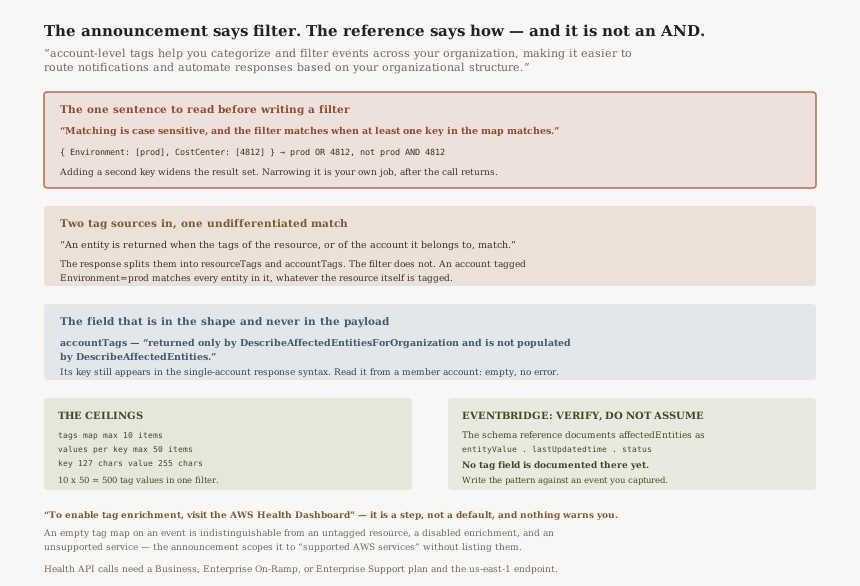
“Matching is case sensitive, and the filter matches when at least one key in the map matches.”
Executive summary
“AWS Health now supports resource and account tags in Health events”. The capability “enables you to enrich Health events with resource tags and account tags, providing additional context to help you manage and respond to events more effectively”, so that “you can now view resource tags directly within Health events for supported AWS services” and “account-level tags help you categorize and filter events across your organization, making it easier to route notifications and automate responses based on your organizational structure”.
That is a real gap closed. A Health event that names
i-1234567890abcdef0 and nothing else has always required a second lookup against the
owning service before anyone could decide whether it mattered. Carrying the tags on the event removes
that hop, and the announcement is right that tags in Health events
“enable more granular event filtering in AWS Health Dashboard and AWS Health API
responses”.
The API reference then supplies the part that decides whether your filter does what you think. The
tags filter unions its keys rather than intersecting them, it matches resource tags and
account tags without distinguishing them, and the account-tag map is documented as arriving from only
one of the two retrieval operations.
What changed
Two new maps on the AffectedEntity object.
resourceTags is “A map of resource tag key-value pairs attached to the
affected entity”. accountTags is
“A map of account tag key-value pairs for the account that owns the affected
entity”.
And a new tags filter on the request side, which is where the behaviour lives:
“A map of tag keys to lists of tag values. A tag matches when its key is in the map and its value is one of the values listed for that key. Matching is case sensitive, and the filter matches when at least one key in the map matches.”
Read that last clause slowly. A filter naming two keys is satisfied by either of them. The intuition most people bring to a map-shaped filter — that adding a key narrows the result — is inverted here: adding a key widens it.
Architecture
What the filter actually evaluates
| Filter you write | What a reader assumes | What the reference documents |
|---|---|---|
{Environment: [prod]} |
Entities tagged prod |
Entities whose resource or owning account is tagged prod |
{Environment: [prod], CostCenter: [4812]} |
prod AND cost centre 4812 |
Either one — “at least one key in the map matches” |
{Environment: [prod, staging]} |
Both environments | Both — values within a key are a list, and any one of them matches |
{environment: [prod]} |
Same as Environment |
No match — “Matching is case sensitive” |
So the only filter whose meaning is unambiguous is a single-key one. Everything else returns a superset of what you meant, and a superset arriving at an automation that creates tickets is not a harmless over-fetch.
The two tag sources are matched together and returned apart
“An entity is returned when the tags of the resource, or of the account it belongs to, match.”
The response separates the two — resourceTags and accountTags are
distinct maps. The filter does not. There is no documented way to ask for entities whose
resource is tagged Environment=prod while ignoring the account tag of the same
name.
In a typical organisation that is exactly the collision you have. Accounts are tagged by environment
because account-per-environment is the standard pattern, and resources inside them are tagged by
environment too. A filter for Environment=prod against a production account matches
every affected entity in it, tagged or not. The filter is still useful; it is useful as a coarse
account-and-resource sieve, not as the resource-level predicate the announcement's framing suggests.
If you need the distinction, the tags are in the response. Filter broadly, then branch on
resourceTags in your own code.
One tag predicate per organizational call
“When you specify several filters in organizationEntityAccountFilters, the
tags must be identical in every filter.”
organizationEntityAccountFilters takes up to 10 account filters, so the natural design
— one filter per account, each with that account's own tag convention — is not available.
Differing tag conventions across accounts mean one call per convention.
The field that is in the shape but not in the payload
“This field is returned only by DescribeAffectedEntitiesForOrganization and is not populated by DescribeAffectedEntities.”
That is accountTags. The documented response syntax for
DescribeAffectedEntities — the single-account operation — still shows an
accountTags key, because both operations return the same
AffectedEntity object. A member-account script that reads it finds nothing there, and
nothing in the response says why.
The organizational operation is the one that populates it, and it has prerequisites: “Before you can call this operation, you must first enable AWS Health to work with AWS Organizations”, which is a management-account action. So account tags are a management-account and delegated-administrator capability in practice, not something a workload account can read about itself.
Ceilings
| Thing | Documented limit |
|---|---|
tags filter, keys | Maximum number of 10 items |
tags filter, values per key | Maximum number of 50 items |
| Filter key / value length | 127 / 255 characters |
resourceTags, accountTags in the response | Maximum number of 10 items each |
organizationEntityAccountFilters | Maximum number of 10 items |
Ten keys of fifty values is 500 tag values in a single filter, which is generous for the OR semantics it actually implements. The ten-entry cap on the returned maps is the one to think about: a resource carrying more tags than that has some subset surfaced, and the reference does not say which. Do not build a decision on a tag key being absent from the map.
EventBridge, where the announcement runs ahead of the schema
The announcement is specific: the feature “enables sophisticated routing and handling of Health events based on tag values, supporting use cases such as automatically creating tickets in your IT service management system or sending targeted notifications to specific teams”.
The AWS Health EventBridge schema reference, checked today, documents
affectedEntities as carrying entityValue, lastUpdatedtime and
status. No tag field appears in that table or in any of its five sample payloads.
That is a statement about the documentation, not a claim that tags are absent from events. The reference may simply trail the launch. The operational conclusion is the same either way: capture a real tagged Health event and write your event pattern against the JSON you observed, rather than against a field name you inferred from the announcement. An EventBridge rule whose pattern never matches is silent — no error, no metric, no indication that the routing you built is routing nothing.
One related constraint worth carrying into the design: “Pagination occurs only on resources. If the 256KB size limit is exceeded for another reason, the communication to fail.” Health events already split across pages on resource count, and a consumer that handles only page one was already incomplete.
Business value
The enrichment is worth having on its own. Health events identify resources the way the owning service does, which is rarely the way a human reasons about them. Tags on the event mean the first question — whose is this, and does it matter tonight — is answerable from the event.
The routing case is real too, with the filter semantics understood. Sending an event about a
CostCenter=4812 resource to the team that owns 4812 is the kind of thing every
organisation builds badly from an account-ID lookup table that goes stale. Tags are maintained by the
teams themselves.
The cost-allocation framing in the announcement — improve cost allocation tracking for health-related events — is the weakest of the three. Health events are not billing records, and correlating an impairment with a cost centre tells you who was affected, not what it cost.
Security considerations
Tags are now a disclosure surface on a new channel. AWS's own tagging guidance is blunt — “Do not store personally identifiable information (PII) or other confidential or sensitive information in tags” — and that guidance now applies to anywhere Health events land: an EventBridge bus, an SNS topic, a ticketing system, a chat channel. A tag key naming an internal project or a customer is now in the notification path.
The retrieval asymmetry is a boundary worth noticing rather than working around. Account tags come from
the organizational operation, which requires management-account enablement, and
DescribeAffectedEntitiesForOrganization
“doesn't support resource-level permissions” — so access to it is
all-or-nothing across the organization's events. That is an argument for keeping it in the
management or delegated-administrator account and fanning out derived notifications, rather than
granting workload accounts the organizational read.
And if you route on tags, the tag becomes an authorisation input of sorts. Whoever can tag a resource can change which team gets paged about it. That is usually fine and occasionally is not.
Cost considerations
The announcement states no price for the feature, and no Region list. What the surrounding documentation does state is the access requirement: “Organizational view is available in the AWS Health console for all AWS Support plans at no additional cost”, but “You must have a Business, Enterprise On-Ramp, or Enterprise Support plan to call the AWS Health API”, and “You must use the US East (N. Virginia) Region endpoint”.
So the console half of this is available broadly and the programmatic half is gated on a paid support plan. For anyone already paying for one, the marginal cost of the tag enrichment is whatever your downstream consumers charge — EventBridge targets, Lambda invocations, ticket creation.
Operational considerations
Enrichment is a step, not a default: “To enable tag enrichment, visit the AWS Health Dashboard or view the AWS Health User Guide for more information.” Until someone does that, events carry no tags, and the symptom is an empty map rather than an error.
Which produces the ambiguity to design around. An entity with no tags in a Health event can mean the resource is untagged, enrichment is not enabled, or the service is not one of the “supported AWS services” the announcement scopes this to and does not enumerate. Three different problems, one indistinguishable signal. A consumer that treats a missing tag as not mine will silently drop events in all three cases.
The safe default is the inverse: route on a tag when it is present, and route to a catch-all when it is absent. Never filter an event away because a tag did not arrive.
Tradeoffs
| Approach | What you get | What it costs |
|---|---|---|
Filter server-side with tags |
Less data over the wire; one call per convention | OR semantics, no resource-versus-account distinction, case-sensitive exact match |
| Fetch broadly, filter in code | Exact predicate you intended, including conjunctions and resource-tags-only matching | More pages, more API calls against a rate-limited service |
| Route in EventBridge on tag values | No polling; event-driven fan-out | Pattern written against a payload the schema reference does not yet document |
| Keep the existing account-ID lookup table | Behaviour you have already debugged | Staleness, and none of the resource-level context this launch adds |
Implementation guidance
Enable tag enrichment from the AWS Health Dashboard first, then capture one real event before writing
anything that depends on its shape. For the API path, call from the management or delegated
administrator account against us-east-1, with organizational access already enabled.
Write single-key tag filters. If you need a conjunction, filter on the most selective key and apply
the rest in code against the returned resourceTags and accountTags maps
— which is also the only way to require that a match came from the resource rather than its
account.
Normalise case before you filter. Tag keys and values are case sensitive in AWS generally and the
filter is explicitly case sensitive, so a convention that tolerates prod and
Prod in the tag estate needs both listed in the values array.
Best practices
- Treat a missing tag as unknown, never as excluded. Route unmatched events to a catch-all.
- Do not depend on a specific tag key being present in the returned map — it caps at ten entries and the reference does not say which ten.
- Keep the organizational read in the management or delegated administrator account; it has no resource-level permissions to narrow it with.
- Audit tag values for anything sensitive before routing events into chat or ticketing.
- Alarm on your EventBridge rule matching nothing. A pattern against an undocumented field fails silently.
Who should adopt this and when
Now, for the enrichment: anyone running more than a handful of accounts who currently resolves Health event resource IDs by hand. Enable it and read the tags in the dashboard; there is no downside and no filter semantics involved.
Now, carefully, for the API filter: teams building organizational Health automation, with the OR semantics and the resource-or-account matching understood and the narrowing done in code.
Wait, for EventBridge tag routing: not because it will not work, but because the schema reference does not yet document the field you would pattern-match on. Capture an event, confirm the shape, then build.
Key takeaways
The enrichment is straightforwardly good: “you can now view resource tags directly within Health events for supported AWS services”, removing a lookup that every Health consumer has been doing by hand.
The filter is the part to read twice. “the filter matches when at least one key in the map matches” makes a multi-key filter wider than a single-key one, and “An entity is returned when the tags of the resource, or of the account it belongs to, match” means you cannot ask for resource tags alone.
And two silent failures to design against: accountTags is
“not populated by DescribeAffectedEntities” while still appearing in its response
syntax, and the EventBridge schema reference documents no tag field yet — so a pattern written
from the announcement rather than from a captured event matches nothing, forever, without complaint.
Official AWS references
- AWS Health now supports resource and account tags — the announcement: enrichment of Health events with resource and account tags, viewing resource tags directly within events for supported AWS services, account-level tags for categorising and filtering events across an organization, more granular filtering in the AWS Health Dashboard and API responses, the EventBridge routing use cases, and the instruction to enable tag enrichment from the AWS Health Dashboard
- EntityAccountFilter — the
tagsfilter semantics: a map of tag keys to lists of tag values, that a tag matches when its key is in the map and its value is one of those listed, that matching is case sensitive and the filter matches when at least one key matches, that an entity is returned when the tags of the resource or of its owning account match, that tags must be identical across severalorganizationEntityAccountFilters, and the 10-key, 50-value, 127-character and 255-character limits - AffectedEntity — the
resourceTagsandaccountTagsmaps, their ten-entry caps and key and value length constraints, and thataccountTagsis returned only byDescribeAffectedEntitiesForOrganizationand is not populated byDescribeAffectedEntities - DescribeAffectedEntitiesForOrganization — the organizational enablement prerequisite, that the operation does not support resource-level permissions, the response shape carrying both tag maps, and the ten-item cap on
organizationEntityAccountFilters - AWS Health events Amazon EventBridge schema — the documented
affectedEntitiesfields (entityValue,lastUpdatedtime,status) with no tag field, and that pagination occurs only on resources with the 256KB size limit failing the communication otherwise - Enabling organizational view — that organizational view is available in the console for all AWS Support plans at no additional cost, that calling the AWS Health API requires a Business, Enterprise On-Ramp, or Enterprise Support plan, and that the US East (N. Virginia) Region endpoint must be used
- DescribeAffectedEntities — the single-account operation whose response syntax shows the
accountTagskey that theAffectedEntityreference documents as unpopulated here; no other claims in this post are drawn from it - What is Tag Editor? — the guidance not to store personally identifiable information or other confidential or sensitive information in tags
Comments