Bedrock spend is now breakable down by model, model provider, inference type and feature in Cost Explorer, Budgets and Dashboards. Useful, free, and available today.
The sentence to read carefully is the one about which tool gets which verb: “In Cost Explorer and Dashboards, you can group and filter costs by these attributes. In Budgets, you can filter budgets by the same attributes.”
Executive summary
A new billing dimension, “product attributes”, that “breaks down Bedrock cost by model, model provider, inference type, and feature”. It works in three billing tools you already have, costs nothing extra, and is live in every commercial Region.
Group and filter in Cost Explorer and Dashboards. Filter only in Budgets — which is the difference between one budget that reports per model and one budget per model. AWS's own example is “set a budget that alerts on spend for a single model”, so the singular is deliberate.
What changed
| Attribute | AWS's examples | What it answers |
|---|---|---|
| model | “Claude Sonnet 5 or Claude Haiku 4.5” | Which model costs the most. |
| model provider | “Anthropic or Cohere” | Concentration per vendor, which is a negotiating and portability question. |
| inference type | “input tokens or output tokens” | Why a model costs what it does — the only attribute here that points at a change you can make. |
| feature | “on-demand inference or reranker” | Which capability the spend sits in, separating inference from the things around it. |
And the combinations, which are where this stops being a report and becomes attribution: “You can combine product attributes with cost allocation tags on application inference profiles, projects, or workspaces to see which applications drive spend on each model, and with IAM principal tags to see which users or roles drive it.”
Architecture
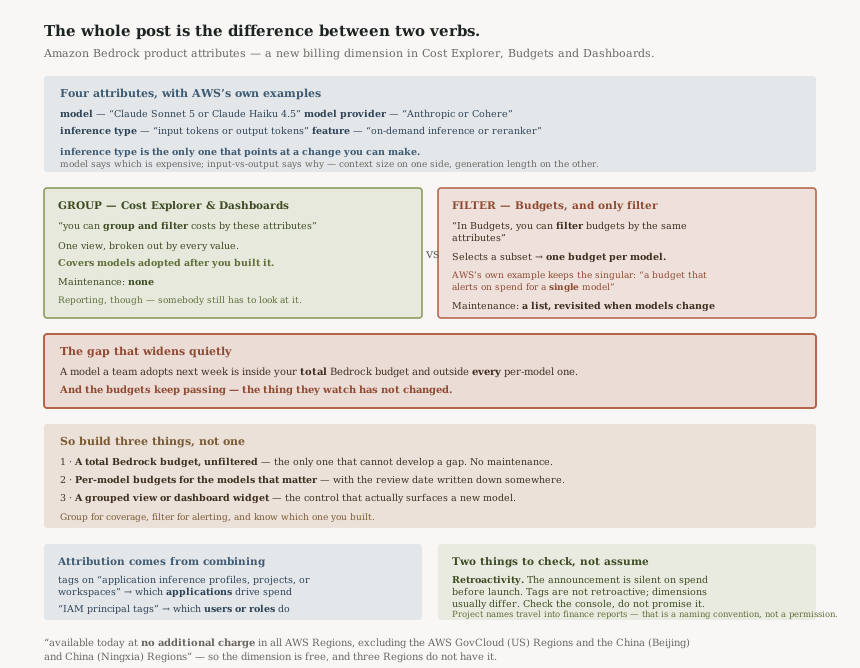
The whole post is in the difference between two verbs.
Group produces one view broken out by every value of the attribute. One Cost Explorer view grouped by model covers every model you use, including ones adopted after you built the view. It needs no maintenance.
Filter selects a subset. A budget filtered to Claude Sonnet 5 watches Claude Sonnet 5. It does not watch the model a team started using last week, because nobody told it to.
So per-model reporting is a one-time setup and per-model alerting is a list to maintain. Those are different operational commitments, and in the announcement the whole distinction rests on one sentence's choice of verbs — easy to read past on the way to the attribute list.
Business value
The real gain is the inference type attribute, and it is the one the announcement undersells by listing it third of four.
"Model X costs the most" tells you what to stop using. Splitting that into “input tokens or output tokens” tells you what to change, because the two are driven by different things: input is prompt and context size, output is how much the model is asked to generate. A retrieval pipeline stuffing large contexts and a chat feature generating long replies have the same bill and opposite fixes.
Without the split, every optimisation conversation starts with a guess about which half is dominant. With it, that is a dashboard widget.
The model provider attribute is the one finance will ask for and engineering should care about for a different reason: provider concentration is a portability measure. Knowing what share of spend sits with one provider is the input to any conversation about whether the abstraction you built over Bedrock is actually being used.
Security considerations
Nothing here changes access to Bedrock itself, but two of the attribution paths are identity-shaped and worth noting.
“IAM principal tags to see which users or roles drive it” means Bedrock spend becomes attributable to a principal. That is good for chargeback and it also means the billing console answers "who has been using the model" with reasonable fidelity — a question that is usually a CloudTrail query. Billing data is typically visible to a wider audience than CloudTrail, so consider who can see it.
The same applies to “cost allocation tags on application inference profiles, projects, or
workspaces”. Project and workspace names leak intent. A line item reading
project=redundancy-analysis in a report finance circulates is the kind of disclosure that
happens by accident, and the fix is a naming convention rather than a permission.
Cost considerations
“The Amazon Bedrock product attribute dimension is available today at no additional charge” — the dimension itself adds nothing to the bill.
What it changes is what you can see, and the thing worth planning for is that a new dimension usually reveals that spend is more concentrated than anyone assumed. Expect the first grouped-by-model view to produce a conversation rather than a confirmation.
One thing the announcement does not say, and I am not going to assume: whether the dimension applies to spend from before the launch. Cost allocation tags are famously not retroactive; AWS-supplied dimensions generally behave differently. The announcement is silent, so check it in the console before promising anybody a trend line that starts earlier than yesterday.
Operational considerations
The maintenance burden sits entirely in Budgets, and it grows with model proliferation rather than with spend.
A newly adopted model is covered by your total Bedrock budget and by none of your per-model budgets. That is the correct behaviour for a filter and it is a gap that widens quietly — the budgets keep passing, because the thing they watch has not changed.
| What you want | Where to build it | Maintenance |
|---|---|---|
| Spend per model, all models | Cost Explorer grouped by model | None — grouping covers new values |
| Cost per provider over time | A dashboard widget | None |
| Alert on one model's spend | A budget filtered to it | One budget per model, reviewed when model choice changes |
| A ceiling nothing escapes | A total Bedrock budget, unfiltered | None — and it is the only one that cannot develop a gap |
Tradeoffs
| Choice | Gains | Costs |
|---|---|---|
| Per-model budgets | Targeted alerts; a threshold tuned to each model's expected spend | A list that goes stale the moment a team adopts a model nobody added |
| One total Bedrock budget only | Nothing escapes it, ever, with no maintenance | Tells you spend rose, not which model did it |
| Grouped views and dashboards | Complete coverage with no upkeep; new models appear by themselves | Reporting, not alerting — somebody has to look |
| Adding cost allocation tags on top | Application and principal attribution, not just model attribution | Tagging discipline, and project names end up in finance reports |
Implementation guidance
- Build the grouped view first. A Cost Explorer view grouped by model, for the last full month. It is free, it needs no maintenance, and it tells you whether the rest of this is worth doing.
- Then group by inference type. This is the one that produces an action. If input dominates, the work is in context and prompt size; if output dominates, it is in generation length and response design.
- Keep one unfiltered total Bedrock budget as the backstop that cannot develop a gap.
- Add per-model budgets only for models that matter, and write down that the list needs revisiting — the same review-date discipline a selected recording list needs in #49.
- Treat a grouped dashboard widget as the control that catches a new model, because no filtered budget will.
- Check retroactivity in the console before building a report whose x-axis starts before the launch date.
- If you operate in GovCloud or the China Regions, this is not available to you — those are excluded by name.
Best practices
- Group for coverage, filter for alerting, and know which one you built. The two words carry the entire operational difference.
- Pair every filtered budget with an unfiltered one. The filter is the gap; the total is the floor.
- Report the input/output split, not just the model total. One identifies the cost, the other identifies the lever.
- Name projects and workspaces as though finance will read them, because with cost allocation tags they will.
- Do not assume a new billing dimension is retroactive. The announcement does not claim it, so neither should a report.
Who should adopt this and when
Today, if you run Bedrock at any meaningful scale. The grouped view costs nothing, takes minutes, and answers a question most teams have been estimating.
This week, if you have a Bedrock budget already. It is almost certainly a total, and the per-model filter is now available to sharpen it — with the list-maintenance caveat written down somewhere other than one person's memory.
Not yet, if your Bedrock spend is small and stable. A total budget and a monthly glance at a grouped view is the whole of what you need; per-model budgets are a maintenance commitment that should be earned by spend.
Key takeaways
- A new dimension breaking Bedrock cost down by “model, model provider, inference type, and feature”, free, in all commercial Regions.
- “group and filter” in Cost Explorer and Dashboards; “filter” only in Budgets — so per-model alerting is one budget per model.
- A model adopted after you built the budgets sits outside all of them, and the budgets keep passing.
- inference type is the attribute that points at a fix, because input and output spend have opposite remedies.
- Combine with cost allocation tags and IAM principal tags for application and principal attribution — and expect project names to travel into finance reports.
- Excluded: “the AWS GovCloud (US) Regions and the China (Beijing) and China (Ningxia) Regions”.
Official AWS references
- AWS Cost Explorer, Budgets, and Dashboards now support Amazon Bedrock product attributes — the four attributes and their examples, the group-versus-filter split across the three tools, the cost allocation tag and IAM principal tag combinations, and the pricing and Regional availability statement
- What is AWS Cost Explorer — further reading on grouping, filtering and the console; no claims in this post are drawn from it
Comments