EC2 Capacity Manager can now score how likely a configuration is to get capacity, and measure how much you actually received against what you asked for. Both are genuinely useful. Both carry a condition in the last sentence of the announcement, and the score carries a disclaimer in the documentation that is the whole point of understanding it.
“Real-time supportability checks help customers find capacity by scoring how well each instance type and Availability Zone can support a request, without launching or reserving instances.”
Executive summary
Two capabilities. Forward-looking: “The check returns a High, Medium, or Low score for each option, plus an overall score.” Backward-looking: “Capacity fulfillment metrics show how much capacity was delivered against the amount requested”, measurable “across their AWS organization, accounts, Regions, and tagged workloads, with a breakdown by instance type and Availability Zone”.
And the sentence that decides whether any of this is available to you: “Both capabilities are included with AWS Unified Operations, the AWS Support plan for global enterprises running mission-critical workloads, and are available in all commercial AWS Regions.”
What changed
Capacity planning on EC2 has largely been retrospective or anecdotal: you learn an Availability Zone is tight when a launch fails. A supportability check moves that signal before the attempt, and the fulfillment metric turns we had trouble getting instances last quarter into a rate you can put in a document.
What has not changed is what secures capacity. The documentation is unambiguous:
“A check reflects capacity at a point in time. It doesn't reserve capacity or guarantee that a later launch will succeed.”
Architecture
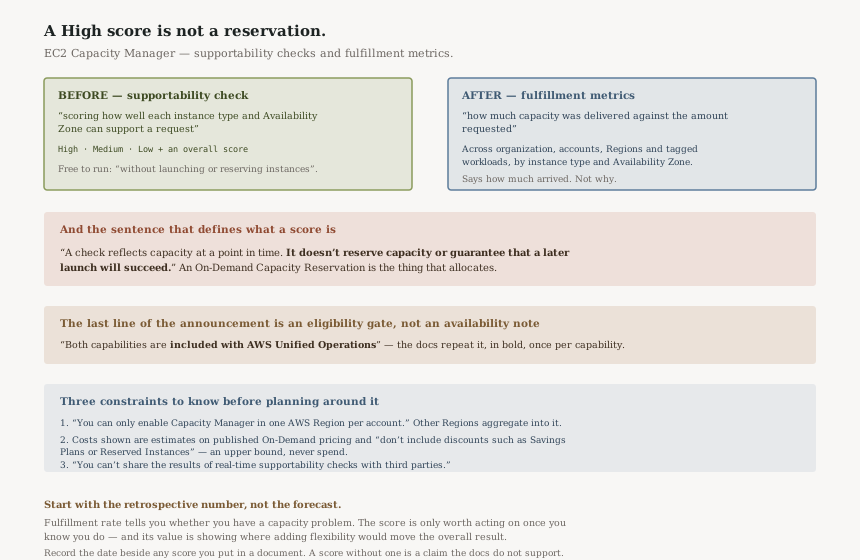
A forecast, a measurement, and neither is an allocation
| Supportability check | Fulfillment metrics | |
|---|---|---|
| Direction | Before you launch | After you launched |
| Output | “High, Medium, or Low score for each option, plus an overall score” | “how much capacity was delivered against the amount requested” |
| Does it secure capacity? | No — “doesn't reserve capacity or guarantee that a later launch will succeed” | No — it is a measurement |
| Costs anything to run? | No — “without launching or reserving instances” | No |
The thing that does reserve capacity is a Capacity Reservation, and Capacity Manager tracks those alongside On-Demand and Spot — “Track capacity across Capacity Reservations, On-Demand Instances, and Spot Instances with over 30 metrics”. The check tells you where to point a reservation, not whether you need one.
What the score is good for, read precisely
The useful framing is the one the documentation gives: the check exists so you can see where to add flexibility before you scale. A workload that can run on four instance types across three Availability Zones has more ways to be fulfilled than one pinned to a single pair, and the score tells you which of your options are carrying the risk.
It is also a diagnostic. AWS names using a check “to diagnose a launch failure”, which is the moment most teams would otherwise be guessing between quota, capacity and configuration.
Three constraints worth knowing before you plan around it
One Region per account. “You can only enable Capacity Manager in one AWS Region per account.” Data from other Regions aggregates into that one, so the choice is about where the console lives rather than what it can see — but it is a choice you make once.
Costs shown are estimates, not your bill. “All costs displayed in Capacity Manager are estimated costs based on published On-Demand pricing. These estimates don't include discounts such as Savings Plans or Reserved Instances.” For any estate with meaningful commitment coverage, those numbers are an upper bound and should never be quoted as spend.
The results are not yours to pass on. “You can't share the results of real-time supportability checks with third parties.” Worth knowing before a capacity score lands in a slide for a customer or a vendor.
Business value
Fulfillment rate is the number this unlocks. Most organisations cannot currently answer what proportion of the capacity we asked for did we get, by Availability Zone, last quarter? — and that is the number that justifies either widening instance-type flexibility or buying reservations.
The tagged-workload dimension matters as much as the organisational one. Fulfillment measured per workload rather than per account is what lets you say which application is bearing the capacity risk, which is the form the conversation has to take before anyone funds a change.
Security considerations
Cross-account visibility is a deliberate step. “Without Organizations integration, Capacity Manager only monitors resources within the individual AWS account where it's enabled.” The organisation-wide view requires enabling that integration, which is a governance decision rather than a toggle.
Supportability checks need less than you might assume. “Account-level Amazon EC2 Capacity Manager is all you need — no organization-level setup is required.” So a single team can use the check without an organisation-wide rollout, which is a reasonable way to trial it.
Cost considerations
The checks themselves cost nothing to run — “without launching or reserving instances” — and the access condition is the real price. Both capabilities are “included with AWS Unified Operations”, a support plan. If you are not on it, this announcement is information about what is available at a higher support tier rather than a feature you can enable.
That is worth saying plainly because the announcement's final sentence reads like an availability note and is actually an eligibility gate. The documentation states it twice, in bold, once per capability.
Operational considerations
A score has a shelf life and the documentation says so. It reflects capacity “at a point in time”, so a check run during planning and a launch attempted a week later are two different questions. Treat the output as input to a design decision, not as a clearance to proceed.
The data window is 90 days. “Analyze capacity data across ranges from the past hour to the past 90 days”, so anything longer-term needs the export to S3 rather than the console.
Tradeoffs
| What you gain | What it does not give you |
|---|---|
| A capacity signal before the launch attempt, at no cost | Any guarantee — it “doesn't reserve capacity” |
| Fulfillment rate per workload, account, Region and AZ | A reason — the metric says how much arrived, not why |
| A diagnostic for a launch failure | Availability outside the Unified Operations support plan |
| Cost figures alongside capacity | Accurate cost — the figures exclude Savings Plans and RI discounts |
Implementation guidance
Confirm your support plan first. Everything else here depends on it, and it is the one thing you cannot configure your way to.
Start with fulfillment metrics rather than the check. The retrospective number tells you whether you have a capacity problem at all; the forward-looking score is only worth acting on once you know you do.
Run checks against the flexibility you could have, not the flexibility you have. The value is in discovering that adding a second instance type moves an overall score, which is a design change rather than an observation.
Keep reservations as the answer to anything that must launch. A High score is a probability statement; an On-Demand Capacity Reservation is an allocation. For workloads where a failed launch is an incident, the score informs where to put the reservation and does not replace it.
Pick the Capacity Manager Region deliberately, since it is one per account and other Regions aggregate into it.
Best practices
Never quote Capacity Manager cost figures as spend. They are published On-Demand estimates and will overstate any estate with commitments.
Record the date alongside any supportability score you put in a document. A score without a timestamp is a claim the documentation explicitly does not support.
Use the tagged-workload breakdown as the unit of analysis. Fulfillment per account tells you where the problem is; fulfillment per workload tells you whose it is.
Who should adopt this and when
Adopt now if you are on Unified Operations and run large, scale-out EC2 workloads. The fulfillment metric answers a question most capacity conversations currently guess at.
Trial the check in one account before any organisation-level work, since account-level Capacity Manager is all it requires.
Nothing to do if you are on another support plan. This is a reason to know what Unified Operations includes, not a feature awaiting enablement.
Key takeaways
A High score is not a reservation. “It doesn't reserve capacity or guarantee that a later launch will succeed.”
Both capabilities are gated behind the Unified Operations support plan, stated once in the announcement's last sentence and twice in the documentation.
The check is about flexibility. Its purpose is showing which of your instance-type and Availability Zone options carry the risk, so you can widen them before you scale.
Displayed costs are On-Demand estimates and exclude Savings Plans and Reserved Instance discounts.
Official AWS references
- New features for Amazon EC2 Capacity Manager — the two capabilities, scoring without launching or reserving instances, the High / Medium / Low scale and overall score, fulfillment measured across organization, accounts, Regions and tagged workloads, and the statement that both are included with AWS Unified Operations
- Check supportability — the statement that a check reflects capacity at a point in time and does not reserve capacity or guarantee a later launch, the Unified Operations requirement, the note that account-level Capacity Manager is sufficient, and the restriction on sharing results with third parties
- EC2 Capacity Manager — one Region per account, costs displayed as On-Demand estimates excluding Savings Plans and Reserved Instance discounts, the account-only scope without Organizations integration, the 90-day data window, and the 30-plus metrics across Capacity Reservations, On-Demand and Spot
- What the scores mean — further reading on score interpretation; no claims in this post are drawn from it
Comments