Business Challenge
Azure Firewall has been the implied answer to three earlier posts without ever being the subject of one. #77 put it in the hub and found its SNAT budget shared by every spoke. #79 pointed the default route at it and found that its SNAT hid the source address the perimeter existed to read. #82 made it the next hop for a routing policy, and #83 established that it is an Azure-native NVA using the same high availability designs as any third-party appliance. In all four it was a box that traffic went through. This post is about what it does with the packet once it arrives.
The starting position is the one safe thing about it:
“By default, Azure Firewall denies all traffic until you manually configure rules to allow traffic. The rules are terminating, so rule processing stops on a match.”
Both halves of that matter, and the second one is where the surprises live. A terminating rule set means the order of evaluation is not a performance detail — it is the policy. Two rule sets containing exactly the same rules enforce different things if they are evaluated in a different sequence, and Azure Firewall's sequence is decided by four separate sorting keys, only one of which is called priority.
The SKU choice is the other half, and it is not the capacity decision it looks like. Basic, Standard and Premium differ by throughput, but they also differ in whether threat intelligence is allowed to block anything, whether you can filter on an FQDN in a network rule at all, and whether the firewall can resolve DNS on behalf of your workloads — which turns out to be load-bearing for the filtering you were buying it for.
Architecture
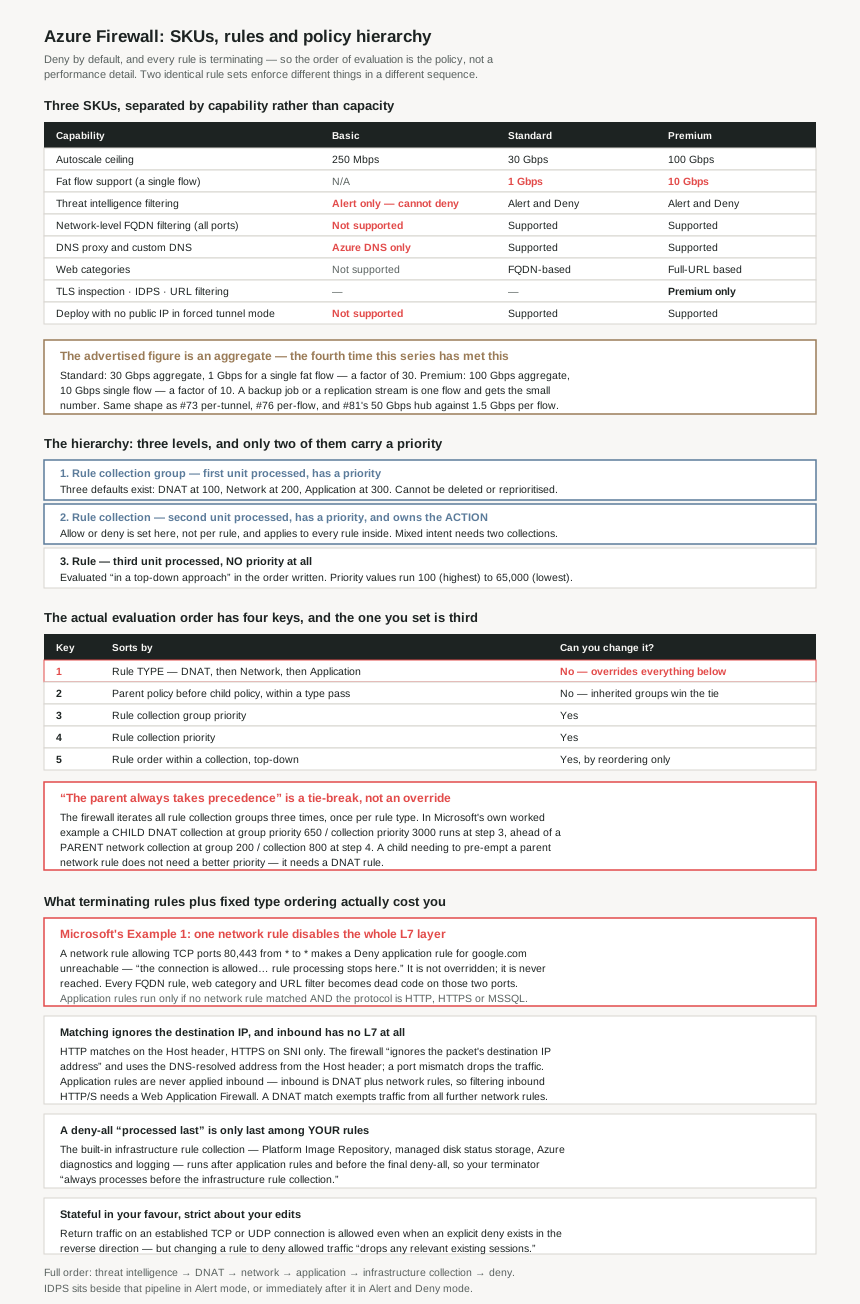
The three SKUs
| Capability | Basic | Standard | Premium |
|---|---|---|---|
| Autoscale ceiling | Up to 250 Mbps | Up to 30 Gbps | Up to 100 Gbps |
| Fat flow support | N/A | 1 Gbps | 10 Gbps |
| Threat intelligence filtering | Alert only — cannot deny | Alert and Deny | Alert and Deny |
| Network-level FQDN filtering (all ports and protocols) | Not supported | Supported | Supported |
| DNS proxy and custom DNS | Not available — Azure DNS only | Supported | Supported |
| Web categories | Not supported | FQDN-based | Full-URL based |
| Outbound TLS termination, IDPS, full-path URL filtering | — | — | Premium only |
| Deploy without a public IP in Forced Tunnel mode | Not supported | Supported | Supported |
| Availability zones and built-in HA | Yes | Yes | Yes |
The hierarchy, and what each level actually controls
| Level | Processed | Carries a priority? | What it decides |
|---|---|---|---|
| Rule collection group | First unit | Yes — 100 to 65,000 | Grouping and coarse order. Three defaults exist at 100 (DNAT), 200 (Network) and 300 (Application), and you cannot delete them or change those values. |
| Rule collection | Second unit | Yes — 100 to 65,000 | The action. Allow or deny is set here, not per rule, and it applies to every rule in the collection. |
| Rule | Third unit | No | The match condition only. Rules are evaluated “in a top-down approach” in the order they appear. |
That middle row is the one worth pausing on. The action lives on the collection, so “allow” and “deny” are properties of a container rather than of a rule. You cannot write a collection that permits two things and blocks a third; you write two collections and give them priorities. Much of the apparent complexity of an Azure Firewall policy is this constraint propagating outwards.
Why This Architecture Holds Up
Because the SKU boundary is capability, not capacity
Read the SKU table as a throughput ladder and Basic looks like Standard for smaller sites. It is not. Three of its limits change what the firewall is able to enforce, regardless of how little traffic you send through it.
The first is the most direct: threat intelligence on Basic is “Alert only” and “cannot deny traffic”. The feature is present, it draws the same Microsoft threat feed, and it will tell you about traffic to a known malicious address after that traffic has completed. A control that observes is a detection capability filed under a prevention heading, and on this SKU that is the only form it comes in.
The second is that Basic has no “Network level FQDN filtering – all ports and protocols” — only application-rule FQDN filtering, which as the rule-processing rules below establish applies to HTTP, HTTPS and MSSQL. So on Basic you cannot filter SSH, RDP or NTP by hostname at all; those are network rules, and network rules on Basic take IP addresses.
The third is the one that compounds the second:
Basic has “DNS proxy: Not available (uses Azure DNS only)”. And of the proxy itself: “This functionality is crucial for reliable FQDN filtering in network rules.”
So the SKU that cannot do network-rule FQDN filtering is also the SKU missing the mechanism that makes it dependable — and on the SKUs that can, enabling the one without the other is a documented reliability gap rather than a preference.
That last point is the actionable one even for Standard and Premium users. FQDN filtering works by resolving the name and matching the resulting address, so firewall and workload must agree on what the name resolves to. #77 found the symptom of that disagreement — Azure Firewall blocking legitimate traffic on an FQDN DNS mismatch. The DNS proxy is the documented fix, and it is absent from Basic entirely.
One more Basic limitation connects straight back to #79. All three SKUs support forced tunnelling, but “Deployment without public IP address in Forced Tunnel Mode” is a Standard and Premium feature. So a Basic firewall can be forced to send everything to an on-premises next hop and must still carry a public IP address while doing it. The design whose entire purpose is that nothing egresses directly keeps the address that would let it.
Because the headline throughput is an aggregate, and a single flow gets a different number
This series has now met the same pattern four times, and the row that carries it here is called fat flow support:
| SKU | Advertised scalability | Single fat flow | Ratio |
|---|---|---|---|
| Basic | Up to 250 Mbps | N/A | — |
| Standard | Up to 30 Gbps | 1 Gbps | 30× |
| Premium | Up to 100 Gbps | 10 Gbps | 10× |
The number in the product description is what the firewall can process across all flows at once. The number a single large transfer gets is thirty times smaller on Standard and ten times smaller on Premium. A database replication stream, a backup job, a single large file copy — these are one flow, and on Standard one flow is 1 Gbps no matter what the autoscale ceiling says.
The same shape appeared in #73 as aggregate benchmark versus observed per-tunnel throughput, in #76 as gateway aggregate versus per-flow, and in #81 as a Virtual WAN hub's 50 Gbps against 1.5 Gbps for a single TCP flow. Four services, four pairs of figures, and in every case the larger one is the one on the overview page. It is worth treating as a standing question rather than a per-service surprise: when Azure publishes a throughput figure, find the per-flow figure before sizing anything against it.
Because “priority” is the third sorting key, not the first
The hierarchy suggests that a policy is sorted by priority, and the priority range is generous — “any number between 100 (highest priority) to 65,000 (lowest priority)”, a span of 64,900 values, with Microsoft advising “100 increments” so there is room to insert more later.
Then one note removes most of its significance:
“The system always processes application rules after network rules, and processes network rules after DNAT rules regardless of rule collection group or rule collection priority and policy inheritance.”
And the mechanism behind it is explicit: “The firewall iterates through all rule collection groups three times — once per rule type in order: DNAT, then Network, then Application.” So the real sort is:
| Key | What it sorts by | Can you change it? |
|---|---|---|
| 1 | Rule type — DNAT, then Network, then Application | No. Fixed, and it overrides everything below. |
| 2 | Parent policy before child policy, within a type pass | No — inherited policies always win the tie. |
| 3 | Rule collection group priority | Yes. |
| 4 | Rule collection priority | Yes. |
| 5 | Rule order within a collection, top-down | Yes, by reordering — there is no priority field. |
Which means a number you chose only ever breaks ties inside a group that two fixed rules have already selected. If an application rule is not matching when you think it should, the priority you assigned it is unlikely to be the reason — something in the network pass matched first, and nothing you write at the application level can reach past that.
Because “the parent always takes precedence” is narrower than it sounds
The same page says both of these. First: “rule collection groups in the parent policy always take precedence regardless of the priority of a child policy”, restated as point one of a four-point summary — “The parent policy always takes precedence over the child policy.” Second, in the note quoted above: type ordering wins “regardless of… policy inheritance”.
Those read as contradictory, and Microsoft's own worked example resolves it. In a policy with four groups — BaseRCG1 at 200 and BaseRCG2 at 300 inherited from a parent, ChildRCG1 at 300 and ChildRCG2 at 650 in the child — the published processing order contains this:
| Step | Collection | Type | Group (priority) | Collection priority | Policy |
|---|---|---|---|---|---|
| 3 | ChDNATRC3 | DNAT | ChildRCG2 (650) | 3000 | Child |
| 4 | NetworkRC1 | Network | BaseRCG1 (200) | 800 | Parent |
The child policy's collection is evaluated first, despite a worse group priority, a worse collection priority, and being the child. It wins because it is a DNAT rule and the other is a network rule, and the DNAT pass happens before the network pass. So parent precedence is a tie-break inside a type pass, not a general override — which the same example confirms, because BaseRCG2 and ChildRCG1 are both priority 300, and the parent's network collection is evaluated at step 5 while the child's comes at step 6.
This is the detail that matters for anyone running a central policy inherited by business units, which is the normal reason to use policy inheritance at all. A central security baseline cannot guarantee that it is evaluated before a subscription's own rules — it can only guarantee that among rules of the same type. A child policy that wants to pre-empt a parent network rule does not need a better priority; it needs a DNAT rule.
Because one broad network rule makes your whole FQDN layer unreachable
Rules are terminating, and network rules are always evaluated before application rules. Put those two facts together and you get the single most consequential behaviour in Azure Firewall — which Microsoft documents, without alarm, as Example 1:
A network rule — action Allow, protocol TCP, source *, destination *, destination ports 80,443.
An application rule — action Deny, target FQDN google.com.
“The connection to google.com is allowed because the packet matches the Allow-web network rule. Rule processing stops here.”
The application rule is not overridden. It is never reached. And a network rule allowing TCP 80 and 443 to anywhere is exactly what gets written early in a deployment to “let web traffic out” while the real policy is still being designed. Once it exists, every FQDN rule, every web category, and on Premium every URL filter and every TLS-inspected match is dead code for ports 80 and 443 — which is to say, for the traffic they were bought to inspect.
The explicit statement is worth keeping to hand: “Application rules evaluate the packet in priority order if there's no network rule match and if the protocol is HTTP, HTTPS, or MSSQL.” Two conditions, both easy to fail silently. The first is defeated by a broad allow. The second means an application rule can never filter anything else — which is why network-level FQDN filtering exists, and why its absence on Basic is a real limit rather than a tier marker.
Because the firewall does not look at the destination IP address it was given
For application rules the matching is done on names, and the mechanism has a sharp edge:
“For HTTP, Azure Firewall looks for an application rule match according to the Host header. For HTTPS, Azure Firewall looks for an application rule match according to SNI only… the firewall ignores the packet's destination IP address and uses the DNS resolved IP address from the Host header. If there's a port mismatch between the actual TCP port and the port in the host header, the firewall drops the traffic.”
Three consequences follow. Matching is only as trustworthy as the name the client supplied, which is why TLS inspection exists and why without it an HTTPS rule is an SNI rule. The firewall's own DNS resolution decides which address a name maps to, which is the mechanism behind #77's mismatch symptom and the reason the DNS proxy is called crucial. And a port mismatch is not a miss that falls through to the next rule — it is a drop, so a host header carrying a port that does not match the connection fails closed rather than being evaluated further.
On the inbound side there is a harder boundary still: “Azure Firewall doesn't apply application rules for inbound connections. So, if you want to filter inbound HTTP/S traffic, use Web Application Firewall.” Inbound is DNAT and network rules only. Every L7 capability in the SKU table — FQDN filtering, web categories, URL filtering — is an egress capability. A Premium firewall in front of a public web application is not inspecting requests to it.
And a DNAT match is the broadest exemption in the product: “if Azure Firewall finds a match, it translates the traffic according to the DNAT rule and allows it. So, the traffic isn't subject to any further processing by other network rules.” Which is why the documentation's advice on DNAT is about scoping the source: “add a specific Internet source to allow DNAT access… and avoid using wildcards.”
Because a deny-all that is “processed last” still is not last
Azure Firewall ships a built-in allow list you did not write: “a built-in rule collection for infrastructure FQDNs that are allowed by default” — the storage Platform Image Repository, managed disks status storage, and Azure Diagnostics and Logging. It sits “after application rules and before the final deny-all rule”, and the override instruction contains a sentence that repays a careful read:
“You can override the built-in infrastructure rule collection by creating a deny all application rule collection that is processed last. It always processes before the infrastructure rule collection.”
So “processed last” means last among your rules. The platform's collection sits below the floor of your policy, and the only way to reach it is to deny everything above it. For anyone writing an explicit deny-all as a policy terminator — good practice, and the way you make an allow list auditable — the thing to know is that it is not the final word unless you intend it to also switch off the platform's own egress.
Because statefulness quietly outranks an explicit deny
Two statements about return traffic sit near each other and point in slightly different directions. One advises an explicit deny for the reverse direction; the other says it is unnecessary — “Creating an allow rule from VNet-A to VNet-B doesn't mean that newly initiated connections from VNet-B to VNet-A are allowed. As a result, you don't need to create an explicit deny rule from VNet-B to VNet-A.” The reconciliation is in what an explicit deny can and cannot do:
“Azure Firewall is stateful, so it allows return traffic for an established TCP or UDP connection… even when an explicit Deny rule exists in the reverse direction. The explicit Deny rule continues to block new connections.”
That is correct firewall behaviour and worth stating plainly, because an explicit reverse deny is often written in the belief that it hardens something. It blocks new connections, which the default deny already did. It does not block the return half of a flow the other direction was permitted to open, and it should not.
One behaviour here is the opposite of what #83 found for the load balancer, and the contrast is instructive. There, established TCP flows survived every backend failing its health probe. Here: “If you change a rule to deny previously allowed traffic, Azure Firewall drops any relevant existing sessions.” A policy change is enforced immediately on connections already in flight. The platform is lenient about an appliance it believes is dead and strict about a rule you have just edited — so a tightening change is a change with an immediate blast radius, not one that takes effect on the next connection.
Because one protocol keyword changed meaning and old rules kept it
A network rule's protocol can be “TCP, UDP, ICMP, or Any IP protocol”, and Any now means genuinely any: “all the IP protocols as defined in the Internet Assigned Numbers Authority Protocol Numbers document.” It did not always:
“Before November 9, 2020, Any meant TCP, or UDP, or ICMP. So, you might have configured a rule before that date with Protocol = Any, and destination ports = '*'. If you don't intend to allow any IP protocol as currently defined, modify the rule to explicitly configure the protocol(s) you want.”
A rule written years ago to mean “TCP or UDP or ICMP” now means every IP protocol in the IANA registry, and nothing about the rule changed to say so. Any Azure Firewall estate predating that date should be audited for Protocol = Any specifically, and it is the sort of thing that no review catches by reading the rule, because the rule still reads exactly as its author intended.
A smaller related detail with the same flavour: “If you explicitly configure a destination port, the rule translates to a TCP+UDP rule.” Specifying a port narrows the protocol for you, which is convenient and also means the protocol field is not always what is enforced.
Because IDPS runs after the decision and drops without saying so
On Premium, IDPS is substantial — “over 67,000 rules in more than 50 categories”, “20 to 40+ new rules released daily”, and “support for customizing up to 10,000 IDPS rules”. Where it sits in the pipeline depends on its mode, and both placements have a logging consequence.
| Mode | Position | What you see |
|---|---|---|
| Alert | In parallel with the rule processing logic | An alert on a signature match for inbound and outbound flows. Traffic the rules already allowed or denied “might still generate another log entry”. |
| Alert and Deny | Inline, after the rules processing engine | Both engines generate alerts and might block. “Session drops that IDPS performs block the flow silently. So no RST is sent on the TCP level.” |
The order is the point: IDPS always inspects after a rule has matched and been logged. So a flow can appear in the logs as allowed by a rule and then be dropped, producing a second Drop entry for the same traffic. A client sees a connection that was permitted and then stopped with no reset — which presents as a timeout, not a refusal, and is therefore diagnosed as a network problem.
Threat intelligence sits at the other end of the pipeline: “those rules have the highest priority. Azure Firewall always processes them first, before network and application rules… can block traffic before Azure Firewall processes any configured rules.” So the full order is threat intelligence, then DNAT, then network, then application, then the infrastructure collection, then deny — with IDPS either beside the whole thing or immediately after it.
Key Architecture Decisions
| Decision | Choose | Because |
|---|---|---|
| SKU, when the requirement is “block known-bad traffic” | Standard at minimum | Threat intelligence on Basic is Alert only and cannot deny traffic. Basic gives you the detection, not the control. |
| SKU, when you need to filter SSH, RDP or NTP by hostname | Standard at minimum | Network-level FQDN filtering across all ports and protocols is unavailable on Basic, and application rules only cover HTTP, HTTPS and MSSQL. |
| DNS configuration whenever FQDN rules exist | Enable the DNS proxy (Standard or Premium) | It is described as crucial for reliable FQDN filtering in network rules. Firewall and workload resolving a name differently is the documented cause of legitimate traffic being blocked. |
| Sizing against a published throughput figure | Size on the fat flow number | Standard is 30 Gbps aggregate but 1 Gbps per flow; Premium 100 Gbps but 10 Gbps. A single backup or replication stream gets the small number. |
| Broad “allow web traffic” network rules | Do not write them — put 80 and 443 in application rules | Rules are terminating and network rules precede application rules, so an allow on TCP 80/443 to * makes every FQDN, web category and URL rule unreachable. This is Microsoft's Example 1. |
| Inbound HTTP/S filtering | Web Application Firewall, not Azure Firewall | Application rules are never applied to inbound connections. Inbound is DNAT plus network rules; all L7 filtering here is egress-only. |
| DNAT rule sources | A specific internet source, never a wildcard | A DNAT match exempts the traffic from all further network rule processing, so the DNAT rule is the whole of the policy for that flow. |
| Reasoning about why a rule did not match | Check the type pass before the priority | Type ordering overrides group priority, collection priority and inheritance. An unmatched application rule usually means something matched in the network pass. |
| A central baseline policy inherited by child policies | Do not rely on parent precedence alone | Parent-first is a tie-break within a type pass. A child DNAT rule is evaluated before any parent network rule, whatever the priorities. |
| Rule collection priority numbering | Space in 100 increments within 100 to 65,000 | Microsoft's own advice, and the 64,900-value span is there to be left gappy so collections can be inserted without renumbering. |
| An explicit deny-all terminator | Write it, and know it is not last | A deny-all application collection “processed last” still runs before the built-in infrastructure rule collection, which allows platform FQDNs by default. |
| An explicit deny for the reverse direction | Skip it | The firewall is stateful, so return traffic on an established connection is allowed regardless. The deny only blocks new connections, which the default deny already did. |
| Tightening a rule in production | Treat it as an immediate change | Changing a rule to deny previously allowed traffic drops relevant existing sessions, rather than applying from the next connection. |
| Auditing an estate older than November 2020 | Search for Protocol = Any |
Any once meant TCP, UDP or ICMP and now means every IANA IP protocol. The rule text did not change, so review cannot catch it by reading. |
| IDPS mode, when connection behaviour must be explainable | Know that Alert and Deny drops silently | No RST is sent, and IDPS runs after a rule has already matched and logged, so traffic logs as allowed and then dropped. It presents as a timeout. |
Closing Thought
The hierarchy diagram makes Azure Firewall look like a sorted list, and almost everything surprising about it comes from the fact that it is three sorted lists walked in sequence. DNAT, then network, then application, with your priorities operating only inside each pass. Once that is the mental model, the behaviours stop being quirks: an application rule that never fires, a central policy a child can pre-empt, a web category feature that does nothing because of a rule written before anyone thought about categories. All three are the same fact seen from different directions.
If there is one thing to take from this and check today, it is Example 1. A network rule allowing TCP 80 and 443 to everywhere is the most natural thing to write while a policy is still being built, it looks like a sensible default, and it silently disables every L7 control above it. The Premium SKU exists almost entirely to inspect that traffic — TLS inspection, URL filtering, full-URL web categories, IDPS signatures — and one network rule in the wrong layer makes all of it unreachable for the ports that matter. Nothing errors, nothing logs a conflict, and the firewall reports itself as working.
The SKU half has a similar shape. Read as a throughput ladder, Basic is a smaller Standard. Read as a capability list, it is a firewall whose threat intelligence cannot block, which cannot filter a hostname outside three protocols, and which lacks the DNS proxy that the filtering it does have depends on for reliability. Those are not limits you grow out of at 250 Mbps. They are limits on what the control can be asked to enforce, and the question they settle is not how much traffic you have but what you were planning to claim about it.
#85 moves up a level to the management plane: Azure Firewall Manager and secured virtual hubs — how one policy reaches many firewalls, and what changes when the firewall lives in a Virtual WAN hub rather than a virtual network.
Official Azure Reference
- Azure Firewall rule processing logic — deny-by-default and terminating rules, the 100 to 65,000 priority range and 100-increment advice, parent policy precedence, the note that type ordering overrides priority and inheritance, the three-pass iteration with its full worked example and processing order, threat intelligence and IDPS placement, stateful return traffic against an explicit deny, network-before-application ordering, Host header and SNI matching with the port-mismatch drop, the infrastructure rule collection and its override, the
Anyprotocol change of November 2020, DNAT exemption from network rules, no application rules inbound, Examples 1 and 2, and session drops on a rule change - Azure Firewall policy rule sets — the three-level hierarchy, the three default rule collection groups at priorities 100, 200 and 300 and the fact they cannot be deleted or reprioritised, the action living on the rule collection, rules being processed top-down with no priority, the three rule types and the requirement that a rule match its parent collection's category, and deny-by-default
- Azure Firewall features by SKU — threat intelligence Alert-only on Basic, the absent network-level FQDN filtering, DNS proxy and web categories on Basic, the DNS proxy being crucial for reliable FQDN filtering, the 250 and 80 public IP limits for a virtual network and a secured hub, forced-tunnel deployment without a public IP, the Premium IDPS rule and category counts, TLS inspection's two connections, inbound TLS termination via Application Gateway, and the FQDN versus full-URL web category example
- Choose the right Azure Firewall SKU — the 250 Mbps, 30 Gbps and 100 Gbps ceilings, the fat flow row, availability zone and built-in HA support across all SKUs, the two cost components, and the advice to choose the lowest SKU that meets the requirement
- Azure Firewall threat intelligence-based filtering — the feed and the alert and deny modes in full (no claims drawn from it)
- Azure Firewall Premium features — TLS inspection, IDPS and URL filtering described at length (no claims drawn from it)
Comments