ECS can now run several tasks on one NVIDIA GPU through MPS, which is a real utilisation win for small-model inference. The documentation is unusually candid about what is shared and what is not, and the three constraints worth reading before you pack anything are all in the same page.
“Amazon ECS places tasks based on GPU memory only, so it doesn't account for compute when making placement decisions.”
Executive summary
“Amazon Elastic Container Service (Amazon ECS) now supports GPU sharing with NVIDIA Multi-Process Service (MPS), enabling you to run multiple Amazon ECS tasks concurrently on a single NVIDIA GPU.”
You declare memory, optionally cap compute, and ECS does the packing. The three things to understand before enabling it are that memory is the only thing the scheduler considers, compute is a ceiling rather than a floor, and the fault domain is the physical GPU.
What changed
“You define the GPU memory each container needs and can optionally set a maximum share of GPU compute, and Amazon ECS places tasks on GPUs with available capacity as your services scale and deploy.”
Two capacity types: “GPU sharing is supported on Amazon ECS Managed Instances and Amazon ECS on Amazon EC2”, and the operational burden differs between them — see below. Availability is “all AWS commercial and AWS GovCloud (US) Regions”.
Architecture
The two parameters are asymmetric in a way the announcement does not convey.
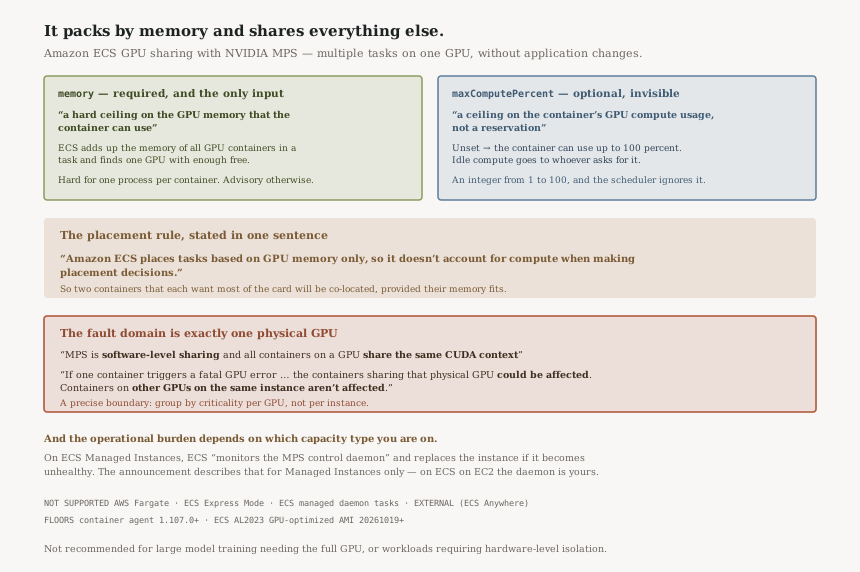
Two parameters, three different kinds of guarantee
memory | maxComputePercent | |
|---|---|---|
| Required | Yes | No — defaults to 100 percent |
| What it is | “a hard ceiling on the GPU memory that the container can use” | “a ceiling on the container's GPU compute usage, not a reservation” |
| Affects placement | Yes — it is the only input | No |
| Idle capacity | Not shared | “available to other containers on the same GPU” |
The placement row is the one with consequences. Because “Amazon ECS places tasks based on GPU memory only”, the scheduler will happily co-locate two containers that each expect most of the GPU's compute, provided their memory fits. Compute contention is something you prevent by how you size memory, not by what you declare about compute.
The fault domain is the physical GPU
AWS is direct about this rather than burying it: “GPU sharing is not recommended for … Workloads that are sensitive to GPU faults from neighboring containers, because MPS is software-level sharing and all containers on a GPU share the same CUDA context.”
And the blast radius, stated exactly: “If one container triggers a fatal GPU error, such as an illegal memory access from a faulty GPU kernel, the containers sharing that physical GPU could be affected. Containers on other GPUs on the same instance aren't affected.”
One physical GPU, no more and no less. That is a usefully precise boundary to design against: it means mixing criticality levels within a GPU is the thing to avoid, while mixing them across GPUs on the same instance is fine.
The hard limit has a condition
“Run a single GPU process per container when you use NVIDIA MPS for GPU sharing.” And for the case where you cannot: “configure the GPU memory requirement based on the combined peak memory usage of all processes. Use application-level controls to keep total consumption within the configured value.”
With the consequence spelled out: “As a result, multi-process applications can consume more GPU memory than configured, which can cause memory contention.”
So the hard ceiling is hard for a single-process container and advisory for a multi-process one. That is a meaningful distinction to carry into a design review, because we set a memory limit means two different things depending on what is inside the container.
Business value
The case AWS makes is utilisation: “GPU sharing helps you increase GPU utilization and reduce infrastructure costs for workloads that use only part of a GPU's capacity, such as small-model inference, AV/ADAS simulations, embedding generation, and multi-model serving.”
And the adoption cost is low: “you can pack more workloads onto each GPU instance without changing your application code”. For a fleet of inference containers each using a fraction of a card, that is a straightforwardly good trade.
Security considerations
The shared CUDA context is the thing to raise with a security reviewer, not because AWS hides it but because it is the kind of boundary people assume containers provide. If your isolation requirement is between tenants rather than between workloads, the documentation already answers the question: GPU sharing is not recommended for “Workloads that require hardware-level isolation between processes”.
Also worth noting that ECS owns two environment variables inside your container —
CUDA_MPS_PINNED_DEVICE_MEM_LIMIT and CUDA_MPS_ACTIVE_THREAD_PERCENTAGE —
and “Don't set these variables in your container definition”.
Cost considerations
The saving is the point of the feature: fewer GPU instances for the same number of inference containers. Neither page prices the feature separately, so treat the saving as the instance count rather than as a line item.
The cost risk is the opposite of the usual one. Packing by memory alone means you can land in a state where the GPUs are memory-full and compute-starved, so you are paying for cards whose throughput is contended. That shows up as latency, not as a bill, which makes it harder to attribute.
Operational considerations
The daemon monitoring is capacity-type specific. “On Amazon ECS Managed Instances, Amazon ECS also monitors the MPS control daemon that enables sharing on each instance. If the daemon stops or becomes unhealthy, Amazon ECS automatically replaces the instance and moves your tasks to healthy capacity.”
The announcement attributes that monitoring to Managed Instances specifically. It does not say the equivalent is absent on ECS on EC2, so read this as a question to settle rather than a difference I have confirmed — but settle it before assuming the daemon is somebody else's to watch.
There are version floors. “GPU sharing with MPS on Amazon ECS on Amazon EC2 requires Amazon ECS container agent version 1.107.0 or later and the Amazon ECS AL2023 GPU-optimized AMI version 20261019 or later.”
And a list of places it does not work:
“GPU sharing is not supported on AWS Fargate, Amazon ECS Express Mode, or Amazon ECS managed
daemon tasks”, nor for task definitions requiring EXTERNAL compatibility.
Tradeoffs
| Choice | What you gain | What it costs |
|---|---|---|
| Enabling GPU sharing | Higher utilisation, no application changes | A shared CUDA context, so a neighbour's fatal GPU error can reach you |
Leaving maxComputePercent unset |
Bursty containers can use the whole card when it is free | Every container defaults to 100 percent, so nothing caps contention |
| Setting it low | Predictable ceilings per container | It is still not a reservation, and idle capacity goes to whoever asks |
| Multi-process containers | Works, with care | The memory ceiling becomes advisory — enforcement moves into your application |
Implementation guidance
- Measure peak GPU memory per container first. It is the required parameter and the only input to placement, so an inaccurate figure misplaces tasks rather than merely wasting memory.
-
Set
maxComputePercentdeliberately rather than leaving the 100 percent default, on any GPU where you intend to co-locate workloads with different latency expectations. - Group by criticality, per GPU. The fault domain is one physical GPU, so keep workloads you would not want failing together off the same card — the same instance is fine.
- Confirm one GPU process per container, or size memory on combined peak usage and enforce it in the application. The hard ceiling is only hard in the first case.
- Check agent and AMI versions before planning a rollout on ECS on EC2, and note that the MPS daemon is yours to monitor there.
Best practices
- Record which capacity type each GPU service runs on, because daemon monitoring differs between them.
- Watch GPU compute contention as a latency signal; the scheduler will not see it coming.
- Keep the reserved environment variables out of your task definitions.
- Revisit memory figures after model changes — placement is only as good as the number you declared.
Who should adopt this and when
Now, for small-model inference fleets. This is the case the feature is built for, and the utilisation gain is immediate with no code change.
Carefully, for mixed-criticality workloads. Possible, but group by GPU and set compute ceilings rather than relying on the scheduler.
Not for training that needs the whole card, nor where you need “hardware-level isolation between processes” — both are on AWS's own not-recommended list.
Key takeaways
- Multiple ECS tasks per NVIDIA GPU via MPS, on Managed Instances and ECS on EC2, in all commercial and GovCloud (US) Regions.
memoryis required and is a hard ceiling;maxComputePercentis optional, is a ceiling and not a reservation, and defaults to 100 percent.- Placement considers memory only, so compute contention is not something the scheduler prevents.
- All containers on a GPU share one CUDA context; a fatal GPU error can affect the others on that physical GPU, but not on other GPUs in the instance.
- The memory ceiling is reliable for single-process containers and advisory for multi-process ones.
Official AWS references
- Amazon ECS now supports GPU sharing with NVIDIA Multi-Process Service (MPS) — the capability, the memory and optional compute parameters, the two supported capacity types, the Managed Instances daemon monitoring, and Region availability (5 claims)
- Share GPUs on Amazon ECS — the memory and maxComputePercent parameter definitions, the memory-only placement rule, the not-recommended list and the shared CUDA context, the fatal-GPU-error blast radius, the single-process guidance and multi-process caveat, task placement mechanics, supported instance families and unsupported launch types, agent and AMI version floors, and the reserved environment variables (13 claims)
- Working with GPUs on Amazon ECS — further reading on dedicated GPU task definitions; no claims in this post are drawn from it
Comments