EC2 Image Builder has put the DevOps Agent in its console, for diagnosing failed pipelines and for drafting resources. The announcement describes it as creating resources. The documentation is careful to say it does not.
“You create or update the resource yourself. The AI doesn’t create or modify resources.”
Executive summary
“EC2 Image Builder now integrates with the AWS DevOps Agent directly in the Image Builder console, enabling you to troubleshoot failed image pipelines and create resources directly from the console chat panel.” It is “available in all commercial regions”, and there are two distinct features behind that one sentence.
Troubleshoot reads a failed build and explains it: “reads build logs, workflow steps, components, and network configuration, then provides the root cause and the steps to fix it”, with “up to 50 failed pipelines at once” in a single aggregate investigation. It changes nothing: “Troubleshoot performs read-only analysis. Your resources are not modified.”
Create with AI drafts configuration. The announcement says “the agent verifies the configuration before populating the console for you to review and submit”, and the documentation says plainly what that leaves with you: “You create or update the resource yourself. The AI doesn’t create or modify resources.” The agent writes into a form. A human presses the button.
That is the right design, and it is worth reading carefully rather than skimming, because two things inside it are easy to misread: what verifies means, and the one case where a single submission creates more than the resource you were looking at.
What changed
Image Builder failures are a well-known time sink: a build runs for twenty minutes on an EC2 instance you cannot see, and fails on a component script, a missing egress route, an expired base AMI or an instance profile without the permission it needed at step nine. The evidence is spread across build logs, workflow step executions, the recipe and the VPC.
The Troubleshoot feature collects that spread. The documented scope is specific: “Failure context” to scope the investigation to the stage, step or Region that failed; “Build logs and Amazon CloudWatch logs” for “errors, non-zero exit codes, timeouts, and stack traces”; “Workflow step executions”; “Networking and permissions”, covering “IAM instance profile permissions, security groups, subnet routing, NAT gateways, internet gateways, and VPC endpoints”; “Components and recipe configuration” for “script errors, missing dependencies, broken URLs, and base AMI validity”; “Network connectivity” including “Systems Manager Agent reachability, DNS resolution, and proxy configuration”; and “Build history”, which “Reviews recent builds to distinguish persistent failures from intermittent issues.”
That last one is the item an experienced engineer would check first and a runbook almost never includes. It is also the only one of the seven that needs more than the failed build to answer.
Architecture
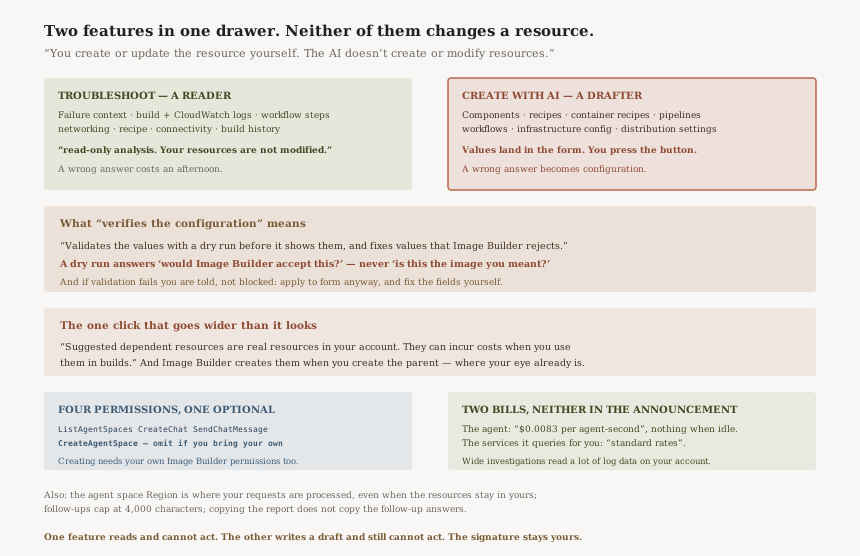
Two features, one agent space, two different risk profiles
| Troubleshoot | Create with AI | |
|---|---|---|
| What it does | Explains a failed build | Drafts values for a new or edited resource |
| Can it change anything | No — “read-only analysis” | No — “The AI doesn’t create or modify resources” |
| Who acts | Nobody; it is a report | You, by submitting the form |
| What a wrong answer costs | Time, and a wrong fix applied by hand | A resource created with values nobody read |
Both features share the same agent space and the same four permissions, which makes them feel like one capability. They are not, and the table's last row is why: an incorrect investigation wastes an afternoon, while an unreviewed draft becomes configuration.
What “verifies the configuration” actually means
The announcement's phrasing — “the agent verifies the configuration before populating the console” — sounds like correctness checking. The documentation names the mechanism: “Validates the values with a dry run before it shows them, and fixes values that Image Builder rejects.”
A dry run answers would Image Builder accept this? It does not answer is this the image you meant to build? A recipe that installs the wrong package version, distributes to a Region you did not intend, or selects a base AMI that is valid but not yours will pass a dry run cleanly. The check is real and worth having; it is a syntax and acceptance check, not a review.
The failure mode is handled honestly too: “If the assistant can’t produce values that pass validation, the drawer shows a warning. You can still choose Apply to form and fix the fields in the form.” Nothing is blocked; you are told, and you decide.
The one place a single click goes wider than it looks
Create with AI can “Suggest dependent resources” — for recipes and pipelines, it suggests “a recipe, components, an infrastructure configuration, distribution settings, or workflows”. And then: “Image Builder creates these resources when you create the parent resource.”
With the caveat in bold in the documentation: “Suggested dependent resources are real resources in your account. They can incur costs when you use them in builds.”
So the rule that the human submits the form still holds, but one submission can bring several resources into existence, and the reviewer's attention is naturally on the parent. This is the sentence to put in front of whoever reviews your Image Builder change process.
The seven resource types it will draft
“Components”, “Image recipes”, “Container recipes”, “Image pipelines”, “Image workflows”, “Infrastructure configurations” and “Distribution settings”. With one documented exclusion: “Lifecycle policies aren’t supported.”
Updating is narrower than creating in a useful way: “Update with AI doesn’t change fields that you can’t edit, such as the resource name”, and removals are shown rather than silently applied — fields the update removes are marked “Will be cleared”.
Business value
The value in Troubleshoot is not that it knows things an engineer does not. It is that it reads seven sources at once, including the two that get skipped under pressure: the network path, and the build history that separates “persistent failures from intermittent issues”. A pipeline that failed once and a pipeline that has failed every night for a week are different incidents, and the console does not make that distinction for you.
The aggregate mode is the stronger half for anyone running image builds at scale. Multiple failed pipelines are grouped by shared root cause, with “Description of the shared root cause”, “Pipelines affected by that root cause” and “Remediation steps for the group”. One expired certificate or one revoked permission that broke eleven pipelines is a single finding, and discovering that by opening eleven consoles is how a morning disappears.
Create with AI's value is narrower and honest about it: it is faster form-filling for a service with a lot of fields, with a dry run attached.
Security considerations
The permissions are small and well-scoped. Four actions: “aidevops:ListAgentSpaces”, “aidevops:CreateChat”, “aidevops:SendChatMessage”, and “aidevops:CreateAgentSpace” — the last of which is “Required only if you want Image Builder to create an agent space for you. You can omit this permission if you bring your own agent space.” A platform team that creates agent spaces centrally can withhold the fourth action from everyone else, and the feature still works.
Creating is gated by your existing permissions, not the agent's. Create with AI additionally requires “Image Builder permissions – Required to create or update the resources when you apply the suggested values.” The agent cannot lend you authority you do not have: it drafts, and your own identity submits.
Read-only is stated, not implied. “Troubleshoot performs read-only analysis. Your resources are not modified.” It is also scoped: “Troubleshooting is scoped to Image Builder build failures and related infrastructure such as IAM, VPC, and Systems Manager Agent.” Worth knowing both for what it will reach into and for what it will not answer.
The agent space Region may not be your Region. “AWS DevOps Agent processes your requests in the agent space in your account, in the AWS Region of that agent space”, and “If AWS DevOps Agent isn’t available in your current Region, you select a supported Region for the chat. The resources that you create stay in your current Region.” Your resources stay put; the conversation, and the log content the investigation reads, are processed where the agent space lives. For a team under a data-residency constraint that is the paragraph to read before enabling this, and it is not in the announcement.
Both features carry the same disclaimer, in the documentation rather than in the console copy: “AI generates these responses. Verify the analysis and recommendations before you modify your resources”, and for drafting, “AI generates these suggestions. Review every value before you create or update the resource.”
Cost considerations
There are two bills, and the announcement mentions neither.
The first is the agent: “AWS bills DevOps Agent usage separately from Image Builder, based on the time that the agent spends working on your investigation, per agent-second”, at “$0.0083 per agent-second” for investigations, evaluations and on-demand SRE tasks. It is metered by how long the agent works, not by how many questions you ask, and “there are no upfront commitments or charges for when the agent is idle or waiting for work”. “Creating an agent space is free.”
Per-second billing on a thinking process is unusual enough to be worth a sanity check: at the published rate an agent-hour is $29.88. Investigations are short — “The investigation typically completes in a few minutes” — so a single investigation is cents, and the figure only matters if an aggregate run over a large estate turns out to be long rather than wide. Charges are identifiable: “Charges appear in your AWS bill and in Cost Explorer under AWS DevOps Agent.”
The second bill is the one that is easy to miss: “During an investigation, the agent also queries other AWS services on your behalf, such as Amazon CloudWatch Logs. Those services bill the queries at their standard rates.” Reading build logs means scanning log data, and scanned log data is charged. An aggregate investigation across fifty pipelines is fifty builds' worth of logs read on your account.
And the third, which is not a bill until later: “Suggested dependent resources are real resources in your account. They can incur costs when you use them in builds.”
Operational considerations
An agent space is a prerequisite, not an afterthought. “The Troubleshoot feature requires an AWS DevOps Agent agent space”, either your own or one Image Builder creates on first use. Decide which before the first incident, because the convenient path — letting the console create one — is the path that needs the extra permission.
The conversation is the artefact, and it is partly disposable. The copy control “copies the root cause report, not answers to follow-up questions”. If the useful detail came out of the third follow-up, copying the report does not capture it. Paste it somewhere durable yourself.
Feedback is coarse. “Your rating applies to the whole investigation, including its follow-up questions.” A correct root cause followed by a wrong remediation gets one verdict.
Follow-up questions are capped at “up to 4,000 characters per question”, which is ample for a question and not ample for pasting a log excerpt, which is the thing you will want to do.
The 50-pipeline figure is in the announcement, not the documentation. The announcement says “up to 50 failed pipelines at once”; the documented console controls are “Troubleshoot selected” for a multi-select and “Troubleshoot all” for every failed pipeline, with no cap named in the page. If you are automating around a limit, treat the announcement as the number and expect the console to be the thing that tells you.
Tradeoffs
| Choice | What you gain | What it costs |
|---|---|---|
| Let Image Builder create the agent space | Works on first use with no setup | Everyone who troubleshoots needs aidevops:CreateAgentSpace |
| Bring your own agent space | One central space; the fourth permission stays with the platform team | Someone has to create and maintain it before anyone needs it |
| Aggregate investigation over single | Shared root causes found once rather than eleven times | Reads many builds' logs, and those queries bill at their own rates |
| Create with AI for a new recipe | Fewer fields typed, values dry-run before you see them | A dry run proves acceptance, not intent — and dependent resources come with it |
| Agent space in another Region | The feature works where DevOps Agent is not yet available | Requests are processed in that Region, even though resources stay in yours |
Implementation guidance
Decide the agent space question first. Central space plus three permissions, or self-service plus four. This is the only part of the setup that is an architecture decision rather than a console click.
Start with an aggregate investigation, not a single one. If you have a backlog of failed pipelines, the grouped-by-root-cause output is where the leverage is. A single failed build is usually faster to read yourself.
Treat the output as a hypothesis with evidence attached. The investigation names the failed workflow step and the log lines behind it, and those are checkable in seconds. Check them before acting on the remediation — “Verify the analysis and recommendations before you modify your resources.”
For Create with AI, read the dependent resources before you press create. The suggested-values card is where that list appears, and the parent resource is what your eye will go to.
Keep the lifecycle-policy gap in mind. “Lifecycle policies aren’t supported”, so image deprecation and deletion rules stay a manual configuration.
Capture anything useful from follow-ups by hand. The copy control will not do it for you.
Best practices
Keep the two features separated in your own head and in whatever you write down for the team. One is a reader; the other is a writer whose output you sign. The shared drawer and shared permissions make them look like one thing.
Do not let the drafting feature become the review. The dry run is a good gate against a malformed recipe and no gate at all against a wrong one, and the documentation says so twice.
Budget the downstream queries, not just the agent. On an estate with large build logs, the CloudWatch Logs charge from a wide aggregate investigation is the larger of the two numbers.
If your organisation has a stance on where prompts and log content may be processed, settle the agent-space Region before the feature is in use rather than after.
Who should adopt this and when
Adopt now if you run more than a handful of image pipelines. The aggregate investigation is the feature: shared root causes across many pipelines is exactly the analysis nobody does by hand.
Adopt now if Image Builder failures land on people who did not write the recipes. The networking and Systems Manager Agent checks are the ones a generalist on call would not think to run.
Adopt Create with AI cautiously, and in a non-production account first. Not because it acts — it does not — but because reviewing a pre-filled form is a different discipline from filling one in, and the dependent-resources behaviour deserves to be seen once before it matters.
Wait if your data-residency position has not been settled. The Region of the agent space determines where your requests are processed, and that question is cheaper to answer before the feature is in daily use.
Key takeaways
The announcement says you can create resources from the console chat panel; the documentation says “You create or update the resource yourself. The AI doesn’t create or modify resources.” The agent drafts and validates. A human submits. That is a deliberate design, and it is the sentence to repeat when somebody asks whether an agent is now changing your build configuration.
Verifies means a dry run — “Validates the values with a dry run before it shows them” — which proves Image Builder would accept the configuration, not that the configuration is the one you wanted.
Two costs sit outside Image Builder: the agent at “$0.0083 per agent-second”, and the services it queries on your behalf, which “bill the queries at their standard rates”. And one cost sits outside the resource you were creating: suggested dependent resources are real, and arrive with the parent.
Official AWS references
- EC2 Image Builder console now integrates with the DevOps Agent for troubleshooting and resource creation — the announcement: console integration for troubleshooting and resource creation, up to 50 failed pipelines at once, follow-up questions in the same conversation, the verify-then-populate description, what the agent reads, and availability in all commercial Regions
- Troubleshoot failed builds with AI — that Troubleshoot performs read-only analysis, the four
aidevopspermissions and which one is optional, the agent space prerequisite, per-agent-second billing separate from Image Builder, the free agent space, the standard-rate charges for services queried on your behalf, the seven areas investigated including build history, the 4,000-character follow-up limit, the copy and rating behaviour, aggregate results grouped by root cause, the scope statement, and the AI-generated disclaimer - Create and update resources with AI — that you create the resource yourself and the AI does not create or modify resources, the dry-run validation and the warning when values do not pass it, the seven supported resource types and the lifecycle-policy exclusion, suggested dependent resources being real resources created with the parent, the commercial-Regions restriction, the agent-space Region processing statement, and the review-every-value disclaimer
- AWS DevOps Agent pricing — the $0.0083 per agent-second rate for investigations, evaluations and on-demand SRE tasks, and that there are no charges while the agent is idle or waiting for work
- Find the cause of a failed image build with failure context — further reading on the structured failure details the investigation reads first; no claims in this post are drawn from it
- Validate Image Builder resource creation with a dry run — further reading on the dry-run mechanism behind the validation step; no claims in this post are drawn from it
Comments