Business Challenge
Two posts have now ended by pointing at a choice between two domain names and deferring it. #90 said a VM reaching Google APIs may use the ordinary addresses; #91 said an on-premises host has no such option and must pick one of the two. Neither explained the choice, because the choice deserves its own post: it is not an addressing decision, it is a decision about VPC Service Controls expressed as an IP range.
The two names are private.googleapis.com and restricted.googleapis.com.
The ranges sit next to each other. restricted.googleapis.com 199.36.153.4/30 2600:2d00:0002:1000::/56 and private.googleapis.com 199.36.153.8/30 2600:2d00:0002:2000::/56. Four addresses each, one digit apart, and they behave very differently.
It is more restrictive, which is the point and also the risk. It enables API access to Google APIs and services that are supported by VPC Service Controls and blocks access to Google APIs and services that do not support VPC Service Controls. Blocking is the feature. The documentation repeats it so there is no doubt: the restricted.googleapis.com domain does not permit access to Google APIs and services that do not support VPC Service Controls.
Correct approachChoose it deliberately, against the list of products VPC Service Controls supports, and only when the blocking is something you want. The documentation's own guidance is conditional rather than a recommendation: choose restricted.googleapis.com when you only need access to Google APIs and services that are supported by VPC Service Controls. Only. If any workload in the network needs an unsupported API, this domain will stop it, and the symptom arrives months later for a team that was not in the room.
It was never going to. These virtual IP addresses (VIPs) support only HTTP-based protocols over TCP (HTTP, HTTPS, and HTTP/2), and then explicitly: all other protocols, including MQTT and ICMP, are not supported. ICMP is ping. A perfectly configured VIP does not answer it.
Correct approachTest with an HTTPS request to a real API endpoint, not with ping or traceroute, and write that into the runbook before anyone needs it. This is the most expensive sentence on the page in practice: a failed ping looks like hard evidence of a routing or firewall problem, so the investigation goes to routes and egress rules that were correct all along, while the actual cause — usually DNS or the wrong VIP for the API in question — goes unexamined.
Expected, for both VIPs. private.googleapis.com does not support Google Workspace web applications such as Gmail and Google Docs, and restricted.googleapis.com does not support Google Workspace APIs or Google Workspace web applications such as Gmail and Google Docs. Only the default domains cover them — that option includes Google Workspace web applications such as Gmail and Google Docs, and other web applications.
Enumerate what resolves through the wildcard before creating it, and keep anything Workspace-shaped out of its scope. Note the asymmetry between the two VIPs while you are there: private excludes the Workspace web applications, restricted excludes the Workspace APIs as well. If a workload calls a Workspace API, that distinction decides whether one of the two domains is usable at all.
Architecture
Three options, two of them VIPs, and a set of records that follows directly from the ranges.
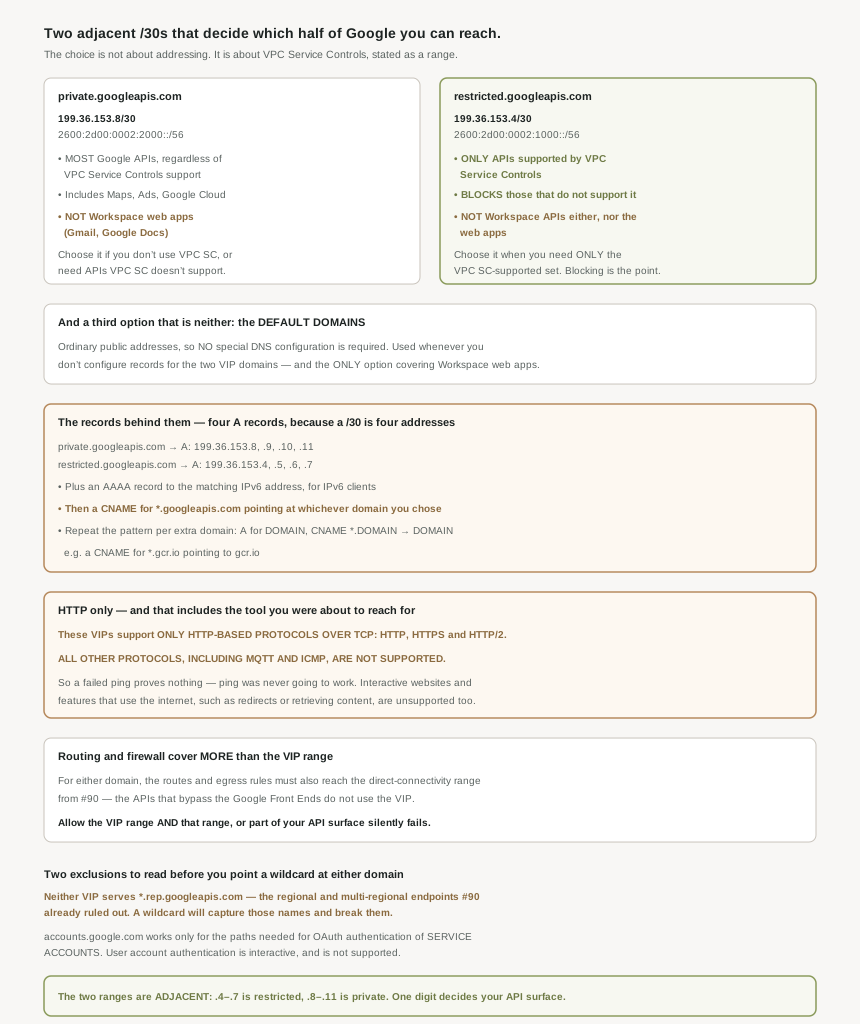
What each option actually covers
private.googleapis.com is the permissive VIP. It enables API access to most Google APIs and services regardless of whether they are supported by VPC Service Controls, and includes API access to Google Maps, Google Ads, Google Cloud, and most other Google APIs. Its exclusion is Workspace's web applications.
restricted.googleapis.com is the enforcing VIP, and its description is a pair of opposites: enables the VPC Service Controls-supported set, blocks everything else. It is a network-level expression of a governance decision, which is unusual and worth appreciating — the perimeter stops being something that only evaluates requests and becomes something that cannot be addressed in the first place.
The default domains are the third option and the one people forget exists. You access Google APIs and services through their public IP addresses, so no special DNS configuration is required, and the default domains are used when you don't configure DNS records for private.googleapis.com and restricted.googleapis.com. So this is what you already have. Doing nothing is a choice with a name.
Choose private.googleapis.com, says the page, under these circumstances: you don't use VPC Service Controls. You do use VPC Service Controls, but you also need to access Google APIs and services that are not supported by VPC Service Controls.
That second condition is the one worth sitting with. It describes an estate that has adopted VPC Service Controls and still needs the permissive VIP, because the supported-product list does not cover everything it calls. That is a common position rather than an edge case, and it means choosing private is not a failure to secure the estate — it is the documented answer for a perimeter that cannot be total. Both VIPs give you a set of IP addresses only routable from within Google Cloud; only one of them also enforces.
The records, and why there are four
A /30 holds four addresses, and the record lists match exactly. For the permissive VIP: create an A record for private.googleapis.com pointing to the following IP addresses: 199.36.153.8 , 199.36.153.9 , 199.36.153.10 , 199.36.153.11. For the enforcing one: create an A record for restricted.googleapis.com pointing to the following IP addresses: 199.36.153.4 , 199.36.153.5 , 199.36.153.6 , 199.36.153.7.
IPv6 is a single address rather than four: also configure an AAAA record for private.googleapis.com pointing to 2600:2d00:0002:2000::, and correspondingly also create an AAAA record for restricted.googleapis.com pointing to 2600:2d00:0002:1000::.
Then the redirection that does the real work: in the googleapis.com zone, create a CNAME record for *.googleapis.com that points to the domain that you've configured. One wildcard, and every API hostname in that zone now resolves to your chosen VIP.
And because Google serves plenty of things outside googleapis.com, the pattern repeats per domain: in the DOMAIN zone, create a CNAME record for *. DOMAIN that points to DOMAIN — the page's own example being for example, create a CNAME record for *.gcr.io that points to gcr.io. Container registries, artifact hosts and the rest each need their own zone with the same shape.
The first ties straight back to #90: the supported-domain list excludes *.rep.googleapis.com regional and multi-regional endpoints. A wildcard for *.googleapis.com matches those names and sends them to a VIP that does not serve them, so the wildcard does not merely fail to help — it actively breaks endpoints that would otherwise have resolved normally.
The second is narrower and catches authentication designs: accounts.google.com (only supports paths needed for OAuth authentication of service accounts; user account authentication is interactive and not supported). Service accounts authenticate; users do not. Which follows from the protocol restriction rather than being an arbitrary limit — interactive sign-in needs redirects, and interactive websites and features that use the internet-for example, for redirects or retrieving content-are not supported.
Why This Architecture Holds Up
The requirement is phrased as a list rather than a single range, for both domains: ensure that your VPC network has routes to the following IP ranges, and ensure that your firewall rules allow egress to the following IP ranges. Plural, and the plural matters.
Alongside the VIP range itself, both entries include the direct-connectivity range from #90 — the one used by APIs that bypass the Google Front Ends. Those APIs do not go through the VIP at all, so a route or egress rule covering only the VIP's four addresses leaves them unreachable. The failure is partial and therefore confusing: most API calls work, a specific subset does not, and nothing about the configuration looks incomplete.
This is the same shape as the firewall precedence problem in #90. The configuration that fails is not obviously wrong; it is obviously right and quietly narrow.
Why HTTP-only is more consequential than it reads
The restriction is stated on both configuration pages, which is a reasonable signal of how often it is missed: the VIPs support only HTTP-based protocols over TCP (HTTP, HTTPS, and HTTP/2).
Three consequences follow, and only the first is obvious. Diagnostics that rely on ICMP cannot work, so ping and traceroute are not tools here. Any workload speaking a non-HTTP protocol to a Google endpoint — the page names MQTT — cannot use this path. And anything that depends on being a browser rather than an API client is out, because interactive websites and features that use the internet are unsupported, which is why the accounts.google.com exception reads the way it does.
Put together, these VIPs are an API transport and nothing else. They are not a general private path to Google, and an estate that treats them as one will keep discovering categories of traffic that do not fit.
Changing your mind later
Worth noting what a switch costs, because it is more than editing one record. The chosen domain appears in the A records, the AAAA record, the wildcard CNAME, every additional per-domain zone, the VPC routes and the egress firewall rules — and on the hybrid path from #91, in the Cloud Router's custom advertised route and the on-premises routes as well. The two ranges differ by four addresses, but they are referenced in six or seven places.
Which argues for settling the VPC Service Controls question before the DNS question, rather than treating the VIP as a networking detail to be revised later.
Key Architecture Decisions
| Situation | Decision | Because |
|---|---|---|
| Not using VPC Service Controls | private.googleapis.com | It is the documented condition for choosing it. |
| Using VPC Service Controls but needing unsupported APIs | private.googleapis.com, deliberately | Also a documented condition, not a compromise. |
| You want unsupported APIs blocked at the network | restricted.googleapis.com | Blocking them is what that domain does. |
| Any workload calls a Workspace API | Not restricted.googleapis.com | It supports neither Workspace APIs nor the web applications. |
| Users need Gmail or Google Docs through this path | Default domains | Only the default domains include Workspace web applications. |
| You configure no records at all | You are using the default domains | They apply whenever the VIP records are absent. |
| Creating the records | Four A records, one AAAA, one wildcard CNAME | A /30 is four addresses; IPv6 is a single address. |
| Google services outside googleapis.com | One zone each: A for DOMAIN, CNAME *.DOMAIN to DOMAIN | The documented pattern, with gcr.io as the example. |
| About to create a wildcard for *.googleapis.com | Exclude rep.googleapis.com names | Neither VIP serves regional or multi-regional endpoints. |
| Designing authentication over this path | Service accounts only | User account authentication is interactive and unsupported. |
| An API call fails and the VIP does not ping | Ignore the ping; test with HTTPS | ICMP is explicitly unsupported, so a failed ping is not evidence. |
| A workload speaks MQTT or another non-HTTP protocol | It cannot use this path | Only HTTP, HTTPS and HTTP/2 over TCP are supported. |
| Writing routes and egress rules | Cover the direct-connectivity range as well as the VIP | Both requirements list more than one range. |
| Most APIs work but a subset fails | Check for the missing second range before anything else | That is exactly what a VIP-only route or rule produces. |
| Considering switching VIP domain later | Settle VPC Service Controls first | The domain is referenced in six or seven places, including on-premises. |
The one to look at today
Find out which of the three options your estate is actually using, which is answerable in one query: does a private zone for googleapis.com exist, and if so what does its wildcard point at. If the answer is "no zone", you are on the default domains and your traffic is going to ordinary public addresses — which may be fine, but is worth knowing rather than assuming. If the answer is restricted, the follow-up is whether anything in that network calls an API outside the VPC Service Controls supported list, because that call is being blocked by design and the team that owns it may not know why.
Closing Thought
Three posts have circled this choice and the thing that makes it interesting is how little of it is about networking. The ranges are four addresses each and adjacent; the records are mechanical; the routing is a static route you already understood by #90. What the choice actually encodes is whether your network should be capable of reaching Google services that your governance model cannot police — and Google made that a routing decision rather than a policy one, which means it is enforced by the absence of a path rather than by a check that could be misconfigured.
The sentence I would hand to anyone operating this is the protocol one. Not because the restriction is burdensome — an API transport carrying only HTTP is entirely reasonable — but because it quietly invalidates the universal first instinct when a connection fails. Ping proves nothing here. Every hour spent on a routing problem that did not exist started with a reply that was never coming.
#93 moves from Google's own APIs to services other people publish: Private Service Connect, consumer endpoints — and the first mechanism in this block that gives you an address inside your own network.
Official Google Cloud Reference
- Configure Private Google Access
- Configure Private Google Access for on-premises hosts
- Private Google Access overview
- Private Google Access for on-premises hosts
- Private access options for services
- VPC Service Controls overview
- VPC Service Controls supported products
- Cloud DNS zones
- Add, modify, and delete records
- Routes overview
- VPC firewall rules
Comments