Inspector can now scan AMIs without launching them, which is a genuinely good place to find a vulnerability — upstream of every instance that would have inherited it. The announcement then points at Allowed AMIs as the way to act on the results, and that control has a scope limit worth knowing before you plan around it.
“Amazon Inspector now extends its vulnerability scanning to EC2 Amazon Machine Images (AMIs), enabling you to identify software vulnerabilities in your AMIs without launching instances or installing additional software.”
Executive summary
The value is in where the scan sits: “This helps you fix issues at the source before AMIs are used to launch instances across your fleet.” One AMI becomes many instances, so a finding on the image is a finding on everything downstream of it that has not launched yet.
Two scanning modes: “you can run continuous evaluations to monitor your AMI catalog for newly discovered vulnerabilities, or perform targeted one-time scans for specific AMIs directly from the EC2 Console.” It enables “for an account or across your entire organization”, and is available “in all commercial AWS Regions where Amazon Inspector is available”.
What changed
Inspector already scanned running EC2 instances and container images. The new surface is the template itself, scanned at rest. That closes a real gap: an AMI sitting in a catalogue is not running, so nothing was looking at it, and it was the thing every future instance would be built from.
The announcement then describes acting on results, and this is the sentence to read carefully: “Based on the scan results, you can enable the Allowed AMIs setting and specify security criteria that AMIs must meet to be available within your account and enforce this setting across the entire organization using Declarative Policies.”
Architecture
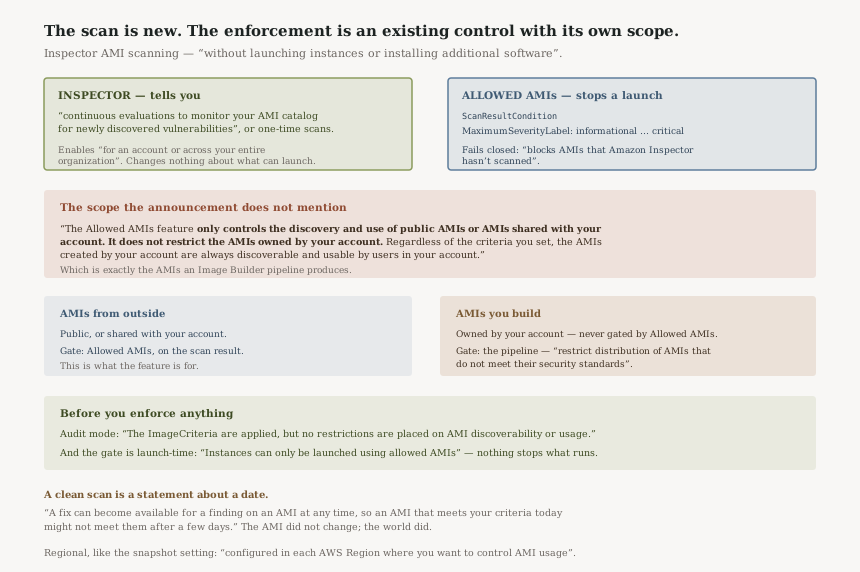
Scanning and enforcement are two mechanisms with different scopes
Allowed AMIs is where a scan result becomes a rule. Its ScanResultCondition takes a
MaximumSeverityLabel —
“The severity values are informational, low, medium, high, and critical” — and
freshness bounds, and it fails closed on unscanned images:
“When you specify this condition, Allowed AMIs blocks AMIs that Amazon Inspector hasn't
scanned.”
That is a well-designed control. It also has a scope the announcement does not mention:
“The Allowed AMIs feature only controls the discovery and use of public AMIs or AMIs shared with your account. It does not restrict the AMIs owned by your account. Regardless of the criteria you set, the AMIs created by your account are always discoverable and usable by users in your account.”
So the combination that reads as a closed loop — scan your AMIs, then gate on the results — does not close for AMIs you built. Those are exactly the AMIs an Image Builder pipeline produces, and exactly the ones the scan was sold as protecting.
Where the enforcement point actually is, per AMI source
| AMI source | Does Allowed AMIs gate it? | What enforces instead |
|---|---|---|
| Public AMIs, AMIs shared with you | Yes — this is what the feature controls | ScanResultCondition and the other criteria |
| AMIs your own account owns | No — “always discoverable and usable” | The pipeline: “restrict distribution of AMIs that do not meet their security standards” |
Read that way the announcement is coherent rather than contradictory — it offers Allowed AMIs for images arriving from outside and Image Builder for images you produce. The two sentences are a paragraph apart and it is easy to read them as one control.
What the gate applies to, and when
“Instances can only be launched using allowed AMIs” — launches, not running
instances. Nothing here stops or flags what is already running; for that AWS points at an AWS Config rule
and describe-instance-image-metadata to find instances launched from AMIs that no longer
meet the criteria.
There is a dry run worth using first:
“In audit mode: The ImageCriteria are applied, but no restrictions are
placed on AMI discoverability or usage.” Given that an over-tight rule stops instance
launches, that is not an optional step.
And like the snapshot setting in today's architecture post, this is Regional: “These settings must be configured in each AWS Region where you want to control AMI usage”, with declarative policies as the way to cover Regions and accounts at once — after which “you can't modify the settings directly within an account”.
Business value
Finding a vulnerability in an AMI is worth more than finding the same vulnerability on fifty instances, because there is one thing to fix and the fix prevents rather than remediates. Scanning without launching also removes the cost and the risk of standing up an instance from an image you already suspect.
The Security Hub path matters for anyone already aggregating there — AMI scanning can be enabled as an organisation add-on with findings delivered into Security Hub, so this lands in an existing queue rather than creating a new console to watch.
Security considerations
A scan result is a timestamp, and AWS says so. “A fix can become available for a finding on an AMI at any time, so an AMI that meets your criteria today might not meet them after a few days.” The AMI did not change; the world did. That is what the continuous evaluation mode is for, and why a one-time scan is evidence about a date.
Severity is judged on every finding, not only fixable ones.
“This limit applies to every finding on the AMI, whether or not a fix is available. A scanned
AMI with no findings meets this limit.” So a MaximumSeverityLabel of
medium will block an AMI carrying an unfixable high, which is correct and will be
unpopular.
Failing closed on unscanned images is the right default and a sharp edge. A
ScanResultCondition blocks anything Inspector has not scanned, so enabling it in a Region
where scanning is not switched on blocks every external AMI at once. Enable scanning first, everywhere,
then the condition.
Cost considerations
The announcement points at the Inspector pricing page without naming a figure, so treat the cost as per-AMI scanning on top of whatever Inspector already does for you. The variable to watch is catalogue size under continuous evaluation rather than scan count on any given day — a sprawling AMI catalogue that nobody prunes is now a recurring line rather than a dormant one.
Operational considerations
An over-tight criterion is an outage. AWS flags this twice in the Allowed AMIs guidance: be careful with date conditions, and be careful with the fix-available windows, because an AMI that qualifies today may not in a week. The failure mode is instance launches failing, which in an Auto Scaling group is a capacity event rather than a security finding.
The configuration has room, and the shape matters more than the size.
“The ImageCriteria can include up to: 10 ImageCriterion”,
each holding up to “200 values for ImageProviders” and
“50 values for ImageNames”. Criteria within one
ImageCriterion are ANDed and the criterion list is ORed, so a realistic policy is a handful
of allow-shapes rather than one long list.
The fix-available windows are a clock you did not start. AWS's own example:
“if you set MaxDaysSinceHighFixAvailable to 30, an AMI isn't allowed if a fix has
been available for one of its high findings for more than 30 days.” Nothing about the AMI
needs to change for it to fall out of compliance.
AWS managed services launch from Amazon-published AMIs. The guidance recommends
including the amazon alias where you use services such as ECS, EKS or Lambda Managed
Instances, which depend on those images.
Tradeoffs
| What you gain | What it costs |
|---|---|
| Vulnerabilities found on the template, before any instance inherits them | A scan result is true as of a date, so the catalogue needs continuous evaluation to stay meaningful |
| Scan results usable as a launch criterion, failing closed on unscanned images | That same behaviour blocks everything external in any Region where scanning is not enabled |
| Org-wide enforcement through declarative policies | Accounts lose the local switch, which is the point and also a support path you need to plan |
| A single control surface for externally sourced AMIs | It does not cover the AMIs you build; those need the pipeline instead |
Implementation guidance
Enable scanning before you enable any criterion that depends on it. A
ScanResultCondition treats unscanned as not allowed, so the order matters and the blast
radius of getting it wrong is every external AMI in the Region.
Run Allowed AMIs in audit mode and read the results. The console shows an
Allowed image field per AMI and the CLI returns ImageAllowed, so you can
see the effect before anything is enforced.
Find what is already running from non-compliant images. The
ec2-instance-launched-with-allowed-ami Config rule and
describe-instance-image-metadata both answer this, and the answer is the migration plan the
enforcement will otherwise force on you suddenly.
For AMIs you build, put the gate in the pipeline. Image Builder can “restrict distribution of AMIs that do not meet their security standards”, and that is the only one of these mechanisms that applies to an image your own account owns.
Use declarative policies rather than per-account settings if you want this to hold as accounts and Regions are added.
Best practices
Start the severity threshold where your current estate actually sits, then tighten. A threshold chosen from policy rather than from measurement will block a working fleet on day one.
Pair ImageNames with ImageProviders rather than using names alone — AWS
notes that a name might not uniquely identify an AMI.
Treat the AMI catalogue as something to prune. Continuous evaluation turns every retained AMI into an ongoing scan and an ongoing finding source, which is a useful incentive to delete the ones nobody launches.
Who should adopt this and when
Adopt the scanning now if you maintain an AMI catalogue of any size. It is new visibility on an asset nothing was watching, and enabling it changes nothing about what can launch.
Adopt the enforcement deliberately, in audit mode first, and only after scanning is on in every Region the criteria will apply to.
Do not rely on Allowed AMIs for your own images. If your risk is a vulnerable self-built AMI reaching production, the control that addresses it is the Image Builder pipeline, not this setting.
Key takeaways
The scan is new; the enforcement is an existing control. Inspector tells you, and Allowed AMIs is what stops a launch.
Allowed AMIs covers external images only. “It does not restrict the AMIs owned by your account.” For those, the gate is the Image Builder pipeline.
It fails closed on unscanned AMIs, so enable scanning first.
A clean scan is a statement about a date. An AMI that passes today can fail in a week without changing, which is what continuous evaluation exists to track.
Official AWS references
- EC2 Amazon Machine Images can now be scanned for vulnerabilities through Amazon Inspector — scanning without launching instances, continuous evaluations and one-time scans, enablement per account or organisation, the Security Hub add-on, the pointer to Allowed AMIs and Declarative Policies, the Image Builder pipeline integration, and Region availability
- Control the discovery and use of AMIs in Amazon EC2 with Allowed AMIs — the statement that the feature covers only public and shared AMIs and not those your account owns, the ScanResultCondition fields and the blocking of unscanned AMIs, the severity values, the warning that an AMI meeting criteria today might not in a few days, audit mode, the launch-time scope, the per-Region requirement, and declarative policies removing the in-account switch
- Scan an Amazon EC2 AMI for software vulnerabilities with Amazon Inspector — further reading on the scanning mechanism itself; no claims in this post are drawn from it
- ec2-instance-launched-with-allowed-ami — further reading on the Config rule for finding already-launched non-compliant instances; no claims in this post are drawn from it
Comments