Executive summary
AWS Network Firewall now tracks how many times each stateful rule has matched, surfaced as a Top Rule Hits widget in the console. It is on by default, needs no configuration, costs nothing extra, and is available in every Region Network Firewall runs in except Middle East (UAE) and Middle East (Bahrain).
This is the feature that firewall teams have been asking for, and the reason is always the same: rulesets accumulate. Rules get added during incidents, during migrations, during audits, and almost none are ever removed, because nobody can prove a rule is safe to delete. A hit counter looks like exactly that proof.
It is not, and the gap matters more than the feature. Hit counts are derived from alert logs, and alert logs have a narrower scope than the ruleset does. Three distinct categories of rule can be fully live and still report zero:
- Stateless rules are not tracked at all.
- Pass rules do not alert, so your allow-list is invisible.
- Anything the stateful engine never sees cannot log, and what reaches it is decided elsewhere in the policy.
Every one of those skews the same direction: the rules most likely to show zero are the permissive ones, which are the ones whose deletion breaks traffic rather than merely reducing coverage.
What changed
The console's Monitoring section gains a Top Rule Hits widget. For each matching rule it shows the hit count with a bar chart, that rule's percentage of total hits, the resource ARN, the Suricata signature ID, the rule description from the msg field, and the timestamp of the last occurrence.
There is nothing to turn on. AWS is explicit that no additional configuration is needed to start tracking rule hits. The same data is pushed to CloudWatch Logs and Amazon S3 as alert logs, so it is queryable with CloudWatch Logs Insights and Athena rather than only viewable in the console.
| Aspect | Detail |
|---|---|
| Enablement | On by default, no configuration |
| Rule types covered | Stateful only — stateless rules are not tracked |
| Surfaces | Console widget, CloudWatch Logs, S3, Logs Insights, Athena |
| Cost | No additional charge; log storage and query charges unchanged |
| Regions | All Network Firewall Regions except Middle East (UAE) and Middle East (Bahrain) |
Why AWS built this
A firewall ruleset is an append-mostly data structure. Rules arrive with a reason and a ticket; they leave only when someone is willing to sign their name against the claim that nothing needs them. In the absence of evidence, the rational choice for every individual engineer is to leave the rule alone, and the aggregate of those rational choices is a ruleset nobody understands.
That has a cost beyond tidiness. Suricata evaluates rules in a defined order, so an oversized ruleset is slower to reason about and slower to change safely. It also degrades incident response: when the ruleset is 800 rules and 300 of them are inert, the signal you need during an incident is buried in rules that have not matched anything in years.
Hit counts convert that from an argument into a measurement — provided you understand what is being measured.
Architecture
The mechanism is the important part, because it is what produces the blind spots.
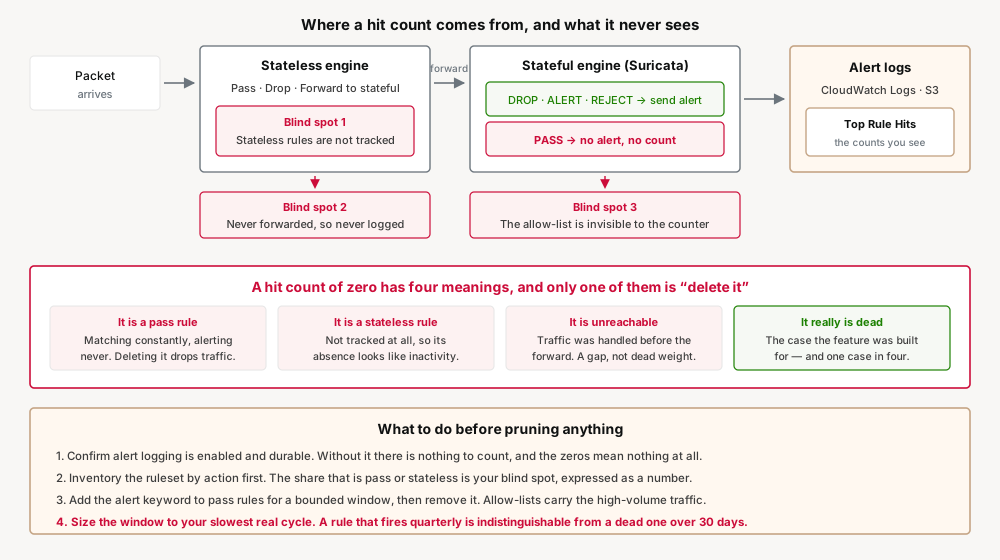
Network Firewall has two engines. Packets meet the stateless engine first, which can pass them, drop them, or forward them to the stateful engine. That routing is not incidental — AWS states plainly that firewall logging is only available for traffic you forward to the stateful rules engine, and that forwarding happens through stateless rule actions and the policy's stateless default actions.
Within the stateful engine, only some actions generate log entries. Alert logs report traffic matching stateful rules that have an action that sends an alert, and the actions that do so are DROP, ALERT and REJECT. PASS is not among them.
So the chain from packet to hit count has two filters in it, both of which discard traffic before it can be counted, and neither of which is visible in the widget that shows you the counts.
The trap: three ways a live rule reports zero
A zero in the hit count column has at least four possible meanings, and only one of them is "this rule is dead".
1. It is a pass rule
Pass rules are the allow-list. They are the rules that say this specific traffic is permitted, and per the documentation a pass rule discontinues inspection of the matching packet and permits it to go to its intended destination, with pass rules evaluated before rules with other action settings. They do not send alerts, so they do not increment a counter.
This is the dangerous case, and it is dangerous in a specific way. A pass rule can be matching thousands of packets per second, reporting zero, and be the only thing keeping a business-critical flow alive. Delete it because it looks unused and the traffic falls through to whatever the policy does next — frequently a drop.
You can make a pass rule visible by adding the alert keyword to it, which is worth doing before any pruning exercise and worth undoing afterwards if the log volume is significant.
2. It is a stateless rule
Stateless rules do not support hit count tracking. If your policy does meaningful work in the stateless engine — and policies that care about throughput usually do, because stateless evaluation is cheaper — that portion of your ruleset is simply absent from this feature. Its absence looks identical to zero activity.
3. The traffic never reached the stateful engine
A stateful rule can only match packets that were forwarded to it. If the stateless configuration passes or drops traffic before the forward action, the stateful rule written to catch that traffic will never fire, no matter how much of it there is. The rule is not unused; it is unreachable, which is a different problem with a different fix, and the hit count cannot tell the two apart.
4. It really is dead
This case exists too, and it is the one the feature was built for. The point is not that hit counts are unreliable — it is that a zero needs one more question asked of it before it becomes a deletion.
Business value
The value is real and it is mostly about time. Ruleset reviews currently proceed by asking owners whether they still need a rule, which is slow, produces "yes" by default, and does not scale past a few dozen rules. A hit count replaces most of that conversation with data for the drop, alert and reject rules — which, in a mature ruleset, is the majority of it.
The secondary value is in the percentage column. Knowing that one rule accounts for most of your total hits tells you where your traffic actually is, which is frequently a surprise and occasionally a finding in its own right.
Security considerations
The failure mode here is a security team pruning a firewall using an incomplete view and believing it to be complete. That is worse than not pruning, because the pruning exercise produces confidence.
Two guardrails are worth putting in place before anyone deletes anything:
- Enumerate your pass rules separately and exclude them from any hit-count-driven review, or instrument them with
alertfirst and let them run long enough to be representative. - Establish what your stateless configuration forwards before interpreting stateful zeros. A stateful rule with no path to it is a gap in coverage, and it will look like a candidate for deletion when it is actually a candidate for investigation.
There is also a positive security use that is easy to miss: a drop or reject rule with a sharply rising hit count is a signal, not just an accounting entry. The percentage-of-total view makes that kind of shift visible in a way raw log volume does not.
Cost considerations
The feature itself is free. AWS states that rule hit counts are included with Network Firewall at no additional cost, with standard charges continuing to apply for log storage and querying.
The cost that can move is logging. Hit counts derive from alert logs, so if you add the alert keyword to pass rules to make them countable, you are adding a log line for every packet those rules match — and pass rules typically match the high-volume traffic, because that is what allow-lists are for. Do that deliberately and for a bounded window, not permanently and by default.
Operational considerations
Counters increment only when a match produces an alert log entry, which ties the usefulness of this feature to your logging configuration being correct and continuous. A period with logging disabled or misconfigured is a period of undercounting that leaves no marker behind — the counts simply come out lower.
For that reason, treat the observation window as a first-class input to any pruning decision. A rule that fires quarterly looks identical to a dead rule over a thirty-day window. Anything tied to a batch job, a seasonal process, a DR test or a partner integration deserves a window long enough to contain at least two of its cycles.
Tradeoffs
| Gain | Cost |
|---|---|
| On by default, free, and nothing to configure | Nothing announces that it is counting only part of the ruleset |
| Replaces "do you still need this rule?" with evidence | Evidence exists only for DROP, ALERT and REJECT — the allow-list stays silent |
| Percentage of total shows where the traffic actually is | That percentage is of counted traffic, so a pass-heavy policy skews it |
Pass rules can be made countable by adding alert | Doing so logs your highest-volume flows, and log storage and querying are chargeable |
| The same data reaches CloudWatch Logs and S3, so long windows are queryable | Counts derive from alert logs, so a logging gap undercounts and leaves no marker behind |
| Available wherever Network Firewall runs | Except Middle East (UAE) and Middle East (Bahrain) |
| Stateful coverage needs no opt-in | Stateless rules are not tracked at all, by design |
Implementation guidance
- Do nothing to turn it on. It is already collecting, assuming alert logging is configured for the firewall.
- Confirm alert logging is enabled and going somewhere durable. Without it there is nothing to count.
- Inventory the ruleset by action before looking at counts, so you know how much of it is pass and stateless — that is your blind spot, expressed as a number.
- Pick a window that fits your slowest legitimate cycle, not the default view. Query in Logs Insights or Athena rather than reading the widget if that window is long.
- Instrument pass rules with
alertfor the duration of the review if you intend to include them, and remove it afterwards. - Treat every zero as a question. Unreachable, unlogged, unrepresented, or genuinely unused — establish which before deleting.
Best practices
- Read a zero as a question, not a verdict. Unreachable, unlogged, uncounted and genuinely unused are four different findings with one appearance.
- Enumerate pass rules separately and keep them out of any hit-count pruning. They are the allow-list, they report zero while fully live, and they are the rules whose deletion breaks production.
- Establish what your stateless configuration forwards before trusting a stateful zero. A rule with no path to it is a coverage gap, not a deletion candidate.
- Size the observation window to your slowest legitimate cycle. A quarterly rule and a dead rule are indistinguishable over thirty days; aim to contain at least two cycles.
- Add
alertto pass rules only for a bounded review, then take it off. Permanent alerting on allow-listed traffic is a logging bill, not a control. - Confirm alert logging has been continuous before deleting anything on the strength of a count. A gap in the logging is a gap in the evidence.
- Treat a rising drop or reject count as a signal, not an accounting entry. The same column that justifies pruning also shows pressure arriving.
Who should adopt, who should wait
Adopt now: anyone running Network Firewall at all. It is free, on, and there is no adoption decision to make — only a decision about how to read it.
Wait before acting on it: teams whose policies do substantial stateless work, or whose rulesets are pass-heavy. The counts are still worth having, but the fraction of your ruleset they describe may be small enough that a pruning exercise built on them is misleading. Measure that fraction first.
Not applicable: Middle East (UAE) and Middle East (Bahrain), where the feature is not available.
Key takeaways
- Rule hit counts are on by default, free, and need no configuration, in all Network Firewall Regions except Middle East (UAE) and Middle East (Bahrain).
- The console shows hit count, percentage of total, resource ARN, signature ID, the
msgdescription and last occurrence; the same data reaches CloudWatch Logs and S3. - Stateless rules are not tracked at all.
- Counts derive from alert logs, which cover only the stateful actions DROP, ALERT and REJECT.
- PASS rules therefore report zero while fully live — and pass rules are the allow-list, so deleting one on the strength of a zero is how this feature breaks production.
- Alert logging covers only traffic forwarded to the stateful engine, so an unreachable rule and a dead rule look the same.
- Adding
alertto pass rules makes them countable, at the cost of logging your highest-volume traffic. Do it for a bounded review window. - Match the observation window to the slowest legitimate cycle in your environment, not to the default console view.
Official AWS references
- AWS Network Firewall now supports rule hit count — launch post, enablement, Regions and cost
- Logging network traffic from AWS Network Firewall — log types, and the stateful-engine-only scope
- Defining rule actions in AWS Network Firewall — stateful and stateless actions, and pass evaluation order
- AWS Network Firewall metrics in Amazon CloudWatch — higher-level metrics for both engine types
Comments