Business Challenge
Every large migration eventually runs the same sum. Petabytes on one side, a link measured in gigabits on the other, and a number of days that does not fit inside the programme. The standard answer for a decade was a shipped appliance: AWS sends a device, you fill it, you send it back.
That answer is gone for anyone starting now. AWS Snowball Edge is no longer available to new customers, and AWS directs them instead to DataSync for online transfers, AWS Data Transfer Terminal for secure physical transfers, or partner solutions. The replacement is not a smaller box. It is a different shape of problem.
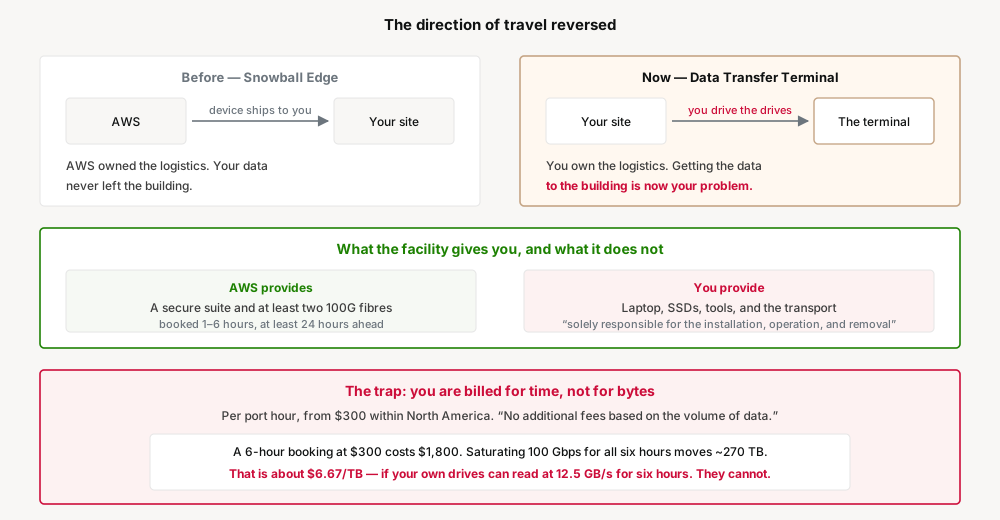
Snowball came to you. A device arrived at your site, your data never left the building until it was encrypted on that device, and AWS owned the shipping.
Data Transfer Terminal is a room you go to. It is a secure facility with “at least two (2) 100G optical fiber cables that are connected to the AWS network”, and the data gets there because you carry it there. Everything between your data centre and that building is now a logistics problem you own.
AWS is unusually direct about the division of labour. Specialists should arrive with “all necessary equipment” — a laptop, solid state drives or Snowball devices, and any other relevant tools. And: “You are solely responsible for the installation, operation, and removal of all equipment and items brought into the Data Transfer Terminal facility.”
There is even a line covering the obvious failure: “AWS Data Transfer Terminal is not liable for any items left behind in the suites.” This is a connectivity service in a locked room, not a managed transfer.
Reservations run “one to six hours in length, for any day of the week, throughout the year”, must be made “at least 24 hours in advance”, and consecutive reservations need “a minimum of one hour separation”.
Six hours is the ceiling on a single session. If your transfer needs more, you are booking multiple sessions with mandatory gaps, which turns a one-day plan into a multi-day one and puts your drives in a car between them.
Billing is “per port hour for each port used during your reservation”, and there are “no additional fees based on the volume of data transferred through the terminal”. Rates start at $300 per port hour within North America and $500 from North America to Europe.
Charging for time rather than bytes sounds generous, and it is — provided you can fill the time. It also moves the entire cost risk onto how fast your own equipment can be read, which is the one variable AWS has no part in.
Architecture
There is very little service here in the usual sense. What you are buying is a scheduled window of very fast connectivity in a physical place, and the design work is entirely about what you bring to it.
The number that decides everything
Take the best case and do the arithmetic, because it is the only way to size a booking honestly. One hundred gigabits per second is 12.5 gigabytes per second. Sustained for a full six-hour reservation that is roughly 270 TB, at a cost of $1,800 at the North America rate — about $6.67 per TB.
That figure is excellent and almost nobody will see it, because it requires your own storage to deliver 12.5 GB/s continuously for six hours. A handful of SSDs in a flight case will not. Miss the line rate by a factor of ten and the same booking costs $66 per TB for the same money, because the money was for the hours.
What the fibre count is really telling you
Each facility has at least two 100G fibres. That is not redundancy framing — it is an invitation to bring enough equipment to use both, in parallel, and it only pays if the source can feed them. The constraint has moved off AWS's network and onto your read path: drive interface, controller, bus, filesystem, and whatever tool you are running.
Where the terminals are is a design input
There are around ten locations worldwide. If none is near your data, the plan acquires a leg that has nothing to do with AWS: moving physical media to a city, securely, with custody documented, and back again. Snowball made that AWS's problem. Data Transfer Terminal makes it yours, and it is the part most likely to be missing from an estimate.
Why This Architecture Holds Up
The failure this creates is not technical. Nothing breaks. The plan simply carries a line item — "bulk transfer via Snowball" — that cannot be purchased, and its replacement has a different cost model, a different owner for the logistics, and a different set of things that can go wrong.
A programme that swaps one for the other without re-planning inherits three new assumptions: that somebody will physically transport the media, that the media can be read fast enough to make the hourly rate reasonable, and that a six-hour ceiling fits the volume. None of those were true or false before, because none of them existed.
And the sum that started all of this is worth redoing rather than inheriting. Networks improved, DataSync is genuinely fast over a good link, and AWS names it first among the alternatives. The physical option is now expensive enough per hour that "is the network really the bottleneck" deserves a fresh answer rather than a remembered one.
Key Architecture Decisions
| Decision | Take this | Because |
|---|---|---|
| Reaching for physical transfer at all | Re-measure the network first; AWS names DataSync before the terminal | The sum that justified Snowball may not survive current bandwidth and per-hour pricing |
| Sizing the booking | Measure your own sustained read rate, not the line rate | You are billed per hour, so a slow source multiplies cost per TB directly |
| Volumes needing more than six hours | Plan multiple reservations with the mandatory one-hour gaps | Six hours is the maximum single session, and gaps are enforced |
| Equipment | Bring enough to drive both fibres, and treat it as your responsibility | Installation, operation and removal are explicitly yours |
| Getting the media there | Budget the transport, custody and insurance as a real workstream | Around ten locations worldwide, and AWS no longer ships anything to you |
| Scheduling | Book at least 24 hours ahead, and prefer off-peak windows | Lead time is mandatory, and AWS names network conditions as a performance factor |
| Cross-continent transfers | Check the rate for your specific pairing before assuming a price | Rates vary by terminal and endpoint location: from $300 NA-to-NA, $500 NA-to-EU |
Closing Thought
Snowball let an organisation solve a bandwidth problem by filling in a form. Data Transfer Terminal solves the same problem faster and cheaper per terabyte, and asks for something most migration plans have never had to include: people, equipment and a van.
The bottleneck did not disappear, it moved. It used to be the network, then it was shipping time, and now it is how fast your own storage can be read inside a six-hour window you booked a day in advance. Size the plan on that number, because it is the one you are paying for.
Comments