Redshift raised the string ceiling inside SUPER from 65,535 bytes to 16,000,000 — roughly 244 times — behind a parameter that is off until you set it. The parameter turns on three things, and the documentation is unusually direct about a fourth that it deliberately leaves alone.
“CREATE TABLE with VARCHAR(MAX) continues to create VARCHAR(65535) columns.”
Executive summary
“Amazon Redshift now supports individual strings up to 16 million bytes within SUPER data types.” The previous ceiling is named: “Previously, individual strings within SUPER data types were limited to 65,535 bytes.”
The gate is in the second sentence of the announcement, and it is the part worth reading first: “Once you opt in through a database parameter, this enhancement applies when ingesting structured or semi-structured data from JSON, PARQUET, TEXT, and CSV source files, and when transforming data through extract load and transform (ELT) processes.” Nothing changes on any existing cluster until somebody changes a parameter group and reboots.
What the parameter buys is a larger working ceiling for strings in flight and in SUPER. What it does not buy is a wider VARCHAR column. Those two facts look like one capability and are not.
What changed
The parameter is enable_large_strings_opt_in, and its documented effect is a list of three
changes and one explicit non-change. Set to Yes:
| What AWS says | What it means in practice |
|---|---|
| “Individual strings that you store in the SUPER data type can be up to 16,000,000 bytes” | SUPER becomes the only durable home for a string above 65,535 bytes |
| “In-memory string functions can process VARCHAR values up to 16,000,000 bytes” | Parsing, concatenating and aggregating large strings stops failing mid-query |
| “VARCHAR(MAX) resolves to VARCHAR(16000000) in expression contexts, such as CAST expressions, views, user-defined functions (UDFs), and stored procedures” | The same declaration means different widths depending on where it appears |
| “CREATE TABLE with VARCHAR(MAX) continues to create VARCHAR(65535) columns” | The non-change. A table column does not get wider, ever |
The third and fourth rows are the same syntax with two different meanings, decided by context. The
character types reference states it from the other direction:
“For VARCHAR, MAX defines the column width as 65,535 bytes in CREATE TABLE statements. When
you set the enable_large_strings_opt_in parameter to Yes, VARCHAR(MAX) supports up to
16,000,000 bytes for in-memory operations.”
So VARCHAR(MAX) in a view definition is a sixteen-million-byte expression; the identical
token in a CREATE TABLE is sixty-five thousand. One parameter changed the meaning of a
keyword in half the places it appears.
AWS's own example in the character types reference shows the in-memory path working end to end, and it stops short of a table:
SELECT LEN(CONCAT(REPEAT('A', 5000000), REPEAT('B', 5000000))) AS total_length; returns
10000000.
Ten million bytes, computed and returned. Writing that result into a VARCHAR column is a separate question with a different answer.
Architecture
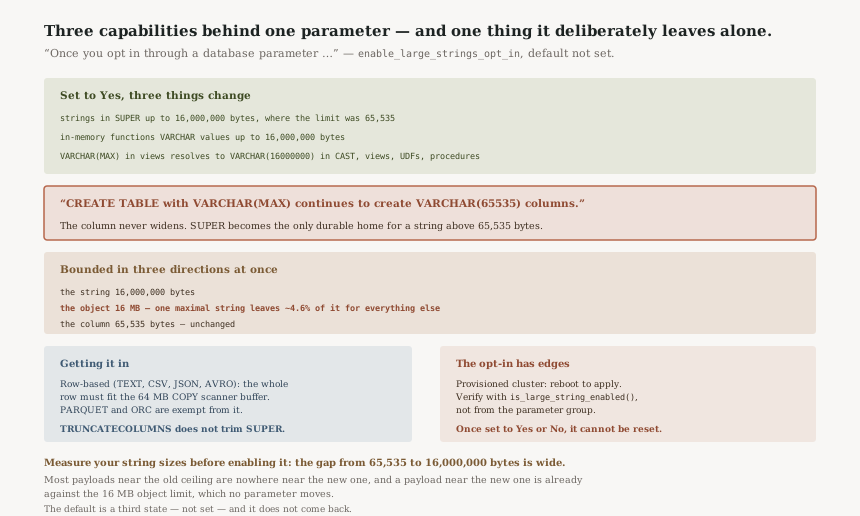
The object is the real ceiling, not the string
Two limits sit next to each other in the SUPER limitations page and need reading together:
“An individual SUPER object can hold up to 16 MB of data”, and
“When you set the enable_large_strings_opt_in parameter to Yes, any string
literal that you store in a single SUPER object has a limit of 16,000,000 bytes. When you don't enable
this parameter, the limit is 65,535 bytes.”
The string limit is therefore within a few percent of the object limit. Reading the 16 MB as binary megabytes, a maximal 16,000,000-byte string leaves 777,216 bytes — about 4.6% of the object — for every other field in that document. Reading it as decimal megabytes leaves nothing at all. Either way the conclusion is the same: one maximal string is effectively the entire object. The feature supports a document with one very large value in it, not a document with several.
That shapes the design. If your payload is one large blob of text plus a handful of identifiers, this fits. If it is several large fields in one record, the object limit binds before the string limit does, and no parameter moves it.
Getting it in, and the format that decides the row limit
“When you use the COPY command to load data into a SUPER column from a row-based format (TEXT, CSV, JSON, AVRO), the entire row must fit within the COPY scanner buffer, which is 64 MB by default.” Then the exemption and the invariant: “The 64 MB scanner limit does not apply to columnar formats (PARQUET, ORC). In all cases, each SUPER object is limited to 16 MB regardless of source format.”
The announcement names JSON, PARQUET, TEXT and CSV as the source formats this applies to, and three of those four are row-based. So for most of the stated ingestion paths there is a second ceiling on the whole row, not just the field — a row carrying a few near-maximal SUPER objects will meet the 64 MB scanner buffer before anything complains about a string.
The option that does not rescue you
“The TRUNCATECOLUMNS option of the COPY command, where supported, applies only to VARCHAR columns and doesn't truncate string values in SUPER columns.”
This matters more after the change than before it. The habit of adding TRUNCATECOLUMNS so a
long field degrades instead of failing a load does not transfer to SUPER. What the documentation establishes is the
narrower point: the flag will not trim an oversized string in a SUPER column, so whatever happens to
that row, it is not a quiet truncation. Not trimming is arguably right for semi-structured data —
silently cutting a JSON document produces invalid JSON — but it is not the behaviour the flag
implies, so the handling has to live somewhere you chose.
Business value
The announcement states the motivation plainly: “Storing large individual strings in the SUPER data type helps avoid complex pre-loading transformations.”
That is the honest version of the benefit. The 65,535-byte limit did not block large strings; it moved the problem upstream into a chunking step, a sidecar store, or an S3 pointer with a join. Each of those is code somebody maintains, and each one turns a single read into two. Removing the need for the workaround is worth more than the raw number suggests.
The function-level change is where that lands day to day:
“Functions such as JSON_PARSE, CONCAT, and LISTAGG can now take input strings and return
output strings up to 16 million bytes in length.” LISTAGG hitting the old ceiling
on a wide aggregation is a familiar failure, and it tended to appear only once the data grew.
Security considerations
The parameter is cluster-wide, set through a parameter group, and applies to “all of the databases that you create in the cluster”. There is no per-database, per-schema or per-role scoping of the new ceiling, so a change made for one workload raises the ceiling for every workload on that cluster.
The practical consequence is on resource consumption rather than access control. A single query can now
construct strings two orders of magnitude larger than before, on any database in the cluster, and the
in-memory wording is explicit that this is in-memory work. Workload management queues and
statement_timeout become the controls that bound it, because the data type no longer does.
Worth noting for review purposes: raising this ceiling makes it possible to store a document in one field that previously had to be split or externalised. Anything that classifies or masks data by column should be checked against the possibility of substantially more content landing in a single SUPER column than its owners expect.
Cost considerations
The parameter itself carries no charge. What changes is what a query can hold in memory and what a table can hold on disk per row, and both of those are already priced — storage by volume, compute by the cluster or the serverless capacity you run.
The cost question is therefore not the feature, it is the shape it encourages. A SUPER column that previously held pointers and now holds documents is a larger table, scanned more expensively, and SUPER columns cannot help by being sort or distribution keys — “You can't define SUPER columns as either a distribution or sort key.” A design that stores large documents inline and then filters on their contents is paying for a scan each time.
Against that, the workaround being removed had its own bill: a second store, the requests to it, and the compute in whatever did the chunking. For workloads that genuinely need large strings this is likely to be cheaper in total. For workloads that merely can now store them, it is a new cost with no new capability.
Operational considerations
Three operational facts about the parameter deserve to be read before it is set anywhere.
It needs a reboot on provisioned clusters. “For a provisioned cluster, you must reboot the cluster to apply this parameter.” This is not a dynamic setting, so enabling it is a maintenance activity with an outage, not a configuration tweak.
There is a function to check the real state.
“To check the current state of your cluster, run the following command:
SELECT is_large_string_enabled();” This is the right thing to assert in a
deployment check. A parameter group showing Yes on a cluster that has not rebooted is a
cluster where the ceiling has not moved, and the parameter group alone will not tell you that.
Setting it is a one-way door.
“When you reset enable_large_strings_opt_in through
ResetClusterParameterGroup, Amazon Redshift preserves the original value of the parameter.
After you set enable_large_strings_opt_in to Yes or No, you can't reset it to the default
value.”
The default is not No — it is
“not set (preserves existing cluster behavior)”, which is a third state. You can
move between Yes and No afterwards, but the unset state is gone once touched.
For a parameter whose whole purpose is an opt-in, that is a detail worth knowing before trying it on a
cluster you care about.
Tradeoffs
| Choice | What you gain | What it costs |
|---|---|---|
| Leave the parameter unset | Existing behaviour preserved exactly; the unset state stays available | The 65,535-byte ceiling and whatever workaround sits on top of it |
Set it to Yes |
16,000,000-byte strings in SUPER and in memory, cluster-wide | A reboot, a one-way parameter change, and a larger blast radius for a single query's memory use |
| Store large documents inline in SUPER | One read, no join, no sidecar store to maintain | Larger tables, scans you cannot avoid with a sort key, and an object capped at 16 MB |
| Keep an external store and a pointer | No cluster-wide change; no 16 MB object ceiling | The pre-loading transformation the announcement is offering to remove |
Implementation guidance
Measure the actual distribution of your string sizes first. The gap between 65,535 and 16,000,000 bytes is wide enough that most payloads near the old limit are nowhere near the new one. If your largest field is 200 KB, this removes your workaround. If it is 15 MB, the 16 MB object limit is now your design constraint and it is close.
Enable it on a non-production cluster and assert with the function, not the console.
SELECT is_large_string_enabled(); is the only statement that reflects whether the reboot
has taken effect.
Check every place VARCHAR(MAX) appears in your DDL and your views. After
the change those two populations mean different widths. A view that casts to VARCHAR(MAX)
and writes into a table column declared VARCHAR(MAX) is a 16,000,000-byte expression
feeding a 65,535-byte destination.
Decide what should happen to an oversized string before you load one.
TRUNCATECOLUMNS will not trim it in a SUPER column, so the handling has to be in your
pipeline or your error path.
If you load from TEXT, CSV, JSON or AVRO, size the whole row against 64 MB, not just the field. Columnar sources (PARQUET, ORC) are exempt from that scanner limit, which is a reason to prefer them for large-document ingestion independent of this change.
Best practices
Treat SUPER as the destination for a large string and VARCHAR as unchanged. The cleanest mental model after this release is that the column ceiling did not move at all; what moved is how much a query can carry and how much one SUPER value can hold.
Keep one large value per SUPER object. With the string limit at 16,000,000 bytes against an object limit of 16 MB, a document with two large fields does not fit however the megabyte is counted.
Remember the other SUPER limits still apply unchanged — “The maximum nesting depth for arrays and structures of the SUPER data type is 1,000”, and SUPER columns cannot be a distribution or sort key. A wider string does not make SUPER a better place to put something you filter on.
If you work with multibyte text, do the arithmetic in bytes. “A VARCHAR can contain multibyte characters, up to a maximum of four bytes per character”, so 16,000,000 bytes is four million characters in the worst case, not sixteen million.
Who should adopt this and when
Adopt now if you maintain a chunking step, a sidecar store or an S3-pointer join purely because a field exceeded 65,535 bytes, and the field is comfortably under 16 MB. That workaround is now deletable, and deleting it is the whole value.
Adopt now if LISTAGG or JSON_PARSE failures on large inputs
are a recurring operational cost. The in-memory half of the parameter addresses that directly and does
not require you to change any table.
Wait if your interest is a wider table column. That is the one thing this does not provide, and the documentation says so explicitly.
Wait if the cluster is shared by workloads you do not own. The parameter is cluster-wide and the change is a reboot, so it needs the consent of everyone on it.
Availability is not a constraint: “This enhancement is available in all AWS Regions, including the AWS GovCloud (US) Regions, where Amazon Redshift is available.”
Key takeaways
The headline number is real and it is bounded in three directions at once. The string can reach 16,000,000 bytes; the object containing it stops at 16 MB; the table column it might have gone into stays at 65,535 bytes.
The non-change is the part to carry away. “CREATE TABLE with VARCHAR(MAX) continues to create VARCHAR(65535) columns” means SUPER is now the only durable home for a large string in Redshift, and a pipeline that computes one and tries to land it in a VARCHAR column will find the old limit exactly where it left it.
And the opt-in has more edges than an opt-in usually does: a reboot to apply, a function rather than a console field to verify it, and a default state you cannot return to once you have left it.
Official AWS references
- Amazon Redshift expands SUPER data type to store strings up to 16 million bytes — the announcement: the new and previous limits, the database-parameter opt-in, the source formats and ELT scope, the named functions, and Region availability including GovCloud (US)
- enable_large_strings_opt_in — the three values with not set as default, the three behaviours enabled by Yes, the statement that CREATE TABLE with VARCHAR(MAX) still creates VARCHAR(65535), the provisioned-cluster reboot requirement, the
is_large_string_enabled()check, and the fact that the parameter cannot be reset once set - SUPER data type limitations — the 16 MB per-object limit, the 16,000,000-byte and 65,535-byte string literal limits either side of the parameter, the 64 MB COPY scanner buffer for row-based formats and its exemption for columnar ones, TRUNCATECOLUMNS not applying to SUPER columns, the 1,000 nesting depth, and SUPER columns being ineligible as distribution or sort keys
- Character types — the VARCHAR range of 65535 bytes, the two meanings of VARCHAR(MAX) before and after the parameter, the four-bytes-per-character multibyte note, and the CONCAT example returning 10000000
- Amazon Redshift parameter groups — that a parameter group applies to all databases in the cluster, the default value of
enable_large_strings_opt_inin theredshift-2.0family, and that some parameter changes require a cluster restart
Comments