Business Challenge
Posts #34 to #37 were about proving who a workload is: the object model, the two kinds of managed identity, the endpoints that issue tokens, the federation that removes the secret. Identity established. This post is the other half — what that identity may do once it has a token — and it opens with the single most consequential ambiguity in the Entra permission model.
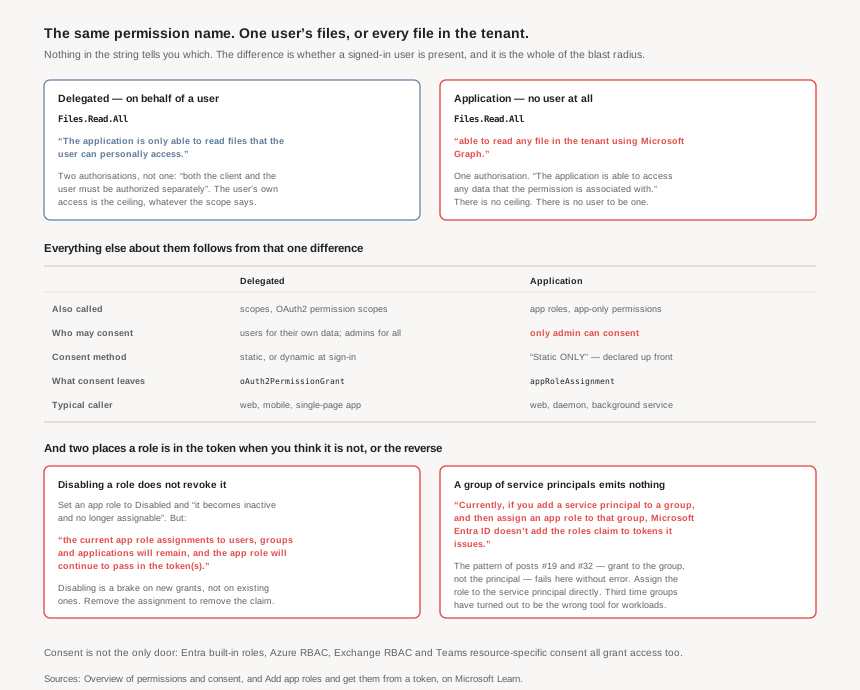
Take Files.Read.All. Granted as a delegated permission, the application is only able to read files that the user can personally access. Granted as an application permission, the same app is able to read any file in the tenant using Microsoft Graph.
One string. One person's documents, or the organisation's. The permission name is identical in the portal, in the manifest, in the code review, and in the change ticket. The only thing that distinguishes them is which column of the API permissions blade someone clicked — and that is a decision about blast radius disguised as a decision about wiring.
Delegated access requires two authorisations, not one: both the client and the user must be authorized separately to make the request. The scope says what the app may attempt; the user's own access decides what actually succeeds. So a delegated permission has a ceiling built into it, and that ceiling is a person.
App-only access has one authorisation and no person. Nothing is left to constrain it, which is why in general, only an administrator or owner of an API's service principal can consent to application permissions.
Architecture
Two vocabularies for two mechanisms
Much of the confusion here is naming. The same concepts carry several names each, and the documentation lists them side by side:
| Delegated permissions | Application permissions | |
|---|---|---|
| Also called | Scopes, OAuth2 permission scopes | App roles, app-only permissions |
| Access context | Get access on behalf of a user | Get access without a user |
| Who can consent | Users can consent for their data; admins can consent for all users | Only admin can consent |
| Consent method | Static or dynamic: request individual permissions at sign-in | Static ONLY |
| What consent leaves behind | oAuth2PermissionGrant | appRoleAssignment |
| Typical app | Web / Mobile / single-page app | Web / Daemon |
That last row of objects is the practically useful one. If you want to audit what an application has actually been granted, you are looking for two different object types in Microsoft Graph, and a tool that enumerates one will silently miss the other. The dangerous half — app-only access to everything — is the appRoleAssignment side.
The consent-method row matters too, and in an unexpected direction. Application permissions being static ONLY means they must be declared on the registration up front; there is no equivalent of an app quietly asking for more at run time. For once the more dangerous mechanism is the less dynamic one, which is a small mercy.
App roles, and what the roles claim actually carries
App roles are the same machinery used in both directions, which is worth stating plainly because the portal presents them as two features. App roles are defined on an application registration representing a service, app, or API, and Entra emits a roles claim for each role that the user or service principal was granted.
They can be assigned to a user or a group of users, and also to the service principal for another application, or to the service principal for a managed identity — which is the join between this post and #35. A managed identity can hold an app role in your own API, so "what may this workload do" becomes a question your application answers from a claim rather than one Azure RBAC answers at the resource.
Where the role lands depends on the shape of the app: for an app that signs in users, the roles claims are included in the ID token. When your application calls an API, the roles claims are included in the access token.
Disabling a role does not revoke it. Set an app role to Disabled and it becomes inactive and no longer assignable. But: the current app role assignments to users, groups and applications will remain, and the app role will continue to pass in the token(s). Disabling is a brake on new grants, not on existing ones. To stop the claim you must remove the app role from the user, group or application.
A group of service principals emits nothing. Currently, if you add a service principal to a group, and then assign an app role to that group, Microsoft Entra ID doesn't add the roles claim to tokens it issues. The pattern this series recommended in #19 and #32 — grant to the group, not the principal — fails here, and fails without an error.
Consent, and who is making the decision
Consent is a process where users or admins authorize an application to access a protected resource. The prompt carries the list of permissions the application requires and the publisher information, and it appears in more situations than first sign-in — also when previously granted consent is revoked, when an app is coded to specifically prompt, and when it uses dynamic consent to ask for new permissions as needed at run time.
Two subtleties are worth pulling out.
First, the threshold for requiring an admin is not "application permission" alone: application permissions and many high-privilege delegated permissions can only be consented to by an administrator, and the prompt escalates if consent wasn't granted and if one of those high-privilege permissions is requested. So some delegated scopes are gated too, and which ones is a property of the resource rather than something visible in your own app.
Second, and going the other way: permission requests that contain custom application scopes aren't considered high-privilege and thus, they don't require admin consent. Scopes you define on your own API are not treated as privileged by the platform, however privileged they are in your domain. If your API exposes a Payments.Write scope, Entra has no opinion about it — an ordinary user can consent, and your own authorisation code is the only thing standing behind it.
And preauthorization removes the prompt altogether: it enables a resource application owner to grant permissions to client apps without requiring users to see a consent prompt for the set of permissions that are preauthorized. Correct for first-party clients of your own API; worth knowing exists, because it means "no prompt appeared" does not mean "no permission was granted".
Why This Architecture Holds Up
Because the delegated/application choice is the blast radius, and it is invisible in review
Return to Files.Read.All. A pull request adding that permission, a change ticket describing it, and a screenshot of the manifest all look the same in both cases. The difference — one mailbox versus the organisation — lives in which list the permission was added to.
The rule that falls out is simple and worth enforcing: treat every application permission as a tenant-wide grant, because that is what it is. The question is never "does this app need Files.Read.All" but "does this app need to read every file belonging to everyone, with no user to bound it". Phrased that way, most requests answer themselves, and the ones that survive are genuinely daemons.
Where app-only access truly is required — automation, and backup, background services or daemons, or when the data required can't be scoped to a single user — the mitigation is not the consent screen but the resource itself: scoping the application's access at the API where that is supported, rather than relying on the permission name to be narrow.
Because app roles are portable and groups are not
The documentation makes an argument here that generalises well beyond SaaS:
An app using groups for authorization will break in the next tenant as both the group ID and name could be different. An app using app roles remains safe. In fact, SaaS apps often assign groups to app roles for the same reasons, as it allows the SaaS app to be provisioned in multiple tenants.
The underlying distinction: app roles are specific to an application and are defined in the app registration, so they move with the application, while groups aren't specific to an app, but to a Microsoft Entra tenant. And they have different lifecycles — app roles are removed when their app registration is removed, while groups remain intact even if the app is removed.
That last pair is a neat inversion of post #34's asymmetry. There, deleting an application object took its service principal with it but restoring did not bring it back. Here, deleting the registration takes the roles and leaves the groups — so an app rebuilt from a template comes back with its authorisation model intact and its group memberships orphaned, or the reverse, depending on which you chose.
The recommended shape is the hybrid the docs describe: define app roles for the authorisation model, and assign groups to those roles. The application code only ever sees roles, so it stays portable; the directory still does the membership management it is good at. With the one exception above — that trick does not work for service principals.
Because the consent framework is only one way an application is authorized
A closing caution from the overview that deserves more attention than its two lines get: the consent framework is only one way an application or user can be authorized to access protected resources, and admins should be aware of other authorization systems — Microsoft Entra built-in roles, Azure RBAC, Exchange RBAC, and Teams resource-specific consent.
So a complete answer to "what can this application do?" requires four or five separate enumerations, in different portals, returning different object types. This series has now walked through most of them: Azure RBAC in #18 to #21, Entra roles in #32, app roles and consent grants here. The uncomfortable conclusion is that no single screen answers the question, and an audit that checks one and stops has not checked anything much.
Key Architecture Decisions
| Decision | What to do | Why |
|---|---|---|
| Any request for an application permission | Restate it as "every object of this type in the tenant, with no user to bound it" | The application is able to access any data that the permission is associated with — the name does not say so. |
| Choosing between the two | Prefer delegated wherever a user is present | Both the client and the user must be authorized separately, so the user's own access is a built-in ceiling. |
| Auditing what an app was granted | Enumerate oAuth2PermissionGrant and appRoleAssignment |
Consent leaves two different object types; a tool reading one misses the other. |
| Revoking an app role | Remove the assignment; do not rely on disabling the role | Disabled roles continue to pass in the token(s) for existing assignments. |
| Granting an app role to a workload | Assign to the service principal directly, not via a group | A service principal in a group gets no roles claim — and no error. |
| Authorisation model for your own app | Define app roles; assign groups to them | App roles move with the application; group IDs and names differ per tenant. |
| Scopes you define on your own API | Assume no platform gate; enforce in your code | Custom application scopes aren't considered high-privilege and need no admin consent. |
App role value strings |
Fix them early and keep them stable; no spaces | The value should exactly match the string referenced in the application's code. |
| "No consent prompt appeared" | Check for preauthorization before concluding nothing was granted | Preauthorization grants permissions without requiring users to see a consent prompt. |
| Answering "what can this app do?" | Check consent grants, Entra roles, Azure RBAC and the resource's own RBAC | The consent framework is only one way an application or user can be authorized. |
Closing Thought
The permission model has a naming problem that is really a design problem. Files.Read.All reads as a statement about scope — all files — when the word doing the work is invisible: all files that this caller could otherwise reach, or all files full stop. Two permissions with one name, distinguished by a property of the grant rather than a property of the permission.
That is why this is worth a post of its own rather than a paragraph in an implementation guide. Every other control in this phase has been explicit about its reach: a role assignment names a scope, an administrative unit names its members, a federated credential names one subject. The consent model is the exception — the reach is decided by a radio button, recorded in a different object type depending on which you picked, and displayed identically afterwards.
The habit that protects you is small: when a permission request arrives, say out loud what it means with no user in the picture. "Read any file in the tenant." "Send mail as anyone." Most requests do not survive being said that way, and the ones that do have earned an administrator's attention — which is precisely what requiring admin consent was for.
#39 goes under the consent screen to the protocol itself: the OAuth 2.0 and OpenID Connect flows on Entra — which grant type belongs to which kind of client, and why the answer has changed twice in the last decade.
Comments