Business Challenge
#36 noted in passing that denial conditions are a cut-down dialect. That turns out to be the general case rather than the exception.
Not possible. You cannot use conditions when you grant legacy basic roles — Owner, Editor and Viewer. This is the second functional consequence of the #32 rename, and the one people meet first.
Correct approachReplace the legacy role with the narrowest predefined role that fits, then condition that binding. The condition requirement is often the best argument for finally removing an Owner grant.
Also not possible. You cannot use conditions when you grant roles to all users or all authenticated users. The two principals from #31 that need constraining the most are the two that cannot carry one.
Correct approach
Public is binary in IAM. If access must be conditional, the grant cannot be to allUsers — use a real principal set, or put the control in front of the resource.
It will not mean the same thing, because conditions in deny policies only recognize resource tag functions. A resource.type or request.time test has no equivalent there.
Treat each policy type as a separate language with a shared syntax. Translate the intent through tags, or accept that the restriction cannot be expressed as a deny.
You have roughly a hundred. Google recommends no more than 100 conditional role bindings to a single allow policy, and beyond that you might exceed the overall size limit for allow policies — the #31 budget, consumed faster because conditions are verbose.
Correct approachPush the variability into resource tags and write one conditional binding that reads them, rather than one binding per case.
Architecture
A condition is a title, an optional description, and an expression. The expression defines an attribute-based logic expression using a subset of the Common Expression Language, and can contain multiple statements where each statement evaluates one attribute.
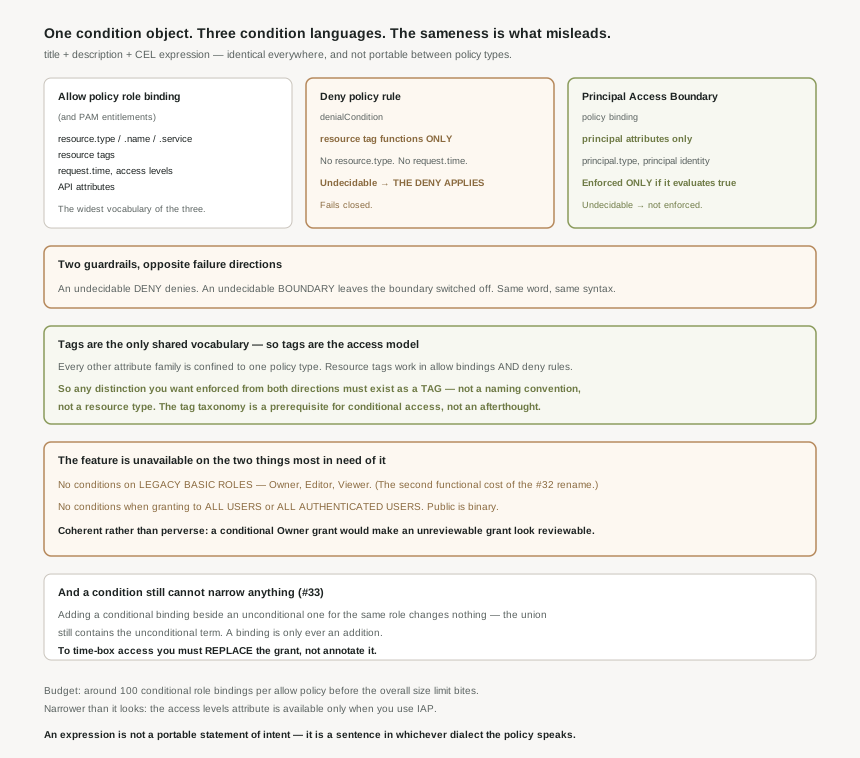
Three places a condition can live
| Policy type | Attributes available | If the expression cannot be decided |
|---|---|---|
| Allow policy role binding including Privileged Access Manager entitlements |
Resource (type, name, service, tags), request (date and time, access levels, IAP host and path), and API attributes. | Not stated in the same terms as the other two. |
| Deny policy rule | Resource tag functions only. | The deny applies. Fails closed. |
| Principal Access Boundary binding | Principal attributes — the type of principal in the request, and its identity. | Not enforced — the policy applies only if the condition evaluates to true. |
Read the third column twice. An undecidable condition on a deny rule denies; an undecidable condition on a boundary binding leaves the boundary switched off. Both are guardrails, and they fail in opposite directions.
What you can actually test in a role binding
- Resource — the classic use.
resource.type == 'compute.googleapis.com/Instance'allows access to Compute Engine VM instances, but no other type of resource;resource.name.startsWith(...)scopes to a bucket prefix. - Date and time — expiry via
request.time, or working-hours windows withgetHoursandgetDayOfWeekin a named time zone. - Access levels — Access Context Manager levels such as a corporate network range. Narrower than it looks: the access levels attribute is available only when you use IAP.
- API attributes — the sharpest and least known.
api.getAttribute('iam.googleapis.com/modifiedGrantsByRole', []).hasOnly([...])lets you grant someone the ability to manage bindings for one specific role and no other. - Resource tags — and note you can use the resource tags attribute in deny policy deny rules, which is what makes tags the only shared vocabulary across policy types.
Of everything in the condition language, resource tags are the one attribute family that works in both allow bindings and deny rules. Every other attribute is confined to one policy type. So if a distinction matters enough to be expressed in more than one kind of policy — production versus test, regulated versus not — it has to exist as a tag, not as a naming convention or a resource type. Getting the tag taxonomy right is therefore a prerequisite for conditional access, not an afterthought, and it is the same taxonomy #36 needs for denial conditions.
Why This Architecture Holds Up
Three limits define the shape of the feature more than its capabilities do.
It cannot narrow an existing grant
This is #33's rule and it is worth restating here because conditions are where people expect it to be false. Adding a conditional binding beside an unconditional one for the same role changes nothing — the union still contains the unconditional term. A condition constrains the binding it sits on, and a binding is only ever an addition. To time-box access you must replace the grant, not annotate it.
It cannot apply to the grants that most need it
Legacy basic roles cannot carry conditions. Neither can grants to all users or all authenticated users. Those are, respectively, the broadest role and the broadest principal in the product. The feature designed to narrow access is unavailable on the two things most in need of narrowing — which is coherent rather than perverse: a conditional Owner grant would be a way to make an unreviewable grant look reviewable.
It does not travel between policy types
The structure is identical, the syntax is CEL in all three, and the expression is still not portable. Take a working resource.type condition from a role binding, paste it into a deny rule, and the deny rule is wrong — not rejected for using the wrong grammar, but wrong, because deny recognises only tag functions. Paste a principal.type test into a role binding and it belongs to Principal Access Boundary bindings instead.
What to do with this
- Build the tag taxonomy first. It is the only vocabulary shared by allow and deny conditions.
- Replace, do not annotate. A conditional binding added next to an unconditional one has no effect.
- Treat a required condition as a reason to drop a basic role, since the two are mutually exclusive.
- Budget around 100 conditional bindings per allow policy, and prefer one tag-driven binding to many near-identical ones.
- Check the attribute is available for your case before designing around it — access levels in particular are IAP-only.
- Write down the failure direction for each condition you deploy. Deny fails closed; a boundary binding simply does not enforce.
Key Architecture Decisions
| Decision | Choose this | Because |
|---|---|---|
| Expressing a distinction in both allow and deny | A resource tag | Tags are the only attribute family both accept. |
| Time-boxing an existing grant | Replace the binding | A conditional binding beside an unconditional one adds nothing. |
| Conditioning an Owner or Editor grant | Not possible — change the role | Conditions cannot be used with legacy basic roles. |
| Conditioning public access | Not possible — change the principal | Conditions cannot be used when granting to all users. |
| Many similar conditional bindings | One binding reading a tag | Stay under 100 per allow policy and within the size limit. |
| Reusing an expression across policy types | Rewrite it | Deny recognises tag functions only; boundary bindings take principal attributes. |
| Restricting which roles someone may grant | An API attribute condition | modifiedGrantsByRole with hasOnly limits role granting. |
| Designing around access levels | Confirm IAP is in the path | The attribute is available only when you use IAP. |
| An undecidable deny condition | Assume it denies | If it cannot be evaluated, the deny rule applies. |
Closing Thought
The tidiest way to describe IAM Conditions is that the product has one condition object and three condition languages. The object is the same everywhere — title, description, expression — and that sameness is exactly what misleads. An expression is not a portable statement of intent; it is a sentence in whichever dialect the enclosing policy speaks, and the dialects differ in vocabulary and in what they do when the sentence cannot be resolved.
The practical consequence is that tags stop being metadata and become the access model. They are the only nouns both the allow and deny dialects understand, which means any distinction you want enforced from both directions must be a tag before it can be a condition. That is a larger architectural commitment than the feature's presentation suggests, and it is worth making deliberately rather than discovering halfway through writing a deny rule that the expression you wanted does not exist.
#38 finally brings the tools: Policy Troubleshooter and Policy Analyzer — the machinery that answers the #34 question properly, including what conditions actually evaluated to on a real request.
Comments