Business Challenge
An auditor asks a simple question: if one availability zone in your region fails, does this service keep running? The team checks that the region supports zones, sees that it does, and says yes.
The honest answer is that nobody knows. Nothing in their deployment asked for zones. Azure placed those resources wherever it liked across the zones in the region, told nobody which, and if the failed zone happens to be the one holding them, they go down with it.
This is not a misconfiguration. It is the default. A resource that does not opt into zonal or zone-redundant placement is nonzonal, and nonzonal means Azure chooses and you are not told.
"Our region has availability zones" is a fact about Microsoft's datacenters. "Our workload uses availability zones" is a fact about your configuration. The first is necessary for the second and tells you nothing on its own — and services differ in whether zone support needs configuring, comes automatically, or requires a particular tier or SKU.
Architecture
An availability zone is a logical grouping of one or more physically separate datacenters within a region, each zone with independent power, cooling and networking. They are typically several kilometres apart and usually within 100 kilometres of one another — far enough that a local power failure or weather event is unlikely to take two at once, close enough that the network between them stays fast.
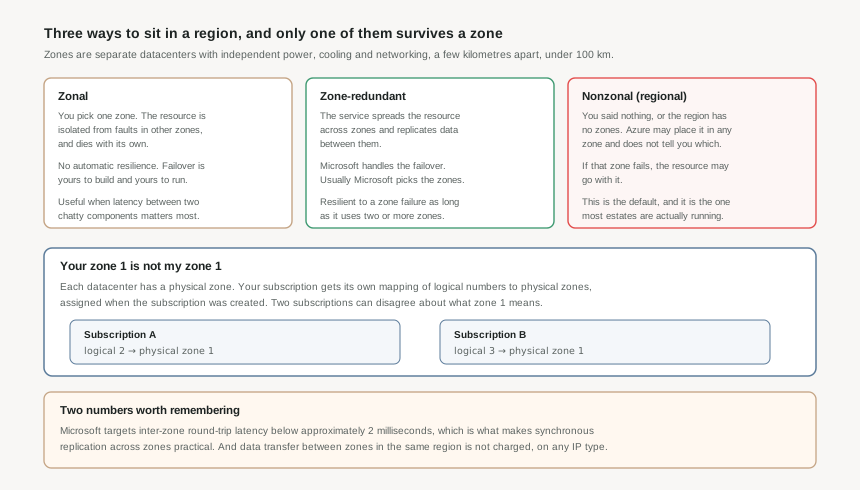
Zone-redundant: the service does it for you
A zone-redundant resource is replicated or distributed across multiple zones by the service itself. Microsoft spreads the requests, replicates the data, and manages the failover automatically when a zone has an outage. For most services Microsoft also chooses which zones to use.
The rule for whether it counts is refreshingly blunt: a resource is resilient to a zone failure as long as it uses two or more zones.
Zonal: you pick the zone, and you own the consequences
A zonal resource sits in one availability zone that you select. It is isolated from faults in other zones — but it does not survive the failure of its own, and Azure does not move it. Failover is yours to design, build and execute.
That sounds strictly worse, and for most workloads it is. It exists for the case where inter-zone latency matters more than zone resilience: a chatty set of virtual machines that talk constantly can be pinned to a single zone deliberately. To make zonal resources resilient you deploy separate resources into several zones yourself and handle the failover between them.
Nonzonal: the default, and the one in the audit story
If a resource is not configured for zones — either because the region has none or because nobody asked — it is nonzonal. Azure may place it in any zone in the region, you do not choose, and you are not told. If that zone has an outage, the resource may be in it.
Most estates contain far more nonzonal resources than their owners believe, because nonzonal is what you get by not deciding.
Why This Architecture Holds Up
Here is the detail that catches experienced Azure teams. Each datacenter is assigned a physical zone. Your subscription sees logical zone numbers — 1, 2, 3 — and the mapping between the two is assigned per subscription, automatically, when the subscription is created.
So subscription A might have physical zone 1 mapped to logical zone 2, while subscription B has that same physical zone as logical zone 3. Both teams say "zone 1" and mean different buildings.
This matters in two concrete situations:
- Cross-subscription locality. Two components in different subscriptions pinned to "zone 1" for low latency may be in different physical zones — so you have paid the coordination cost and got none of the benefit.
- Cross-subscription spread. Placing replicas in "zone 1 and zone 2" across two subscriptions does not guarantee two distinct physical zones, which is the assumption a resilience design rests on.
The mapping is readable rather than mysterious. From the CLI, az account list-locations returns each region's availabilityZoneMappings for the current subscription, and there is a Check Zone Peers API for comparing across subscriptions. Any design that pins zones across subscription boundaries should be reading that mapping rather than trusting the number.
Microsoft targets inter-zone round-trip latency below approximately 2 milliseconds, which is what makes synchronous replication across zones viable rather than theoretical. And Azure does not charge for data transfer between availability zones in the same region, on private or public IP addressing. Together those remove the two objections usually raised against spreading a workload across zones.
What zones do not do
They do not protect against a full-region outage. That is what multi-region design is for, and for mission-critical workloads Microsoft's guidance is to be both multi-zone and multi-region.
There is one more benefit worth knowing because it is invisible: for each region, Microsoft aims to deploy updates to Azure services one availability zone at a time. A workload already spread across zones therefore rides out platform updates in the other zones — but only if it is spread already. The nonzonal resource gets no such protection.
Key Architecture Decisions
| Decision | Choose this | Because |
|---|---|---|
| Default posture for production | Zone-redundant wherever the service offers it | The service handles spreading and failover, inter-zone latency is around 2 ms, and cross-zone traffic is not charged. The usual objections do not survive contact with the numbers. |
| When zonal is the right answer | Only when inter-zone latency genuinely dominates | Zonal buys locality and costs resilience. It is a deliberate trade for chatty components, not a default, and it makes failover your job. |
| Auditing what you already run | Assume nonzonal until the configuration proves otherwise | Nonzonal is what a resource gets by not deciding. Being in a zoned region is not evidence of anything. |
| Pinning zones across subscriptions | Read availabilityZoneMappings, never trust the number | Logical-to-physical mapping is per subscription and assigned at creation, so the same number can mean different datacenters in two subscriptions. |
| Choosing a SKU or tier | Check zone support before deciding on price | Some services only support zones on particular tiers or SKUs, so the cheap tier can quietly remove zone resilience from the design. |
| Workloads pinned to one region by data residency | Multi-zone, plus backup and restore with honest recovery objectives | Zones are the primary way to maximise availability without moving data outside the region — but they do not survive a regional outage, so the recovery plan has to say what happens if the region goes. |
Closing Thought
Availability zones are the cheapest resilience Azure sells. The network between them is fast, the traffic across them is free, and for zone-redundant services the failover is somebody else's problem. The only real cost is deciding.
Which is why the interesting question is never "does this region have zones". It is: for each resource in this workload, which of the three shapes is it, and who performs the failover when a zone goes? If the answer to the second half is "nobody has thought about it", the resource is nonzonal and the honest audit answer is no.
#8 takes the other half of regional resilience: paired regions — what pairing actually promises about sequential updates and recovery priority, what it does not promise, and why many newer regions have no pair at all.
Comments