Business Challenge
Two services, one sentence of requirement. "We need to move files into S3" is answered by AWS DataSync and by AWS Transfer Family, and the comparison tables people build to choose between them compare the wrong things — throughput, protocol lists, price per GB.
Those all differ, and none of them is the deciding factor. The deciding factor is a question the requirement did not ask: who starts the transfer, and whose software is at the other end.
DataSync is a transfer you define and execute. You describe a source location and a destination location, and it moves data between them — “to, from, and between AWS storage services” — on your schedule, under your control, with both ends known in advance.
Transfer Family is an endpoint you operate. It provides “fully managed support for the transfer of files over SFTP, AS2, FTPS, FTP, and web browser-based transfers”, and somebody else's client connects to it. You do not initiate anything; you are the server.
If files arrive from a partner, a supplier, a bank or a government body, their end is fixed. It is an SFTP client configured years ago, referenced in a contract, operated by people you will never meet.
No amount of DataSync's superiority changes that. Transfer Family exists precisely so that you can “maintain existing client-side configurations for authentication, access, and firewalls—so nothing changes for your customers, partners, and internal teams”. That sentence is the product's entire reason for existing, and it is a statement about other people's software.
The mirror-image mistake is standing up an SFTP endpoint to move your own data from your own NAS into your own bucket. It works. It also means operating an internet-reachable server, managing its credentials, and scripting a client to drive it — to solve a problem where you control both ends.
DataSync handles that case with no endpoint at all, and brings things a scripted client will not: automatic encryption and data integrity validation, a purpose-built protocol, and parallel multi-threaded transfer.
Both move data over the network, so both are bounded by it. That used to be where Snowball came in, and for new customers it no longer does — AWS Snowball Edge is closed to new customers, and AWS now directs them to DataSync for online transfers, AWS Data Transfer Terminal for secure physical transfers, or partner solutions.
So "the network is the bottleneck" is now a question with a different answer than most reference architectures record, and DataSync inherited a job it did not previously have.
Architecture
Read each service by what it requires you to operate, and the boundary between them stops being a judgement call.
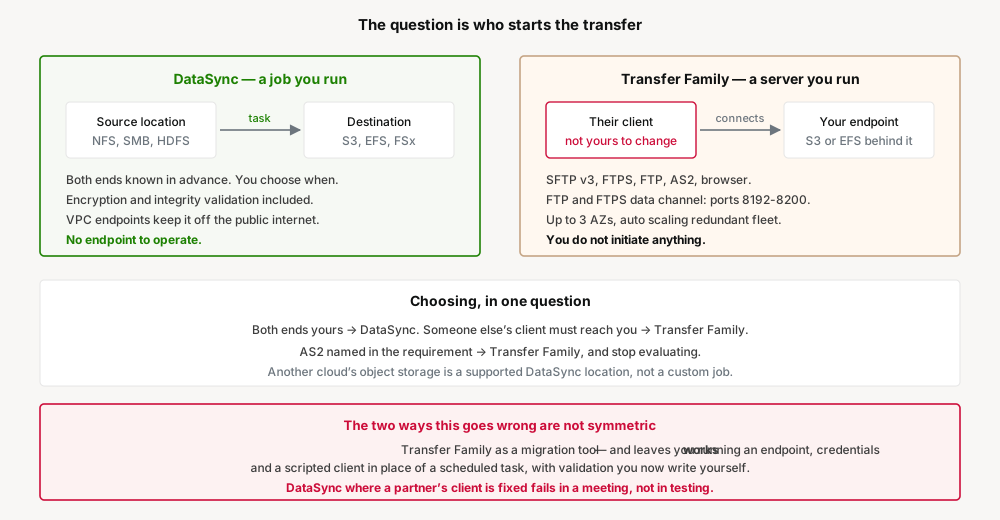
DataSync: locations and a task
The model is two locations and a task between them. On-premises sources are NFS, SMB, HDFS and object storage. AWS destinations are S3, EFS, and FSx in all four flavours — Windows File Server, Lustre, OpenZFS and NetApp ONTAP.
The reach beyond AWS is wider than most people expect and worth knowing before anyone proposes a custom sync job: DataSync moves data to and from Google Cloud Storage, Azure Blob Storage and Azure Files, along with Wasabi, DigitalOcean Spaces, Oracle Cloud Object Storage, Cloudflare R2, Backblaze B2 and others. A multi-cloud copy that teams routinely hand-build is a supported location type.
Two properties matter for anything regulated. Transfers carry “automatic encryption and data integrity validation”, so "did every byte arrive" is answered by the service rather than by a checksum script somebody wrote. And VPC endpoint support means data can move “without traversing the public internet”, which is frequently the difference between an approved design and a rejected one.
Transfer Family: an endpoint and its protocol contract
Here you are running a server, and the details that matter are the ones your counterparty's client will meet. SFTP is version 3 — a specific version, not a family, and the thing to check against a client that assumes something newer. FTP and FTPS data connections use the port range 8192 to 8200, which is a firewall conversation on both sides and the most common reason a first connection fails.
AS2 is the one that decides the question outright when it appears. It exists for B2B exchange with compliance requirements that rely on data protection built into the protocol, and no amount of preference for DataSync substitutes for it.
The endpoint supports up to 3 Availability Zones and is backed by an auto scaling, redundant fleet — which is the actual argument for the managed service over an SFTP server on EC2 that somebody has to patch.
Choosing, in one question
| Who is at the other end | Service | Why |
|---|---|---|
| Your own storage, both ends | DataSync | No endpoint to run; validation and encryption included |
| A partner with an existing SFTP client | Transfer Family | Their configuration does not change, which is the point |
| A B2B counterparty requiring AS2 | Transfer Family | The protocol is the requirement |
| Another cloud's object storage | DataSync | Supported location type, not a custom job |
| Business users who need to drop files in | Transfer Family web apps | Browser-based access to S3 without a client |
| Nobody — the network is the limit | Neither | Data Transfer Terminal or a partner; Snowball is closed to new customers |
Why This Architecture Holds Up
Both services will run in the wrong role for a long time before anything surfaces as a problem, and the two failure modes are asymmetric.
Transfer Family used as a migration tool works. Files move. What you have is an internet-facing endpoint, a set of credentials, and a scripted client, all standing in for a scheduled task — and the integrity validation you would have got for free is now something you either wrote or skipped. Nothing fails; you simply own more than you needed to.
DataSync proposed where a partner's client is fixed fails differently. It does not fail in testing, because it never reaches testing. It fails in a meeting where somebody explains that the client is specified in a contract and will not be changing, and the design has to be redone.
The reason "who starts the transfer" is the better question is that it is answerable at requirements time, by the person who knows who the counterparty is — before any throughput number has been looked up.
Key Architecture Decisions
| Decision | Take this | Because |
|---|---|---|
| Choosing between the two | Ask who initiates and whose client is at the far end, before comparing features | It is answerable at requirements time and it decides the outcome |
| Both ends under your control | DataSync, with no endpoint at all | An SFTP server to move your own data is infrastructure standing in for a task |
| A counterparty's client is fixed | Transfer Family, and stop evaluating | Not changing their configuration is the entire product rationale |
| Regulated or sensitive data | DataSync over VPC endpoints | Keeps the transfer off the public internet, with validation built in |
| Multi-cloud copies | Check the DataSync location list before building anything | Google Cloud Storage, Azure Blob and Azure Files are supported locations |
| Standing up FTP or FTPS | Agree ports 8192-8200 with both firewall owners up front | The data channel range is where first connections fail |
| SFTP client compatibility | Confirm the client works with SFTP version 3 | It is a specific version, not a protocol family |
| The network is genuinely the bottleneck | Data Transfer Terminal or a partner, not Snowball | Snowball Edge is closed to new customers; see arch #26 |
Closing Thought
Most AWS service comparisons are genuine trade-offs where either choice can be defended. This one is not. The two services solve adjacent problems that happen to share a verb, and the boundary between them is sharp once you stop looking at what they do and start looking at what they require you to run.
DataSync is a job. Transfer Family is a server. If you control both ends, you want the job. If someone else's client has to connect to you, you need the server. Almost every other difference follows from that one, and no comparison table makes the decision better than the question does.
Comments