Business Challenge
Every post since #41 has added a control that can refuse a sign-in. Conditional Access can block. Authentication strengths can demand a method a user does not have. PIM can require an approval from someone who is not there. Each is correct on its own, and together they produce a system with a failure mode nobody designs for: the administrators are locked out of their own tenant, and the mechanism that would let them fix it is the mechanism that is broken.
The break-glass account is the answer, and its design brief is unusual. Almost every other account in this series is made safer by adding dependencies — a device, a policy, a role activation. This one is made safer by removing them.
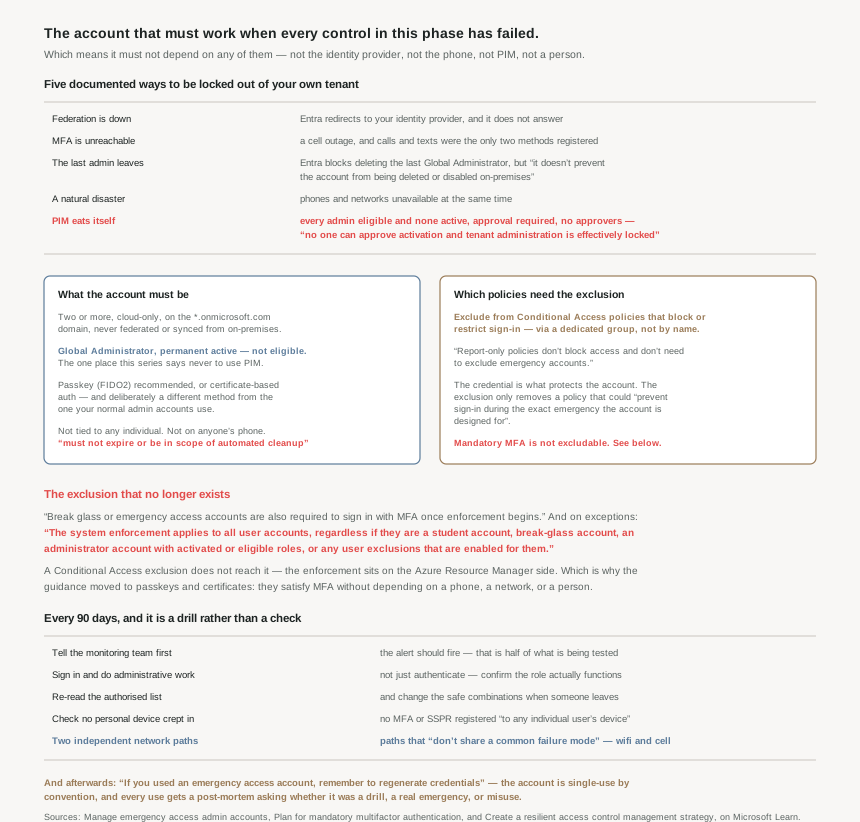
Microsoft lists five ways to get locked out, and the fifth one is this series eating itself:
- Federation is down. Users might be unable to sign in when Microsoft Entra ID redirects to their identity provider.
- MFA is unreachable. A cell outage, where calls and texts were the only two authentication mechanisms that they registered.
- The last administrator leaves. Entra blocks deleting the last Global Administrator, but it doesn't prevent the account from being deleted or disabled on-premises.
- A natural disaster, during which a mobile phone or other networks might be unavailable.
- PIM locks the door behind itself. All Global Administrator and Privileged Role Administrator role assignments are eligible (not active), activation requires approval, and no approvers are selected … no one can approve activation and tenant administration is effectively locked.
That last one is the configuration #45 flagged as reasonable-looking and fatal. It appears here, in a different document, as a named cause of needing break-glass. Two teams at Microsoft wrote it down independently, which is a reasonable signal that it happens.
The system enforcement applies to all user accounts, regardless if they are a student account, break-glass account, an administrator account with activated or eligible roles, or any user exclusions that are enabled for them.
Mandatory MFA is enforced on the Azure Resource Manager side, not by Conditional Access. So the standard break-glass design — a password, excluded from every policy — no longer signs in to Azure. The account needs a real credential now.
Architecture
The design is a list of things not to depend on
| Requirement | The dependency it removes |
|---|---|
| Two or more accounts | Any single credential, safe, or person |
| Cloud-only … use the *.onmicrosoft.com domain, not federated or synchronized from an on-premises environment | Your identity provider, your directory sync, your custom domain's DNS |
| Global Administrator assigned active permanent rather than eligible | PIM — activation, approval, and the approver being awake |
| An authentication method that doesn't use the same authentication methods as your other administrative accounts | Whatever outage just took out your normal admins |
| Don't associate … with any individual user, and don't connect these accounts with any employee-supplied devices, such as phones | A person leaving, and a personal phone |
| The credential must not expire or be in scope of automated cleanup due to lack of use | Your own hygiene automation |
Read as a set, those are not six separate hardening tips. They are one instruction applied six times: nothing this account needs may be something the emergency might have taken away.
The PIM row is worth dwelling on, because it inverts everything #45 argued. That post's case was that permanent active assignment is what PIM exists to eliminate. Here it is mandatory, and for exactly the reason PIM is good: activation is a dependency, and dependencies are what this account cannot have.
The same logic governs hybrid environments: keep the emergency access for on-premises systems and the emergency access for cloud services distinct, with no dependency of one on the other. Two break-glass systems, deliberately unlinked, because mastering or sourcing authentication for accounts with emergency access privileges from other systems adds unnecessary risk if an outage occurs in those systems.
Which policies need the exclusion, and which do not
The instruction is narrower than the folklore. Exclude from Conditional Access policies that block or restrict sign-in — and explicitly not from everything: report-only policies don't block access and don't need to exclude emergency accounts.
That is a useful clarification given what #41b established about report-only, which is that it looks like a working policy from every angle. Here it genuinely is inert, and excluding from it adds maintenance for no protection.
The mechanism matters as much as the rule: create a dedicated security group for your emergency access accounts, such as EmergencyAccess, and exclude this group. A group means every future policy gets one exclusion entry rather than two account names somebody forgets to add.
And the reasoning behind excluding at all is stated in a way worth quoting to anyone who objects: the phishing-resistant authentication method registered in the previous step protects the account; an enforced Conditional Access policy could prevent sign-in during the exact emergency the account is designed for. The credential is the control. The exclusion only removes a second control that might misfire.
Why This Architecture Holds Up
Because mandatory MFA killed the classic break-glass design
For years the standard pattern was a long random password in a safe, with the account excluded from every Conditional Access policy. That pattern is now broken, and not by a policy you can edit.
Break glass or emergency access accounts are also required to sign in with MFA once enforcement begins. The enforcement runs in phases — from October 2024 for the Azure portal, Microsoft Entra admin center, and Microsoft Intune admin center, and from October 1, 2025 for Azure CLI, Azure PowerShell, Azure mobile app, IaC tools, and REST API endpoints. And crucially it does not run where you can exclude things: this enforcement is on the Azure Resource Manager server side, so any requests that target https://management.azure.com are under scope.
There is no exemption and no opt-out — there's no way to opt out, only a postponement, and for Phase 2 that ran until July 1st, 2026, which has passed. The only relief is geographic: Microsoft enforces mandatory MFA only in the public Azure cloud, not in Azure for US Government or other Azure sovereign clouds.
So the account needs a second factor that is itself dependency-free. Microsoft's answer is the one #44 spent a post on: Passkey (FIDO2) (Recommended), or certificate-based authentication if your organization already has a Public Key Infrastructure (PKI) setup. Both satisfy the mandatory multifactor authentication requirements.
That is a genuinely good outcome rather than a grudging workaround. A FIDO2 key in a safe needs no network, no phone, no carrier, and no person's device. It is a better break-glass credential than a password was, and the enforcement that forced the change also removed the temptation to use something phishable because it was easier to store.
One related trap for anyone building the surrounding policy: once you configure a Conditional Access policy to satisfy mandatory MFA, if you configured exceptions or exclusions in the policy, they no longer apply. Exclusions you wrote for other reasons stop meaning what they meant.
Because the account decays silently, and only a drill finds it
A break-glass account is the only control in this series that is never exercised in normal operation. Everything else fails visibly — a blocked sign-in, a refused push. This one fails the first time you need it, having quietly broken months earlier.
So the validation cadence is specified, and it is not a calendar reminder: validate account functionality at least every 90 days, and also when there's a recent change in IT staff, such as after termination or position change, and when the Microsoft Entra subscriptions in the organization change.
What the drill contains is more interesting than its frequency:
- Tell the monitoring team first — ensure that security-monitoring staff are aware that the account-check activity is ongoing. The alert firing is half of what is being tested.
- Do administrative work, not just sign in — validate that the emergency access accounts can sign in and perform administrative tasks.
- Re-read the list of authorised people, and regularly change the combinations on any safes and after someone with access leaves the organization.
- Check nothing personal crept in — ensure that users didn't register multifactor authentication or self-service password reset (SSPR) to any individual user's device or personal details.
- Two independent network paths — if a device is involved, verify it can communicate through at least two network paths that don't share a common failure mode. For example, the device can communicate to the internet through both a facility's wireless network and a cell provider network.
That last one is the sentence I would put in front of anyone designing this. It is not enough for the device to work; the paths it works over must fail independently. Two SIMs from the same carrier is one path wearing two hats.
There is also a separate quarterly test aimed at a different decay: regularly test (for example, every quarter) that emergency access accounts can sign in successfully with your current Conditional Access configuration. Policies accumulate. The exclusion that was complete last quarter is not automatically complete now, and #41a's finding applies — a new policy covering all resources reaches these accounts too unless somebody remembered the group.
Because using it is an event, not an action
The monitoring design is unusually specific, and the specificity is the point. The alert rule uses threshold type Static, operator Greater than, threshold value 0, and severity 0 — Critical. Any sign-in at all, treated as critical.
And every trigger gets a review that sorts the use into one of three buckets: for a planned drill to validate its suitability, in response to an actual emergency where no administrator could use their regular accounts, or as a result of misuse or unauthorized usage of the account. Then: examine the logs to determine what actions the individual with the emergency access account took.
Afterwards the credential is spent. If you used an emergency access account, remember to regenerate credentials and physically secure the new credentials details as part of your emergency access account procedures. Break-glass is single-use by convention — the glass does not go back.
And one more step that ties back to every token post in this phase: revoke all refresh tokens that were issued to target a set of users, because revoking all refresh tokens is important for privileged accounts used during the disruption and doing it will force them to reauthenticate and meet the control of the restored policies. Turning the policies back on does not reach sessions that already exist. #40 and #41a both landed on that; here it is the documented final step of an incident.
Because the better answer is not needing the account
Break-glass is the last resort, and the resilience guidance is clear that relying on it is a symptom: organizations that rely on a single access control, such as multifactor authentication or a single network location, to secure their IT systems are susceptible to access failures … if that single access control becomes unavailable or misconfigured.
The mitigation is structural and cheap: use Conditional Access policies with multiple controls to give users a choice of how they access apps and resources, so that if one of the access controls is unavailable the user has other options. That is #41a's Require one of the selected controls option, which most tenants leave on the default of requiring all — a single-point-of-failure choice made by not making one.
Beyond that come contingency policies, and their design is deliberately unnerving: a contingency Conditional Access policy is a backup policy that omits Microsoft Entra multifactor authentication, third-party MFA, risk-based or device-based controls. A policy whose purpose is to be weaker. It should remain in report-only mode when not in use — the one place in this series where report-only is a feature rather than a trap, because a disabled policy in report-only is both inert and observable.
They come with a naming convention, which sounds like bureaucracy until you picture someone looking for them at 03:00 during an outage:
EMnnn - ENABLE IN EMERGENCY: [Disruption][i/n] - [Apps] - [Controls] [Conditions]
The [i/n] is the part to notice. Contingency policies activate in sequence, and the name carries its own position in that sequence. Someone thought about what it is like to read a policy list under pressure.
The prerequisite is a decision made in advance rather than during: categorise apps into Category 1 mission critical apps that can't be unavailable for more than a few minutes, Category 2 important apps needed within a few hours, and Category 3 low-priority apps that can withstand a disruption of a few days. You cannot make that judgement while the tenant is down.
And the standing warning for the period the contingency is active: assume that malicious actors will attempt to harvest passwords through password spray or phishing attacks while you disabled MFA, so archive all sign-in activity to identify who access what during the time MFA was disabled. Last week's roundup gave that a face — the password spray detection only fires on a successful credential validation.
Key Architecture Decisions
| Situation | Decision | Why |
|---|---|---|
| Break-glass still uses a password in a safe | Move to a FIDO2 key or certificate | Mandatory MFA applies to break-glass account with no exclusion. |
| Choosing the credential type | Deliberately different from your normal admins | It must survive the outage that took the normal accounts out. |
| Putting break-glass in PIM as eligible | Don't — permanent active | Activation is a dependency, and approval can be unreachable. |
| Naming the accounts | Cloud-only on *.onmicrosoft.com |
No federation, no sync, no custom-domain DNS in the path. |
| Excluding from Conditional Access | Use a dedicated group; skip report-only policies | Report-only doesn't block access; a group survives new policies. |
| Lifecycle automation that disables stale accounts | Carve these out explicitly | The credential must not expire or be in scope of automated cleanup. |
| Hybrid tenant | Two separate break-glass systems | Cloud and on-premises emergency access must not depend on each other. |
| Storing the credential | Separate fireproof safes, multiple locations | One safe is one failure mode. |
| Alerting on use | Static, greater than 0, severity 0 — Critical | Any sign-in at all is the event. |
| Running the quarterly drill | Warn the SOC first, then perform an admin task | The alert firing is half the test; signing in is not enough. |
| A device is part of the flow | Two network paths with no shared failure mode | Two SIMs on one carrier is a single path. |
| Someone with safe access leaves | Change the combination that week | Named as a trigger alongside the 90-day cadence. |
| After any real use | Regenerate credentials and revoke refresh tokens | Restored policies do not reach sessions already issued. |
| Hoping never to need it | Use "require one of the selected controls" | Multiple controls mean one outage is not a lockout. |
Closing Thought
This post is the negative image of the six before it. Those added conditions: prove more, from a known device, in a trusted location, with an approval. This one removes every condition it can and then asks what is left.
What is left turns out to be a physical object in a safe, which is a strange place for a Zero Trust architecture to end up and is exactly right. The credential works because it is not connected to anything — not a directory that can fail, a phone that can be lost, a network that can be cut, or a person who can leave. Its strength is its isolation, and every requirement on the list is a way of protecting that isolation from being eroded by well-meaning hygiene.
Mandatory MFA is the interesting wrinkle, because it removed a design choice and improved the result. The old pattern relied on an exclusion, and an exclusion is a promise the platform can revoke — as it did. The new pattern relies on a credential, which the platform cannot take back. Being forced off the exclusion produced a break-glass account that is less dependent than the one it replaced, which is the opposite of how mandates usually go.
The part that will actually fail is the drill. Ninety days is a long time, nobody is measured on it, and the account works fine right up until the morning it does not. Of everything in this post, the sentence I would put on a calendar is the one about network paths that do not share a common failure mode — because that is the check that looks like it passed last quarter and quietly stopped being true.
#48 turns to the signals that decide whether a sign-in is trustworthy at all: Entra ID Protection, its risk detections, and the policies that act on them.
Comments