Business Challenge
#45 kept mentioning that host-network Pods fall back to the node's identity. This is that identity, and the mechanism underneath every VM on Google Cloud.
Only if the scope agrees too. Authorization on a Compute Engine instance is limited by two separate configurations — the roles granted to the attached service account, and the access scopes set on the instance — and both must allow access before the application can reach a resource.
Correct approachWhen a VM gets a permission error that IAM says should work, check the scopes before re-reading the policy. It is the gate nobody remembers exists.
Partially, and unevenly. Access scopes do not apply for calls made using gRPC — so the same operation may be blocked through one client library and permitted through another, depending on the transport it chose.
Correct approachTreat scopes as a default, not a boundary. If access must be denied, deny it in IAM, where the answer does not depend on the protocol.
The scope is narrow and the role may be enormous. The default service account might automatically be granted the Editor role on your project, while the default scopes include only read-only access to Cloud Storage. The narrow half is hiding the wide half.
Correct approachFix the role, not the scope. A configuration whose safety depends on the legacy gate is one change away from being wide open.
Not by itself. Access scopes have no effect if you have not enabled the related API on the project that the service account belongs to.
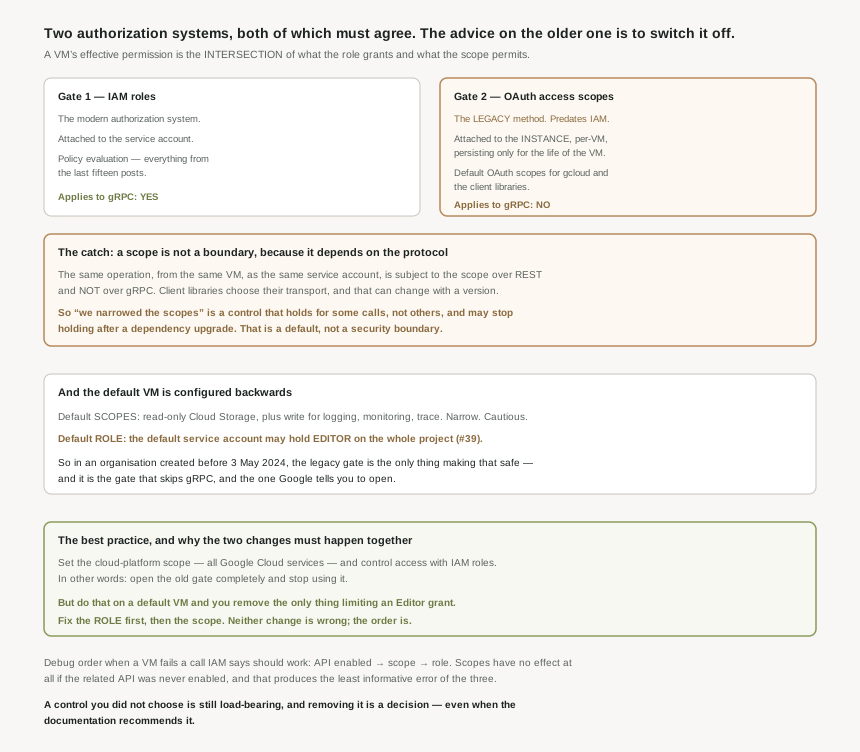
Correct approachThree things must line up: the API enabled, the scope permitting, the role granting. Debug in that order, because the first one produces the least informative error.
Architecture
Attaching is simple: when code running on the resource accesses Google Cloud, it uses the service account attached to the resource as its identity. No credential is configured, nothing is stored, and the application does not know it is happening.
The permission to attach is a grant in itself
Attaching requires the Service Account User role, because that predefined role contains the iam.serviceAccounts.actAs permission, which is required to attach a service account to a resource. That is the same permission #41 flagged: whoever can attach a service account to a VM can run code as it. Boot an instance with a privileged account attached and you have that account's access, without ever holding a credential.
Two gates, in series
| IAM roles | Access scopes | |
|---|---|---|
| What it is | The modern authorization system. | The legacy method of specifying authorization for your VM instance. |
| Attached to | The service account. | The instance — per-VM, persisting only for the life of the VM. |
| Mechanism | Policy evaluation. | Default OAuth scopes for requests from the gcloud CLI or the client libraries. |
| Applies to gRPC | Yes. | No. |
The two are ANDed: both configurations must allow access. So the effective permission of a VM is the intersection of what the role grants and what the scope permits — which is why a VM can fail a call that the IAM policy plainly allows, and why that failure sends people back to re-read a policy that was never the problem.
Access scopes do not apply for calls made using gRPC. Read that as an operational statement rather than a footnote: the same logical operation, from the same VM, as the same service account, is subject to the scope over REST and not over gRPC. Client libraries choose their transport, and that choice can change with a library version. So a team that narrowed scopes as a hardening measure has a control that holds for some calls, does not hold for others, and may silently stop holding after a dependency upgrade. Anything that can be bypassed by choosing a different transport is a default, not a security boundary — and Google's own best practice treats it as exactly that.
The default VM is configured backwards
A new instance gets six default scopes, and the notable one is read-only access to Cloud Storage — plus write access for logging, monitoring and trace, and two Endpoints-related ones. Narrow, cautious, sensible-looking.
Meanwhile the default service account might automatically be granted the Editor role on the project, exactly as #39 described, unless iam.automaticIamGrantsForDefaultServiceAccounts is enforced — which it is by default only if you created your organization after May 3, 2024.
So the out-of-the-box VM in an older organisation is a project-wide Editor grant behind a read-only storage scope. The legacy gate is the only thing making that safe, and it is the gate that does not cover gRPC and that Google tells you to open.
Why This Architecture Holds Up
Google's recommendation is unusually direct: a best practice is to set the cloud-platform access scope, which is an OAuth scope for Google Cloud services, and then control the service account's access by granting it IAM roles.
cloud-platform means all Google Cloud services. So the advice is to open the scope gate entirely and let IAM be the only thing deciding — which is to say, stop using the older system. That is a sensible recommendation and it is worth understanding why it is the right one rather than a resignation.
Scopes predate IAM. They come from an era when OAuth scopes were how you said what an application could touch, before there were roles, conditions, deny policies or any of the machinery in the last fifteen posts. Keeping them as a second gate buys almost nothing — they are coarse, they are per-VM rather than per-identity, they vanish when the VM does, and they do not cover gRPC. Meanwhile it costs you a failure mode where IAM is correct and the call still fails.
Follow the best practice on an older organisation's default VM and you will widen the scope to cloud-platform on an instance whose service account holds Editor. The narrow scope was the only thing limiting that account to reading storage; removing it exposes the full Editor grant across the project. Neither change is wrong — the scope should be open and the role should not be Editor — but doing the first without the second is a meaningful expansion of access dressed as following Google's advice. Fix the role first, then the scope.
What to do with this
- Check the role before widening the scope. A default service account with Editor and narrow scopes becomes a default service account with Editor.
- Use
cloud-platformand control access with IAM, as recommended, once the roles are right. - Stop treating scopes as hardening. They do not apply to gRPC, so they cannot be relied on to deny anything.
- Audit who holds
actAson privileged service accounts — attaching one to a VM is running code as it. - Debug in order: API enabled, scope, role. A disabled API produces the least useful error of the three.
- Remember scopes die with the VM. They persist only for the life of the instance, so a rebuild is a chance for them to change silently.
Key Architecture Decisions
| Decision | Choose this | Because |
|---|---|---|
| Scope configuration on a VM | cloud-platform |
It is the documented best practice, with IAM controlling access. |
| Order of the two changes | Role first, then scope | Widening the scope exposes whatever the role already grants. |
| Narrow scopes as a security control | No | They do not apply to gRPC calls. |
| Denying a specific action | IAM, or a deny policy | The answer must not depend on the transport. |
| The default service account | Replace it, or enforce the constraint | It may hold Editor on the project. |
| An organisation created before May 2024 | Check the constraint by hand | Default enforcement applies only from 3 May 2024. |
| Granting Service Account User | Treat as granting the account itself | actAs lets the holder attach it and run as it. |
| A permission error IAM says is impossible | Check scopes and API enablement | Both gate the call independently of the role. |
| Relying on scopes surviving a rebuild | No | They persist only for the life of the VM. |
Closing Thought
Access scopes are the clearest example on Google Cloud of a mechanism that outlived its reason. They were how authorization worked before IAM was what it is now, and they are still in the path of every call a VM makes, still ANDed with the modern system, still capable of producing a denial that no policy explains. Google's answer is not to remove them — existing VMs depend on them — but to tell you to set them so wide that they stop mattering.
What makes that worth knowing rather than just following is the default configuration, which does the opposite. A new VM in an older organisation pairs the widest plausible role with some of the narrowest scopes, so the legacy system is doing the actual restricting while the modern one is wide open. Anybody who then follows the best practice, sensibly, in isolation, removes the only thing that was holding it. The lesson is the one this block keeps returning to: a control you did not choose is still load-bearing, and removing it is a decision even when the documentation recommends it.
#47 covers the thing that has been quietly finding all these identities: Application Default Credentials — the search order libraries use, and why the same code authenticates as four different principals depending on where it runs.
Comments