Business Challenge
The last two posts were about tokens: how they are obtained, what is inside them, how long they last. This one is about the thing that decides whether you get one. It is the same subject viewed from the other end, and the connection is not decorative — it is the whole explanation for how Conditional Access behaves.
The pitch is clean. Conditional Access policies at their simplest are if-then statements: if a user wants to access a resource, then they must complete an action. Signals in, decision out, policy enforced. That is genuinely what it does.
What the pitch omits is timing, and timing is where the operational surprises live. Three of them, all from the documentation rather than from folklore:
- You add a user to the group a policy targets. The policy does not apply to them. The policy doesn't apply retroactively — it waits for their next token.
- You write a policy requiring MFA for the finance team on the payroll app. Everyone outside finance can now reach the payroll app without MFA, because access tokens are issued by default if a Conditional Access policy condition doesn't trigger an access control.
- You edit a policy to close a gap. It could take up to one day to be effective against Exchange Online and SharePoint Online.
None of those is a bug and none is obscure. They all follow from one design choice, which is that Conditional Access is evaluated when a token is issued and not when a request is made. Hold that and the rest of the system stops being surprising.
Conditional Access policies are enforced after first-factor authentication is completed. Conditional Access isn't intended to be an organization's frontline defense for scenarios like denial-of-service (DoS) attacks, but it can use signals from these events to determine access.
So the password has already been accepted by the time any of this runs. Conditional Access is not a gate in front of the door; it is the decision about what happens once someone is standing in the hallway. Anything that needs to be stopped before that is somebody else's control.
Architecture
The shape of a policy
A policy is an if-then statement of Assignments and Access controls, and the minimum is short: a Conditional Access policy must include at least a name, users and/or groups, target resources, and grant or block controls. Assignments are the "if" — who, what, where, plus conditions. Access controls are the "then" — grant with requirements, block, or shape the session afterwards.
Two combination rules decide what a tenant full of policies actually does, and both default to the strict reading:
- Within a policy, assignments are ANDed. All assignments are logically combined using AND. If you have more than one assignment configured, all assignments must be satisfied to trigger a policy. Narrowing a policy by adding assignments makes it fire less often, not more.
- Across policies, everything applicable must pass. Multiple Conditional Access policies can apply to an individual user at any time. In this case, all applicable policies must be satisfied — the documented example being that if one policy requires MFA and another requires a compliant device, you need both.
Grant controls within one policy are the exception, and the default there is also the strict one: administrators choose require all the selected controls or require one of the selected controls, and by default, multiple controls require all.
Two phases, and a prompt order you do not choose
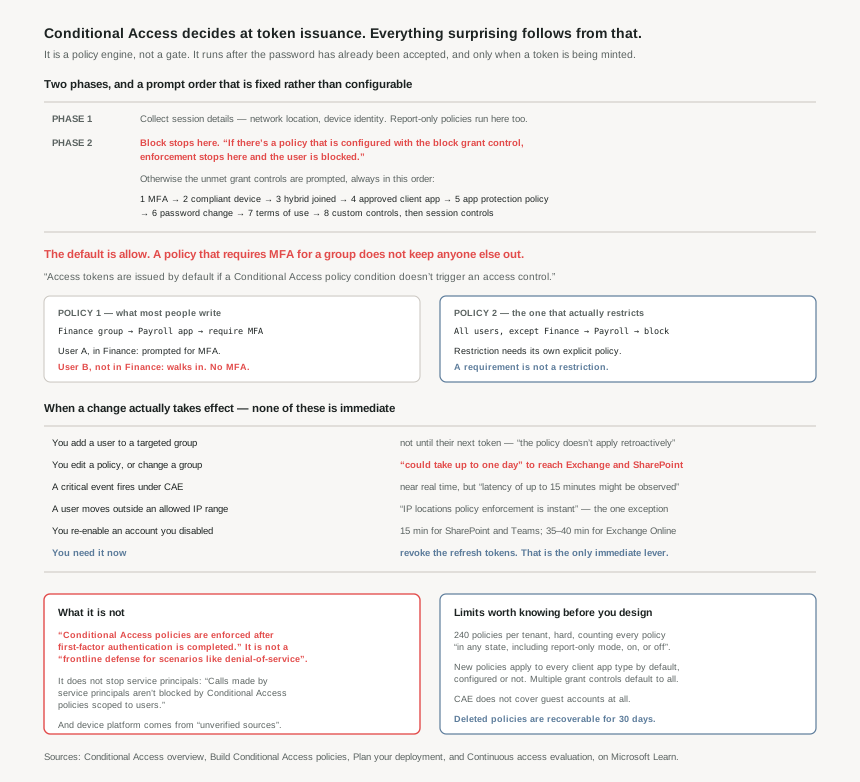
All policies are enforced in two phases. Phase 1 gathers session details, like network location and device identity necessary for policy evaluation, and it runs for report-only policies as well as enabled ones — which is exactly why report-only mode can tell you what would have happened. Phase 2 is enforcement, and it runs only for enabled policies.
Phase 2 has a shape worth knowing. Block is evaluated first and terminates everything: if there's a policy that is configured with the block grant control, enforcement stops here and the user is blocked. There is no negotiating past it, and no other policy grants around it. Otherwise the unsatisfied grant controls are prompted in the following order, until policy is satisfied:
- Multifactor authentication
- Device to be marked as compliant
- Microsoft Entra hybrid joined device
- Approved client app
- App protection policy
- Password change
- Terms of use
- Custom controls
Then once all grant controls are satisfied, session controls are applied (App Enforced, Microsoft Defender for Cloud Apps, and token lifetime). That ordering is fixed. It is not a priority you set, and a user's experience of a policy — which prompt they see first, how many hoops before the one that fails — is a property of this list rather than of your configuration.
The default is allow, and this is the one to internalise
A Conditional Access policy adds a requirement. It does not create a restriction. The documentation states the mechanism plainly — access tokens are issued by default if a Conditional Access policy condition doesn't trigger an access control — and then walks through the consequence with a worked example that deserves to be read slowly.
Policy: users in the finance group, accessing the payroll app, require multifactor authentication.
- User A is in the FINANCE GROUP, they're required to perform multifactor authentication to access the PAYROLL APP.
- User B is not in the FINANCE GROUP, is issued an access token and is allowed to access the PAYROLL APP without performing multifactor authentication.
User B is not blocked by that policy. User B is not in that policy. The assignment scoped the policy to finance, and everyone else fell straight through it into the default, which is yes. Restricting access to the payroll app takes a second, explicit policy: Users: Include All Users / Exclude FINANCE GROUP · Accessing: PAYROLL APP · Access control: Block access.
I labour this because the mental model people bring from firewalls and IAM policies is default-deny, and here it is the opposite. A tenant can be full of carefully written Conditional Access policies and still have no policy that stops anybody. Microsoft's own guidance is to close this structurally rather than app by app: ensure that every app has at least one Conditional Access policy applied, preferably one scoped to all resources so that you don't need to update Conditional Access policies every time you onboard a new application.
Be careful when using block and all resources in a single policy. This combination could lock out admins, and exclusions can't be configured for important endpoints such as Microsoft Graph.
Which is why the break-glass rule is not optional. Microsoft recommends excluding emergency access or break-glass accounts to prevent lockout due to policy misconfiguration — and note the failure it is guarding against is your policy being wrong, not an attacker. The documented pre-flight check is verify emergency access accounts are excluded from all policies before deploying anything.
Why This Architecture Holds Up
Because the policy applies to a token, not to a person
This is the sentence that joins this post to the last one: policies targeting roles or groups are evaluated only when a token is issued. The consequences are spelled out in two bullets that every incident response runbook should have read:
- Newly added users to a role or group aren't subject to the policy until they get a new token.
- If a user already has a valid token before being added to the role or group, the policy doesn't apply retroactively.
Put that beside post #40's numbers and the window becomes concrete. An access token lasts a randomised 60 to 90 minutes, or up to 28 hours under CAE; a refresh token lasts 90 days in most scenarios. Adding someone to a group that requires MFA does not make them do MFA. It makes them do MFA the next time Entra mints them a token, which could be an hour away or considerably more.
The documented remedy for the planned case is to make the membership change and the evaluation happen together: the best practice is to trigger Conditional Access evaluation during role activation or group membership activation using Microsoft Entra Privileged Identity Management. That is a real argument for PIM that has nothing to do with approval workflows, and it is the first time in this phase that PIM has shown up as a mechanism rather than a governance feature. We reach it properly in #45.
Because "near real time" has four different values
Continuous access evaluation is the answer to the staleness problem, and it is a good one — it is worth noting that Microsoft says openly that the obvious fix was tried and rejected: Microsoft experimented with the "blunt object" approach of reduced token lifetimes but found they degrade user experiences and reliability without eliminating risks. What replaced it is a "conversation" between the token issuer Microsoft Entra, and the relying party, standardised as Open ID Continuous Access Evaluation Profile (CAEP), in which a resource provider can reject a token when it isn't expired by returning a 401+ claim challenge.
That is the mechanism. The timings are the design input, and they are not one number:
| What changed | When it takes effect |
|---|---|
| A user moves outside an allowed IP range | IP locations policy enforcement is instant |
| A critical event — account disabled, password reset, tokens revoked, high user risk | Near real time, but latency of up to 15 minutes might be observed because of event propagation time |
| You re-enable an account you just disabled | SharePoint Online and Teams typically have a 15-minute delay. Exchange Online typically has a 35-40 minute delay. |
| You edit a Conditional Access policy, or change group membership | Could take up to one day to be effective — optimisation reduce[s] the delay to two hours for some policy updates, but it doesn't cover all the scenarios yet |
The bottom row is the one that gets misjudged, because CAE's reputation is "instant" and the policy change is the thing an administrator does during an incident. Editing a policy is the slowest lever available. The documentation names the fast one: to apply a change to certain users immediately, revoke all refresh tokens of a specified user, or select "Revoke Session" on the user profile page.
That is the same conclusion post #40 reached from the revocation table, arrived at from a different direction. Revoking refresh tokens is the only control in this system that acts now. Everything else — disabling the account, tightening the policy, removing the group — is a change that has to propagate before it means anything.
Because the coverage has documented holes, and they are not edge cases
CAE's reach is narrower than the marketing suggests, and the gaps are specific. The initial implementation of continuous access evaluation focuses on Exchange, Teams, and SharePoint Online. Beyond that:
- Guests are excluded outright. CAE doesn't support Guest user accounts. CAE revocation events and IP based Conditional Access policies aren't enforced instantaneously. For a tenant whose risk concentrates in external collaborators, that is the population you most wanted this for.
- Only IP-based named locations are visible to it. CAE doesn't have insight into other location conditions like MFA trusted IPs or country/region-based locations, and where those are used Entra issues a one-hour access token without instant IP enforcement check. A country-based location policy is not enforced in real time, whatever else is.
- There is a size cliff. When the sum of all IP ranges specified in location policies exceeds 5,000, CAE can't enforce user change location flow in real time and falls back to a one-hour token.
- Co-authoring defers revocation. Users collaborating on a document lose access only on closing the document, closing the Office app, or after 1 hour when a Conditional Access IP policy is set.
- Push notification previews are not covered. An IP address policy isn't evaluated before push notifications are released, and the preview they display isn't protected by an IP address policy.
None of those makes CAE not worth enabling. They make it a control with a described perimeter rather than a blanket, and the difference matters when someone writes "access is revoked immediately" into a control description.
Because several defaults are broader than the person configuring them expects
Three, each of which produces a policy that covers more than intended or trusts more than it should.
Client apps. By default, all newly created Conditional Access policies apply to all client app types even if the client apps condition isn't configured. Leaving that condition untouched is not "unset"; it is "everything".
Device platform is self-reported. The information used to determine the device platform comes from unverified sources, like user agent strings that can be changed. A policy that grants on device platform is trusting a string the client chose. It is fine for shaping experience and unfit for a security boundary — a distinction that vanishes once "require iOS" is sitting in a table of controls next to "require compliant device", which is attested.
Service principals are outside the user-scoped world entirely. Calls made by service principals aren't blocked by Conditional Access policies scoped to users. A tenant-wide "all users, all resources, block" policy does not touch a daemon holding a client secret. Covering those takes Conditional Access for workload identities, which is a separate licence and a separate policy target — and the standing advice from #35 through #37 applies first: if your organization uses these accounts in scripts or code, replace them with managed identities.
Because the limits shape the design before you reach them
Conditional Access has a hard limit of 240 policies per tenant, and the counting rule is the part that catches people: this 240-policy limit includes Conditional Access policies in any state, including report-only mode, on, or off. Disabled experiments and forgotten report-only drafts consume the budget. So does a policy-per-application habit, which the guidance discourages directly — creating a policy for each app isn't efficient and makes managing policies difficult — and the recommended direction at scale is consolidating policies, not adding more.
There is a second, softer limit inside each policy: Conditional Access policies are contained in a JSON file, and that file has a size limit, reachable with a long list of GUIDs. Both limits push the same way, towards groups and filters rather than enumerated lists.
And one absence that has real operational cost: Conditional Access policies don't have a built-in owner attribute, so the recommendation is to encode ownership in the policy name and keep an out-of-band registry that maps each policy to a responsible admin or team. A naming convention doing the work of metadata is a workaround, and it is worth adopting deliberately rather than discovering later that nobody knows who owns policy 37.
Key Architecture Decisions
| Situation | Decision | Why |
|---|---|---|
| You want only one group to reach an app | Write two policies — the requirement and the block | Access tokens are issued by default if a Conditional Access policy condition doesn't trigger an access control. |
| Before enabling any policy | Exclude break-glass accounts, and confirm it | Verify emergency access accounts are excluded from all policies. Exclusions can't be set for endpoints like Microsoft Graph. |
| You added a user to a targeted group | Don't assume it applied | If a user already has a valid token before being added to the role or group, the policy doesn't apply retroactively. |
| A change must take effect now | Revoke refresh tokens | Policy and group changes could take up to one day; revocation is the documented immediate path. |
| Making membership changes that must bite | Activate through PIM | Trigger Conditional Access evaluation during role activation or group membership activation. |
| Testing an exclusion | Test that the excluded user is actually not prompted | The combination of other policies can require MFA for those users. All applicable policies must be satisfied. |
| Granting on device platform | Treat it as experience shaping, not security | It comes from unverified sources, like user agent strings that can be changed. |
| Leaving the client apps condition alone | Know that it means all of them | All newly created Conditional Access policies apply to all client app types even if the client apps condition isn't configured. |
| Covering daemons and scripts | Managed identities first, workload identity policies second | Calls made by service principals aren't blocked by Conditional Access policies scoped to users. |
| Location policies you need enforced live | IP-based named locations only, under 5,000 ranges | CAE has no insight into country/region or MFA trusted IPs, and falls back to a one-hour token past the range limit. |
| Relying on CAE for guests | Don't — design another control | CAE doesn't support Guest user accounts. |
| Approaching the policy count | Consolidate; delete stale report-only drafts | The 240 limit includes Conditional Access policies in any state, including report-only mode, on, or off. |
| Protecting the policies themselves | Enable protected actions | Requires additional verification before anyone creates, modifies, or deletes Conditional Access policies. |
| You deleted a policy you needed | Restore it within 30 days | It can be restored within the 30 day soft-delete period. |
Closing Thought
Three posts into tokens and I have ended up in the same place from three directions. Post #39 said the authorization request is a list of attacks that have already happened. Post #40 said the interesting property of a token is not its contents but its expiry and its revocability. This one says Conditional Access is a policy engine whose reach is exactly the reach of the token lifecycle underneath it.
That is a more coherent system than it first appears, and also a less magical one. There is no continuous check. There is a decision made at issuance, a token carrying that decision for somewhere between sixty minutes and twenty-eight hours, and — where CAE applies — a side channel that can cut the token short. Every gap in the model is one of those three parts not reaching: a policy that has not propagated, a token that has not expired, a channel that does not cover guests.
The piece I would put in front of anyone inheriting a tenant is the default. A tenant can have forty Conditional Access policies, every one correct, and still let a stranger into the payroll app — because forty policies that add requirements to named groups say nothing at all about everybody else. The documentation states it in a single line and moves on. It deserves rather more weight than that, and it is the one thing here I would check first.
#42 goes one level into the assignments: named locations, filters for devices, and how risk from ID Protection arrives as a condition — the three signals that make a policy specific rather than tenant-wide.
Comments