Business Challenge
#39 established what a service account is. This is the credential most people reach for first, and the one Google spends a documentation page telling you to avoid.
Not in production, and Google says so directly: in production, an expired service account key could cause an accidental outage. The guidance is the opposite of the instinct — instead, use keys that do not expire, and manage their lifecycle with key rotation.
Correct approachExpiry is for short-lived, non-production cases. For anything that must keep running, rotation is the lifecycle control and expiry is an outage waiting for a date.
The constraint stops new keys, not existing ones — and it might disrupt existing workloads that regularly rotate their keys, because a rotation is a key creation. The teams it breaks first are the ones that followed the rotation advice.
Correct approachEnforce it on a development folder before the organization, and find your rotating workloads before they find you.
True, and it introduces a different exposure. Google never sees the private key — but the X.509 certificate you uploaded is served from a public endpoint, so any optional attributes you embedded in it, such as address or location information in the common name, become publicly accessible.
Correct approachUpload certificates with a generic subject and no optional attributes. What you put in the certificate is published.
It will tell you the service account did it. That is the non-repudiation threat, stated plainly: by authenticating with a key and letting the service account act on their behalf, a bad actor might conceal their identity and actions.
Correct approachPrefer mechanisms that keep the human identity in the chain — impersonation, which is #41, records who asked as well as what acted.
Architecture
There are two kinds of key pair behind a service account, and the difference is not cosmetic. One is a system you benefit from without touching; the other is a file that becomes your responsibility the moment it exists.
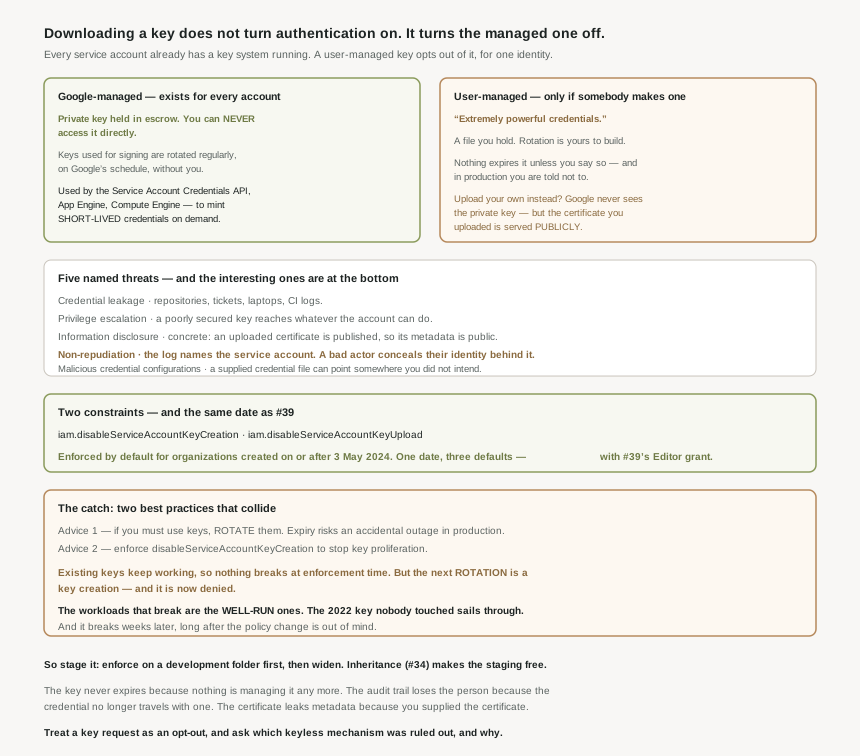
The two categories
| Google-managed | User-managed | |
|---|---|---|
| Who holds the private key | Google. Always held in escrow, and you can never access it directly. | You. Downloaded as a file, or generated by you and the public half uploaded. |
| Rotation | Automatic — keys actively used for signing are rotated regularly. | Yours to build and operate. |
| What it is used for | The Service Account Credentials API, and services like App Engine and Compute Engine, to mint short-lived credentials. | Direct authentication as the service account, from anywhere. |
| Exists by default | Yes, for every service account. | Only if somebody creates one. |
Read the first column again. Every service account already has a key system: Google holds the private half in escrow, rotates it automatically, and uses it to issue short-lived credentials on demand. That machinery is running whether or not you ever create a key. So a user-managed key does not give a service account the ability to authenticate — it already had that. It replaces a rotating, escrowed, short-lived credential with a static file that you store, protect and rotate yourself. The decision is not "how should this authenticate" but "should I opt out of the mechanism that already works", and phrased that way the answer is usually obvious.
Five threats, and why they are not the usual list
The documentation names five, and the interesting ones are at the bottom.
- Credential leakage — the obvious one: keys end up in repositories, tickets, laptops, CI logs.
- Privilege escalation — a poorly secured key becomes a route to whatever the account can do.
- Information disclosure — and this is concrete, not theoretical: an uploaded certificate is published, so anything you embedded in it is public.
- Non-repudiation — the audit trail names the service account, not the person holding its key.
- Malicious credential configurations — a supplied credential file can point somewhere you did not intend.
Non-repudiation is the one that changes how you think about incidents rather than about storage. A key is a way for a human to act as a machine, and the log will faithfully record a machine acting. Every other control in this series — the tracing in #34, the troubleshooting in #38 — assumes the principal in the record is the principal that acted.
The two constraints, and the date that matters
Two organization policy constraints from #22 turn this off at the source:
constraints/iam.disableServiceAccountKeyCreation— nobody can create a user-managed key.constraints/iam.disableServiceAccountKeyUpload— nobody can upload a public key for a service account.
And the same line as #39: if your organization was created on or after May 3, 2024, these constraints are enforced by default. That is now the second and third default Google changed on that date, alongside the automatic Editor grant on default service accounts. One date, three defaults, all of them making a new organization meaningfully safer than an old one that nobody revisited.
Why This Architecture Holds Up
Here is the failure worth planning around, because both halves of it are advice from the same guide.
If you must use keys, rotate them — that is the recommended lifecycle control, and it is why expiry is discouraged for production. A team that took this seriously has a pipeline that periodically creates a new key, swaps it in, and deletes the old one.
Then you enforce iam.disableServiceAccountKeyCreation to stop the proliferation. It does not prevent the usage of existing keys, so nothing breaks immediately, and the change looks clean. But it might disrupt existing workloads that regularly rotate their keys — because the next rotation is a key creation, and it is now denied.
The shape of that is worth naming. The workloads that break are the well-run ones. A team that generated a key in 2022, put it in a secret manager and never touched it again sails through the constraint unaffected. A team that built rotation breaks at whatever interval they chose — possibly weeks later, long after the policy change is out of mind, in a failure that looks nothing like a policy change.
Which is why Google's migration guidance is to decide where to enforce it in your hierarchy first, and to prefer a project or folder — a development folder before the organization — rather than turning it on everywhere at once. Inheritance from #34 makes that easy to stage, and the staging is the whole point.
What to do with this
- Check both constraints and your organization's creation date. Before May 2024 means neither is on unless somebody enforced it.
- Inventory rotating workloads before enforcing, because they are the ones the constraint breaks, and they break late.
- Enforce on a folder first, then widen. Inheritance makes the staging free.
- Do not add expiry to production keys. Rotation is the control; expiry is a scheduled outage.
- Keep uploaded certificates generic — a public endpoint serves whatever you put in them.
- Treat a key request as an opt-out, and ask which of the keyless mechanisms was ruled out and why.
Key Architecture Decisions
| Decision | Choose this | Because |
|---|---|---|
| Authenticating a workload | Anything other than a key | You should choose a more secure alternative whenever possible. |
| An organization created before May 2024 | Verify both constraints by hand | Default enforcement applies only from 3 May 2024. |
| Enforcing the creation constraint | A folder first, then wider | It may disrupt workloads that regularly rotate their keys. |
| Production key lifecycle | Rotation, not expiry | An expired key could cause an accidental outage. |
| Non-production or short-lived access | Expiry is appropriate here | The outage risk that rules it out in production does not apply. |
| Uploading your own key | Generic subject, no optional attributes | The certificate is served publicly, so the metadata is too. |
| Attributing an action to a person | Not a key-authenticated call | A bad actor might conceal their identity and actions behind the service account. |
| Relying on Google-managed keys | Yes, by default | They are rotated regularly and the private key is never accessible. |
Closing Thought
The strongest argument against service account keys is not the threat list. It is that the alternative is not a new thing you have to build — it is the thing already running. Google holds a key pair for every service account, keeps the private half in escrow where nobody including you can reach it, rotates it on its own schedule, and uses it to issue credentials that expire on their own. Downloading a key does not turn authentication on. It turns that off, for one identity, and hands you the part that was being looked after.
Everything else follows from that inversion. The key never expires because nothing is managing it any more. The audit trail loses the person because the credential no longer travels with one. The certificate leaks metadata because you supplied the certificate. And the constraint that prevents all of it has been on by default since May 2024, in the same release of good sense that stopped handing Editor to default service accounts — which means the estates most likely to be full of keys are precisely the ones that predate somebody deciding this was worth preventing.
#41 covers the first and best of the alternatives: service account impersonation — how a human or a workload borrows an identity without ever holding its credential, and why the audit trail keeps both names.
Comments