Business Challenge
Post #19 ended where most estates begin this conversation: the built-in roles are either too broad or too narrow, so somebody proposes a custom role. That is often the right answer — it is Microsoft's own documented remedy for the 4,000-assignments-per-subscription limit, and the limit is fixed and cannot be increased.
What makes custom roles worth a post of their own is that they are the first object in this series with two lifecycles. A built-in role is Microsoft's problem: it is versioned, documented and maintained by somebody else. A custom role is a resource you now own, in a tenant-wide budget of 5,000, with a deletion path that gets harder the more successful the role becomes.
Three things routinely go wrong, and all three trace back to reading AssignableScopes as a list of places rather than as a boundary:
- The role is defined at a scope its author cannot administer. Creating, updating or deleting a custom role requires
Microsoft.Authorization/roleDefinitions/writeon all of its assignable scopes — not one of them. Add a subscription somebody else owns and you have made a role you can no longer edit. - The role is scoped per resource. It is possible from the command line and explicitly not recommended, because 5,000 is a tenant-wide ceiling and one role per resource exhausts it.
- The role cannot be deleted. Every assignment referencing it must be removed first, including PIM-eligible ones — which the documented Resource Graph query for unused roles does not return, because it looks at active assignments only.
The documentation is explicit that the level of access is determined by the assignment — scope plus role permissions plus security principal — and not by the AssignableScopes listed in the custom role. So the list is not a security control on access. It is a control on reach and on ownership: where the role may later be assigned, and who may change it. Define broadly, assign narrowly.
Architecture
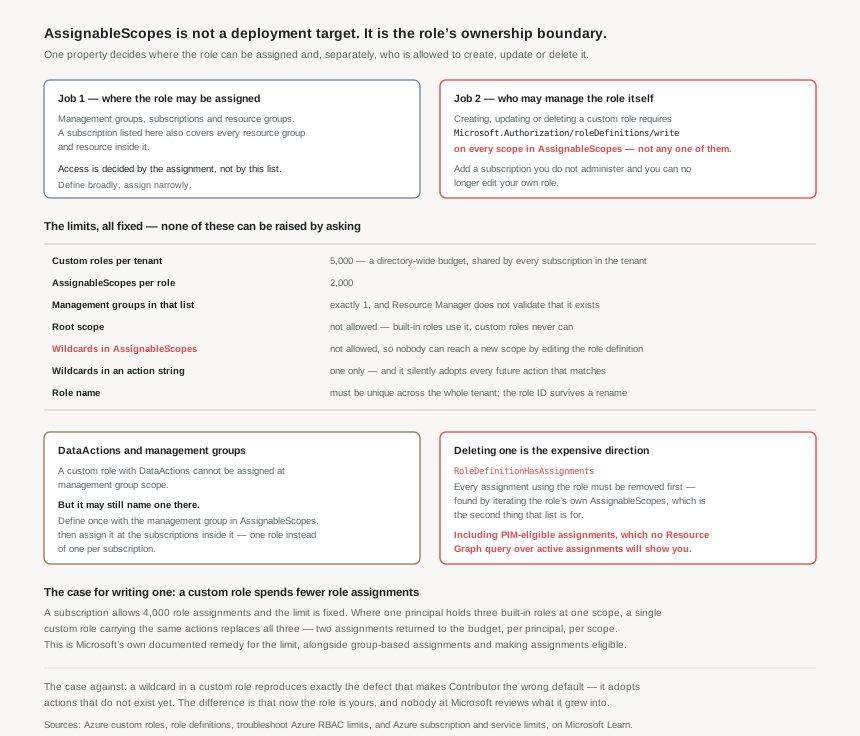
The two jobs of one property
Job one is reach. A custom role may be assigned at management group, subscription and resource group scopes, and a scope named in the list carries everything beneath it — naming a subscription makes the role assignable at that subscription, at any resource group in it, and at any resource in it. At least one management group, subscription or resource group must be present.
Job two is ownership, and it is the one that is not obvious from the property's name. Creating or deleting a custom role requires roleDefinitions/write on all of its assignable scopes; updating it requires the same. Viewing it requires roleDefinitions/read at a scope, which every built-in role provides.
Read those together and a practical rule falls out. The set of scopes in a custom role is also the set of administrators who must collectively agree to it. A role listing five subscriptions owned by four teams is a role that four teams can each block a change to, and that only somebody with write access across all five can maintain. That is a reasonable design for a platform-owned role defined at one management group; it is an accident waiting to happen when the list grew by accretion as teams asked to use it.
The limits, and the two that are there on purpose
| Limit | Value | What it means in practice |
|---|---|---|
| Custom roles per tenant | 5,000 | A directory-wide budget shared by every subscription that trusts the tenant. Exceeding it returns RoleDefinitionLimitExceeded. |
AssignableScopes per role | 2,000 | Generous, and not the constraint that bites. The write-permission requirement bites first. |
| Management groups in that list | 1 | Exactly one. And Resource Manager does not validate that it exists, so a typo produces a role that appears fine and is assignable nowhere useful. |
Root scope "/" | not allowed | Built-in roles use it; custom roles never can. There is no such thing as a tenant-wide custom role. |
Wildcards in AssignableScopes | not allowed | Deliberate: it "helps ensure a user can't potentially obtain access to a scope by updating the role definition". |
| Wildcards per action string | 1 | Microsoft.Compute/*/read is fine; two wildcards in one string is not. |
| Role definition size | 1 MB | Effectively unreachable, and a role approaching it is a design problem rather than a limits problem. |
| Display name | 512 chars, unique per tenant | Uniqueness is tenant-wide, so role naming needs a convention before the second team writes one. |
The two prohibitions are worth separating from the numbers, because they encode a threat model rather than a capacity constraint. No root scope and no wildcards in AssignableScopes together mean a custom role cannot expand its own reach: someone with write access to the role in one subscription cannot edit the definition to make it assignable somewhere they do not already administer. Given that AssignableScopes doubles as the ownership list, a wildcard there would let a role quietly acquire new owners.
The DataActions rule, and the pattern hiding inside it
A custom role containing DataActions cannot be assigned at management group scope. Read alone, that reads like a restriction to work around. The documentation immediately supplies the pattern instead:
You can create a custom role with DataActions and one management group in AssignableScopes. You cannot assign it at the management group scope itself — but you can assign it at the scope of the subscriptions within that management group. Microsoft states the reason plainly: this is helpful if you need a single custom role with DataActions assigned across multiple subscriptions, instead of creating a separate custom role for each subscription.
That is the difference between spending one of the 5,000 and spending one per subscription, and it is the single most useful thing to know about custom roles at scale. The management group entry is doing definitional work, not assignment work.
Wildcards: the same defect as Contributor, in a role you own
Post #19's argument against Contributor was that its wildcard adopts actions for services that did not exist when the assignment was made. A wildcard in a custom role does exactly the same thing — Microsoft's own example notes that Microsoft.CostManagement/exports/* "would also include any future export permissions that might be added" — and the recommendation is correspondingly blunt: specify Actions and DataActions explicitly rather than using the wildcard, because the additional access granted through future actions may be unwanted behaviour.
The asymmetry is what matters. When Contributor grows, it grows under a name everybody recognises as broad, maintained by a vendor who documents each change. When your VM Operator role grows, it grows under a name chosen to sound narrow, and nobody reviews it — because the review happened once, at creation, against a list of actions that has since changed underneath the wildcard.
Deletion is the expensive direction
Custom roles are easy to create and hard to retire. Deleting one requires removing every role assignment that references it first, or the operation fails with There are existing role assignments referencing role (code: RoleDefinitionHasAssignments). The documented procedure is to list the role definition, take the management groups, subscriptions and resource groups out of its AssignableScopes, iterate them listing role assignments, remove those, remove eligible assignments in PIM, then delete the role.
Notice what makes that procedure possible: AssignableScopes is the search space. It is the only record of where the role could have been used, which is a third job for the same property and a good reason to keep it honest rather than aspirational.
There is a trap in the tooling here. The Resource Graph query Microsoft publishes for finding unused custom roles matches roles with no role assignments — and the documentation notes that it checks active assignments and does not consider PIM-eligible ones. A role that is unused today because its holders are eligible rather than active will appear in that result set as a candidate for deletion. Cross-check against eligible assignments before acting on the list.
Why This Architecture Holds Up
A custom role is a budget trade, not a free abstraction
Two fixed limits sit on either side of this decision. A subscription allows 4,000 role assignments; a management group allows 500; a tenant allows 5,000 custom roles. All three are fixed.
A custom role converts assignments into definitions. Where a principal holds three built-in roles at one scope, one custom role carrying the same actions replaces all three — 3 − 1 = 2 assignments returned to the subscription budget, repeated for every principal and scope with that pattern. That is a genuine and documented remedy. But it spends one of the 5,000, permanently, and adds an object with an owner, a review cadence and a deletion cost.
So the question is not "would a custom role be tidier". It is: does this shape repeat often enough that converting assignments into a definition pays for the definition? One team needing three roles once does not. Forty teams needing the same three roles does, decisively.
Start from a built-in role, and keep the derivation visible
The documented method is to start with an existing built-in role and modify it. That is good advice for a reason beyond convenience: it keeps the custom role's intent legible. "Contributor minus the ability to delete" is reviewable; a hand-assembled list of forty action strings is not, and it is the form that quietly drifts out of date as services change.
Two mechanical details support the same goal. Permission strings are case-insensitive, but the convention is to match the casing in the resource provider operations reference — which makes a definition diffable against that reference. And the role ID never changes even when the role is renamed, so automation should reference the ID, exactly as it should for built-ins.
Ownership needs deciding before the first role, not after the fortieth
Because AssignableScopes is simultaneously the reach, the ownership boundary and the search space for deletion, it is worth deciding once, centrally, how custom roles are scoped in an estate. The shape that holds up:
- Platform-owned roles at the management group that contains everything they will ever serve — one entry, so one set of administrators, and assignable throughout the hierarchy beneath it.
- Team-owned roles at that team's subscription, where the team already holds
roleDefinitions/writeand can maintain what they wrote. - Never a resource instance in
AssignableScopes. Documented as possible, documented as not recommended, and the mechanism by which a tenant burns through 5,000 roles.
A role that needs to span two management groups cannot have both; that is a signal to define it at a common ancestor, or to accept two roles. A role that has accumulated subscriptions from four teams should be split before somebody discovers they cannot edit it during an incident.
Key Architecture Decisions
The shape that works
| Decision | What to do | Why |
|---|---|---|
| Whether to write one at all | Only when the same permission shape repeats across teams, or when it collapses several built-in assignments per principal | It converts a per-assignment cost into a per-definition cost. That trade only pays when the shape repeats. |
| Where to define it | One management group for platform roles; the owning subscription for team roles | AssignableScopes is the ownership boundary — write access is needed on every scope in it, and only one management group is permitted. |
Resource instances in AssignableScopes |
Never | Possible from the CLI, explicitly not recommended, and the fastest route to exhausting 5,000 custom roles per tenant. |
| A data-plane role across many subscriptions | Define once with the management group in AssignableScopes; assign at the subscriptions inside it |
Custom roles with DataActions cannot be assigned at management group scope, but this is the documented way to avoid one role per subscription. |
| Actions | Explicit strings, derived from a built-in role, cased to match the operations reference | A wildcard adopts future actions that nobody will review, in a role whose name implies it is narrow. |
| Management group entries | Verify the ID after creating the role | Resource Manager does not validate that the management group exists, so a typo fails silently. |
| Naming | A tenant-wide convention agreed before the second role exists | Display names must be unique across the tenant, and the collision surfaces at creation time in somebody else's pipeline. |
| Automation | Reference the role ID, never the display name | The ID survives a rename; the name does not. |
| Retirement | Sweep for unused roles with the Resource Graph query, then cross-check PIM-eligible assignments before deleting | The published query considers active assignments only, so an eligible-only role looks unused when it is not. |
Closing Thought
Custom roles are usually introduced as a least-privilege measure, and they can be one. But the property that governs them is not about privilege at all. AssignableScopes grants nothing — the assignment does that. What it decides is how far the role can travel, who has to agree to change it, and where you will have to look when you eventually want it gone.
Those are ownership questions, and they are the ones that determine whether an estate ends up with a dozen well-maintained roles or several hundred that nobody will delete because nobody is certain who is using them. The 5,000 ceiling sounds impossibly generous until roles are created per resource, per team, per project, each one reasonable on the day.
The test before writing one is short. Name the management group or subscription it belongs to, name the person who can edit it, and describe how you would remove it. If any of the three is unclear, the built-in role you were avoiding is still the better answer.
#21 covers the one mechanism in Azure that actually subtracts access — deny assignments — why they are almost entirely system-managed, and what replaced Blueprints as the way to create them.
Comments