Business Challenge
Every one of these comes from writing a constraint that looked obviously correct and behaved otherwise.
Both, depending on when the page you are reading was written. What used to be called predefined constraints are now legacy managed constraints, and they have a constraint type of list or boolean. Alongside them sit newer managed constraints, which Google states are designed to replace the equivalent legacy ones with additional flexibility and greater insight from Policy Intelligence tools. Then there are custom constraints, which are managed by your organization instead of by Google.
Correct approach
Read the constraint's own name, not the prose around it. constraints/compute.trustedImageProjects is legacy; iam.managed.disableServiceAccountCreation is managed; anything starting custom. is yours.
An empty list is not an inert one. If no list of values is provided, or the policy is set to the Google-managed default, the default behaviour of the constraint takes effect — and Google is explicit that this either allows all values or denies all values. Which of the two depends on the constraint, so emptying a list can silently mean "deny everything".
Correct approachLook up the constraint's default before clearing its values, and prefer an explicit list over an empty one. This is the same lesson as #19's "an unset policy is not an open one", one level further down.
List values are not bare strings; they carry a prefix that decides the shape of the comparison. is: applies a comparison against the exact value. under: applies a comparison to the value and all of its child values. in: applies a comparison to all resources that include this value. Writing a folder id without under: matches the folder and nothing inside it.
Decide deliberately whether you mean this resource or this subtree, and write the prefix even where it is optional. The prefix is the semantics, not decoration.
That is what actionType: ALLOW means. It does not permit the operation when the condition matches and stay quiet otherwise — it permits it only when the condition matches. A constraint written to allow a particular configuration is simultaneously a constraint denying every other configuration of that resource.
Read every custom constraint as a whitelist or a blacklist, never as a rule about one case. If you only want to block one thing, express it as DENY on the thing you are blocking.
Architecture
A constraint is a definition; #19 covered how the policy that configures it reaches a resource. What follows is what the definition itself can express.
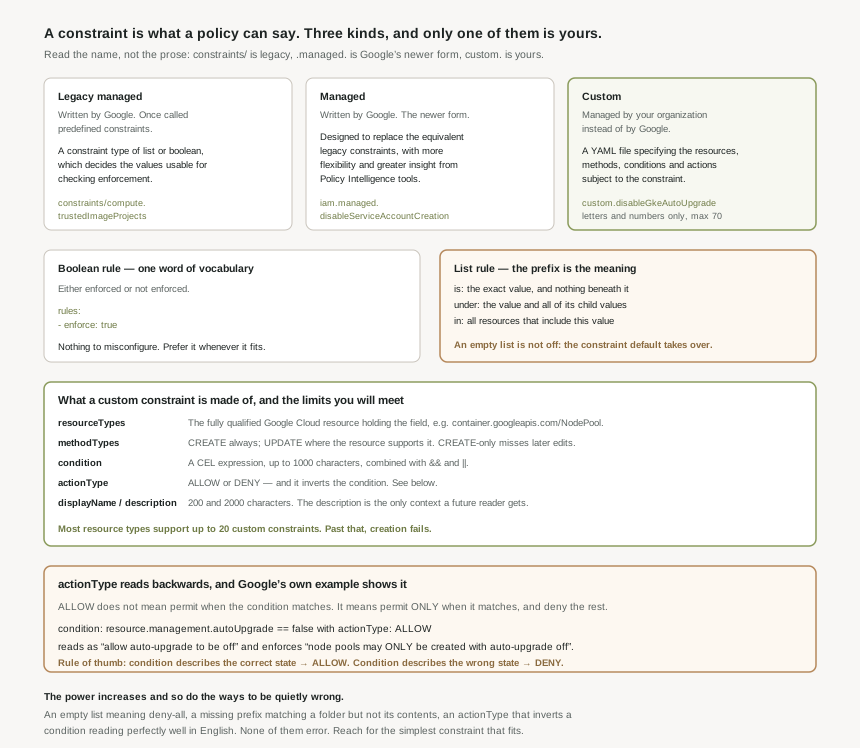
The three kinds, and what each is for
| Kind | Written by | Shape | Named like |
|---|---|---|---|
| Legacy managed | A constraint type of list or boolean, which determines the values that can be used for checking enforcement. | constraints/compute.trustedImageProjects |
|
| Managed | Similar structure to a custom constraint, but managed by Google, and supporting parameters. | iam.managed.disableServiceAccountCreation |
|
| Custom | You | A YAML file specifying the resources, methods, conditions and actions subject to the constraint. | custom.disableGkeAutoUpgrade |
Boolean rules: the whole vocabulary is one word
A legacy managed constraint with a boolean rule is either enforced or not enforced. The policy that configures it says so directly:
rules:
- enforce: true
There is nothing else to express. That is a virtue rather than a limitation — a boolean constraint is unambiguous, cheap to audit, and impossible to get subtly wrong. When a boolean constraint fits the requirement, it is always the right choice.
List rules: values, and the prefixes that give them meaning
List rules allow or disallow a list of values defined in the organization policy, using allowedValues and deniedValues. The values are hierarchy strings, and the prefix decides what the comparison means:
| Prefix | Comparison | Use it when |
|---|---|---|
is: |
Applies a comparison against the exact value. | You mean this one resource and nothing beneath it. |
under: |
Applies a comparison to the value and all of its child values. | You mean a folder or project and everything inside it. |
in: |
Applies a comparison to all resources that include this value. | You mean membership rather than containment. |
If no list of values is provided, or the policy is set to the Google-managed default, the default behaviour of the constraint takes effect — which either allows all values or denies all values. So clearing a list does not turn a constraint off. Depending on which constraint it is, it can mean "everything is permitted" or "nothing is", and the two look identical in the policy document. Check the constraint's documented default before removing values, particularly during an incident, when clearing a list feels like the safe rollback and may be the opposite.
Custom constraints: a YAML file and a CEL expression
A custom constraint is defined in a YAML file specifying the resources, methods, conditions and actions subject to it. Google's own example is compact enough to read in full:
name: organizations/1234567890123/customConstraints/custom.disableGkeAutoUpgrade
resourceTypes: container.googleapis.com/NodePool
methodTypes:
  - CREATE
  - UPDATE
condition: "resource.management.autoUpgrade == false"
actionType: ALLOW
displayName: Disable GKE auto upgrade
description: Only allow GKE NodePool resource to be created or updated if AutoUpgrade is not enabled.
Each field has a job and a limit worth knowing before you hit it:
resourceTypes— the fully qualified name of the Google Cloud resource containing the object and field you want to restrict. Each service defines the set of custom constraint fields available on its resources, so the field you want has to be one that service exposes.methodTypes— the REST methods enforced on.CREATEis universal;UPDATEdepends on the resource, and a constraint that only fires onCREATEwill not stop somebody editing a compliant resource into a non-compliant one.condition— a CEL expression, up to 1000 characters, combined with&&and||. Organization Policy Service uses Common Expression Language to evaluate these.actionType—ALLOWorDENY, and the source of the inversion below.displayNameup to 200 characters,descriptionup to 2000. The description is where the reason lives, and it is the only part a colleague reads at three in the morning.
A custom constraint name can only contain letters and numbers — no hyphens, no underscores — up to 70 characters, not counting the custom. prefix. So custom.disableGkeAutoUpgrade is legal and custom.disable-gke-auto-upgrade is not, which is a different character set again from the labels, tags and resource names in #17 and #18. And most resource types support up to 20 custom constraints; attempting to create more fails. Twenty per resource type sounds generous until a platform team writes one per requirement rather than one per rule, at which point a single popular resource type — a GKE node pool, a Compute instance — runs out.
Why This Architecture Holds Up
actionType reads backwards
This is the single thing most worth internalising about custom constraints. ALLOW does not mean "permit this when the condition matches". It means permit the operation only if the condition evaluates to true — and therefore deny it in every other case.
Google's own example makes the trap visible once you look for it. The constraint is called disableGkeAutoUpgrade, the condition is resource.management.autoUpgrade == false, and the action is ALLOW. Read casually, it looks like a rule that allows auto-upgrade to be disabled. It is the opposite: node pools may be created or updated only with auto-upgrade off, and every node pool with it on is refused. The name says what it enforces; the YAML says how, and the two only agree once you know the inversion.
Write the condition to describe the state you consider correct, then use ALLOW. Or write it to describe the state you consider wrong, then use DENY. Mixing the two — a condition describing the bad state with ALLOW — produces a constraint that permits only the thing you were trying to prevent, and it will pass review because every individual line reads correctly.
Which kind to reach for
| If the requirement is | Use | Because |
|---|---|---|
| A capability that should be off everywhere | A boolean rule on the existing constraint | One word to write, nothing to get subtly wrong, and Google maintains it. |
| An approved set of regions, images or domains | A list rule, with explicit prefixes | The set is the requirement, and under: expresses a subtree without enumerating it. |
| The same shape as an existing legacy constraint | The managed equivalent where one exists | Managed constraints are designed to replace legacy ones with more flexibility and better Policy Intelligence insight. |
| A rule about a field no constraint covers | A custom constraint | It is the only kind that can reach an arbitrary field on a supported resource. |
| A rule about who, not what | Not a constraint at all | That is IAM. Organization Policy does not know who is asking, which is the point of it. |
Custom constraints are code, and should be treated as such
A custom constraint is a CEL expression evaluated on every create — and sometimes every update — of a resource type across an organization. That is a piece of production logic with a blast radius larger than most services, written in a language nobody uses daily, in a YAML file, against a resource schema that varies per service.
Three habits follow. Keep the constraints in version control alongside everything else, because 20 per resource type is a budget that needs review rather than a limit to discover. Write the description as though the reader has no context, because the 2000 characters are free and the constraint will outlive whoever wrote it. And never let one reach production without watching it run first — which is exactly what the next post is about.
Key Architecture Decisions
| Decision | Choose this | Because |
|---|---|---|
| Identifying a constraint's kind | Read its name, not the surrounding prose | constraints/, .managed. and custom. are unambiguous; the documentation's wording has moved. |
| When a boolean constraint fits | Use it, and do not reach further | It is either enforced or not enforced — nothing to misconfigure. |
| Writing list values | Always state the prefix | is:, under: and in: are three different comparisons, and the default is not obvious. |
| Rolling back a list constraint | Set an explicit permissive list, do not empty it | An empty list falls through to the constraint's default, which may deny all values. |
| Choosing between legacy and managed | The managed equivalent, where one exists | They are designed to replace the legacy ones, with more flexibility and better tooling insight. |
actionType |
Condition describes correct state → ALLOW; wrong state → DENY |
Mixing them produces a constraint permitting only what you meant to forbid. |
methodTypes |
Include UPDATE wherever the resource supports it |
A CREATE-only constraint does not stop a compliant resource being edited into a non-compliant one. |
| Naming a custom constraint | Letters and numbers only, under 70 characters | Hyphens and underscores are rejected, unlike every other identifier in this series. |
| Budgeting custom constraints | One per rule, not one per requirement | Most resource types support up to 20, and creation fails past that. |
The description field |
Write the reason, at length | 2000 characters, and it is the only context a future reader gets. |
| Storing custom constraints | Version control, reviewed like code | It is a CEL expression on every create across the organization. |
Closing Thought
There is a progression buried in these three kinds, and it is the usual one. A boolean constraint expresses a decision somebody already made for you and named. A list constraint expresses a decision you made, from a vocabulary Google supplied. A custom constraint expresses a decision nobody has made before, in a language that will evaluate it on every resource your organization creates.
The power increases and so does the number of ways to be quietly wrong — an empty list meaning "deny all", a missing prefix matching a folder but not its contents, an actionType that inverts a condition reading perfectly well in English. None of those produce an error. They produce a policy that is enforced exactly as written and not at all as intended, which is the most expensive kind of correct. Reach for the simplest constraint that expresses the requirement, and when you cannot, assume the custom one is wrong until you have watched it run.
#21 is the answer to that last sentence: dry-run mode — how to enforce a policy that only reports, what it logs, and why every constraint in this post deserves a period of being watched before it is allowed to deny anything.
Comments