Business Challenge
Twenty-three posts have treated the management hierarchy as a place where governance is attached: policies at a management group, role assignments at a subscription, resources in a group. This post is about the same hierarchy from the deploying end, where it stops being an org chart and becomes an argument to a command.
The friction shows up the first time a template needs to do two things at once. Create the resource group and the storage account in it. Assign the policy at the management group and the role at the subscription. Both are ordinary requirements, and neither works in a single flat template, because of one rule: every resource declared with the resource keyword must be deployed at the same scope as the deployment itself.
So a template has a scope of its own, distinct from where its resources end up, and crossing between them requires a specific mechanism. Three consequences follow, and each is a section below:
- Modules are the only way across. Deploying a module triggers a nested deployment, which is what lets one file target several scopes — and the principal deploying the parent must be able to deploy at every scope those modules reach.
- Everything above a resource group needs a location. Subscription, management group and tenant deployments must be given one, and it is not the location of the resources — it is where deployment data is stored.
- Deployment name and location are welded together permanently. For a given deployment name the location is immutable, and the default name is the template's own file name. Every estate has hundreds of deployments called main.
Choosing targetScope = 'subscription' does not mean "this template concerns the subscription". It means every bare resource block in the file will be created at subscription scope, and anything that belongs lower or higher has to be reached deliberately. Get it wrong and the failure is at compile time rather than in production, which is the one piece of good news here.
Architecture
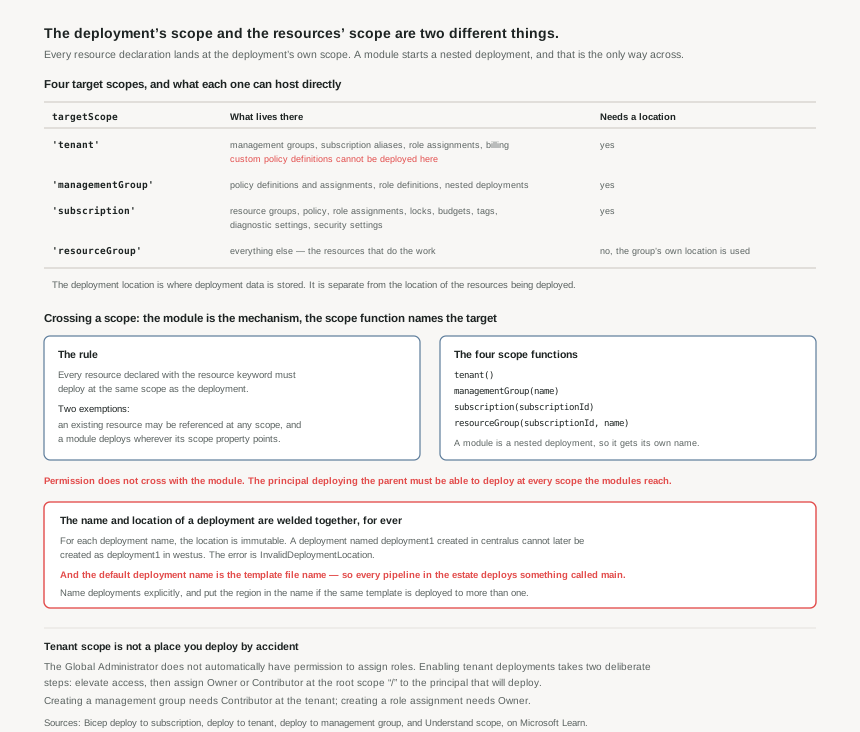
What each scope can hold
Not every resource type can be deployed at every level, and the lists are worth knowing in outline because they explain why estates end up with the template structure they do.
| Scope | What can be created there | The catch |
|---|---|---|
'tenant' |
Management groups, subscription aliases, role assignments, billing profiles, portal tenant configurations, nested deployments. | Built-in policy definitions are tenant-level resources, but custom policy definitions cannot be deployed at the tenant. |
'managementGroup' |
Policy definitions, initiatives and assignments; role definitions; nested deployments to subscriptions. | This is where the governance from posts #14 to #20 actually belongs, and it is a different targetScope from the one most templates use. |
'subscription' |
Resource groups, policy definitions and assignments, role assignments and definitions, locks, budgets, tags, diagnostic settings, security settings. | Deploying to 800 different resource groups in one subscription-level deployment is supported — the same 800 that bounds a move operation. |
'resourceGroup' |
Everything else: the resources that actually run the workload. | The default, and the only scope that does not require a deployment location. |
Crossing scopes: modules and the four scope functions
The rule is strict and it has exactly two exemptions. Bare resource declarations deploy at the deployment's scope. Existing resources are exempt — a template may reference an existing resource at a different scope, which is how a resource group deployment reads a key vault in another subscription. And modules are exempt, because a module is a nested deployment with a scope of its own.
The scope is set with one of four functions, and the arguments are the tell for how much context each level needs:
tenant()— no arguments; there is one.managementGroup(name)— management groups are named, and unique in the tenant.subscription(subscriptionId)— subscriptions are identified by GUID.resourceGroup(subscriptionId, name)— a group name means nothing without knowing which subscription it is in.
One detail saves a class of ordering bug. When the target resource group is created in the same file, set the module's scope to the resource group's symbolic name rather than calling resourceGroup(...) with a string. That makes the dependency explicit, so Resource Manager creates the group before deploying into it instead of racing.
A module reaching into another subscription does not borrow authority from the parent deployment. The principal running the parent template must have the rights to initiate deployments at every scope the modules target. A pipeline identity that works at one subscription and quietly fails at another is not a template problem — it is post #18's additive model showing up at deployment time, and the fix is a role assignment at the other scope, not a template change.
The location that is not a location
Subscription, management group and tenant deployments all require a location. Resource group deployments do not, because the group's own location is used to store the deployment data.
That phrase — store the deployment data — is the whole concept. The deployment location has nothing to do with where the resources are created; it is where Azure keeps the record of the deployment. A subscription-level template deployed with --location centralus can create resource groups in West Europe without contradiction.
And then the sharp edge. For each deployment name, the location is immutable. A subscription deployment named deployment1 created in centralus can never be created again as deployment1 in westus; the attempt returns InvalidDeploymentLocation. The name is the key, and the location is bound to it permanently.
Put that next to the default-naming rule — the default deployment name is the template's file name, so main.bicep produces a deployment called main — and the trap assembles itself. A pipeline that deploys main.bicep to one region and later runs the same pipeline against another region hits an error that appears to have nothing to do with what changed.
Why This Architecture Holds Up
Scope decides who can run the pipeline
The higher the scope, the fewer principals can deploy it, and the requirements are documented rather than implied. At tenant scope the principal needs Microsoft.Resources/deployments/* plus rights to create what the template contains — Contributor at the tenant to create a management group, Owner to create role assignments.
And the sentence worth pinning to the wall: the Global Administrator does not automatically have permission to assign roles. Enabling tenant deployments is a two-step, deliberate act — elevate access, then assign Owner or Contributor at the root scope "/" to the principal that will deploy. Post #19 noted that Contributor's NotActions excludes elevateAccess/Action precisely so this cannot happen by accident.
The practical consequence is that tenant-scope templates are rarely the right answer. The documentation offers the alternative directly: if your account cannot deploy to the tenant, management groups can still be created by deploying to another scope. Given the choice between elevating a Global Administrator and deploying a management group from a subscription-scoped template, the second is almost always the better trade.
The scope of a template is a statement about what it owns
A well-shaped estate ends up with templates whose scopes match their lifecycles, and the mapping falls out of what each scope can hold:
- Management group templates for policy definitions, initiatives and assignments — the governance layer, deployed rarely, reviewed carefully.
- Subscription templates for resource groups, subscription-wide policy and role assignments, budgets and diagnostic settings — the landing zone.
- Resource group templates for workloads, deployed constantly by the teams that own them.
- Tenant templates for almost nothing, because the permission required to run them is the permission you spent posts #18 to #21 trying not to hand out.
The seam between the second and third is where most estates get value. A subscription template that creates a resource group and then calls a module scoped to that group produces the landing zone and its workload in one operation — and the module boundary is exactly where the ownership boundary should be, so the workload template can later be deployed on its own by a team that has no subscription-level rights at all.
Name deployments deliberately
Because name and location are permanently paired, deployment names are a small design decision with a long tail. Two habits cover it: never rely on the default name, and if one template is deployed to more than one region, put the region in the deployment name. Both cost nothing at the time and remove an error that is genuinely confusing when it arrives months later.
Key Architecture Decisions
The shape that works
| Decision | What to do | Why |
|---|---|---|
| Choosing a target scope | Pick the scope of the thing the template owns, not the highest scope it touches | Bare resource declarations land at the deployment's scope; anything else is reached by module. |
| Creating a group and its contents | Subscription-scoped template, resource group as a resource, workload as a module scoped to its symbolic name |
The symbolic name creates the dependency, so the group exists before the module deploys into it. |
| Reading something at another scope | Use an existing reference rather than a module |
Existing resources are exempt from the same-scope rule, and no nested deployment is created. |
| Cross-subscription deployments | Confirm the deploying principal has rights at every target scope before the first run | Modules cross scopes; authority does not travel with them. |
| Tenant scope | Avoid it. Deploy management groups from a subscription-scoped template instead | It requires elevating access and an Owner or Contributor assignment at the root scope. |
| Deployment names | Always explicit, and include the region when a template is deployed to several | Name and location are immutable as a pair, and the default name is the file name. |
| Deployment location | Choose one and standardise on it per scope | It stores deployment data, not resources, so it should be boring and consistent rather than matched to the workload. |
| Custom policy definitions | Deploy at management group, never tenant | Custom policy definitions cannot be deployed at tenant scope at all. |
Closing Thought
There is a satisfying symmetry to where this series has arrived. The first posts described a hierarchy for organising an estate. The governance posts attached rules to each level of it. This one shows the same four levels acting as deployment targets, with the same inheritance and the same permission boundaries — because they are not an analogy for each other, they are the same structure viewed from different ends.
The design instinct that follows is to make a template's scope match the scope of the thing it owns, and then let modules express every relationship that crosses a boundary. A module is more than a code-reuse device in Bicep; it is the only construct that can say "and this part belongs somewhere else". Templates written that way tend to have boundaries in the same places as the teams that maintain them, which is usually the sign that the decomposition is right.
And when a deployment fails with a location error on a template nobody has edited, the answer is almost always that somebody, once, deployed something called main.
#25 goes inside the template itself: ARM template structure, parameters and outputs — what each section is for, how parameters are validated, and why outputs are the part that most often has to be redesigned.
Comments