Business Challenge
Cloud Asset Inventory is reached for at exactly the moment somebody needs an answer quickly, which is also the moment its limits are least welcome.
If it was more than five weeks ago, Cloud Asset Inventory cannot tell you. Create, update and delete history is kept for up to 35 days, and a snapshot time must be no more than 35 days in the past. Assets that have not changed in that window return their latest status — so the answer comes back looking complete while the event you wanted sits outside it.
Correct approachTreat the service as a window, not a record. If you will ever need to prove when something changed, the export has to be running before the question is asked.
You cannot ask for it. Google states plainly that asset history can only be retrieved at the organization and project level, and folders are not supported. The level this series has spent four posts treating as the unit of governance is the one level with no history endpoint.
Correct approachAsk at the organization and filter to the folder's projects, or iterate the projects underneath it. Both work; neither is what the console's hierarchy leads you to expect.
Search covers a subset. Google's own line is that not all resources can be searched, and the supported set is a published list rather than everything the platform can create. An empty result is therefore two different facts wearing one appearance: there are none, or this type is not searchable.
Correct approachCheck the asset type against the supported list before treating an empty search as evidence. For a completeness claim, export rather than search.
You get twenty of those a day. Policy analysis is capped at 20 queries per organization per day without Security Command Center Premium or Enterprise at the organization level, where it becomes unlimited. Twenty is enough to investigate an incident and not enough to build anything that runs on a schedule.
Correct approachBudget the analysis queries deliberately, or export the IAM policy metadata to BigQuery and do the analysis there, where the only limit is your own.
Architecture
Cloud Asset Inventory is a global metadata inventory service that lets you view, search, export, monitor and analyse your Google Cloud asset metadata. The useful part of that sentence is the word metadata: it holds descriptions of things, not the things, and it holds more kinds of description than most people expect.
It is not only resources
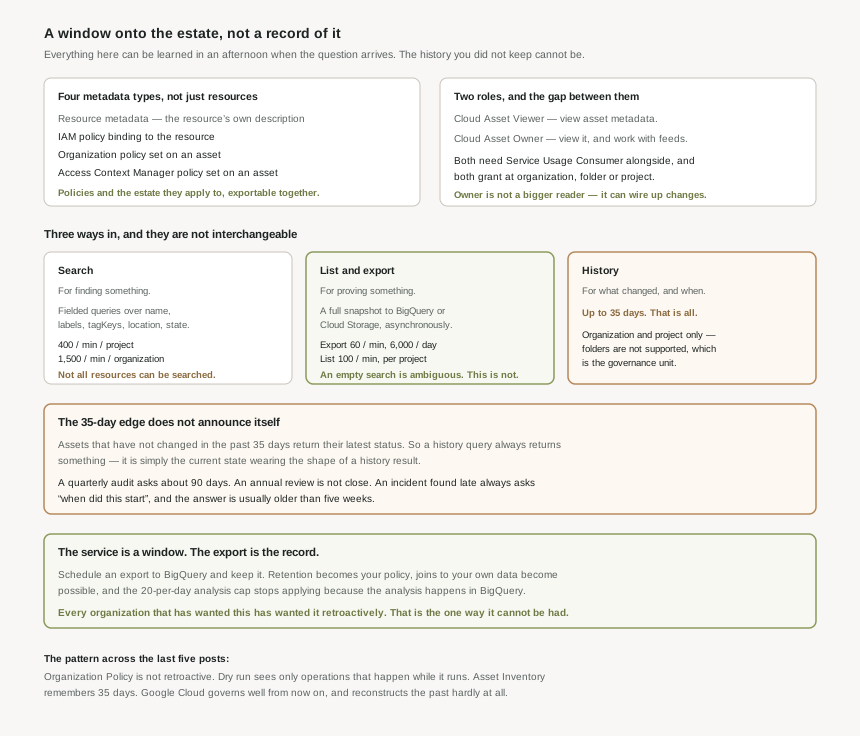
Four metadata types travel together, and the last three are why this service matters more than a resource list would:
- Resource metadata — the resource's own description.
- IAM policy — the IAM policy metadata binding to the resource.
- Organization policy — the organization policy metadata set on an asset.
- Access policy — the Access Context Manager policy set on an asset.
That third one closes a loop this series opened. Post #19 said the effective policy is computed rather than stored, and post #22 said a day-one policy set can only be judged against the estate rather than the policy page. Asset Inventory is where both of those become queryable: the policies and the resources they apply to, in one place, exportable together.
Three ways in, and they are not interchangeable
| Mode | Good for | Limits that matter |
|---|---|---|
| Search | Interactive questions. Fielded queries over name, labels, tagKeys, location, state and more. |
Not all resources can be searched. 400 per minute per project, 1,500 per minute per organization. |
| List and export | Completeness. A full snapshot to BigQuery or Cloud Storage, as an asynchronous operation. | Export 60 per minute and 6,000 per day per project. List 100 per minute per project. |
| History | What changed, and when. | 35 days. Organization and project only — folders are not supported. |
The distinction between the first two is the one that causes wrong answers. Search is for finding something; export is for proving something. A search that returns nothing is not a claim that nothing exists, and the quota difference — 400 a minute against 60 — tells you which one Google expects you to run in a loop.
Cloud Asset Viewer covers viewing asset metadata; Cloud Asset Owner covers viewing it and working with feeds. Both are granted at the organization, folder or project, and both need Service Usage Consumer alongside them. The gap between them is the whole of #24's subject: a feed is a standing subscription to change notifications, so Owner is not a slightly larger reader — it is the ability to wire the estate's changes to a destination of your choosing.
Why This Architecture Holds Up
Why 35 days is the wrong length for every question worth asking
The retention window is not short in absolute terms. It is short relative to the cadences that generate the questions:
- A quarterly audit asks about 90 days. The window covers the last five weeks of it.
- An annual review is not even close.
- An incident found late — a public bucket, a broad grant, a disabled constraint — is usually found well after it was made, and "when did this start" is the first question asked.
- A compliance evidence request arrives on somebody else's schedule, and it is never within 35 days of the thing it asks about.
Note also that assets which have not changed in the past 35 days return their latest status. That is sensible behaviour and it means a history query always returns something, so the boundary does not announce itself. You get an answer; it is simply the current state wearing the shape of a history result.
The single decision that makes Cloud Asset Inventory useful long-term is to schedule an export to BigQuery and keep it. Once the snapshots accumulate in a dataset you control, the 35-day limit stops being an architectural constraint and becomes a detail about one API. Retention becomes your retention policy, joins to your own data become possible, and the analysis-query cap stops applying because the analysis is happening in BigQuery rather than in Policy Analyzer. Every organization that has ever wanted this has wanted it retroactively, and that is the one way it cannot be had.
Where the folder gap actually bites
History at the organization and project level, but not the folder, is a small-sounding limitation with a specific consequence. The hierarchy design in this series puts environments and business units in folders, so the natural question — what changed in production this month — maps onto exactly the level with no endpoint.
Both workarounds are fine and both need writing down. Query at the organization and filter to the folder's project set, which requires knowing that set at query time and is wrong the moment a project moves. Or iterate the projects under the folder, which is correct but multiplies the request count against a 100-per-minute list quota. Neither is difficult; the failure is assuming the folder level works and discovering it under time pressure.
Effectiveness: what to build first
- A scheduled export to BigQuery, covering resource and IAM policy content, from day one. It is the only thing on this list that cannot be added retroactively.
- A saved search or two for the questions asked weekly — public buckets, external IPs, service account keys. Search is generous at 400 a minute and is the right tool for a question with a known shape.
- An organization-level history query in the incident runbook, with the folder workaround already written out, so nobody is discovering the limitation at 2am.
- A deliberate decision about Policy Analyzer: twenty queries a day is a manual investigation budget. If IAM analysis needs to be continuous, it belongs in the exported data.
Key Architecture Decisions
| Decision | Choose this | Because |
|---|---|---|
| Long-term change history | Scheduled BigQuery export, starting now | History is kept for up to 35 days and cannot be recovered afterwards. |
| Treating a history result as complete | Do not | Assets unchanged in 35 days return their latest status, so the boundary is silent. |
| Folder change history | Query at the organization, filter to its projects | History is organization and project level only; folders are not supported. |
| Proving something does not exist | Export, not search | Not all resources can be searched, so an empty search is ambiguous. |
| Interactive questions | Search | 400 per minute per project against 60 for export — the quotas say which is the loop. |
| Continuous IAM analysis | In BigQuery, from the export | Policy analysis is 20 queries per organization per day without SCC Premium or Enterprise. |
| Granting access to the inventory | Cloud Asset Viewer by default | Owner adds feed management, which is a standing subscription rather than a bigger read. |
| Auditing organization policy compliance | Export the org policy metadata alongside resources | It is one of the four metadata types, so the policy and the estate arrive together. |
| Snapshot for a past date | Within 35 days, or not at all | --snapshot-time must be no more than 35 days in the past. |
| Bulk project iteration | Rate-limit it | List is 100 per minute per consumer project. |
Closing Thought
There is a pattern across the last five posts. Organization Policy is not retroactive, so it tells you nothing about what already exists. Dry-run mode observes only operations that happen while it runs. And Cloud Asset Inventory remembers 35 days. Each of these is reasonable on its own, and together they say something consistent: Google Cloud gives you excellent tools for governing from now on, and almost nothing for reconstructing the past.
Which makes the export the most valuable thing in this post, and the least interesting to write about. A scheduled job copying metadata into a dataset is not an architecture worth presenting. It is simply the only component here whose value increases with age, and the only one that cannot be added the day you need it. Everything else in Cloud Asset Inventory can be learned in an afternoon when the question arrives. The history you did not keep cannot be.
#24 takes the other half of the Cloud Asset Owner role: asset feeds and change notifications — watching the estate as it changes rather than asking afterwards, and what a feed can and cannot tell you.
Comments