Business Challenge
Post #32 left a principle hanging: a rule that writes membership is a rule that writes privilege. That was an inference from why role-assignable groups forbid dynamic membership. This post is about the mechanism itself, and Microsoft's own documentation turns out to make the same argument in plainer words — which is unusual enough to be the starting point.
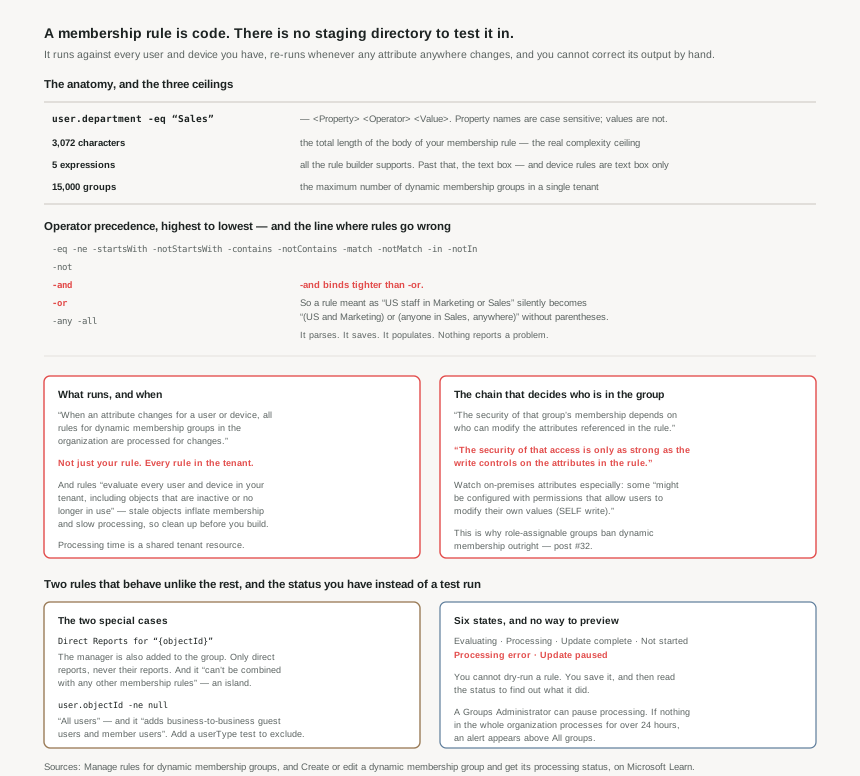
The framing that makes everything else fall into place is this: a dynamic membership rule is a program. It has a syntax, operators with a precedence order, type rules, a length limit and a performance profile. What it has by way of the apparatus that normally surrounds a program is one narrow instrument. On the Validate rules tab you can validate a rule against sample group members to confirm that the rule is working as expected, and when a result surprises you, verification details show the result of each expression that composes the rule — per-expression output, which is genuinely useful for debugging precedence. But you can select 20 users or devices at one time, and you choose them. There is no test directory, and no tenant-wide diff of everyone the rule would add or remove. So you can confirm a hypothesis about twenty objects you already suspected; you cannot discover the ones you did not think to check.
And its output is not editable. You can't manually add or remove a member of a dynamic membership group. If the rule is wrong, the membership is wrong, and the only repair is to fix the rule and wait. That single property is what separates this from an ordinary configuration screen: there is no manual override to fall back on when the automation misbehaves.
A tenant can hold a maximum of 15,000 dynamic membership groups. A single rule body can't exceed 3,072 characters. And the portal's rule builder supports the construction of up to five expressions — past that you are writing in the text box, unaided. The 3,072 characters is the one that actually binds: it is the ceiling on how much logic any single group is allowed to express.
Architecture
The shape of a rule
A single expression is Property Operator Value, with the property written as object.property:
user.department -eq "Sales"
Two syntax facts that cause more trouble than they should. Property names are case sensitive, while regex and string operations aren't case sensitive — so user.Department fails but "sales" matches "Sales". And null is special: use -eq or -ne when you're comparing the null value, and don't use the -not operator as a comparative operator for the null value, which errors either way you spell it.
Precedence, which is where correct-looking rules go wrong
The documented order, highest to lowest: the comparison operators, then -not, then -and, then -or, then -any and -all. Microsoft's guidance is that you need parentheses only when precedence doesn't meet your requirements, which is true and is also the trap.
-and binds tighter than -or. So a rule intended as "US staff who are in Marketing or Sales", written without parentheses, groups as "(US and Marketing) or (Sales, anywhere in the world)". The Sales department in every country lands in a group that was scoped to one. The rule is syntactically valid, so it parses, saves, and populates. Nothing anywhere reports a problem — the group simply has more people in it than the name suggests.
This is worth dwelling on because it is the failure mode of the whole feature. The portal validates syntax: if the rule that you entered isn't valid, the portal displays an explanation of why the rule couldn't be processed. Nothing validates intent. A rule that is well-formed and wrong is indistinguishable, at save time, from a rule that is well-formed and right.
memberOf operator is being withdrawn
The rules reference notes that the memberOf operator is in preview and has some limitations. Its own page is blunter: the public preview of the memberOf rule operator is ending, and after November 3, 2026, dynamic membership groups, dynamic administrative units, and entitlement management auto-assignment policies that use the memberOf operator stop updating and remain in their last known state — which can lead to stale access and enforcement gaps, including outdated Teams and SharePoint access, Conditional Access targeting, group-based licensing, and access package assignments. Microsoft states plainly that memberOf is a preview operator and isn't recommended for production use and that the preview should only be used in test environments as it can affect dynamic group processing in the tenant. Note too that the dynamic group rule builder and validate feature can't be used for memberOf at this time, so the validation instrument above does not cover it. If you have memberOf anywhere, the work is to find and replace it before that date, not to design with it.
What actually runs, and how often
Here is the sentence that determines the performance characteristics of the entire feature:
When the attributes of a user or a device change, the system evaluates all rules for dynamic membership groups in a directory to see if the change would trigger any group additions or removals.
Not the rules that reference the changed attribute. All of them. One person's job title changing causes every dynamic rule in the tenant to be considered. Which means the cost of your rules is not borne by your groups alone — it is a shared tenant resource, and two facts in the documentation confirm that reading:
- The advice to minimize the use of Match or Contains as much as possible, explicitly because of dynamic group processing times. An expensive operator is a tax on every attribute change in the directory, not just on your group.
- The alert behaviour: if no pending updates for dynamic membership groups can be processed for all the groups within the organization for more than 24 hours, an alert appears above All groups. That alert is organization-wide because the backlog is organization-wide.
And the inputs are larger than you think. Dynamic membership group rules evaluate every user and device in your tenant, including objects that are inactive or no longer in use. The documentation's recommendation follows directly: clean up stale devices and inactive users before you create a rule, because stale devices and stale users can inflate group membership and slow dynamic membership group processing. Directory hygiene stops being cosmetic the moment rules exist.
The status page is your test output
Once the rule is live, the processing status is the only feedback channel — validation tests objects you nominate, not the rule’s actual effect on the directory — and it has six states: Evaluating, Processing, Update complete, Processing error, Update paused, and Not started.
Two of those are worth planning around. Processing error means the rule could not be evaluated — membership is now whatever it was before the failure, which is a state no one designed. And Update paused is a deliberate control: someone with at least the Groups Administrator role can pause and resume the processing of dynamic membership groups, and notably group owners who don't have the correct roles don't have the necessary rights to edit this setting.
Pause is the closest thing to a safety catch this feature has. It is the mechanism for stopping a bad rule from continuing to act while you work out what it did.
An operational detail that surprises people at the worst moment: when users are added to a Microsoft 365 group they receive a welcome email, and later, if any attributes of a user or device change, all rules for dynamic membership groups in the organization are processed for changes. Users who are added then also receive the welcome notification. Edit a rule carelessly and the directory sends mail on your behalf, to everyone the edit swept in. The behaviour can be turned off in Exchange PowerShell — which is worth doing before the first rule, not after.
Two rules that do not behave like the others
Direct reports. Written as Direct Reports for "{objectId}", and constrained in three ways that together make it an island: the manager is also added to a direct reports dynamic group; it supports only the manager's direct reports, so you can't create a group that has the manager's direct reports and their reports; and you can't combine this rule with any other membership rules. One manager, one level, nothing else in the group. If you wanted an org-chart subtree, this is not it — and the manager being silently included has caught out more than one approval workflow.
All users. user.objectId -ne null is the documented way to select everyone, and it adds business-to-business guest users and member users to the group. That is the entire directory, guests included. If the group drives access, the guest inclusion is the part to notice — adding -and (user.userType -eq "Member") is the documented fix, and post #31's guest-billing distinction is a reason to care which you picked.
Why This Architecture Holds Up
Because Microsoft documents the threat model, and it is the one from #32
The security section of the rules reference is unusually direct:
When you create a dynamic membership rule, the security of that group's membership depends on who can modify the attributes referenced in the rule. And, for groups that matter: if a dynamic group controls access to sensitive resources, applications, or Conditional Access policies, the security of that access is only as strong as the write controls on the attributes in the rule.
Post #32 reached that conclusion by generalising from why role-assignable groups ban dynamic membership. Here it is stated outright — and the documentation closes the loop itself: role-assignable groups already prevent this risk by requiring assigned (not dynamic) membership.
The hybrid case is called out specifically, and it is the one most likely to be live in a real estate: some on-premises attributes might be configured with permissions that allow users to modify their own values (SELF write). So a rule on department or jobTitle may be a rule the subject can satisfy themselves, from a directory your Entra administrators do not control, using a permission granted years ago for an unrelated reason.
Which makes the review question concrete. For any dynamic group that gates something: list the attributes in the rule, and for each, list who can write it — in Entra and at the source. That list is the true membership-control list for the group, and it will not match the list of people who can edit the group.
Because the licence model bills the way #31 warned
Dynamic membership requires a Microsoft Entra ID P1 license or an Intune for Education license for each unique user who's a member of one or more dynamic membership groups — and, exactly as with governance in #31, you don't have to assign licenses to users for them to be members, but you must have the minimum number of licenses in the Microsoft Entra organization to cover all such users. The worked example is blunt: if you have a total of 1,000 unique users in all dynamic membership groups in your organization, you need at least 1,000 licenses.
Two consequences. First, "unique users across all dynamic groups" is a union, not a sum, so the marginal cost of an additional dynamic group is zero for people already covered and P1 for anyone new it reaches. Second — and this is the planning point — a rule like user.objectId -ne null puts the entire directory into that union in one line.
Devices are free: no license is required for devices that are members of a dynamic membership group based on a device. Given that device rules must be written in the text box and cannot reference owner attributes, the device side of this feature is cheaper and blunter than the user side, in both senses.
Because the type system is stricter than the vocabulary suggests
Three separations that cannot be bridged, and that quietly determine how many groups you end up with:
- You can create dynamic membership groups for users or devices, but you can't create a rule that contains both. A "corporate Windows laptops belonging to Finance" group is two groups and something else to join them.
- You can't create a device membership group based on the user attributes of the device owner. Device rules see device attributes only — which is why
deviceOwnershipandenrollmentProfileNameexist as device-side proxies for organisational facts. - Agents are split down the middle: agent identities, which are service principals, aren't supported as members of dynamic membership groups, but an agent's user account is evaluated by user-based membership rules and can be included. So an agent can arrive in a dynamic group through the user half of its identity while being excluded through the other — and by default isn't distinguished from other user identities unless the rule says so.
Because the tooling stops helping exactly where the risk starts
The rule builder supports the construction of up to five expressions and is available only for user-based dynamic membership groups. Everything past that threshold — more than five expressions, direct reports, -contains, setting operator precedence, complex expressions with -any, and every device rule — is written free-hand in a text box.
Read that list again and notice what it is: it is a list of the rules most likely to be wrong. Precedence is on it. Collections are on it. The assisted path covers the simple cases; the unassisted path covers the dangerous ones. That is not an argument against the text box — it is an argument for treating anything written in it as code that needs review, because the product has stopped offering an opinion at precisely the point where opinions matter.
Key Architecture Decisions
| Decision | What to do | Why |
|---|---|---|
| Choosing attributes for a rule | Audit write permissions on every attribute first — in Entra and at the source | The security of that access is only as strong as the write controls on the attributes in the rule, and on-premises SELF write is common. |
| Any group that gates privileged access | Assigned membership, not dynamic | Role-assignable groups already prevent this risk by requiring assigned (not dynamic) membership (#32). |
Writing a rule with both -and and -or |
Parenthesise it even when precedence happens to agree with you | -and binds tighter than -or. A well-formed wrong rule saves and populates without complaint. |
| Before the first rule in a tenant | Clean up stale devices and inactive users | Rules evaluate every user and device in your tenant, including objects that are inactive, inflating membership and slowing processing. |
| Operator choice | Prefer -eq, -in, -startsWith; treat -match and -contains as a cost |
Minimize the use of Match or Contains as much as possible — the cost lands on every attribute change in the directory, not just yours. |
| Rolling out any new rule | Know where the pause control is before you need it | Validation covers 20 nominated objects, not the tenant. Pause is the only way to stop a live rule acting, and needs Groups Administrator — owners cannot. |
| Microsoft 365 groups with rules | Decide about the welcome email before the first edit | Users swept in by a rule change also receive the welcome notification. Turn it off in Exchange PowerShell if unwanted. |
| "Everyone" groups | Add -and (user.userType -eq "Member") unless guests are genuinely intended |
user.objectId -ne null adds business-to-business guest users and member users — and puts the whole directory in the P1 licence union. |
| Org-chart groups | Do not expect direct reports to give you a subtree | One level only, the manager is included, and it can't be combined with any other membership rules. |
| Rules past five expressions | Review them like code, with a second reader | The builder stops helping exactly at the cases most likely to be wrong: precedence, collections, and every device rule. |
Closing Thought
Almost everything in this post follows from one gap. You can ask Entra "would these twenty objects match?" before committing a rule, and that is a real instrument. What you cannot ask is "who would this rule select?" across the tenant. Post #29 was about the opposite situation on the Azure side — what-if, preflight and deployment history, three separate mechanisms for finding out what a change would do before and after it did it. The identity plane, which governs who can do anything at all, has none of that for the mechanism that decides group membership.
What it has instead is a status field and a pause button: a way to see that something happened, and a way to make it stop. That is a fair amount, and it is not a preview. So the discipline has to come from the author rather than the tool — parenthesise defensively, prefer cheap operators, scope guests deliberately, and treat the attribute list as the real access-control list.
The deeper point is the one the documentation makes itself, and it is worth carrying into the rest of this phase: a dynamic group's membership is not controlled by whoever administers the group. It is controlled by whoever can write the attributes the rule reads. Those are rarely the same people, the second list is rarely written down, and in a hybrid estate it may not even live in the same directory.
#34 turns from human identity to workload identity: app registrations and service principals — the difference between the two, why one object in your tenant can represent an application defined in another, and what that means for consent.
Official Azure Reference
- Manage rules for dynamic membership groups
- Create or edit a dynamic membership group and get its processing status
- Validate rules for dynamic membership groups
- Create simpler, more efficient rules for dynamic membership groups
- The memberOf rule for dynamic membership groups
- Manage stale devices in Microsoft Entra ID
Comments