Business Challenge
Post #31 took one half of a binding. This is the other half, and the half where most of the received wisdom is now out of date.
Not any more. IAM also has three legacy basic roles that existed prior to the introduction of IAM — Owner, Editor and Viewer — and they were originally known as primitive roles. The current basic roles are Admin, Writer and Reader.
Correct approachLearn both sets, because the estate you inherit is full of the legacy three and the documentation now describes them as the historical case rather than the default.
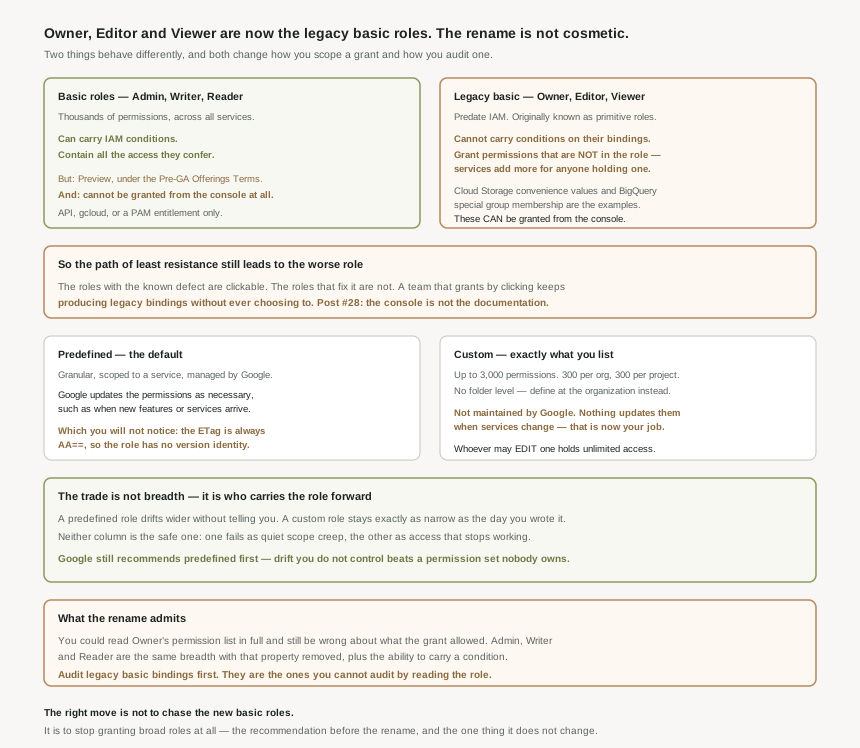
Two things behave differently, and both matter. You cannot add conditions to role bindings for legacy basic roles, so the entire conditional access model from #37 is unavailable on them. And a legacy role carries permissions that are not listed in it: the principal also gets any permissions that services provide to principals with legacy basic roles.
Correct approachTreat the rename as a functional change. One set can be scoped with conditions and audited by reading it; the other cannot.
Two obstacles. They are Preview, subject to the Pre-GA Offerings Terms in the General Service Terms section of the Service Specific Terms. And you cannot use the Google Cloud console to grant the Reader, Writer, or Admin roles — only the API or the gcloud CLI.
Correct approachKnow the direction of travel without betting production on it. The better replacement for a legacy basic role today is usually a predefined role, not a new basic one.
They are the tightest fit and the largest liability. Unlike predefined roles, custom roles are not maintained by Google — nothing updates them when services change. Google's own guidance is to prioritise predefined roles because they offer a balance of security and convenience.
Correct approachReach for a custom role when no predefined role fits without over-granting, and treat each one you create as code you have adopted maintenance of.
Architecture
Three kinds of role, and the differences between them are about breadth, who maintains them, and what you are allowed to do with them — not just about how many permissions each contains.
What a role is made of
Before comparing the kinds, two details from the role anatomy are worth carrying into the rest of this post. Permissions are named SERVICE.RESOURCE.VERB, and permissions usually, but not always, correspond 1:1 with REST methods — so the mental model of "one permission per API call" is a good default and not a rule you can rely on when auditing.
The second is quieter and more useful. An ETag identifies the version of a role, and basic and predefined roles always have the ETag AA==, while ETags for custom roles change each time you modify them. A Google-managed role therefore has no version identity at all. Its contents change — Google automatically updates their permissions as necessary, such as when Google Cloud adds new features or services — but nothing about the role tells you that it changed.
The three kinds
| Kind | Breadth | Who maintains it | When to reach for it |
|---|---|---|---|
| Basic Admin, Writer, Reader |
Thousands of permissions, all services. | Google. | Development and test. In production environments, do not grant basic roles unless there is no alternative. |
| Legacy basic Owner, Editor, Viewer |
As above, plus permissions injected by services. | Google. | What you inherit. Migrate away; do not choose it new. |
| Predefined | Granular, scoped to a service. | Google, updated automatically. | The default. The balance of security and convenience. |
| Custom | Exactly the permissions you list. | You, and nothing else. | When every predefined role that has the permission also has ones the principal should not have. |
When a legacy basic role is granted, the principal gets the permissions in the role and any permissions that services provide to principals with legacy basic roles — Cloud Storage convenience values and BigQuery special group membership are the documented examples. So the permission list for Owner is not the answer to "what can an Owner do". The current basic roles do not work this way: those two mechanisms give no permissions to principals holding Admin, Writer or Reader. That is the substance behind the rename, and it is the part that changes how you audit.
Custom roles: the limits that shape the design
- 300 per organization and 300 per project — a real ceiling if you are tempted to mint one per team per service.
- Up to 3,000 permissions in a single custom role.
- No folder level. You cannot define custom roles at the folder level — if you need one inside a folder, define it at the organization level. This is the one place the hierarchy from #29 does not apply, and it surprises people who have organised everything else by folder.
- Granted only where created. A custom role works within the project or organization it was created in, and nowhere else.
Anyone able to edit custom roles in a project or organization can add any permission to any custom role there. Google states the consequence plainly: if you grant any custom role to such a principal, they can use the custom role to get unlimited access. Edit rights on custom roles are therefore an administrative privilege on the whole container, not a developer convenience — which makes it exactly the kind of grant the #31 argument for a small, durable set of groups exists to keep visible.
Why This Architecture Holds Up
The three kinds are usually taught as a least-privilege ladder: basic is too broad, custom is ideal, predefined sits in between. That framing gets the recommendation backwards, because it measures only breadth and ignores who carries the role forward.
| When Google Cloud adds a feature or service | A predefined role | A custom role |
|---|---|---|
| Does the role change? | Yes, automatically. | No. Nothing updates it. |
| Do you find out? | No — the ETag stays AA==. | Yes, because you made the change. |
| What breaks | Scope creeps quietly under a grant you already reviewed. | Access stops working as services move on. |
Neither column is the safe one. A predefined role drifts wider without telling you; a custom role stays exactly as narrow as the day you wrote it, which is a different kind of failure and often a louder one. Google still recommends predefined first, and the reason is operational rather than security-theoretical: drift you do not control is cheaper to live with than a permission set nobody owns.
Why the console asymmetry matters more than it looks
Put the two facts next to each other. The legacy basic roles are the leaky ones, and they can generally be granted from the console. The current basic roles fix the leak, and you cannot use the Google Cloud console to grant the Reader, Writer, or Admin roles — that needs the API, the gcloud CLI, or an entitlement through Privileged Access Manager.
So the path of least resistance still leads to the worse role. This is the #28 point arriving in IAM: what the console makes easy is not what the documentation recommends, and a team that grants access by clicking will keep producing legacy bindings without ever choosing to. If you want the newer roles used, the grant has to move into the tooling from #26 and #28, because the interface will not offer them.
What to do with this
- Inventory legacy basic bindings first.
roles/owner,roles/editorandroles/vieweracross the estate, using the asset export from #23. These are the bindings you cannot fully audit by reading the role. - Replace with the most limited predefined role that fits — not with a new basic role, which is Preview, and not reflexively with a custom role.
- Check before you cut over. Role recommendations suggest what to grant instead, and Policy Simulator shows whether the change affects existing access. Both get proper treatment in #38.
- Treat every custom role as owned code — with a reason it exists, and someone who will notice when a service adds permissions it should include.
- Audit who can edit custom roles separately from who holds them. That grant is unlimited access wearing a narrow label.
Key Architecture Decisions
| Decision | Choose this | Because |
|---|---|---|
| Default role kind | Predefined | Managed by Google, and they offer a balance of security and convenience. |
| Basic roles in production | No | In production environments, do not grant basic roles unless there is no alternative. |
| Replacing an Owner or Editor grant | The narrowest predefined role that fits | The new basic roles are Preview and cannot be granted from the console. |
| Auditing a legacy basic grant | Do not rely on the role's permission list | Principals also get permissions that services provide to legacy basic role holders. |
| Conditional access on a broad grant | Not available on legacy basic roles | You cannot add conditions to role bindings for them. |
| Tracking whether a predefined role changed | Do not use the ETag | Basic and predefined roles always have the ETag AA==. |
| Custom role for a folder | Define it at the organization level | You cannot define custom roles at the folder level. |
| One custom role per team per service | No | 300 per organization and 300 per project. |
| Who may edit custom roles | A small, audited set | They can use a custom role to get unlimited access. |
| Adopting a custom role | Assign an owner | Custom roles are not maintained by Google. |
Closing Thought
The interesting thing about the basic-role rename is what it admits. Owner, Editor and Viewer had a property that made them impossible to reason about: the role did not contain all the access it conferred, because services could add permissions for anyone holding one. You could read the permission list in full and still be wrong about what the grant allowed. Admin, Writer and Reader are the same breadth of access with that property removed, plus the ability to carry a condition.
Which leaves an odd situation worth naming. The better roles exist, are documented, and cannot be granted from the interface most access is granted through — while the roles with the known defect can. That gap will close, but until it does, the right move is not to chase the new basic roles. It is to stop granting broad roles at all, which was the recommendation before the rename and is the one thing the rename does not change.
#33 puts the two halves together: allow policies, bindings, and the union rule — why access is additive, what that means for a grant you thought you had narrowed, and why removing a role often changes nothing at all.
Comments