Business Challenge
Phase 1 of this series took the Azure resource model apart over thirty posts, and in all of them the question of price came up exactly once, in passing, on quotas. That is because the Azure control plane is essentially free to govern. Management groups cost nothing. Azure Policy assignments cost nothing. Azure RBAC role definitions and assignments cost nothing, at any scale. The constraints in Phase 1 were structural — a limit of six levels, a cap of 4,000 role assignments, an AssignableScopes array you cannot widen later — and none of them had an invoice attached.
Phase 2 begins in a different economy. Microsoft Entra ID is the foundational product of Microsoft Entra, providing authentication, policy enforcement, and protection for users, devices, apps, and resources, and you already have it: if you're a Microsoft 365, Azure, or Dynamics CRM Online subscriber, you're already using Microsoft Entra ID, because every tenant is automatically a Microsoft Entra tenant. What you have is the Free edition, and the distance between Free and the thing most architecture diagrams quietly assume is a per-user bill.
That would be a procurement problem and not an architecture problem, except for how the counting works. Entra does not bill you for the users who use a feature. It bills you for the users a feature could reach. A policy you write on a Tuesday afternoon, scoping an access package to All employees, is a licensing decision for the whole company — taken by an administrator, in a blade, with no number displayed anywhere on the screen.
From the governance licensing FAQ: Users don't need to be assigned a Microsoft Entra ID Governance license, but there needs to be as many licenses to include all member users in scope of, or who configures, the Identity Governance features. The licence is not a thing you attach to a person. It is a count you must hold, matched against a scope you define in policy. Nothing enforces the match at the moment you widen the scope.
Architecture
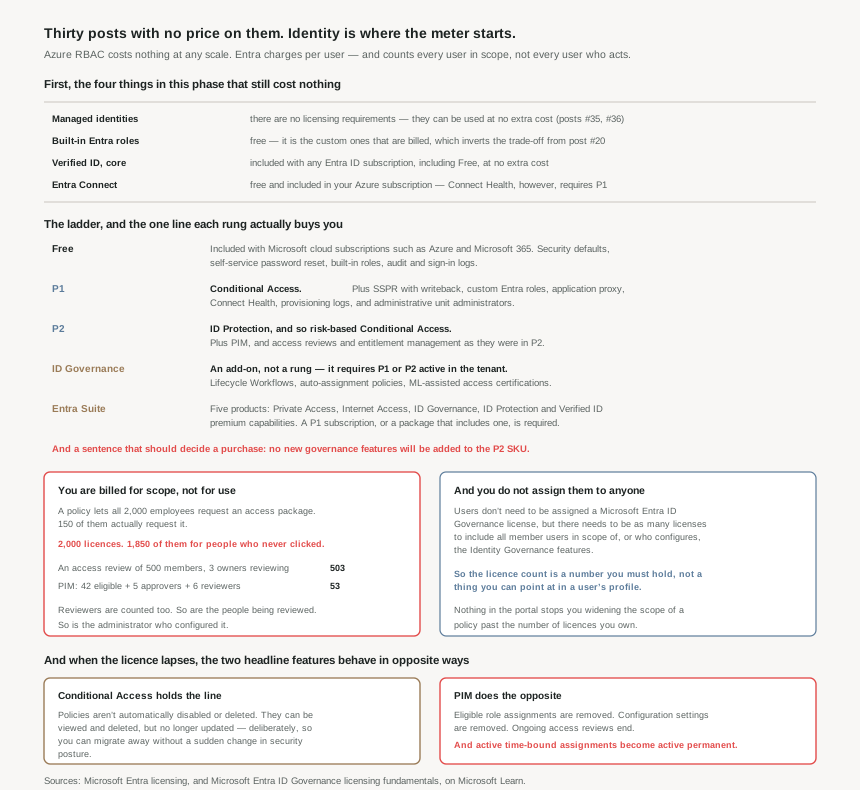
Start with what is still free, because it is more than you expect
Four things this phase depends on carry no licence at all, and knowing them stops you over-buying on the strength of a feature you already have.
Managed identities. There are no licensing requirements for using Managed identities for Azure resources, and they can be used at no extra cost. Posts #35 and #36 are entirely about them; it is worth saying now that the most-recommended answer to credential handling in Azure is also the free one.
Built-in Entra roles. Using built-in roles in Microsoft Entra ID is free. But using custom roles requires a Microsoft Entra ID P1 license for every user with a custom role assignment — and that is a precise inversion of the trade-off from post #20. In Azure RBAC, a custom role costs nothing but is permanently capped by the AssignableScopes you set at creation. In Entra, a custom role has no such cap, and instead bills you per assignee. Two directories, two custom-role systems, opposite constraints.
Verified ID. Included with any Microsoft Entra ID subscription, including Microsoft Entra ID free, at no extra cost — with Face Check as the premium add-on that is not.
Entra Connect. Using this feature is free and included in your Azure subscription. Connect Health, which is the part that tells you whether sync is working, requires Microsoft Entra ID P1 licenses. Free to run the hybrid plumbing, paid to monitor it.
The ladder, and the one line on each rung that matters
The full comparison runs to several screens of tables. Compressed to the decision each rung actually forces:
| Edition | How you get it | The line it buys |
|---|---|---|
| Free | Included with Microsoft cloud subscriptions such as Microsoft Azure, Microsoft 365, and others. | Security defaults, which help protect against identity-related attacks and are available for all customers. Self-service password reset. Built-in roles. Audit logs and sign-in logs. |
| P1 | Standalone, or with Microsoft 365 E3, E5, E7, F1, F3, or Enterprise Mobility + Security E3. | Conditional Access. Also SSPR with writeback, custom Entra roles, application proxy, Connect Health, provisioning logs, and administrative unit administrators. |
| P2 | Standalone, or with Microsoft 365 E5 and E7, the Microsoft Defender Suite, or Enterprise Mobility + Security E5. | ID Protection — and therefore risk-based Conditional Access, because risk-based policies require access to Microsoft Entra ID Protection, which is a Microsoft Entra ID P2 feature. Plus PIM, and access reviews and entitlement management as they stood. |
| ID Governance | An add-on. It requires that the tenant also have an active subscription to another product containing the AAD_PREMIUM or AAD_PREMIUM_P2 service plan. |
Lifecycle Workflows, auto-assignment policies, ML-assisted access certifications, and the sponsor and delegation models. An advanced set of identity governance capabilities available for Microsoft Entra ID P1 and P2 customers. |
| Entra Suite | Standalone or in Microsoft 365 E7. A Microsoft Entra ID P1 subscription or a package that includes Microsoft Entra ID P1 is required. | Five products at once: Private Access, Internet Access, ID Governance, ID Protection, and Verified ID premium capabilities. |
Two observations about the shape of that table. First, the two rungs everyone argues about — P1 and P2 — are not usefully separated by quantity of features. The distinction worth carrying is this: P1 gives you Conditional Access for conditions you can explicitly state, and P2 adds the risk signals from ID Protection that make risk-based Conditional Access possible. That is architectural shorthand rather than a complete description of the SKU boundary — P2 also carries PIM and the governance capabilities that came with it — but it is the line that decides what kind of rules your design is allowed to express.
Second, ID Governance and the Suite are not the top of the ladder. They are additions that require a rung beneath them to already be paid for. If a prerequisite isn't present, or the subscription expires, then Microsoft Entra ID Governance scenarios might not function as expected — so the dependency is live, not a one-time purchase check.
The counting rule, which is where budgets actually go wrong
This is the part worth reading twice. The documentation gives worked examples, and they are unusually candid.
| Scenario | The calculation | Licences |
|---|---|---|
| A policy says All employees (2,000) can request a set of access packages. 150 employees actually request them. | 2,000 employees who can request the access packages. | 2,000 |
| An access review of a group with 500 member users and 3 group owners, with the owners as reviewers. | 500 licenses for users, and 3 licenses for each group owner as reviewers. | 503 |
| 50 administrators, 42 managed through PIM, activation requires approval from 5 people, and monthly reviews are done by 6 managers not otherwise in PIM roles. | 42 licenses for the eligible roles + five approvers + six reviewers. | 53 |
In the first row, 2,000 − 150 = 1,850 licences are bought for employees who never clicked anything. That is not a billing error; it is the stated rule, and it is the right rule, because the entitlement exists whether or not it is exercised. But it means the cost of an access package is set by the audience of its policy, and an administrator widening a scope from one department to the whole company has just multiplied a bill with no prompt to say so.
The second and third rows make the same point from the other direction: you pay for reviewers as well as the reviewed, for approvers as well as the eligible. Governance features bill the entire loop, not the subject of it.
Administrative units require a Microsoft Entra ID P1 license for each administrative unit administrator and only a Microsoft Entra ID Free license for each administrative unit member — a sensible, cheap split. But: if you are using rules for dynamic membership groups for administrative units, each administrative unit member requires a Microsoft Entra ID P1 license. Choosing dynamic membership over manual, a decision that looks purely operational, moves every member of that unit from Free to P1.
Why This Architecture Holds Up
Because the licence boundary decides where your control plane is
Phase 1 established that Azure governance has one enforcement point worth the name: Azure Policy, evaluated at resource write. Entra adds a second: Conditional Access, evaluated at sign-in. The two do not overlap, and they answer different questions — Policy asks may this resource exist in this shape, Conditional Access asks may this person reach it right now.
Conditional Access requires P1. That single fact determines whether an organisation's identity design can be conditional at all. Below P1 you have security defaults, which are an on/off posture for the tenant, not a policy language. So the choice between Free and P1 is not "do we want more features"; it is do we want an enforcement point at sign-in. Everything downstream of that — every design in this phase that says "require MFA when", "block from", "require compliant device for" — presumes the answer was yes.
Because P2 is a frozen SKU, and that is a stated roadmap
Buried in the governance licensing FAQ is a sentence that should end a great many purchasing debates: All currently Generally Available features in Microsoft Entra ID P2 will remain, but no new Identity Governance & Administration (IGA) features or capabilities will be added to the Microsoft Entra ID P2 SKU.
P2 is not being withdrawn, and what you have keeps working. But for governance specifically, P2 is a snapshot. New capability lands in ID Governance and the Suite. An architecture that plans to grow its governance posture over three years and budgets for P2 has budgeted for a feature set that will not grow with it. This is rare: a vendor stating plainly, in documentation rather than a roadmap deck, that a SKU is closed for new function.
Because the failure mode on expiry is different for every feature
Almost every discussion of licensing stops at what you get. The more useful question for an architect is what happens when you stop paying — during a migration, a tenant consolidation, a contract gap, or an expired trial. Entra answers that question differently for its two flagship features, and the difference is stark.
Conditional Access degrades safely. When licenses required for Conditional Access expire, policies aren't automatically disabled or deleted. They can be viewed and deleted, but no longer updated, and the documentation states the intent outright: to grant customers the ability to migrate away from Conditional Access policies without a sudden change in their security posture. Your rules keep enforcing. You lose the ability to change them.
PIM does the opposite. On expiry, eligible role assignments are removed, as users will no longer be able to activate privileged roles, any ongoing access reviews of Microsoft Entra roles end, and Privileged Identity Management configuration settings are removed. And the line that deserves to be read slowly: active time-bound assignments become active permanent, which means they'll no longer expire at a designated time.
A time-bound privileged assignment is a control: this person holds this role until Friday. When the licence lapses, that control does not fail closed by removing the access, and it does not fail open by leaving the timer running. It deletes the expiry and keeps the access. An expired invoice silently converts temporary privilege into permanent privilege, in exactly the roles you were most careful about.
There is a defensible logic to it — removing active assignments outright would lock administrators out of their own tenant at the worst possible moment — but the result is that letting a P2 subscription lapse is a privilege-escalation event that produces no alert, because Privileged Identity Management no longer sends emails on role assignment changes either. The operational consequence: a PIM deployment needs a licence-expiry watch as much as it needs an access-review schedule, and offboarding a tenant needs a deliberate pass to strip the assignments PIM will otherwise make permanent on its way out.
Because guests are billed on a different model entirely
One more structural point that catches B2B-heavy estates. Microsoft Entra ID Governance utilizes Monthly Active User (MAU) licensing for guest users which is different than licensing for employees, and the tenant must be linked to an Azure subscription for the applicable guest-governance billing.
It is worth being precise about which MAU model that is, because there are two and they are not the same one. Microsoft Entra External ID's core offering is free for its first 50,000 monthly active users. The ID Governance guest meter is separate, and the documentation answers the obvious question directly: there's no free tier for governance billing. Governance guest billing applies to all guest users, even those within the first 50,000 MAU. A guest can therefore be billable for governance while sitting comfortably inside External ID's free allowance.
The second qualifier matters just as much, and it narrows the exposure considerably. Guest users are only billed when they actively use features that are exclusive to Microsoft Entra ID Governance. Microsoft Entra P2 features are not billed, and linking an Azure subscription is not required or enforced for P2 actions. Put plainly: governance features included with Microsoft Entra P2 including basic access reviews and entitlement management capabilities won't be billed to the governance guest add-on. Billing is also per-guest-per-month and activity-based — if a guest doesn't take any active governance-related action during a month, such as an assignment that was made in a prior month, they won't be billed for that month.
So a design spanning employees and guests can involve two licensing models at once: held-seat licensing for the member users, and MAU-based Azure billing for the guests when ID Governance-exclusive guest capabilities are used. Which path applies depends on the capability, not on the mere presence of guests in the scope. That is still the first place in this series where an Entra decision reaches back into the Azure billing hierarchy of posts #9 and #10 — and it means someone has to nominate which subscription carries it, before the feature that needs it is switched on. Note too that governing guests at all requires at least one Microsoft Entra ID Governance or Microsoft Entra Suite license for an administrator in the tenant, even though the guests themselves do not hold seats.
Key Architecture Decisions
| Decision | What to do | Why |
|---|---|---|
| Free or P1 | Treat it as "do we need an enforcement point at sign-in", not as a feature count | Conditional Access requires P1. Below it you have security defaults, which are a posture, not a policy language. |
| P1 or P2 | Buy P2 for risk, not for volume of features | Risk-based policies require ID Protection, a P2 feature. That is the qualitative line; the rest follows from it. |
| Governance beyond P2 | Plan on ID Governance, not on P2, for anything multi-year | No new IGA features or capabilities will be added to the Microsoft Entra ID P2 SKU. P2 governance is a snapshot. |
| Sizing an access package | Count the audience of the policy, not the expected requests | 2,000 who can request means 2,000 licences even when 150 do. Scope is the bill. |
| Sizing a review or a PIM rollout | Count reviewers and approvers as well as subjects | 500 members + 3 owner-reviewers is 503. 42 eligible + 5 approvers + 6 reviewers is 53. |
| Administrative unit membership | Know that choosing dynamic rules moves members from Free to P1 | Static AU members need only Free; dynamic membership rules require P1 for each member. |
| Custom roles | In Entra, budget per assignee; in Azure, budget the scope instead | Entra custom roles need P1 per user assigned one. Azure custom roles are free but permanently capped by AssignableScopes (#20). |
| Credentials for workloads | Reach for managed identities first | No licensing requirements, no extra cost, and no secret to rotate (#35, #36). |
| PIM operations | Monitor licence expiry as a security control | On expiry, eligible assignments are removed and active time-bound assignments become active permanent — silently. |
| Guest-heavy estates | Nominate the Azure subscription that carries guest governance before you need it | Guest use of ID Governance-exclusive capabilities is MAU-billed against a linked Azure subscription, unlike the held-seat model for members. P2 capabilities are not billed to that meter, and there is no free tier for governance billing — External ID's first 50,000 MAU does not cover it. |
Closing Thought
Licensing pages are the documentation nobody reads for architecture, and that is a mistake here, because in Entra the licence boundary is an architecture boundary. It decides whether you have an enforcement point at sign-in. It decides whether privileged access can be temporary. It decides, through the counting rule, that the cost of a governance design is set by the breadth of its scope rather than the frequency of its use — which is the opposite of how almost everything else in Azure bills.
The detail I keep returning to is the expiry behaviour, because of what it reveals. Two features, both premium, both security controls, and the platform chose opposite failure modes for them: Conditional Access keeps enforcing and stops accepting changes, while PIM stops enforcing and quietly makes the temporary permanent. Neither choice is wrong on its own terms. But together they mean you cannot reason about "what happens if the licence lapses" as a single question with a single answer, and an estate that assumed it could will find the answer differs per feature, at the worst time.
Phase 1 taught that the expensive Azure decisions are the ones that are hard to reverse. Phase 2 opens with a different lesson: the expensive identity decisions are the ones taken in a blade, by someone choosing a scope, with no number on the screen.
#32 covers users, groups and administrative units — the objects Entra actually governs, and why the administrative unit exists at all when management groups and resource groups already partition the Azure side.
Comments