Business Challenge
The blueprint is an opinionated target architecture, but a real organisation may already have identity, networking, governance and workload decisions that constrain how that target is adopted. Every one of these is a constraint arriving before the design does.
It is one of three options, and for most organisations the wrong one. You can use Google as your primary source for identities with no federation; you can federate an existing provider; or you can use Workforce Identity Federation without Cloud Identity in the path at all. The deciding question is whether you want employees to use their existing identity and credentials to sign in.
Correct approachSettle this before anything else, because it is the one decision owned outside the cloud team. An organisation with Active Directory or Okta has already made most of it.
There are four designs on offer, and later is the most expensive time to choose between them. Once workloads depend on the paths that exist, changing the topology means changing the workloads — which is why this is the least reversible of the four areas despite being the one most often deferred.
Correct approachChoose the topology in the first week, from the requirement rather than the default. You can add capacity to any of the four; you cannot cheaply swap between them.
Sometimes, and not always. Workloads with materially different requirements may need more than one landing zone in a single organisation, sharing the foundational elements — identities and billing — while differing above them.
Correct approachAsk whether the regulated workload and the internal tooling genuinely belong under the same network and control model. If not, two landing zones over one identity is a cleaner answer than one landing zone with exceptions.
Google says otherwise, in as many words: because a landing zone is modular, your first iteration is often not your final version. That is meant as reassurance and it is also a warning — it is true of some areas far more than others.
Correct approachDesign for growth explicitly, and know which of the four decisions you are actually free to revisit. The rest of this post is that ranking.
Architecture
A landing zone, also called a cloud foundation, is a modular and scalable configuration that enables organisations to adopt Google Cloud for their business needs. Four areas have to be decided, and unlike the blueprint's single path each offers several defensible answers.
Identity provisioning
Three options, and the choice is usually made elsewhere in the company:
- Google as the primary source, with no federation. The simple path when there is no existing identity system.
- Federate an existing provider — Active Directory, Entra ID, Okta — when you want employees to use their existing identity and credentials to sign in to Google Cloud and other Google services.
- Workforce Identity Federation, federating directly without Cloud Identity or Workspace in the path.
Post #2 covered the mechanism; the design question is narrower and harder. It is the only one of the four areas where the cloud team is usually not the decision-maker, which makes it the one to raise first and the one most likely to sit unanswered while everything else proceeds around it.
Network: four designs, not two
| Design | Choose it when |
|---|---|
| Shared VPC per environment | You want simple, scalable infrastructure with centralised IP address management and central control of firewalling and routing. The default for most cases. |
| Hub-and-spoke with appliances | You require Layer 7 inspection between workloads, or a corporate mandate specifies the security appliance vendor. |
| Hub-and-spoke without appliances | Workloads do not need to talk to each other over internal IPs, but they do share on-premises connectivity, and teams want autonomy over their own firewall and routing rules. |
| Private Service Connect, consumer-producer | Services communicate over few ports, and teams need independence to manage their own IP space, firewalls and routing. |
The blueprint in post #29 offers the first two. The other two exist for a specific reality: teams that will not accept central control of their networking, and an organisation that would rather define service boundaries than a shared address space. The fourth option in particular is the answer for an estate that grew before the foundation did, because it does not require retrofitting a shared network onto workloads that never had one.
Security controls
Seven decisions, each with several implementation options, and Google's framing is that a central team — security or platform — enforces them. Three carry most of the weight:
- Limit persistent credentials for service accounts. Post #22's baseline already blocks key creation on new organisations; this is the same decision stated as a requirement rather than a default.
- Mitigate data exfiltration through Google APIs. The one control with no equivalent in the earlier posts, and the reason VPC Service Controls exists.
- Centrally aggregate necessary logs. The word doing the work is necessary — aggregating everything is a cost decision disguised as a security one.
The remaining four cover continuous monitoring for insecure configurations and threats, encryption at rest, encryption in transit, and managing cloud service provider access.
Why This Architecture Holds Up
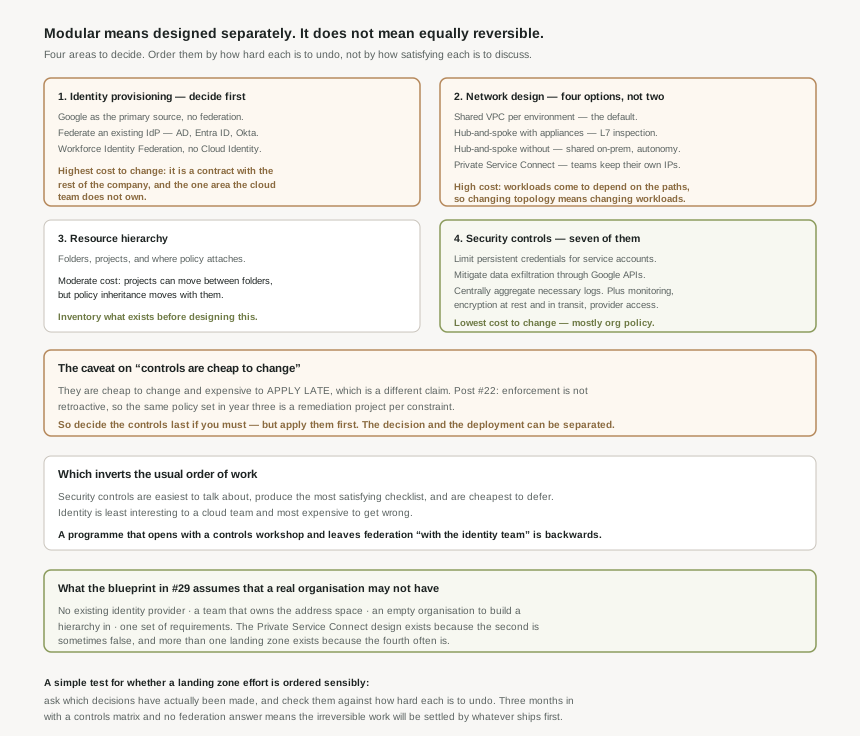
Google's "your first iteration is often not your final version" is accurate and incomplete. The four areas are modular in the sense that they can be designed separately; they are not equally revisable, and the difference is large enough to drive the order you decide them in.
| Area | Cost to change later | Why |
|---|---|---|
| Identity provisioning | Highest | It is a contract with the rest of the company, not a cloud configuration. Changing it means changing how everyone signs in. |
| Network design | High | Workloads depend on the paths that exist. Changing topology means changing workloads, not just networking. |
| Resource hierarchy | Moderate | Projects can move between folders, but policy inheritance changes with them — see #19's asymmetry. |
| Security controls | Lowest | Mostly organization policies and logging configuration, changeable deliberately at any time. |
Which inverts the usual order of work. Security controls are the easiest to talk about, produce the most satisfying checklist, and are the cheapest to defer. Identity is the least interesting to a cloud team and the most expensive to get wrong. A landing zone programme that starts with a controls workshop and leaves federation "with the identity team" has ordered itself backwards.
They are cheap to change and expensive to apply late, which is a different claim. Post #22 established that enforcement is not retroactive: the same policy set applied in year three is a remediation project per constraint rather than a configuration change. So the control itself is revisable while the estate's compliance with it is not. Decide the controls last if you must, but apply them first — they are the one area where the decision and the deployment can be separated, and should be.
Where an existing estate constrains the target
- Existing identity architecture. The blueprint already supports this — it recommends federating your Cloud Identity account with your existing identity provider. What remains yours is which of the three onboarding options above applies, and that may already be settled by the enterprise identity architecture rather than by you.
- Central network control. Both blueprint topologies use Shared VPC, which assumes a team that owns the address space. The Private Service Connect design exists because that team sometimes does not exist.
- An inherited hierarchy. Google documents two uses for the blueprint — to create a complete foundation, and to review an existing environment on Google Cloud. The second is the one a migration needs, and it needs post #23's asset export first: you cannot compare a hierarchy you have not inventoried.
- One set of requirements. A regulated workload and internal tooling may warrant separate landing zones over shared identities and billing.
What to do in the first fortnight
- Raise identity with whoever owns it, on day one, because the answer arrives on their schedule rather than yours.
- Choose the network design from the requirement — Layer 7 inspection, team autonomy, on-premises connectivity, or none of those — and write down which of the four it is and why.
- Inventory what already exists before designing the hierarchy, so the folders describe the organisation rather than the blueprint.
- Apply the day-one security controls immediately, even if the full set is still being argued, because they are the only decision that gets more expensive to deploy the longer it waits.
Key Architecture Decisions
| Decision | Choose this | Because |
|---|---|---|
| What to decide first | Identity provisioning | Highest cost to change, and the only area the cloud team usually does not own. |
| Existing Active Directory or Okta | Federate | Employees use their existing identity and credentials to sign in. |
| No existing identity system | Google as the primary source | The simpler path when there is nothing to federate. |
| Network, default case | Separate Shared VPC per environment | Simple and scalable, with central firewall and routing control. |
| Layer 7 inspection required | Hub-and-spoke with appliances | It is the design that has somewhere to put them. |
| Teams will not cede network control | Private Service Connect consumer-producer | Each team keeps its own IP space, firewalls and routing. |
| Deferring the network decision | Do not | Workloads come to depend on the paths, so the topology stops being changeable. |
| Migrating an existing estate | Inventory before designing the hierarchy | The folders should describe what you have, not what the blueprint expects. |
| Materially different workloads | More than one landing zone, shared identity and billing | Cleaner than one landing zone carrying permanent exceptions. |
| Security controls | Decide late if needed, apply early regardless | The control is revisable; retrofitting compliance with it is not. |
Closing Thought
The word "modular" is doing a lot of quiet work in Google's description, and it is worth being precise about what it earns. The four areas are modular in that they can be designed independently and improved one at a time. They are not modular in the sense that matters most to a programme plan — that any of them could be swapped out later at similar cost. Identity and network are load-bearing in a way that controls and hierarchy are not.
That gives a simple test for whether a landing zone effort is ordered sensibly. Ask which decisions have actually been made, and check them against how hard each is to undo. A team three months in with a full controls matrix, a folder structure, and federation still "with the identity people" has done the reversible work and left the irreversible work to be settled by whatever happens to get built first. Which it will be, and the answer will be permanent.
#31 starts the IAM block properly: principals — users, groups, domains and service accounts — what each can be granted, and why groups are the only one of the four that scales.
Comments