Business Challenge
ID Protection produces probabilities. User risk represents the probability an identity is compromised, and sign-in risk represents the probability a sign-in is compromised (for example, the identity owner didn't authorize the sign-in). Post #42 catalogued where those probabilities come from. This post is about the part that decides whether any of it matters: what the platform does with the number, and what happens to risk that nobody acts on.
The design goal is stated plainly, and it is about headcount rather than security: allowing users to self-remediate using this process significantly reduces the risk investigation and remediation burden on administrators while protecting your organization from security compromises. A detection that requires an analyst does not scale. A detection that the user closes by doing something they were going to do anyway does.
So the interesting architecture is a loop. Detect, apply a policy, let the user clear it, and record how it cleared. Three of those steps are automatic. The fourth — the record — is where the design gets careful, because the closing state is a claim someone will read later.
The legacy risk policies configured in Microsoft Entra ID Protection are retiring on October 1, 2026.
If a tenant still has its user risk or sign-in risk policy configured inside ID Protection rather than in Conditional Access, that is the deadline. The replacement is not a like-for-like port — it is better, and it is the reason everything in #41 through #43 composes with risk at all.
Architecture
Two risks, and one feeds the other
Sign-in risk is per-authentication; user risk is per-account. The connection between them is the sentence that makes sign-in risk policies worth having:
Sign-in risks that aren't remediated impact the user risk, so having risk-based policies in place allows users to self-remediate their sign-in risk, so their user risk isn't affected.
An unremediated risky sign-in does not simply expire. It accumulates into the account's risk level, and eventually crosses whatever threshold the user risk policy uses. So a sign-in risk policy is not just a gate on one authentication — it is the thing that stops today's anomaly becoming next week's blocked account.
The state machine, and what each exit records
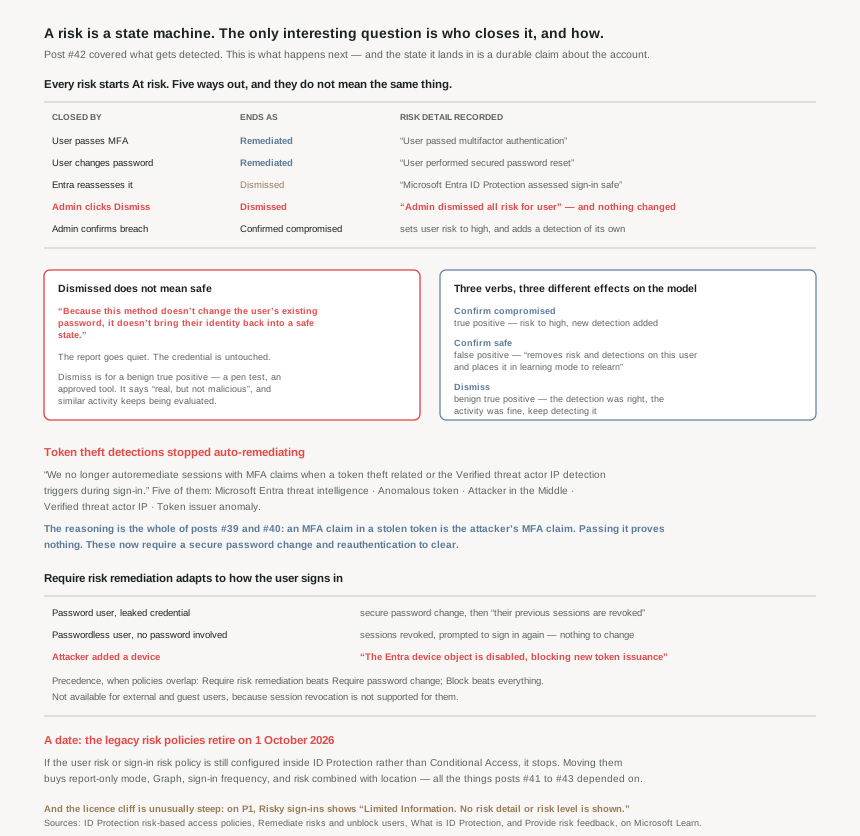
| Closed by | Ends as | Risk detail recorded |
|---|---|---|
| User passes MFA | Remediated | User passed multifactor authentication |
| User changes password | Remediated | User performed secured password reset |
| Admin issues a temporary password | Remediated | Admin generated temporary password for user |
| Entra reassesses it | Dismissed | Microsoft Entra ID Protection assessed sign-in safe |
| Admin clicks Dismiss | Dismissed | Admin dismissed all risk for user |
| Admin confirms breach | Confirmed compromised | Admin confirmed user compromised |
That second row carries a naming trap the documentation flags itself: the risk detail value "User performed secured password reset" is a system-reported label. Despite the name, this value indicates the user completed a secure password change (MFA + password change), not a self-service password reset flow. The two flows are genuinely different — a password change means the user knows their current password, authenticates with multifactor authentication (MFA), and then changes their password, and it doesn't use self-service password reset (SSPR). The label says otherwise.
Require risk remediation adapts to how the user signs in
The older control, Require password change, assumes there is a password worth changing. The newer one does not, and the three branches are worth knowing because they are three different incident responses:
- Password authentication — a leaked credential or password spray. The user performs a secure password change, and when completed, their previous sessions are revoked.
- Passwordless authentication — the detection doesn't involve a compromised password, so there is nothing to change. Instead the user's sessions are revoked and they're prompted to sign in again.
- Attacker-added device — the Entra device object is disabled, blocking new token issuance.
That middle branch is the one that matters as tenants move to passkeys. A passwordless user with a risk detection has no password to reset, so the only meaningful remediation is killing the sessions. Which is, once again, the conclusion every post in this phase has reached from a different direction: revocation is the control that actually acts.
Why This Architecture Holds Up
Because "Dismiss" is the button that looks like remediation and is not
Of everything in this post, this is the sentence to carry:
Because this method doesn't change the user's existing password, it doesn't bring their identity back into a safe state. You might still need to contact the user to inform them of the risk and advise them to change their password.
Dismiss clears the report. It does nothing to the account. If the detection was real and the credential is in someone else's hands, the credential is still in someone else's hands — and the risky users list is now empty, which is the state an administrator reads as "handled".
The intended use is narrow and the documentation is precise about it: dismiss is for a benign true positive — this sign-in risk we detected is real, but not malicious, like those from a known penetration test or known activity generated by an approved application. The detection was right; the activity was fine. That is a genuinely useful category, and it is not the same as "I looked and it seemed OK".
For that second case there is a different verb, with a very different effect.
Because the three feedback verbs train the model differently
| Verb | Means | Effect |
|---|---|---|
| Confirm compromised | True positive | Sets the user risk to high and adds a new detection, Admin confirmed user compromised. On a sign-in, Microsoft immediately increase[s] the user's risk and sign-in's aggregate risk (not real-time risk) to high. |
| Confirm safe | False positive | Removes risk and detections on this user and places it in learning mode to relearn the usage properties. |
| Dismiss | Benign true positive | The detection stands. Similar users should continue being evaluated for risk going forward. |
Confirm safe is the strongest of the three and the least used. It does not just clear the risk — it puts the account back into learning mode, which means the baseline #42 described (the 14-day-or-10-login window for atypical travel, the five-day minimum for unfamiliar sign-in properties) starts again. That is the right response to a genuine false positive and the wrong response to "probably fine", because it deliberately makes the system less suspicious of this account.
None of it is instant: feedback on risk detections in ID Protection is processed offline and might take some time to update, with a risk processing state column showing where it has got to. So the triage queue and the model are not in step, and an analyst clearing a backlog is not immediately changing what the detector does tomorrow.
Because auto-remediation was withdrawn from exactly the detections this series has been tracking
This is the most consequential recent change in the product, and it follows directly from #39 and #40:
With a recent update to our detection architecture, we no longer autoremediate sessions with MFA claims when a token theft related or the Verified threat actor IP detection triggers during sign-in.
Five detections lost auto-remediation: Microsoft Entra threat intelligence, Anomalous token, Attacker in the Middle, Verified threat actor IP, and Token issuer anomaly.
The reasoning is the whole argument of this phase in one move. Auto-remediation closes a risk when the session carries an MFA claim — a reasonable rule, because an MFA claim normally means a human proved something. But if the token was stolen, the MFA claim came with it. The attacker inherits the proof. So for detections that specifically indicate a stolen or replayed token, an MFA claim is not evidence of anything, and treating it as evidence closes the incident in the attacker's favour.
What replaces it is stricter: the end user is required to perform secure password change and reauthenticate their account with multifactor authentication to clear the risk. And to support investigation, ID Protection now surfaces the session details — Token Issuer type, Sign-in time, IP address, Sign-in location, Sign-in client, and the request and correlation IDs.
Last week's EvilTokens write-up gave this a scale: 12,000 inboxes taken through device code phishing, where the victim completes real MFA at a real Microsoft page and the token lands in somebody else's session. This change is the detection side catching up with that.
Because the remediation flow deliberately bypasses Conditional Access
A detail that sounds like trivia and is a genuine design decision:
During risk remediation, Microsoft Entra ID uses a dedicated, secure flow to perform actions such as session revocation. To ensure remediation is not blocked, this flow is allowed to proceed without being impacted by other Conditional Access policies.
It even has a published application ID — 93625bc8-bfe2-437a-97e0-3d0060024faa in the public cloud. So there is a first-party application in your tenant that Conditional Access does not govern, by design.
That is correct, and it is the same lesson as #47. A remediation path that can be blocked by the policies it is trying to fix is not a remediation path. Break-glass accounts need exclusions for the same reason; here Microsoft built the exclusion into the platform so nobody has to remember it.
The policy layer has its own precedence rules worth knowing before stacking things: Require risk remediation overrides Require password change, and Block overrides all others, with the blunt advice to assign each user to only one of these policies at a time. And a Require risk remediation policy quietly brings friends — Require authentication strength and Sign-in frequency - Every time are automatically applied, which is #41b's control and #43's, applied for you.
Because the licence cliff changes what you can even see
Most features in this series degrade gracefully between P1 and P2. This one does not. On Free or P1:
- Risky users — Limited Information. Only users with medium and high risk are shown. No details drawer or risk history.
- Risky sign-ins — Limited Information. No risk detail or risk level is shown.
- Risk policies, Overview, alerts, weekly digest, MFA registration policy, and Graph access — all No.
A P1 tenant can see that something is risky and cannot see what, how risky, or when — and cannot act on it automatically or export it. That is not a reduced feature; it is a signal you can observe and not use. It also explains #42's finding that non-P2 tenants receive detections titled Additional risk detected with no detail.
Two more licensing edges: reviewing workload identity risk needs Workload Identities Premium licensing on top, and several detections are owned by Defender products, so you also need the appropriate license for the Microsoft Defender product that owns the signal — impossible travel, mass access to sensitive files and new country all come from Defender for Cloud Apps.
Because there are three ways the system acts without you
Worth knowing, because each one produces a state change nobody on your team made.
Automatic dismissal. Both the risk detection and the corresponding risky sign-in are identified by ID Protection as no longer posing a security threat — for instance after a second factor, or when reassessment clears it. The state becomes Dismissed, detail Microsoft Entra ID Protection assessed sign-in safe.
Automatic blocking. Microsoft Entra ID Protection automatically blocks sign-ins that have a very high confidence of being risky, independent of any policy you wrote. The user gets a 50053 authentication error and the log reads Sign-in was blocked by built-in protections due to high confidence of risk. It most commonly occurs on sign-ins performed using legacy authentication protocols — so a tenant that has not blocked legacy auth will meet this, and the fix is to stop using the protocol rather than to unblock the user.
Microsoft acting in your tenant. When Microsoft has high-confidence evidence of compromise that poses an active risk to your organization, Microsoft might take remediation action on your behalf to help contain the threat. Recorded in the audit logs with Microsoft listed as the initiator, and reversible: administrators retain full control of their tenant and can reverse any action taken.
That last one is worth reading twice if you own an incident process. An account can be remediated by a party outside your organisation, and the only trace is an audit entry with an unusual initiator.
Key Architecture Decisions
| Situation | Decision | Why |
|---|---|---|
| Risk policies still live in ID Protection | Migrate to Conditional Access now | The legacy policies retire 1 October 2026. |
| Clearing the risky users list | Don't reach for Dismiss | It doesn't bring their identity back into a safe state. |
| A detection that was genuinely wrong | Confirm safe, not Dismiss | Only Confirm safe removes detections and relearns the baseline. |
| A pen test or approved tool tripping detections | Dismiss — that is what it is for | Benign true positive; similar activity keeps being evaluated. |
| Expecting feedback to change detections today | Don't — watch the risk processing state | Feedback is processed offline. |
| Moving users to passwordless | Use Require risk remediation, not Require password change | A passwordless user has no password to change; sessions are revoked instead. |
| Stacking risk policies on one user | Assign only one | Precedence is fixed, and overlap is explicitly discouraged. |
| Relying on risk policies for guests | Require risk remediation is unavailable | Session revocation isn't supported for external and guest users. |
| Turning on a sign-in risk policy | Confirm MFA registration first | Users must have a method registered before triggering a sign-in risk policy. |
| Skipping sign-in risk policies | Don't — they protect user risk | Unremediated sign-in risk accumulates into the account. |
| Users hitting error 50053 | Stop using legacy auth, don't unblock | The block is built-in and keyed on high-confidence risk. |
| Running on P1 | Treat risk as unactionable | No risk detail, no risk level, no policies, no Graph. |
| Hybrid tenant wanting self-remediation | Enable password hash sync and the opt-in setting | Required before on-premises password change can clear risk. |
| A deleted user still showing risk | Open a support case | Administrators can't dismiss risk for users who were deleted. |
Closing Thought
The thing I did not expect from this material is how much of it is about record-keeping. Six ways out of "At risk", and each one writes a different string into a field almost nobody looks at — User passed multifactor authentication, Admin dismissed all risk for user, Admin generated temporary password. Read a year later, that field is the difference between "this account was cleaned up" and "somebody made the alert stop".
Which is why Dismiss is the most dangerous button in the product. It is one click, it is right there next to the ones that work, it produces exactly the same visible outcome — an empty list — and it changes nothing about the account. The documentation says so in a single sentence and then moves on. That sentence deserves to be on a wall.
The withdrawal of auto-remediation from the token-theft detections is the other thing worth carrying out of here, because it is a correction rather than a feature. The old rule was that an MFA claim closes a risk. That rule was built when an MFA claim meant a person had proved something. Once tokens became the thing worth stealing — #40's refresh token, #39's device code, last week's twelve thousand inboxes — the claim stopped being proof and started being loot. Microsoft noticed and changed the rule.
And the pattern that has now held for eight consecutive posts: the default is permissive, the interesting setting is the one about inaction, and the only control in the entire system that reliably acts is revoking the session. Detection is the easy half.
#49 leaves the cloud-only picture for the hybrid one: Entra Connect sync topologies, and what it means when your directory has two sources of truth.
Comments