Business Challenge
#65 named these four options and showed that the transitions between them run one way. This post is the level below that: given that you are hosting a model, which of the four can actually accept your data — and it is answered by constraints, not by preference.
The usual comparison starts with latency, because that is the requirement people arrive with. Two numbers settle it earlier than that.
The InvokeEndpoint API reference states the timeout in its opening
paragraphs: “A customer's model containers must respond to requests within
60 seconds. The model itself can have a maximum processing time of 60 seconds before
responding to invocations.”
And the payload constraint is on both the request and the response body, expressed in bytes: “Length Constraints: Maximum length of 6291456.” That is exactly 6 MiB.
Either ceiling removes real-time from consideration on its own. A 20 MB document or a 90-second model cannot use a real-time endpoint however urgently the answer is wanted, and no amount of instance sizing changes it.
FixMeasure your largest payload and your slowest inference first. They decide what is even available.
Asynchronous inference looks like a mode you switch on. It is a property of the endpoint, and it is
exclusive: “The presence of an asynchronous inference configuration
(AsyncInferenceConfig) object in the endpoint configuration implies that
the endpoint can only receive asynchronous invocations.”
So a single endpoint cannot serve a fast path and a slow path. A workload with both needs two endpoints, two sets of scaling policy, and the same model deployed twice.
It also changes the call shape entirely: “you need to place the request payload in Amazon S3” and pass a pointer, and the response is “an identifier and output location” rather than a prediction.
FixDecide per endpoint, not per request. Mixed workloads mean two deployments.
This is the one that quietly wastes money. “Batch Transform partitions the Amazon S3 objects in the input by key and maps Amazon S3 objects to instances.”
And then the consequence, stated without euphemism: “If you have one input file but initialize multiple compute instances, only one instance processes the input file. The rest of the instances are idle.”
Ten instances against one large CSV is one instance working and nine billed for nothing. The job completes, the output is correct, and the only symptom is the bill and the duration.
FixShard the input into at least as many S3 objects as instances before tuning anything else.
Architecture
Laid out by what each one will accept, the choice mostly makes itself.
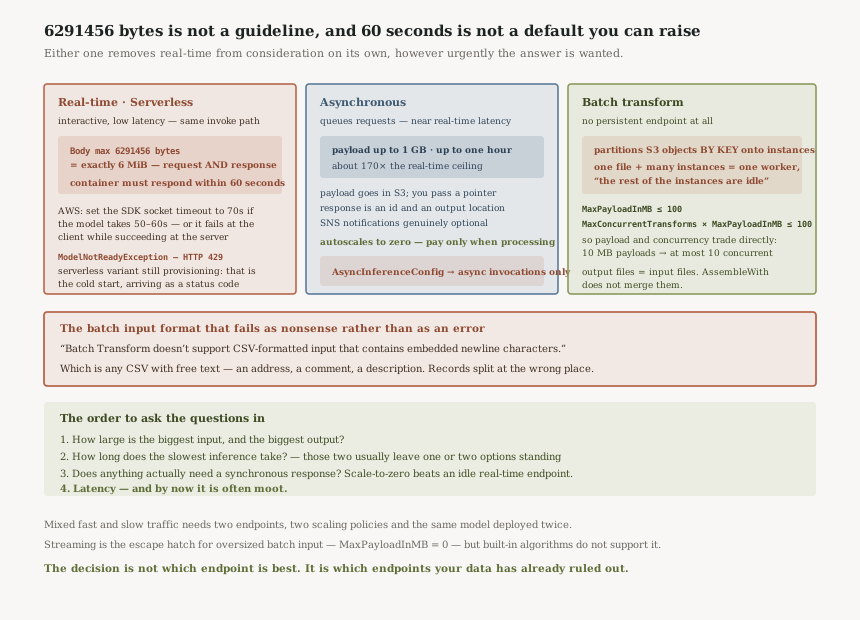
The four, by what they accept
Real-time is “ideal for inference workloads where you have real-time, interactive, low latency requirements”, and it is bounded at 6 MiB in, 6 MiB out, 60 seconds.
Serverless shares that invocation path, and has its own tell in the error list:
ModelNotReadyException, HTTP 429, returned when
“a serverless endpoint variant's resources are still being provisioned”. That is the
cold start from #65 arriving as a retryable
status code rather than a slow response — worth handling explicitly, because a 429 that means
“wait” and a 429 that means “you are throttled” deserve different backoff.
Asynchronous takes “large payload sizes (up to 1GB), long processing times (up to one hour), and near real-time latency requirements” — about 170 times the real-time payload ceiling — and it “autoscal[es] the instance count to zero when there are no requests to process, so you only pay when your endpoint is processing requests.”
Batch transform is for when you “don't need a persistent endpoint” at all, and its constraints are about file shape rather than request shape.
That is worth stating precisely, because it is the one place the four are not alike. Real-time,
serverless and asynchronous are endpoints — long-lived resources you invoke.
Batch transform is a transform job: it starts, consumes S3, writes S3, and ends.
Calling all four “endpoints” is a category error, and it matters here because three of them
share the InvokeEndpoint limits and the fourth shares nothing with them at
all.
Batch has its own timeout, and it is per invocation rather than per endpoint:
ModelClientConfig.InvocationsTimeoutInSeconds has a
“Valid Range: Minimum value of 1. Maximum value of 3600” with
“The default value is 600”. So batch also reaches an hour, and
defaults to ten minutes — which means the choice above 60 seconds is between asynchronous for
request-driven work and batch for offline work, not asynchronous alone.
“MaxPayloadInMB must not be greater than 100 MB. If you specify the optional MaxConcurrentTransforms parameter, then the value of (MaxConcurrentTransforms * MaxPayloadInMB) must also not exceed 100 MB.” So payload size and concurrency trade against each other directly: 100 MB payloads mean one concurrent transform, and ten concurrent transforms mean 10 MB payloads. Meanwhile AWS advises that “The ideal value for MaxConcurrentTransforms is equal to the number of compute workers” — so a wide fleet forces small mini-batches, and the two pieces of guidance have to be satisfied together.
Async changes the contract, not just the timing
The payload lives in S3 and the response is a receipt. Completion is signalled either by the object appearing at the output location or by SNS — “You can optionally choose to receive success or error notifications with Amazon SNS”, which is genuinely optional here, unlike the pattern Textract documents.
Combined with scale-to-zero, that makes asynchronous the closest thing SageMaker has to a job queue with a model attached: no instances running when idle, no payload limit worth worrying about, and an hour of processing available per request.
Why This Architecture Holds Up
Batch's output shape is fixed by its input shape
Three statements that together determine what you get back.
“SageMaker AI processes each input file separately. It doesn't combine mini-batches from
different input files.” “The number of output files is equal to the number of input
files, and using AssembleWith does not merge files.”
So sharding the input for parallelism — which card 3 says you must — also shards the output.
A thousand input objects produce a thousand .out objects, and reassembling
them is your problem. The parallelism and the output layout are the same decision.
“Batch Transform doesn't support CSV-formatted input that contains embedded newline characters.” That is the default state of any CSV containing free text — an address field, a comment, a product description. The job does not reject the file up front; the records split at the wrong place, because SplitType: Line means what it says. Anything with quoted multi-line fields needs converting before it reaches batch transform, and the failure looks like a model producing nonsense rather than like a parsing error.
The 60-second rule has a client-side corollary
AWS spells out the consequence rather than leaving it to be discovered: “If your model is going to take 50-60 seconds of processing time, the SDK socket timeout should be set to be 70 seconds.”
A model near the ceiling will otherwise fail at the client while succeeding at the server, which produces the worst kind of incident: a timeout in your logs, a completed inference you paid for, and no error on the SageMaker side to correlate against.
There is a smaller warning in the same place worth heeding if you have built any custom plumbing:
“Amazon SageMaker AI strips all POST headers except those supported by the API… You
should not rely on the behavior of headers outside those enumerated in the request syntax.”
Tracing metadata belongs in CustomAttributes, not in a header of your own.
Streaming is the escape hatch, with a caveat
For genuinely large batch input, “set MaxPayloadInMB to
0” and the data is streamed with chunked encoding. Then the caveat:
“Amazon SageMaker AI built-in algorithms don't support this feature.”
Which means the option exists only for your own container. A built-in algorithm and a file larger than the 100 MB payload ceiling is a combination you cannot resolve by configuration — the input has to be split.
Key Architecture Decisions
| Decision | Choice | Reasoning |
|---|---|---|
| First question | Largest payload, slowest inference | 6 MiB and 60 seconds eliminate real-time before latency is discussed. |
| Payload over 6 MiB | Asynchronous or batch | Real-time and serverless share the same 6,291,456-byte body limit. |
| Inference over 60 seconds | Asynchronous if request-driven, batch if offline | Both reach an hour. Batch sets it per invocation via InvocationsTimeoutInSeconds, max 3600, default 600. |
| Mixed fast and slow traffic | Two endpoints | An AsyncInferenceConfig endpoint accepts only async invocations. |
| Batch parallelism | Shard the input objects first | One file plus many instances means one worker and the rest idle. |
| Batch tuning | Solve the product, not the parts | MaxConcurrentTransforms × MaxPayloadInMB ≤ 100 MB. |
| CSV with free text | Convert before batch transform | Embedded newlines are unsupported and fail as bad predictions, not errors. |
| Client configuration | Socket timeout above 60s | AWS's own guidance is 70 seconds for a 50–60 second model. |
The order the questions should be asked in
One: how large is the biggest input, and the biggest output? Two: how long does the slowest inference take? Those two answers usually leave one or two options standing. Three: does anything need a synchronous response at all — because scale-to-zero on asynchronous is cheaper than an idle real-time endpoint, and a great deal of what gets built as real-time never had a user waiting on it.
Latency comes fourth, and by then it is often moot.
Closing Thought
#67 argued that a published limit is worth more
than a plausible answer, because it fails as an exception you can test. This is the same argument applied
to your own hosting: 6291456 is not a guideline, and 60 seconds is not a
default you can raise.
The reason to lead with those numbers is that the alternative is discovering them late. A model that works on sample data and fails on production documents, a batch job that runs for six hours on a fleet of ten, a CSV that produces confident nonsense because a comment field contained a line break — all three are documented behaviours, and all three are cheap to avoid and expensive to diagnose.
The decision is not which endpoint is best. It is which endpoints your data has already ruled out.
Distributed systems — idempotency: the property distributed systems cannot do without, why a retry is a duplicate until something says otherwise, and where the deduplication key has to live.
Official AWS Reference
- InvokeEndpoint API reference — the 60-second container timeout, the 6,291,456-byte body limits, and ModelNotReadyException
- Asynchronous inference — the 1 GB and one-hour ceilings, scale to zero, and why an async endpoint is exclusive
- Batch transform for inference — object-to-instance mapping, the payload-times-concurrency product, and the CSV newline restriction
- Real-time inference — what it is recommended for
- ModelClientConfig — the batch transform invocation timeout, 1 to 3600 seconds, default 600
- CreateTransformJob — the MaxPayloadInMB default of 6 MB and the MaxConcurrentTransforms default
Comments