Business Challenge
Post #14 ended on a constraint rather than a conclusion: a scope allows 500 policy definitions and only 200 policy or initiative assignments. An estate that assigns rules one at a time runs out of the second budget long before it exhausts the first, and every assignment it spends is another object somebody has to audit for scope, exclusions, enforcement mode and overrides. Initiatives are the answer to that, and the answer is uncontroversial. Group the definitions, assign the group.
What follows the grouping is where the difficulty moves. An initiative is the object a compliance number gets attached to — on the portal's Compliance page, in the monthly governance report, on the slide that says 94% compliant. That number is a real measurement of something. It is very rarely a measurement of the thing the room believes it is measuring.
Consider what can be true at once while the tile reads 94%:
- The initiative is assigned with
enforcementModeset toDoNotEnforce. Every resource is evaluated and reported, and nothing has ever been blocked. - Three subscriptions are in
notScopes. Their resources are not evaluated and are not in the denominator, so removing the worst estate from the assignment raised the score. - Forty resources are covered by exemptions. Exempt resources are in the numerator alongside compliant ones, so granting an exemption moves a resource from the wrong side of the fraction to the right side of it.
- Two definitions in the initiative reference an alias that no longer resolves. A policy with an invalid alias in its
ifconditions is not applicable to anything, so it evaluates no resources, reports nothing, and cannot lower any score. - Six of the definitions use the
manualeffect and nobody has attested them. Their state isUnknown, and unknown is in the numerator too. - One definition targets a resource type the estate does not use. It is applicable to zero resources and contributes a clean 100% to the average.
Azure Policy determines which resources are applicable, then evaluates the ones that are not excluded or exempted. Everything filtered out at those two steps leaves the calculation entirely — it is not counted as failing, it is not counted at all. The score therefore rises when coverage falls, and it does so silently, because nothing in the tile distinguishes a resource that passed from a resource that was never asked.
Architecture
Two mechanisms are in play, and they are usually taught together because they appear on the same portal page. They are independent. The initiative is a packaging construct that changes how many assignments an estate needs. Compliance state is a reporting pipeline that runs over whatever assignments exist. Getting the first one right does nothing for the second.
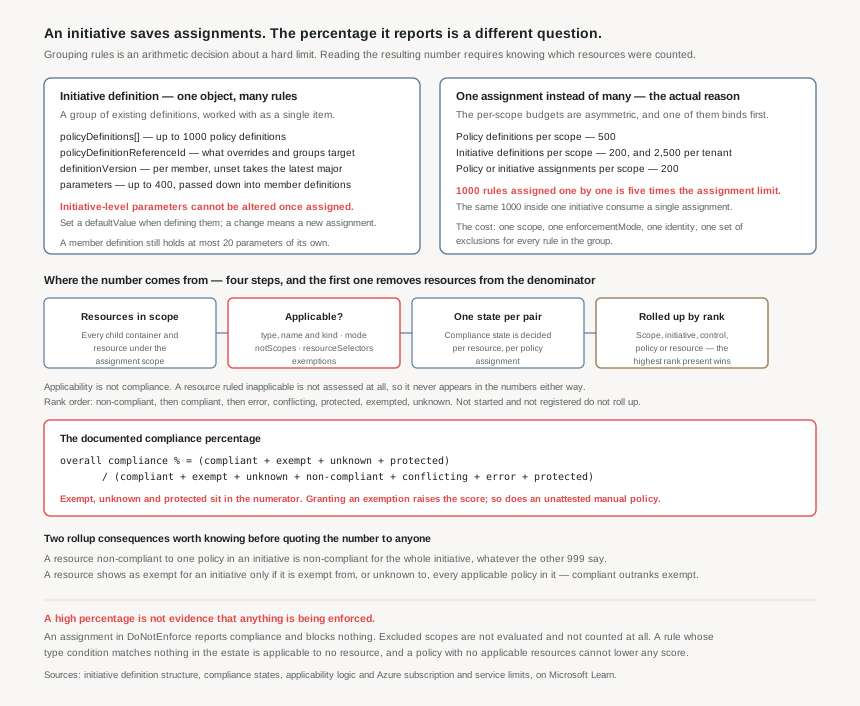
The initiative definition: a list, a parameter set, and one property that cannot be changed later
An initiative definition is JSON with a display name, description, metadata, version, parameters, a policyDefinitions array and an optional policyDefinitionGroups array. It contains no rules of its own — every member is an existing definition referenced by ID, built-in or custom.
Each element of the policyDefinitions array carries four things worth naming individually:
policyDefinitionId— the definition being included.policyDefinitionReferenceId— a short name for the included definition. This is the handle everything else uses: an assignment'soverridestarget it,groupNamesgroup by it, and compliance results report against it. An initiative that leaves these auto-generated is one whose overrides read as GUIDs.definitionVersion— optional, per member. If none is specified it refers to the latest major version at assignment time and auto-ingests any minor updates.groupNames— which group, inpolicyDefinitionGroups, this member belongs to.
Parameters are the reason an initiative is more than a list. A parameter declared once at initiative level can be passed into many member definitions, including into differently-named parameters on each — Microsoft's own example passes one init_allowedLocations into a member's sql_locations and another's vm_locations. The budget is generous where it needs to be: an initiative definition may declare up to 400 parameters, while a single policy definition is capped at 20.
There is one sentence in the documentation that shapes the operational design more than anything else on the page: once an initiative is assigned, initiative level parameters can't be altered, and the stated recommendation is therefore to set a defaultValue when defining the parameter. Read that as a lifecycle rule rather than a caveat. The allowed-locations list, the tag names, the exempted SKUs — all of it is fixed at assignment time, and changing any of it means a new assignment, which means a new object with its own scope, its own enforcement mode and, for anything that remediates, its own identity.
Versioning has a second-order effect here that catches people. A minor version of a built-in is explicitly allowed to add or remove definitions within an initiative. So an assignment of a built-in initiative pinned no further than a major version can gain member policies it was never reviewed with — and its compliance percentage will move for reasons that exist entirely outside your estate.
Groups, controls and the Regulatory Compliance shape
policyDefinitionGroups lets members be categorised, and it is the mechanism behind Azure Policy's Regulatory Compliance feature, which is in Preview. Each group carries a name — in Regulatory Compliance, the control — and a category, which is the hierarchy it belongs to, or the compliance domain. A Regulatory Compliance initiative must set its category metadata to Regulatory Compliance. When groups are present, the portal gains a Controls tab and the SDK's summarize results gain a policyGroupDetails block counting groups by state.
Two facts about the built-in regulatory initiatives matter before anyone quotes one at an auditor. The additional control metadata — the description, the requirements, the responsibility split between Customer, Microsoft and Shared — lives in policyMetadata objects that are read-only and can only be created by Microsoft. And the Microsoft-responsible controls are definitions of policyType Static: their results come from third-party attestation of Microsoft's own infrastructure, not from an evaluation of your resources. A control showing green because Microsoft passed an audit sits in the same table, in the same colour, as a control showing green because your storage accounts are configured correctly.
Applicability: the step that decides the denominator
Compliance is calculated only over applicable resources, and applicability is a separate calculation from compliance with different logic. The documentation is explicit: if a resource is applicable, it is relevant to the policy; if it is compliant, it adheres to the policy. Sometimes only certain conditions from the policy rule affect applicability, while all conditions affect compliance state.
Five things determine it: the conditions in the rule's if block, the definition's mode, the assignment's excluded scopes, its resource selectors, and any exemptions. The rule-condition half behaves differently by effect:
| Effect | How applicability is decided | Consequence |
|---|---|---|
auditIfNotExists, deployIfNotExists |
The entire if condition. When it evaluates to false, the policy is not applicable. |
Narrowing the if to reduce noise also removes those resources from the report entirely. |
| Everything else | Only type, name and kind conditions are evaluated; other conditions are treated as true, or false when negated. |
A rule that matches on a tag or a property is applicable to every resource of that type — the tag test decides compliance, not applicability. |
The special cases are where the silent failures live. Any invalid alias in the if conditions makes the policy not applicable — not an error, not a warning, simply a rule that evaluates nothing and reports nothing. A rule of only name conditions, or only kind conditions, is applicable to all resources. And any condition that includes a location test, including one in deployment parameters, makes the policy inapplicable to subscriptions — which is the trap post #14 described from the mode side, arriving again from the rule side.
The states, and the order they outrank each other in
Compliance state is determined per-resource, per-policy assignment. There are nine states, and only seven of them participate in any aggregation:
| State | What it means | Where it lands in the percentage |
|---|---|---|
| Non-compliant | The rule's conditions evaluated to true for an audit, auditIfNotExists or modify assignment, or for an existing resource under append, deny or deployIfNotExists. | Denominator only |
| Compliant | The conditions evaluated to false, or a manual policy was attested compliant. | Both |
| Error | The assignment generated a system error, such as a template or evaluation error. | Denominator only |
| Conflicting | Two or more assignments in the same scope have contradicting rules — for example, two definitions appending the same tag with different values. | Denominator only |
| Protected | The resource is covered by an assignment with a denyAction effect. | Both |
| Exempt | The resource is in the scope of an exemption. Different from excluded. | Both |
| Unknown | The default for manual effect definitions where no attestation exists and no default was set. | Both |
| Not started | The evaluation cycle has not started for that policy or resource. | Neither — excluded from rollup |
| Not registered | The Microsoft.PolicyInsights provider is not registered, or the signed-in account cannot read compliance data. | Neither — excluded from rollup |
Aggregation happens across five different axes — by scope, by initiative, by initiative group or control, by policy, and by resource — and all five use one rank order to resolve disagreement. The order is: non-compliant, compliant, error, conflicting, protected, exempted, unknown. The highest-ranked state present wins.
That single ordering produces the two behaviours an initiative's number actually depends on. A resource non-compliant to at least one applicable policy in the initiative is non-compliant overall, regardless of the rest — so a 1000-member initiative reports the worst answer any of its members gave. And because compliant outranks exempted, a resource shows as exempt for the whole initiative only if it is exempt from, or unknown to, every other applicable policy in it. Microsoft's worked example is exact: a resource exempt from one policy of ten and compliant to the other nine registers as compliant.
The formula, written out
The percentage is documented, not inferred. The prose says it is determined by dividing Compliant, Exempt and Unknown resources by total resources, where total resources include Compliant, Non-compliant, Unknown, Exempt, Conflicting and Error states. The formula printed alongside it adds protected to both sides:
overall compliance % = (compliant + exempt + unknown + protected)
                     / (compliant + exempt + unknown + non-compliant
                        + conflicting + error + protected)
Microsoft's example is 20 distinct applicable resources with one non-compliant, giving 19 ÷ 20 = 95%. Take the formula literally and three consequences follow, none of which are visible in the tile:
- An exemption is a point of score. It moves a resource from the denominator-only side to both sides. Creating one even triggers an evaluation of the corresponding assignment for the exemption scope, so the improvement lands promptly.
- An unattested manual policy scores the same as a passing one.
Unknownis in the numerator, and unknown is the default state formanualeffects. An initiative full of manual controls that nobody has attested reports high compliance precisely because nobody has looked at it. - Errors and conflicts do count against you. That is the right behaviour and it is the one place the formula is conservative — a broken assignment lowers the score rather than disappearing from it. Which is worth knowing, because it is the only failure mode here that announces itself.
Post #14 separated them by intent: notScopes for permanently out-of-scope estates, exemptions for time-bound cases. The compliance calculation gives that choice a second consequence. An excluded resource is not evaluated and is not in the calculation at all — neither numerator nor denominator. An exempt resource is in both, and shows as Exempted so it can be tracked. Both raise the percentage. Only one of them leaves a record of what was waived.
Why This Architecture Holds Up
Three decisions get made when the first initiative is created, and all three are expensive to revisit once assignments exist.
Initiative granularity is a budget calculation with a clear answer
The limits are asymmetric in a way that decides the shape:
| Where | What | Maximum |
|---|---|---|
| Scope | Policy definitions | 500 |
| Scope | Initiative definitions | 200 |
| Tenant | Initiative definitions | 2,500 |
| Scope | Policy or initiative assignments | 200 |
| Initiative definition | Policies | 1000 |
| Initiative definition | Parameters | 400 |
| Policy definition | Parameters | 20 |
One initiative can hold 1000 definitions and costs one of the 200 assignments a scope allows. The same 1000 assigned individually would need 1000 ÷ 200 = 5 times the entire per-scope assignment budget, so it is not a trade-off, it is an impossibility. That settles the direction but not the granularity, and granularity is the real decision, because everything an assignment carries is shared by every member of the initiative it assigns: one scope, one enforcementMode, one identity, one set of exclusions, one set of non-compliance messages.
So the grouping principle is not topical, it is operational. Definitions belong in the same initiative when they should be turned on together, at the same scope, with the same blast radius, and be reported as one number. A single "Security Baseline" initiative containing both a hard deny and an aspirational audit cannot be rolled out in stages, because the enforcement mode belongs to the assignment. Splitting by enforcement posture — the rules we block, the rules we watch — produces initiatives that can actually be operated. Splitting by compliance framework produces a reporting artefact, which is a legitimate second use, not a substitute for the first.
Overrides do not rescue a badly grouped initiative, and the arithmetic says so. An assignment holds at most 10 overrides, each naming at most 50 reference IDs, so its reach is 10 × 50 = 500 definition references against an initiative that may hold 1000. A maximally large initiative cannot be fully retargeted from its assignment.
Parameter immutability makes the initiative a versioned artefact
Because initiative-level parameters cannot be altered after assignment, an initiative is closer to a released package than to a configuration file. Two things follow. Every parameter gets a considered defaultValue, because the default is what a hurried assignment will inherit permanently. And the deployment pipeline needs a defined path for changing one — create the new assignment, confirm it evaluates, delete the old — rather than discovering at the moment of need that the portal will not accept the edit.
The number needs a stated denominator or it should not be reported
A compliance percentage with no coverage figure beside it is unfalsifiable: it can be raised by exempting, excluding, narrowing an if, or by a definition quietly matching nothing. The fix is not to distrust the metric but to publish what it is over. Alongside the percentage, report the count of applicable resources, the count of exempt resources, the count of excluded scopes, and the number of member policies with zero applicable resources. Those four numbers turn a score into a measurement, and every one of them is available from summarize, which returns nonCompliantResources and nonCompliantPolicies along with per-assignment detail, or from Azure Resource Graph, where the compliance records are stored.
And keep the timing in view when reading any of it. A new or updated assignment takes about five minutes to apply before its evaluation cycle even begins, assignments are automatically reevaluated once every 24 hours, and an on-demand scan is an asynchronous process that takes a long time to run because resources are evaluated against all assigned policies. A dashboard refreshed ten minutes after a change is showing yesterday.
Key Architecture Decisions
The shape that works
| Decision | What to do | Why |
|---|---|---|
| Grouping principle | Group by enforcement posture and blast radius, not by topic or by framework | Scope, enforcement mode, identity and exclusions are properties of the assignment and are shared by every member. Rules that cannot be turned on together do not belong in one initiative. |
| Framework initiatives | Keep them as a separate reporting layer, assigned in audit posture | A regulatory initiative is a map of controls, and its Microsoft-responsible members are Static definitions attested by third-party audit rather than evaluated against your estate. |
policyDefinitionReferenceId |
Set a readable one for every member, and treat it as a stable identifier | Overrides, groups and compliance results all address members by it. Auto-generated IDs make an override unreviewable. |
| Member versions | Pin definitionVersion on anything enforcing |
Unset means the latest major version at assignment time with minor updates auto-ingested — and a minor version may add or remove definitions within a built-in initiative. |
| Initiative parameters | Give every one a deliberate defaultValue, and write the replace-the-assignment procedure down before you need it |
Initiative-level parameters cannot be altered once assigned. The remedy is a new assignment, with everything that implies for identity and scope. |
| Waivers | Exemption with an expiry, never an exclusion, whenever the resource should still be counted | Exempt sits in both halves of the fraction and stays visible as Exempted. Excluded leaves the calculation entirely and leaves no trace in the numbers. |
| Reporting | Publish applicable count, exempt count, excluded scopes and zero-applicability members beside every percentage | The percentage rises when coverage falls. Without the denominator the metric cannot be challenged, which is the same as it not being a metric. |
| Zero-applicability members | Review any member policy reporting no applicable resources | Sometimes correct — the estate does not use that service. Sometimes an invalid alias, which makes a policy inapplicable with no error anywhere. |
manual effect members |
Set an explicit default compliance state, and track attestation as work | Unknown is the default and it counts in the numerator. An unattested manual control is indistinguishable from a passing one in the score. |
| Proving enforcement | Attempt a denied deployment on purpose; do not infer enforcement from a percentage | A DoNotEnforce assignment reports full compliance data and blocks nothing. Compliance state and enforcement are different claims. |
Closing Thought
The initiative half of this post has a right answer and it is a small one: group definitions that share an enforcement posture, name their references, pin their versions, and default their parameters. Half an hour of design, and the 200-assignment ceiling stops being a problem anyone will meet.
The compliance half has no equivalent right answer, because the number is doing something a number cannot do. It is being read as how safe is the estate when it computes how many of the resources we chose to assess passed the rules we chose to apply, plus the ones we waived, plus the ones nobody has looked at. That is not a flaw in Azure Policy — every term in it is documented, and the formula is printed on the page. It is a flaw in reporting a ratio without its denominator.
A governance report worth reading has the percentage in it, and it has four other figures beside it: how many resources were applicable, how many were exempt, how many scopes were excluded, and how many member policies matched nothing. When those four are stable and the percentage moves, something changed in the estate. When the percentage moves and one of the four moved with it, nothing changed except what was counted.
#16 takes the members this post kept setting aside — the deployIfNotExists and modify policies that do not merely report a problem but fix it — and looks at remediation tasks, the managed identities that run them, and what happens to resources that were already non-compliant before the assignment existed.
Comments