Business Challenge
Every quota conversation starts the same way — something failed, the message said a limit was reached, and somebody has opened a request to raise it. About half the time the limit that was reached is not the one in the request.
The error was a 403 with the reason rateLimitExceeded. That is the reason string a Compute Engine rate quota returns — and it is also what a concurrent operations limit returns when too many operations are in flight at once. Concurrent operation limits are system limits, and Google's own guidance for them is not to ask for more: since system limits cannot be modified, the recommendation is to reduce the number of concurrent operations instead.
Before writing the request, establish which of the three things was hit. Read the quota page for the specific limit rather than the error string, because the error string is shared by a limit you can raise and one you cannot.
There is no such thing to have. VM quotas are managed at the regional level, and Google states directly that regional quotas are not a subset of project quotas. Headroom in europe-west1 does nothing for a create in us-central1. The instance, instance group, disk and CPU quotas are consumable by any VM in the region regardless of zone — so zone is not the boundary, and neither is the project.
Read a quota as a triple: the metric, the level it is enforced at, and the dimension value. "CPUs" is not a quota. "CPUs in us-central1 for project X" is one.
That frees one quota and not the other. CPU quotas apply to running VMs and VM reservations, so stopping a VM releases its CPUs. The VM instances quota is a regional quota limiting the number of instances that can exist in a region regardless of whether the VM is running — a stopped instance still occupies it. Deleting is the only thing that releases it.
Correct approachDecide which quota is the binding one before choosing between stopping and deleting. If the constraint is instances, stopping achieves nothing; if it is CPUs or GPUs, stopping is the cheap answer and deleting is unnecessary.
For a per-minute rate quota, the console's Current usage figure is the average per minute usage in the past 10 minutes. A ten-second burst that saturated the limit is one tenth of a ten-minute average, and the number on screen after the incident is not the number that was enforced during it. For a per-day quota the same column means the total usage so far in the current day, Pacific time. For an allocation quota it means the most recent value.
Correct approach
Treat the console column as three different statistics wearing one heading. When the question is "what happened during the incident", go to the consumer_quota metrics in Cloud Monitoring, where the rate series is sampled per minute and can be read at the minute it broke.
Architecture
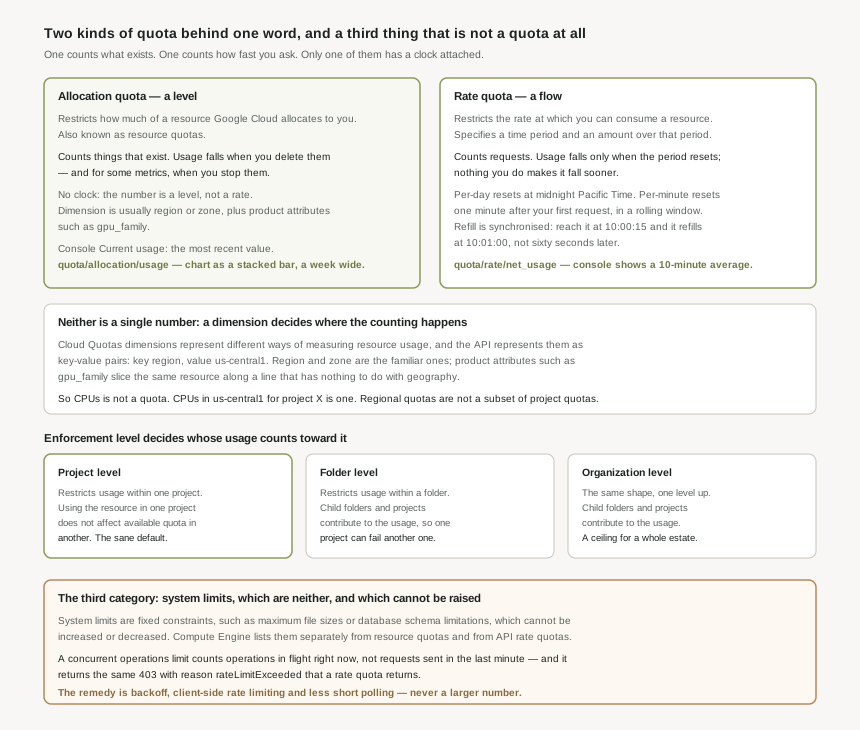
Cloud Quotas is the layer that presents every service's limits in one vocabulary. That is genuinely useful and it is also the source of the confusion, because it puts two mechanisms with almost nothing in common behind one word.
The two definitions, and what follows from each
Google's definitions are one sentence each. Allocation quotas restrict how much of a resource Google Cloud allocates to you. Rate quotas restrict the rate at which you can consume a resource, and specify a time period along with the amount you are permitted to consume over that period.
Everything awkward about quotas falls out of that difference. An allocation quota is a statement about a population — a count of things that presently exist, which changes only when you create or destroy something. A rate quota is a statement about a flow, which is meaningless without the clock attached to it.
| Allocation quota | Rate quota | |
|---|---|---|
| What it counts | Resources that exist. Also known as resource quotas; they define the number of resources your project has access to. | Requests made, over a stated time period. |
| When usage falls | When you delete the resource — or, for some metrics, when you stop it. | When the period resets. Nothing you do makes it fall sooner. |
| The clock | None. The number is a level, not a rate. | Per-day resets at midnight Pacific Time. Per-minute resets one minute after your first request, in a rolling window. |
| Typical dimension | Region or zone, plus product attributes such as gpu_family. |
Project, often with region for regional methods. |
| Monitoring metric | serviceruntime.googleapis.com/quota/allocation/usage |
serviceruntime.googleapis.com/quota/rate/net_usage |
| How to chart it | Stacked bar, at least a week wide — Google's own recommendation, because the value updates infrequently. | A line, per minute, because that is the resolution the enforcement happens at. |
Dimensions decide where the counting happens
A quota metric on its own is only half a limit. Cloud Quotas dimensions represent different ways of measuring resource usage, expressed by the API as key-value pairs — the key being the dimension name such as region, and the value the assignment, such as us-central1. Region and zone are the familiar ones; product attributes such as gpu_family are the ones that surprise people, because they slice the same underlying resource along a line that has nothing to do with geography.
This is why "we have quota" is never a complete sentence. The same metric has a separate value, and a separate usage figure, for every dimension combination that applies to it.
When you set a quota preference against dimensions, a partial specification of the service-specific ones is not allowed: if the configuration contains any service-specific dimensions, it must contain all of them. Location dimensions do not carry that constraint. It is a rule worth knowing before writing the configuration rather than after the API rejects it, because the failure reads as a validation error rather than as a design decision.
Levels: project, folder, organization
Enforcement also has a level, and the level determines whose usage counts toward it.
- Project-level. Restricts usage within one project, and using the resource in one project does not affect available quota in another. This is the isolation that makes a project the natural blast radius — a runaway job cannot consume a sibling's headroom.
- Folder-level. Restricts usage within a folder, with child folders and projects contributing to the usage. A ceiling across a group rather than per member.
- Organization-level. The same shape, one level up.
The two upper levels change the failure mode rather than merely raising the ceiling. Under a folder-level quota, one project's consumption is capable of failing another project's request — which is exactly what it is for when the intent is to cap a business unit, and exactly what makes it a poor default.
The third thing, which is not a quota
Alongside the two quota types sit system limits: fixed constraints, such as maximum file sizes or database schema limitations, which cannot be increased or decreased. Compute Engine's own breakdown makes the split visible — it lists resource quotas, quotas that restrict how often you can call the API, and separately limits that restrict the number of in-flight operations.
That third one is the trap, and it is worth being explicit about it. A concurrent operations limit is not a rate quota. A rate quota asks how many requests you sent in the last minute; a concurrent operations limit asks how many operations are unfinished right now, which is a function of how long each takes as much as how many you started. Long-running operations accumulate against it even at a modest request rate.
Exceeding a Compute Engine rate quota returns a 403 error with the reason rateLimitExceeded. Exceeding a concurrent operations limit returns the same 403 and the same reason. One of those is raised by a quota request; the other is a system limit that cannot be modified at all, and whose documented remedy is exponential backoff, client-side rate limiting, avoiding short polling, and splitting work across projects. The error text will not tell you which of the two you are looking at — the quota page for the specific limit will.
Why This Architecture Holds Up
Once the two kinds are separated, the practical work is knowing which number in front of you is describing which, and on what clock.
Refill is synchronised, not elapsed
The most useful concrete detail in the Compute Engine documentation is about when you are allowed to try again. If a project reaches the maximum number of API requests within 60 seconds, it must wait for that rate quota to refill before making more requests in that group. The refill is not sixty seconds after the failure: reaching the limit at 10:00:15 means the quota refills at the start of the next synchronised interval, such as 10:01:00, rather than refilling immediately.
That has a direct consequence for retry logic. A client that sleeps a fixed sixty seconds after a rate limit error wakes at 10:01:15, having wasted fifteen seconds of a fresh window; a client that retries at 10:00:16 fails again for forty-four seconds and spends the whole of it generating errors. Backoff with jitter is the right shape here not because it is a general good habit but because the boundary is a wall clock you cannot see.
Compute Engine splits API requests into groups — mutating queries, reads, lists, and operation reads — and each group is counted separately, so a project can reach the maximum in each group simultaneously. Two things follow. Polling an operation is not billed against the same bucket as creating the resource, so aggressive polling does not slow your creates by consuming their quota. But it also means a healthy-looking headline usage figure can hide one saturated group, because the saturated one is not averaged with the others.
The console column is three statistics
The Current usage column on the Quotas & System Limits page is a single heading over three different calculations, and each is right for its own kind of quota and misleading if read as another's.
| Quota kind | What "current usage" is | What it hides |
|---|---|---|
| Per-minute rate | The average per minute usage in the past 10 minutes. | Bursts. A one-minute saturation is a tenth of the figure shown. |
| Per-day rate | The total usage so far in the current day, according to Pacific Standard Time. | The day boundary. Early in Pacific morning the figure is near zero everywhere on earth. |
| Allocation | The most recent value — for instance, the number of load balancers in use. | Nothing much. It is a level, and a level is what you wanted. |
The Pacific Standard Time detail on the daily figure is easy to skim past and hard to un-see afterwards. A per-day rate quota resets at midnight Pacific, which for a team operating in Europe or India lands in the middle of a working day — so a batch job that runs at a fixed local hour may sit on one side of the boundary in winter and the other in summer, and consume a daily allowance that has already been half spent by an earlier run.
Alert on the metric, not the page
Quota data is written against the consumer_quota monitored resource, and the four series worth knowing are usage for each kind, the limit, and the errors:
| Metric | Reads |
|---|---|
serviceruntime.googleapis.com/quota/allocation/usage |
How many of the thing exist. Chart it as a stacked bar over at least a week — Google's own recommendation, because these update infrequently and are poorly represented by a line. |
serviceruntime.googleapis.com/quota/rate/net_usage |
Consumption rate, at minute resolution. This is where an incident is legible. |
serviceruntime.googleapis.com/quota/limit |
The ceiling itself, as a time series — so a ratio against usage survives the ceiling being changed. |
serviceruntime.googleapis.com/quota/exceeded |
The rejections. The only one of the four that reports harm rather than risk. |
Alerting on a ratio of usage to limit rather than on an absolute number is the difference between an alert that survives the next quota increase and one that goes permanently quiet the moment somebody raises the ceiling. The limit being a series rather than a constant is what makes that possible, and it is the whole reason the metric exists.
What the API will and will not do
The Cloud Quotas API separates the read side from the write side, and the asymmetry is deliberate. QuotaInfo is a read-only resource providing information about a particular quota; QuotaPreference represents your preference for a particular dimension combination. A default configuration exists even where no preference has been set, which is why a project has working quotas without anybody having configured any.
One constraint shapes how you should treat preferences in infrastructure code: deleting a QuotaPreference is not supported. A preference is a thing you create and update, never remove — so a Terraform-style mental model of "destroy the resource to return to the default" does not hold here. Returning to the default value means setting it back explicitly.
Key Architecture Decisions
| Decision | Choose this | Because |
|---|---|---|
| Reading a quota error | Identify the limit before writing the request | A rate quota and a concurrent operations system limit both return 403 with rateLimitExceeded, and only one can be raised. |
| Planning regional capacity | Per region, never per project | VM quotas are managed at the regional level and regional quotas are not a subset of project quotas. |
| Freeing quota under pressure | Stop for CPU, delete for instances | CPU quotas apply to running VMs and reservations; the VM instances quota counts instances that exist regardless of whether they run. |
| Retrying after a rate limit | Backoff with jitter, not a fixed 60 seconds | The quota refills at the start of the next synchronised interval, not 60 seconds after your failure. |
| Diagnosing a burst | The rate/net_usage metric, not the console column |
The console shows the average per minute usage in the past 10 minutes, which dilutes a burst tenfold. |
| Charting allocation usage | Stacked bar over a week or more | Google's own guidance: these quotas update infrequently and are not represented well with line charts. |
| Setting the alert threshold | A ratio of usage to the quota/limit series |
An absolute threshold silently stops firing the first time the ceiling is raised. |
| Scheduling against a per-day quota | Reason in Pacific time | Per-day quotas reset at midnight Pacific Time, which is mid-working-day across much of the world. |
| Choosing an enforcement level | Project by default; folder only to cap a group deliberately | At folder level, child projects contribute to one usage figure, so one project can fail another's request. |
| Writing quota preferences in code | Plan to update, never to destroy | Deleting a QuotaPreference is not supported; returning to a default means setting it explicitly. |
| Specifying dimensions | All service-specific dimensions or none | A configuration containing any service-specific dimension must contain all of them. |
| Reducing polling pressure | Fix the client before requesting more | Operation reads are their own group, and the documented remedy for concurrent operation limits is backoff and less short polling, not a larger number. |
Closing Thought
The word "quota" suggests an allowance — a bucket with a number on it, which you fill and which somebody can make bigger. That picture fits allocation quotas well enough. It fits rate quotas badly, and it fits system limits not at all, and almost every quota conversation that goes in circles is one where a rate problem is being discussed in allocation language.
The tell is the verb. If the sentence is about something that exists — instances, addresses, load balancers, GPUs of a family in a region — it is an allocation quota and the fix is a number or a deletion. If it is about something that happens — calls, writes, polls — it is a rate quota or a concurrent operations limit, and the fix is usually in the client rather than in a form. Google's console does not make that distinction visually. Making it yourself, before opening a request, is most of the skill.
#16 takes the other half of the problem: requesting a quota increase — what the request actually needs to contain, what the quota adjuster does on your behalf, and the architectural choices that mean you do not have to ask.
Official Google Cloud Reference
- Cloud Quotas overview
- View and manage quotas
- Configure Cloud Quotas dimensions
- Cloud Quotas API overview
- Compute Engine quota and limits overview
- Compute Engine allocation quotas
- Compute Engine rate quotas and system limits
- Troubleshoot Compute Engine concurrent operations quota
- Chart and monitor quota metrics
- Set up quota alerts and monitoring
Comments