Business Challenge
#41a and #41b covered the machinery: how a policy is structured, when it is evaluated, what happens to the session afterwards. This post is about the three conditions that do the actual narrowing — the ones that make a policy say "from the office", "on a managed laptop", "when this looks like an attack" rather than just "everyone, everywhere".
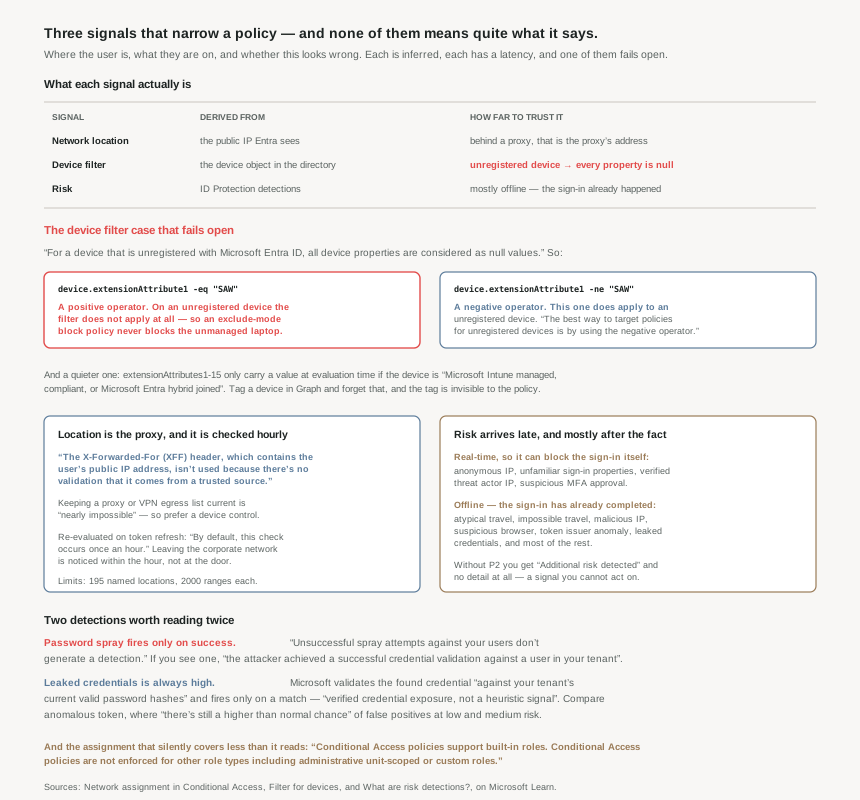
They are presented in the portal as three dropdowns of equal weight. They are not equal. Each one is a different kind of claim about the world:
- Location is an inference from an IP address that may belong to a proxy rather than a person.
- Device is a lookup against a directory object that may not exist — and when it does not exist, the behaviour depends on which operator you happened to type.
- Risk is a probabilistic judgement, most of which arrives after the sign-in it describes.
None of that makes them bad signals. It makes them signals with a shape, and the shape determines what you can honestly claim a policy does. The failure mode throughout this series has been the same: a control that reads as absolute in a design document and turns out to be conditional in the documentation.
Before any of the three: Conditional Access policies support built-in roles. Conditional Access policies are not enforced for other role types including administrative unit-scoped or custom roles.
A policy assigned to a custom role is not a narrower policy. It is a policy that does not run. If your privileged-access design leans on custom roles — and #20 in this series was partly about why you might — that assignment does nothing, and nothing in the policy blade says so.
Architecture
Named locations: an IP range, a country, or a phone
A user's location is determined using their public IP address or the GPS coordinates provided by the Microsoft Authenticator app, and the default is permissive — Conditional Access policies apply to all locations by default. A naming note for anyone reading older material: the Location condition moved and was renamed Network, and existing policies using Location continue to work without changes.
IP-based named locations carry hard limits worth knowing before designing around them: no more than 195 named locations, no more than 2000 IP ranges per named location, and only CIDR masks greater than /8. IPv6 must be in CIDR notation throughout.
Marking a location trusted does more than shorten a policy. Sign-ins from trusted named locations improve the accuracy of Microsoft Entra ID Protection's risk calculation — so the location signal feeds the risk signal, which is the first hint that these three conditions are not independent. And a small operational gotcha: locations marked as trusted can't be deleted without first removing the trusted designation.
One legacy surface to avoid. Using the trusted IPs section of multifactor authentication's service settings isn't recommended, and it accepts only IPv4 addresses. #41b already showed the cost of that path from a different angle — CAE has no insight into MFA trusted IPs, so location enforcement is not real-time for them.
GPS locations, and the price of using them
The GPS option sounds like the answer to IP unreliability, and it is — at a cost the documentation is unusually frank about. Every hour, the system contacts the user's Microsoft Authenticator app to collect the GPS location of their mobile device. After an initial permission grant, for the next 24 hours … the device's location is shared silently once per hour, and after 24 hours, the user must open the app and approve the notification.
There is integrity checking behind it. Every time the user shares their GPS location, the app does jailbreak detection, and a jailbroken device means the location isn't considered valid, and the user isn't granted access. Spoofing is handled the same way — users who modify the location of their device get a denial message for GPS location-based policies. That is a genuinely stronger signal than an IP address.
But note what the integrity check costs in availability. On Android, jailbreak detection uses the Google Play Integrity API, and if the Google Play Integrity API is unavailable, the request is denied and the user isn't able to access the requested resource unless the Conditional Access policy is disabled. A Google service outage becomes your authentication outage, and the documented remedy is to turn the policy off.
Users might receive prompts every hour letting them know that Microsoft Entra ID is checking their location in the Authenticator app. This feature should only be used to protect very sensitive apps where this behavior is acceptable or where access must be restricted for a specific country/region.
And it is not testable quietly, which contradicts what #41b established about report-only: a Conditional Access policy with GPS-based named locations in report-only mode prompts users to share their GPS location, not sharing this information may result in a block. A report-only GPS policy is not a silent experiment.
Why This Architecture Holds Up
Because the location you are filtering on probably belongs to a proxy
This is the one that undermines most corporate-network policies as written. When you use a cloud-hosted proxy or VPN solution, the IP address Microsoft Entra ID uses while evaluating a policy is the IP address of the proxy. The obvious fix is explicitly refused, and the reasoning is sound:
The X-Forwarded-For (XFF) header, which contains the user's public IP address, isn't used because there's no validation that it comes from a trusted source. This lack of validation could allow faking an IP address.
An attacker who could set a header would otherwise be able to claim any location they liked, so ignoring XFF is correct. The consequence is that behind a proxy, every user shares one location — and the location condition stops distinguishing between them. Microsoft's recommendation is to stop trying: when a cloud proxy is in place, a policy that requires a Microsoft Entra hybrid joined or compliant device can be easier to manage, because keeping an up-to-date list of IP addresses used by your cloud-hosted proxy or VPN solution is nearly impossible.
That is a rare thing in vendor documentation: a feature's own page recommending a different feature. It is worth taking at face value. A device control answers "is this a machine we trust"; a location control answers "is this an address we recognise" — and in 2026 the second question has a much weaker relationship to the first than the network diagram suggests.
Then there is timing, which #41a set up and this page makes concrete. Policies are evaluated at sign-in and when a refresh token is redeemed, and by default, this check occurs once an hour. So after users move off the corporate network, within an hour the policy is enforced for applications using modern authentication. A location policy is not a boundary a user crosses; it is a condition re-checked on a cadence, with up to an hour of lag — unless CAE applies, which #41a showed is the one instant case.
Because the device filter's failure mode is silence, and it depends on your operator
This is the sharpest trap in the material, and it is stated plainly but easy to read past:
Microsoft Entra ID uses device authentication to evaluate device filter rules. For a device that is unregistered with Microsoft Entra ID, all device properties are considered as null values and the device attributes cannot be determined since the device does not exist in the directory.
So the question is what a rule does against an object with no attributes, and the answer differs by operator:
| Rule | Operator | Unregistered device |
|---|---|---|
device.extensionAttribute1 -eq "SAW" |
Positive (Equals, StartsWith, Contains, In) | Filter not applied |
device.extensionAttribute1 -ne "SAW" |
Negative (NotEquals, NotStartsWith, NotIn) | Filter applied |
Work through what that means for the documented privileged-access pattern — block admins unless they are on a secure admin workstation, implemented as a block policy that excludes devices where extensionAttribute1 equals SAW. Write the exclusion with a positive operator and an unmanaged personal laptop has no attributes, so the filter does not apply, so the device is not excluded — and it is blocked. That is the correct outcome, and it is why Microsoft writes the Graph example with -ne: the best way to target policies for unregistered devices is by using the negative operator.
Invert the design — a grant policy that includes devices where extensionAttribute1 equals SAW — and the same null-attribute behaviour means the filter does not apply to the unregistered device at all. Combined with #41a's finding that access tokens are issued by default when no condition triggers a control, the unmanaged laptop falls through to the tenant default. The control you wrote to keep it out is the control that ignores it.
A second, quieter version of the same problem: devices must be Microsoft Intune managed, compliant, or Microsoft Entra hybrid joined for a value to be available in extensionAttributes1-15 at the time of the Conditional Access policy evaluation. You can set those attributes on any device object through Graph. They are only readable by the policy on a managed one. Tagging a registered-but-unmanaged device and building a filter on the tag produces a rule that matches nothing, with no error anywhere.
Which is presumably why the guidance is: Microsoft recommends using at least one system defined or admin configurable device property when using Filter for devices condition. A rule resting entirely on an extension attribute is resting on the most conditional thing in the list.
Because most risk detections arrive after the sign-in they describe
Risk is the most powerful of the three conditions and the most misread, because "risk-based Conditional Access" implies the risk is known when the decision is made. For a minority of detections it is. For most it is not.
| Timing | Detections | What a policy can do |
|---|---|---|
| Real-time | Anonymous IP address, unfamiliar sign-in properties, verified threat actor IP, suspicious MFA authentication approval | Block or step up this sign-in |
| Offline | Atypical travel, impossible travel, malicious IP address, suspicious browser, token issuer anomaly, new country, leaked credentials, and most of the rest | Act on the next one — the session in question already happened |
Sign-in risk policies are therefore two different controls wearing one name. Against a real-time detection, a "block high sign-in risk" policy is a gate. Against an offline detection, it is a quarantine that takes effect afterwards — which is still valuable, and is exactly why user-risk policies (requiring a secure password change) exist alongside sign-in-risk ones. But it is not the same promise.
The licence boundary is sharper than usual here too, because it does not merely remove the feature — it removes the explanation. Customers without Microsoft Entra ID P2 licenses receive detections titled Additional risk detected without risk detection details. You are told something is wrong and not what. For triage, a signal you cannot attribute is close to no signal.
Because two detections mean something much more specific than their names
Password spray only fires on success. The risk detection is only triggered when an attacker successfully validates a user's password. Unsuccessful spray attempts against your users don't generate a detection. And when it does fire: Microsoft observed a spray attack and confirmed that the attacker achieved a successful credential validation against a user in your tenant.
So this is not a noisy "we are being sprayed" alert to be tuned down. It is a report that a password is known to an attacker. The documentation is careful about the scope of the claim — it signals that the user's password was correctly identified, not that the attacker was able to access any resources — but the credential is compromised, and it should be treated the way you would treat that sentence written in plain English.
Leaked credentials is verified, not heuristic. Microsoft scans breach dumps and paste sites, and then does the step that matters: the service validates the actual credential material against your tenant's current valid password hashes. A detection is only emitted when a confirmed match is found. Hence this detection is always as high risk because it represents verified credential exposure, not a heuristic signal. It needs password hash synchronisation to cover on-premises passwords, which is a real prerequisite and the reason some hybrid tenants see fewer of these than they should.
Set that against a detection at the other end of the confidence range, quoted because it is refreshingly honest: of anomalous token, there's still a higher than normal chance that some of the sessions flagged by this detection are false positives at low and medium risk levels. Two detections, both feeding the same Sign-in risk dropdown, with completely different evidentiary weight. A policy that treats "medium or above" as one thing is averaging a verified breach match with an acknowledged noisy heuristic.
Because these signals are quietly coupled
The three conditions are presented as independent and are not. Marking a location trusted improves the accuracy of Microsoft Entra ID Protection's risk calculation. The atypical travel algorithm ignores obvious "false positives" … such as VPNs and locations regularly used by other users in the organization — so your network topology shapes your risk detections. Unfamiliar sign-in properties considers IP, ASN, location, device, browser, and tenant IP subnet, which is the location and device signal feeding the risk signal directly.
There is also a warm-up period before risk means anything. Atypical travel has an initial learning period of the earliest of 14 days or 10 logins; unfamiliar sign-in properties puts new users in learning mode with a minimum duration is five days, and a user can go back into learning mode after a long period of inactivity. A risk-based policy on a newly created account is not yet doing much — which is worth knowing, since newly created accounts are exactly what an attacker creates.
One last detail that connects straight back to #40: unfamiliar sign-in properties can be detected on both interactive and non-interactive sign-ins, and when this detection is detected on non-interactive sign-ins, it deserves increased scrutiny due to the risk of token replay attacks. Non-interactive means a refresh token was redeemed. That is the stolen-refresh-token scenario from #40 showing up as a risk detection.
Key Architecture Decisions
| Situation | Decision | Why |
|---|---|---|
| Assigning a policy to a custom or AU-scoped role | Don't — use built-in roles or groups | Conditional Access policies are not enforced for other role types. |
| Users behind a cloud proxy or VPN | Use a device control instead of a location one | Entra sees the proxy's IP; XFF isn't used, and maintaining the egress list is nearly impossible. |
| Writing a device filter for unmanaged devices | Use a negative operator | With a positive operator the filter is not applied to an unregistered device. |
| Tagging devices with extension attributes | Confirm they are Intune managed, compliant or hybrid joined | Otherwise no value is available at the time of the Conditional Access policy evaluation. |
| Building a filter rule | Include at least one system-defined property | Microsoft's explicit recommendation; extension attributes are the most conditional input. |
| Claiming "access is blocked when users leave the office" | Say "within an hour" | By default, this check occurs once an hour. |
| Considering GPS-based locations | Reserve for very sensitive apps only | Hourly prompts, 24-hour re-approval, and an Android dependency that denies on Play Integrity outage. |
| Testing a GPS policy in report-only | Expect user impact anyway | It prompts users to share their GPS location, and refusal may result in a block. |
| Treating a password spray alert as noise | Treat it as a confirmed credential compromise | Unsuccessful spray attempts against your users don't generate a detection. |
| Tuning risk thresholds as one setting | Know which detections sit behind the level | Leaked credentials is verified credential exposure; anomalous token has known false positives at low and medium. |
| Hybrid tenant relying on leaked credentials | Confirm password hash sync is on | It is required for on-premises passwords to be covered. |
| Risk-based policy on brand-new accounts | Don't rely on it yet | Learning periods of 14 days or 10 logins and a minimum duration is five days. |
| Unfamiliar properties on a non-interactive sign-in | Escalate it | It deserves increased scrutiny due to the risk of token replay attacks. |
| Running without P2 | Expect signals you cannot act on | Detections arrive as Additional risk detected without risk detection details. |
Closing Thought
What these three conditions have in common is that each one answers a slightly different question from the one it appears to answer. "Is the user in the office?" becomes "is the request arriving from an address we listed, as seen an hour ago, possibly via a shared proxy". "Is this a managed device?" becomes "does a directory object exist with attributes we can read, given how the rule was phrased". "Is this risky?" becomes "did a detection fire, possibly hours later, from a pipeline whose confidence varies enormously by detection".
That is not a criticism. Every one of those substitutions is a reasonable engineering answer to a question that has no clean answer — you cannot observe a user's physical location, you cannot inspect a device you do not manage, and you cannot know a sign-in is fraudulent at the moment it succeeds. The substitutions are honest, documented, and mostly the best available.
The mistake is writing the original question into a control description and the substitution into the policy. That gap is where the surprises in this pair of posts live, and it is the same gap #41a found in the default-allow behaviour and #41b found in report-only's "User action required". The documentation is consistently clearer about its own limits than the architecture diagrams built on top of it.
If you take one thing from this post into a real tenant, make it the device filter operator. It is a single character of difference between a rule that keeps unmanaged devices out and a rule that silently ignores them, it produces no error, and report-only will show you Not applied — which, as #41b established, looks exactly like a policy that simply did not match.
#43 moves to the controls themselves: multifactor authentication methods and authentication strengths — what counts as phishing-resistant, and how a strength differs from "require MFA".
Comments