Business Challenge
Four posts have now been spent on Azure RBAC, and every one of them described a system that grants. Role assignments add permissions. Custom roles add permissions in a narrower shape. Deny assignments subtract, but you cannot create one directly. None of that helps with the most ordinary production accident there is: somebody with entirely legitimate Owner rights deletes the wrong thing.
Management locks are the answer to that specific problem, and they sit outside the access-control system rather than inside it. Unlike with role-based access control (RBAC), you use management locks to apply a restriction across all users and roles. The lock overrides any user permissions. It is not a permission at all — it is a property of the scope, applied to everyone who reaches it, including the person who created it.
There are exactly two of them. In the portal they are called Delete and Read-only; on the command line they are CanNotDelete and ReadOnly. The first behaves the way its name promises. The second is where estates get hurt, because the set of operations Azure classifies as a write is considerably larger than the set a reasonable engineer would guess.
Locks stop accidents, not attackers. Anyone with the rights to create a lock has the rights to remove it, and the removal is a single API call. The protection is against the slip, not the intent — and it is worth being clear about that before a lock ends up in a compliance document as though it were a boundary.
Architecture
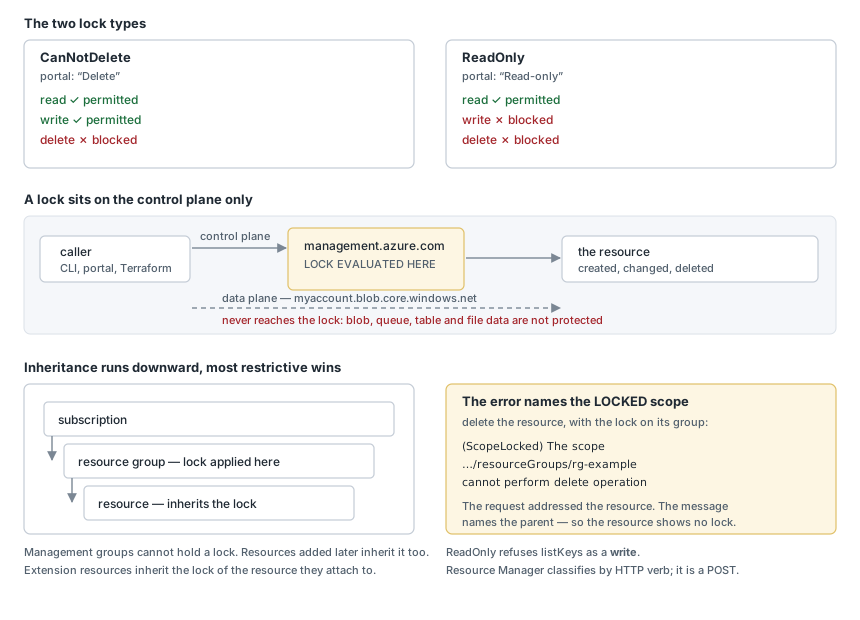
The two types, stated precisely
CanNotDelete means authorized users can read and modify a resource, but they can't delete it. Reads work, writes work, deletes fail. It is the lock that does what its name says.
ReadOnly means authorized users can read a resource, but they can't delete or update it. The documentation offers a useful mental model: applying this lock is similar to restricting all authorized users to the permissions that the Reader role provides. That comparison is the right instinct and it is also the source of the trouble, because Reader is defined by which actions it holds, not by whether an operation feels like reading.
Inheritance runs downward, and the most restrictive wins
When you apply a lock at a parent scope, all resources within that scope inherit the same lock. Even resources you add later inherit the same parent lock. The most restrictive lock in the inheritance chain takes precedence. That last clause matters: locks do not negotiate. A ReadOnly lock on the subscription is not softened by a CanNotDelete lock on a resource group beneath it.
The inheritance also reaches sideways in a way that surprises people. Extension resources inherit locks from the resource to which they're applied. A diagnostic setting on a storage account is an extension resource, so locking the account locks the diagnostic setting too — which follows from the resource ID, since the setting's ID has the account's ID as its prefix.
There is one scope you cannot use. You can't add a lock to management groups. Locks start at the subscription and go down. If the governance requirement is "this must exist across every subscription in the group", a lock is not the mechanism — that is a policy question, which is where posts #14 through #17 went.
Deletion is all or nothing
If you have a Delete lock on a resource and attempt to delete its resource group, the feature blocks the whole delete operation. Even if the resource group or other resources in the resource group are unlocked, the deletion doesn't happen. A partial deletion isn't possible.
This is the behaviour worth designing around. One lock on one resource makes the entire resource group undeletable, which is either exactly what you wanted or a considerable nuisance six months later when a teardown script fails and nothing in the group explains why.
Why This Architecture Holds Up
What a lock actually intercepts
Locks only apply to control plane Azure operations and not to data plane operations. Control plane requests go to management.azure.com; data plane requests go to the service instance, such as a storage account's own blob endpoint. A lock sits in front of the first and is nowhere near the second.
The consequence is blunt and worth stating in the plainest available terms. A read-only lock or cannot-delete lock on a storage account doesn't protect its data from being deleted or modified. It also doesn't protect the data in a blob, queue, table, or file. A lock protects the resource from being changed. It does not protect what is inside the resource, because deleting a blob never touches Resource Manager.
The classification problem
Here is the sentence that explains almost every ReadOnly surprise: Locks prevent the POST method from sending data to the Azure Resource Manager API. Azure classifies operations by the verb the REST API uses, and a number of operations that read something to you are implemented as POST.
The canonical case is storage account keys. A read-only lock on a storage account prevents users from listing the account keys. A POST request handles the Azure Storage List Keys operation to protect access to the account keys. Listing a key is, to any reasonable reader, a read. To Resource Manager it is a POST, so ReadOnly refuses it — and anything authenticating to that account with a shared key stops working, while the account itself sits there looking perfectly healthy.
The same shape recurs across services, and the list is worth reading once in full because the pattern is more useful than the individual entries:
- A read-only lock on a resource group that contains a virtual machine prevents all users from starting or restarting a virtual machine. These operations require a POST method request. A lock intended to stop a VM being deleted stops it being started.
- A read-only lock on a resource group that contains an automation account prevents all runbooks from starting. Same cause, and the symptom is scheduled automation that silently stops running.
- A read-only lock also prevents the assignment of Azure RBAC roles that are scoped to the storage account or to a data container. So the lock quietly becomes an access-management blocker as well.
- A read-only lock on a resource group prevents you from moving existing resources in or out of the resource group.
- A cannot-delete lock on a resource group prevents Resource Manager from automatically deleting deployments in the history. If you reach 800 deployments in the history, your deployments fail. This one has a fuse on it: the lock causes no problem at all until the eight-hundredth deployment, at which point deployments start failing for a reason with no visible connection to the lock.
- Backups fail when there's a cannot-delete lock on the resource group created by Azure Backup Service. The service supports a maximum of 18 restore points. When locked, the backup service can't clean up restore points.
Read as a set, these are not exceptions. They are one rule — a lock blocks POST — observed through six different services.
Measured: what each lock permits, on a live storage account
Deployed to a lab subscription, a Standard LRS storage account in its own resource group, with each lock applied and removed in turn. Every result below is the command line's own output.
| Lock | Operation | Result |
|---|---|---|
| CanNotDelete | delete the account | refused — (ScopeLocked) … cannot perform delete operation because following scope(s) are locked |
| CanNotDelete | write a tag | succeeded |
| ReadOnly | write a tag | refused — (ScopeLocked) … cannot perform write operation |
| ReadOnly | read the account | succeeded |
| ReadOnly | list the account keys | refused — (ScopeLocked) … cannot perform write operation |
The last row is the documented behaviour caught in the act, and the wording is the interesting part. Listing keys is refused as a write operation. Azure is not making an exception for key listing; it simply never considered it a read.
With a CanNotDelete lock on the resource group, deleting a storage account inside it fails with ScopeLocked — and the scope named in the message is the resource group, not the account. Measured on a live deployment: the request targeted the storage account, and the error reported the parent. Inspect the account's own locks and you find none, which reads as "the lock is not the problem". Read the scope in the message before anything else; inheritance means it is regularly a level or two above whatever you were trying to change.
Key Architecture Decisions
Who can lock, and why that list is short
To create or delete management locks, you need access to Microsoft.Authorization/* or Microsoft.Authorization/locks/* actions. Users assigned to the Owner and the User Access Administrator roles have the required access. Contributor cannot — that is deliberate, and it is the entire governance value of the feature. A team with Contributor on a resource group can build and change freely and cannot remove the lock that stops them deleting the database.
It also sets the design rule. A lock is only protection if the people it constrains cannot lift it. Grant the lock-management rights at a scope above the team you are protecting from, or the lock is documentation.
Choosing a type, and choosing a scope
CanNotDelete is the default choice for almost everything. It stops the accident that actually happens — a deletion — and it leaves normal operations, deployments and configuration changes working. Its cost is limited and predictable: the deployment-history cleanup problem, and the all-or-nothing behaviour on resource group deletion.
ReadOnly should be treated as a change freeze rather than a protection setting, applied deliberately and usually temporarily. It breaks starting virtual machines, running runbooks, listing storage keys and assigning roles, and it does so with an error that names a lock rather than the operation. If the goal is "nobody deletes this", ReadOnly is the wrong instrument and CanNotDelete is the right one.
On scope: put the lock as close to the thing you mean to protect as you can. A lock on a resource group is inherited by everything in it, including resources added later, which sounds like thoroughness and behaves like a trap when a future resource type turns out to need POST operations nobody anticipated.
What a lock does not survive
A resource lock doesn't block the subscription cancellation. Locks protect resources from operations inside the subscription; they do not protect the subscription. Anyone weighing a lock as the last line of defence should know that the line ends there.
They also do not survive a determined pipeline. A deployment identity holding Owner can remove a lock, apply its changes and recreate it, and nothing about that sequence is exotic. Locks belong in the same category as a confirmation dialog: valuable precisely because most destructive actions are unintentional, and worth nothing against one that is not.
Closing Thought
Management locks are a small feature with an unusually wide blast radius, and both facts come from the same design choice: they are enforced at the Resource Manager boundary, by HTTP verb, for everyone. That is what makes them simple to reason about and what makes ReadOnly break a running virtual machine.
The useful posture is to treat CanNotDelete as the standing control and ReadOnly as a deliberate, temporary freeze — and to remember, when something inexplicable fails with ScopeLocked, that the scope in the error message is where the lock lives, not necessarily where you were working.
Comments