Business Challenge
The usual day-one list is copied from a guide, applied at the organization node, and produces one of these four surprises within a week.
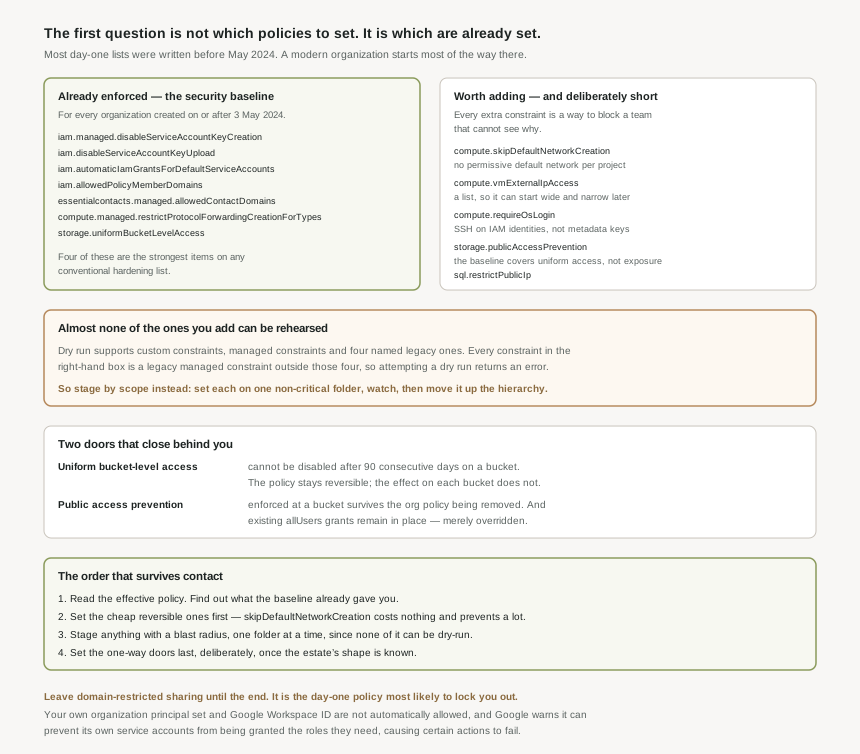
The Google Cloud security baseline addresses insecure security postures with a bundle of organization policies enforced when an organization resource is created, and those constraints are enforced for all organizations created on or after 3 May 2024. Seven policies, already in place, before anybody opened the console.
Correct approachEstablish your organization's creation date first, then read the effective policy rather than the guide. On a post-May-2024 organization the day-one job is smaller and different from what most write-ups describe.
Domain-restricted sharing lets you limit resource sharing based on a domain or organization resource, and it is the single most common day-one lockout. Google states it plainly: your organization principal set and Google Workspace ID are not automatically allowed. It also warns the policy can prevent Google's own service accounts from being automatically granted the roles they need, which can cause certain actions to fail.
Correct approachWrite your own organization into the allow list explicitly, before enforcing, and expect to add exceptions for the automated accounts behind logging and billing. This is a policy to stage by scope, not to set at the root on the first morning.
Enabling it disables ACLs so that only bucket-level IAM permissions grant access. That is the right end state for almost everyone, but it is a door that closes: uniform bucket-level access cannot be disabled after it has been active on a bucket for 90 consecutive days.
Correct approachSet it knowingly rather than as one line in a list. Ninety days is generous for a new estate and short for a migration carrying ACL-dependent tooling nobody has inventoried yet.
Public access prevention has a bucket-level setting of its own, and it wins. Buckets with an enforced setting continue to have public access prevention enforced even if you disable it for the project, folder or organization containing them.
Treat the organization policy and the resource-level setting as two separate controls that both have to be cleared. Removing the policy is not a rollback for anything already enforced at the bucket.
Architecture
The day-one question splits into three: what is already enforced, what is worth adding, and what order to add it in.
What Google already enforces
For any organization created on or after 3 May 2024, the security baseline is already in place:
constraints/iam.managed.disableServiceAccountKeyCreationconstraints/iam.disableServiceAccountKeyUploadconstraints/iam.automaticIamGrantsForDefaultServiceAccountsconstraints/iam.allowedPolicyMemberDomainsconstraints/essentialcontacts.managed.allowedContactDomainsconstraints/compute.managed.restrictProtocolForwardingCreationForTypesconstraints/storage.uniformBucketLevelAccess
Two observations matter more than the list. First, four of those seven are the strongest items on any conventional day-one list — service account keys, default service account grants, domain restriction and uniform bucket access — so a modern organization starts most of the way there. Second, the baseline is a default rather than a lock: it can be removed with gcloud org-policies delete, which means it can also be removed by accident, and is worth monitoring as a thing that should never change.
What is worth adding on top
| Constraint | What it does | Why day one |
|---|---|---|
compute.skipDefaultNetworkCreation |
Skips creation of the default network and related resources during project creation. | The default network's permissive firewall rules are created with every project. Nothing removes them retroactively. |
compute.vmExternalIpAccess |
Defines whether Compute Engine VM instances are allowed to use IPv4 external IP addresses. | A list constraint, so it can start permissive and narrow. The alternative is auditing public IPs forever. |
compute.requireOsLogin |
Requires enablement of OS Login on all newly created projects. | Moves SSH access onto IAM identities instead of metadata keys, which is far harder to retrofit later. |
storage.publicAccessPrevention |
No one can make data in applicable buckets public through IAM policies or ACLs. | The baseline covers uniform access, not public exposure. These are different controls. |
sql.restrictPublicIp |
Restricts configuring public IP on Cloud SQL instances. | A database with a public address is the shortest path from a leaked credential to a breach. |
That is deliberately short. A day-one list is a set of decisions nobody has the context to make yet, and every constraint added is a way for an unfamiliar team to be blocked by something they cannot see. Five is a starting posture; the rest belongs to #23's inventory work, once you can see what the estate actually contains.
Post #21's limitation lands hardest exactly here. Dry-run mode supports custom constraints, managed constraints and four named legacy ones — attempting it with any other constraint results in an error. Every constraint in the table above is a legacy managed constraint outside those four, so none of them can be dry-run. The .managed. entries in the baseline can be; the ones you are adding cannot. So the day-one rollout has to be staged by scope: set each on one non-critical folder, watch, then move it up. That is slower than a single apply at the root, and it is the only rehearsal available.
Why This Architecture Holds Up
Not retroactive, which cuts both ways
Enforcement of most organization policies is not retroactive. On day one of a genuinely new estate that is a gift: there is nothing to remediate, every future resource is constrained, and the policy costs nothing to set. It is the one moment in an organization's life when these are free.
It is also why "day one" is meant literally. The same list applied in year three is a remediation project per constraint, with an inventory, an owner and a negotiation — and the policy page will look identical in both cases.
The one-way doors
Two items on this list are not symmetrical, and both are easy to set without noticing:
- Uniform bucket-level access cannot be disabled after it has been active on a bucket for 90 consecutive days. The organization policy is reversible; the effect on each bucket stops being so after a quarter.
- Public access prevention enforced at a bucket survives the organization policy being removed. And note what it does to what already exists: existing IAM policies and ACLs granting
allUsersandallAuthenticatedUsersremain in place but are overridden. The grants are still there, doing nothing, until somebody disables the control.
Neither is a reason to avoid them. Both are reasons to set them as a decision with a date attached rather than as a line in a copied list.
1. Read the effective policy and find out what the baseline already gives you. 2. Set the cheap, reversible, high-value ones first — skipDefaultNetworkCreation costs nothing and prevents a permissive network being created with every project. 3. Stage the ones with a blast radius by scope, one folder at a time, since they cannot be dry-run. 4. Set the one-way doors last, deliberately, once the estate's shape is known. 5. Leave domain-restricted sharing until you have written your own organization into the allow list and identified the service accounts it will break.
Where to set them
At the organization, for these five. #19's asymmetry is the reason: a denial set high cannot be undone from below, and a permissive policy set high can be tightened by any folder that wants to. Day-one constraints are exactly the case where you want the ceiling at the top and the freedom to tighten underneath.
The exception is anything you cannot rehearse and are not certain of, which is most of this list. There, the folder-by-folder staging above is the compensating control — and once it has run everywhere without complaint, moving it to the organization is a formality rather than a risk.
Key Architecture Decisions
| Decision | Choose this | Because |
|---|---|---|
| Before setting anything | Check the organization's creation date | Organizations created on or after 3 May 2024 already enforce seven baseline constraints. |
| Trusting the baseline | Monitor it as a thing that should never change | It is a default, removable with gcloud org-policies delete. |
| Domain-restricted sharing | Last, and only after allow-listing yourself | Your own organization principal set and Workspace ID are not automatically allowed. |
| Expecting it to be clean | Budget for service-account exceptions | Google warns it can stop its own accounts receiving roles they need. |
| Uniform bucket-level access | Set it knowingly, with the date noted | It cannot be disabled after 90 consecutive days on a bucket. |
| Public access prevention | Treat policy and bucket setting as separate | A bucket set to enforced stays enforced when the policy is removed. |
| Auditing after enabling it | Still clean up the allUsers grants |
They remain in place and are merely overridden. |
| Rehearsing the day-one set | Stage by folder, not by dry run | These are legacy managed constraints, and dry run errors for all but four. |
| Default networks | skipDefaultNetworkCreation first |
Cheapest, most reversible, and prevents a permissive network per project. |
| How long the list should be | Five or so, not thirty | Every constraint is a way to block a team that cannot see why. |
| When to do this | Actually on day one | Enforcement is not retroactive, so the same list later is a remediation project per constraint. |
Closing Thought
The interesting thing about a day-one policy list in 2026 is how much of it Google now does unasked. The security baseline took the four or five items that appeared on every hardening guide — service account keys, default grants, domain restriction, uniform bucket access — and made them the default for every new organization. A guide written in 2023 and a console opened today disagree about most of the work.
What remains is smaller and more particular, and it needs the same care the mechanism posts argued for: policies that cannot be rehearsed, staged by scope instead; doors that close after ninety days, opened with a date attached; a control whose most common configuration locks out the person configuring it. Day one is the cheapest moment to set all of it, because nothing exists yet to violate anything. It is also the moment you know least about the estate you are constraining, and those two facts pull in opposite directions. Five well-understood constraints set deliberately will outperform thirty copied confidently.
#23 answers the question this post kept deferring: Cloud Asset Inventory — how to find out what actually exists across the estate, and what changed, which is the prerequisite for every constraint that did not make the day-one list.
Comments