Business Challenge
Posts #12 and #13 both ended in the same place: Resource Manager has no inheritance of its own, so Azure Policy is what supplies it. That makes policy the load-bearing mechanism under naming, tagging, location control and most of what a platform team means by governance. It also makes it the thing most likely to be adopted as a file format rather than as a system.
The adoption usually looks healthy. A repository of policy definitions in JSON. Pull requests. A pipeline that deploys them. Somebody calls it policy as code and they are not wrong. Six months later a security review asks a simple question — is public blob access denied in production? — and the answer takes two days to establish, because the definition in the repository says deny and the estate says otherwise.
Every explanation for that gap is real, and not one of them is visible in the definition:
- The definition was saved in the wrong management group. The definition location determines the scope to which the policy can be assigned, and production is not underneath it.
- The assignment exists and is set to
DoNotEnforce, left over from the pilot. It evaluates, it reports, it denies nothing — and it writes no Activity log entry, so there is no trail of the thing it did not do. - The definition's
modeisindexed, so resource groups and subscriptions were never evaluated at all. - Three subscriptions are in
notScopes, added during an incident eighteen months ago by someone who has since left. - An exemption covers the storage accounts that matter. It has no
expiresOn, so it is permanent by omission rather than by decision. - The assignment is of an initiative, and an
overrideon it replaced that definition's effect withdisabled— without touching the definition, which still readsdenyin the repository, in the pull request, and in the portal's definition view.
A policy definition is what gets code-reviewed. An assignment is what governs. Scope, exclusions, parameters, effect overrides, enforcement mode and the identity that performs remediation are all properties of the assignment, and a definition can be word-perfect while every one of them is wrong. If the assignments are created by hand in the portal and the definitions live in Git, the half of the system that actually does something has no review at all.
Architecture
Azure Policy is three objects and one pipeline. The definition states a rule and a single effect. The assignment binds that definition to a scope, with parameters, and decides how much of it is real. The effect is what happens at the moment a request arrives — and effects run in a fixed order, some of them before the Resource Provider ever sees the request and some only after it has succeeded.
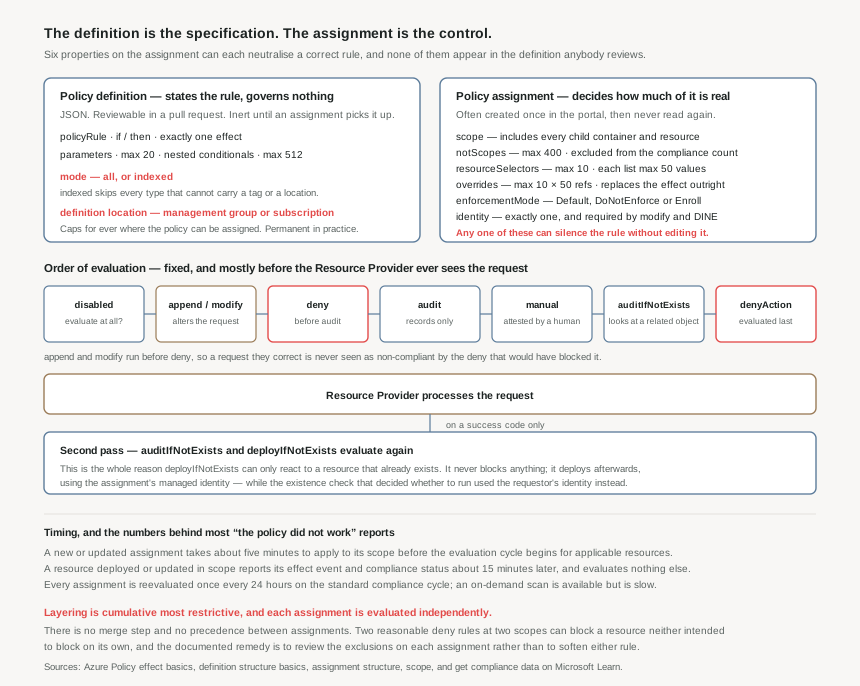
The definition: a rule, one effect, and two properties that decide what is even looked at
A definition is JSON with displayName, description, mode, version, metadata, parameters and a policyRule of if and then. The limits are generous and rarely the constraint: 128 characters for the display name, 512 for the description, 1,024 per metadata property, 20 parameters, and 512 nested conditionals in a rule. Each definition has exactly one effect in its policyRule, which is why an initiative — the subject of post #15 — exists at all.
Two properties on this object matter far more than their prominence suggests.
mode decides which resource types are evaluated. all evaluates resource groups, subscriptions, and all resource types; indexed only evaluates resource types that support tags and location. Microsoft's own example is exact: Microsoft.Network/routeTables supports tags and location and is evaluated in both modes, but Microsoft.Network/routeTables/routes cannot be tagged and is not evaluated in indexed mode. The recommendation is all in most cases, and every definition created through the portal uses it — but the defaults elsewhere do not agree with each other. A definition with no mode value defaults to all in Azure PowerShell and to null in Azure CLI, and a null mode behaves the same as indexed for backward compatibility. The same JSON, deployed by two tools, evaluates two different sets of resources.
There is a specific trap inside that. indexed is the right choice for tag and location rules, because it keeps resources that cannot carry a tag from appearing as non-compliant. The exception is the containers: a definition enforcing location or tags on a resource group or subscription must set mode to all and specifically target Microsoft.Resources/subscriptions/resourceGroups or Microsoft.Resources/subscriptions. Set it to indexed because it is a tag policy, and the containers silently leave scope — which is the same failure post #13 described from the other end.
Definition location decides where the policy can ever be assigned. It must be a management group or a subscription, and resources must be within the hierarchy of that location to be targeted for assignment. Store a definition in a subscription and only that subscription can use it. Store it in a management group and every child management group and child subscription can. Nothing prevents you from saving a definition somewhere convenient; the cost arrives later, when the policy needs to cover subscriptions that are not underneath it and the only remedy is to create it somewhere else and reassign.
The policyType returned by the SDK and shown in the portal is one of three values: Builtin for the definitions Microsoft provides and maintains, Custom for everything created by customers, and Static for Regulatory Compliance definitions under Microsoft ownership, whose compliance results come from non-Microsoft audits of Microsoft infrastructure rather than from your estate.
The assignment: the object that turns a document into a control
An assignment carries scope, the policy definition ID and version, display name, description, metadata, resource selectors, overrides, enforcement mode, excluded scopes, non-compliance messages, parameters and identity. Read that list as a set of independent switches, because that is how it behaves — each one can neutralise the rule on its own.
| Property | What it controls | What it silently does when wrong |
|---|---|---|
scope | Inclusion. Applies to all child resource containers and child resources. | Assigned one level too low; everything above it is ungoverned and nothing reports that. |
notScopes | Exclusion, up to 400 per assignment. | Excluded resources are not evaluated and not included in the compliance count, so removing them raises the compliance percentage. |
resourceSelectors | Narrows evaluation by resourceLocation, resourceType or resourceWithoutLocation. Up to 10 selectors, each list up to 50 values. | A staged rollout never finishes; the assignment covers two regions forever. |
overrides | Replaces the effect or the version, without touching the definition. Up to 10 per assignment, each naming up to 50 policyDefinitionReferenceId. | A rule that reads deny everywhere it is reviewed runs as disabled. |
enforcementMode | Default, DoNotEnforce or Enroll. | DoNotEnforce reports compliance and enforces nothing, with no Activity log entry to show for it. |
identity | The managed identity that performs remediation. Exactly one, system- or user-assigned. | A modify or deployIfNotExists assignment that can never remediate anything. |
nonComplianceMessages | The explanation a caller sees when they are denied. | Absent — and the deploying team gets a policy GUID instead of a reason. |
definitionVersion | Which version of a built-in is assessed. | Unpinned, so a new major version of a built-in changes the rule under a live assignment. |
Enforcement mode is the one worth reading twice. Default enforces the effect during resource creation or update. DoNotEnforce does not, and writes no Activity log entry — which is exactly what makes it useful for evaluating a new assignment before enforcement, and exactly what makes it invisible when it is left on. Enroll is the staged variant: the effect is enforced only for resources enrolled in the assignment, and where no enrollment resource is present, evaluation behaves as if the assignment used DoNotEnforce, though that behaviour is configurable. If enforcementMode is not specified, Default is used. One useful asymmetry: remediation tasks can still be started for deployIfNotExists policies even when the assignment is DoNotEnforce.
Overrides are the property most likely to surprise a reviewer. They change the effect of a policy definition without changing the definition and without a parameterised effect, in two kinds — policyEffect and policyVersion. The intended use is initiative-scale: one override can retarget many definitions by listing multiple reference IDs. The arithmetic bounds it, though. A single override names at most 50 reference IDs and an assignment holds at most 10 overrides, so one assignment can reach 10 × 50 = 500 definition references — while an initiative definition can hold 1000 policies. A maximally large initiative cannot be fully overridden from its assignment, which is a reason to keep initiatives well below their ceiling rather than a reason to add overrides.
Identity is where remediation quietly succeeds or fails. Assignments with deployIfNotExists or modify must carry an identity, and only one — system-assigned or user-assigned, though that single identity can hold several roles. A system-assigned identity also requires a top-level location, which cannot be global and cannot be changed afterwards. The detail that catches people is whose identity is used when: for a deployIfNotExists policy the assignment identity always performs the ARM template deployment, but when the target resource is created or updated, the requestor's identity is used for the evaluation. Microsoft's own worked example is a policy deploying diagnostic settings onto a key vault — the caller needs read permission on Microsoft.Insights/diagnosticSettings for the existence check, and the assignment needs write permission to deploy them. A caller without the read permission changes the outcome of a policy they do not know exists.
notScopes is a property of the assignment: resources within those scopes are not evaluated and not included in the compliance count. An exemption is a separate Resource Manager object created as a child of the resource or hierarchy it covers, and exempt resources show as Exempted in compliance reports so they can be tracked. It can carry an expiresOn value, and it is deliberately harder to create: alongside Microsoft.Authorization/policyExemptions/write on the target, the creator must hold the exempt/Action verb on the assignment itself. Microsoft's guidance splits them by intent — exclusions to permanently bypass a broad scope such as a test environment, exemptions for time-bound or specific cases that should still be tracked. Choosing an exclusion for a temporary waiver removes the resource from the numbers and removes the reminder that it is waived.
The effect: eleven of them, and an order that decides which one the caller sees
Every definition has a single effect, drawn from a list of eleven: addToNetworkGroup, append, audit, auditIfNotExists, deny, denyAction, deployIfNotExists, disabled, manual, modify and mutate. Which one to choose for a given control is post #17; what matters here is that they do not all run at the same point, and the order is fixed.
For a Resource Manager mode definition, Azure Policy builds the list of every assignment applying to the resource and evaluates the resource against each definition, processing several effects before handing the request to the Resource Provider. The sequence is:
disabled— checked first, to determine whether the rule should be evaluated at all.appendandmodify— either can alter the request, and a change made here might prevent anauditordenyeffect from triggering. Both are available only in a Resource Manager mode.deny— evaluated beforeauditso that an undesired resource is not logged twice.audit, thenmanual, thenauditIfNotExists.denyAction— last.
Then the Resource Provider runs. After it returns a success code, auditIfNotExists and deployIfNotExists evaluate again, to decide whether further compliance logging or action is needed. That second pass is why a deployIfNotExists policy can only ever react to a resource that already exists, and why its behaviour has nothing in common with a deny despite both being called policy.
Two consequences follow from the ordering that are easy to miss. First, a modify policy can make a resource compliant with a deny policy before the deny is evaluated — the deployment succeeds, and the audit trail shows a resource that was never non-compliant. Second, a PATCH request that only touches tag-related fields restricts evaluation to policies whose conditions inspect tag-related fields, so a tag edit is not a general re-evaluation of the resource.
Several assignments can affect one resource, at the same scope or at different scopes, each with its own effect. The condition and effect for each are evaluated independently — there is no merge step and no precedence between them. Microsoft's worked example: policy 1 restricts location to westus with a deny at subscription A; policy 2 restricts to eastus with an audit at resource group B inside it. A resource in eastus in group B is compliant to policy 2 and non-compliant to policy 1; policy 1 denies any new resource in the subscription not in westus. Make both deny and every new resource in group B is blocked outright by two rules that each looked reasonable in isolation. When that happens, the fix is to review the exclusions on each assignment — not to soften either rule.
Timing: when an assignment actually starts doing something
Policy is not synchronous with your expectations of it, and the numbers are worth committing to memory because they explain most of the "it did not work" reports:
- A new or updated assignment takes about five minutes to be applied to its scope; the evaluation cycle for applicable resources begins after that. How long the cycle then takes is not predefined — a large policy over a large scope takes as long as it takes.
- A resource deployed or updated in scope produces its effect event and compliance status about 15 minutes later in the portal and SDKs. That event does not cause any other resource to be evaluated.
- A subscription created or moved within a management group hierarchy, with an assignment targeting the subscription type, takes around 30 minutes to evaluate.
- Every assignment is reevaluated once every 24 hours, on the standard compliance evaluation cycle.
- An on-demand scan can be started for a subscription or a resource group through REST, CLI, PowerShell, the VS Code extension or the Azure Policy Compliance Scan GitHub Action — asynchronous, and slow, because resources are evaluated against every assigned policy. Not all resource providers support it.
One exclusion is structural rather than temporal and belongs here: by design, Azure Policy exempts from evaluation all resources under the Microsoft.Resources resource provider, except for subscriptions and resource groups.
Why This Architecture Holds Up
Three of the properties above are effectively permanent once an estate is running, and they are all decided at the moment somebody creates their first policy object.
Definition location is a hierarchy decision, made once. It must be a management group or a subscription, and it fixes the maximum reach of everything defined there. This is the point where post #1's management group design stops being an org chart and starts being a constraint: the definitions belong at a management group near the root that contains every subscription they will ever need to cover, because moving them later means recreating them and recreating every assignment that points at them.
The scarce resource is assignments, not definitions. The per-scope limits are asymmetric in a way that shapes the design:
| Where | What | Maximum |
|---|---|---|
| Scope | Policy definitions | 500 |
| Scope | Initiative definitions | 200 |
| Tenant | Initiative definitions | 2,500 |
| Scope | Policy or initiative assignments | 200 |
| Scope | Exemptions | 1000 |
| Policy definition | Parameters | 20 |
| Initiative definition | Policies | 1000 |
| Policy or initiative assignment | Exclusions (notScopes) | 400 |
| Policy rule | Nested conditionals | 512 |
Five hundred definitions per scope and two hundred assignments. An estate that assigns definitions individually runs out of assignments long before it runs out of rules, and every assignment consumed is also an object somebody has to audit for scope, exclusions, enforcement mode and overrides. That ratio is the practical argument for initiatives, and it is where post #15 begins.
The assignment needs the same review the definition gets
If definitions are deployed from Git and assignments are created in the portal, the review covers the inert half of the system. Everything that determines behaviour — which scope, which exclusions, which effect after overrides, enforced or not, under which identity — is then changed by whoever has the portal open, with no diff and no approver. Put assignments in the same repository, in the same pipeline, reviewed by the same people. An override that turns deny into disabled should be as hard to merge as an edit to the rule itself, because it has the same effect and is harder to notice.
Version pinning is a change-control decision
The latest content of an assigned definition is retrieved every time the assignment is evaluated, so an unpinned assignment of a built-in inherits whatever Microsoft ships next. The version format is Major.Minor.Patch, and a major version is explicitly allowed to introduce breaking changes — including adding an enforcement effect by default. Pinning to #.#.* accepts patch changes only; #.*.* accepts minor ones too. Patch changes are always auto-ingested for security reasons, which is the right trade and worth knowing rather than discovering.
Key Architecture Decisions
The shape that works
| Decision | What to do | Why |
|---|---|---|
| Where definitions live | One management group near the root, containing every subscription the rules will ever cover | Definition location caps assignability permanently. Moving it means recreating the definition and every assignment pointing at it. |
| Where assignments live | At the management group whose blast radius matches the rule — not reflexively at the root, and not per subscription | An assignment covers all child containers and resources. Per-subscription assignment burns the 200-per-scope budget and multiplies the objects to audit. |
mode |
all by default; indexed only for tag and location rules; all plus an explicit container type when the rule targets resource groups or subscriptions |
The CLI and PowerShell defaults disagree, so leaving mode out means the deploying tool decides which resources are evaluated. |
| Rolling out a deny | DoNotEnforce first, then resourceSelectors by region, then Default |
Both mechanisms exist for staged rollout. A deny assigned straight to Default at a management group is a change with no rehearsal and an immediate blast radius. |
| Every deny assignment | Carries a nonComplianceMessage |
The deploying team sees the error, not the platform team. Without a message they get a GUID and file a ticket. Supported only on Resource Manager mode definitions. |
| Waivers | Exemption with an expiresOn for time-bound cases; notScopes only for permanently out-of-scope estates |
Exemptions stay visible as Exempted and expire on their own. Exclusions vanish from the compliance count and never come back on their own. |
| Overrides | Reviewed in the same pipeline as definitions; never used to disable a single rule somebody disagreed with | An override is invisible everywhere the definition is read. Used to silence one rule, it produces a repository that documents a control the estate does not have. |
| Identity | Created with the assignment for anything that could ever use modify or deployIfNotExists, with the location chosen deliberately |
One identity per assignment, and a system-assigned identity's location cannot be changed later. Retrofitting means recreating the assignment. |
| Built-in versions | Pin definitionVersion to #.#.* on anything with an enforcing effect |
The assignment reads the latest content at every evaluation, and a major version may add an enforcement effect by default. |
| Verifying it works | Attempt the denied deployment, on purpose, in a scope you expect it to fail in | Compliance state answers whether resources match a rule. It does not answer whether the assignment is enforcing. Only a rejected request proves that. |
Closing Thought
The reason Azure Policy is misread so consistently is that its most reviewable object is its least consequential one. A definition reads like the control: it names a condition and an effect, in a file, in a language reviewers are comfortable with. It is the specification. The assignment is the deployment, and in most estates it is created once, in a portal, by somebody who had six other things to do that morning — and then never read again, while carrying six properties that can each turn the specification off.
So the useful question about any control is not "do we have a policy for that". It is: which assignment, at which scope, in which enforcement mode, with which overrides, and when did anyone last watch it refuse something. That question has an answer, it takes about ten minutes to establish per control, and an estate where nobody has asked it is an estate whose governance is a document.
#15 takes the constraint this post ended on — 200 assignments per scope against 500 definitions — and looks at initiatives: grouping definitions, parameterising them once, and how compliance state is actually calculated across a set of rules that do not all agree.
Comments