Business Challenge
The invoice for last month arrives, finance forwards it to the platform team, and four questions follow it. Not one of them is answered by the document that prompted them.
The invoice cannot. Project-level cost detail was removed from invoices and statements starting with the November 2019 invoice, and the remaining usage cost line items went with the January 2021 one — since then the CSV mirrors the PDF and carries the header information and cost totals, nothing more. Google is explicit that the PDF is summarised and does not provide details for every resource cost.
Correct approachSend the cost table report for that invoice, not the invoice. It is the surface built to hold the detail the invoice stopped carrying, and it downloads to CSV.
Almost always because a filter is set. A billing report shows an invoice total only when the time range is a billing period and every other filter is in its default state. Choose one project, or one service, and the footer quietly becomes a filtered total — which excludes tax, adjustments and rounding errors, and which Google states does not match the total on your monthly invoice or statement.
Correct approachBefore comparing anything to an invoice, reset the filters. The difference between the two totals is not an error to investigate; it is a different question being answered.
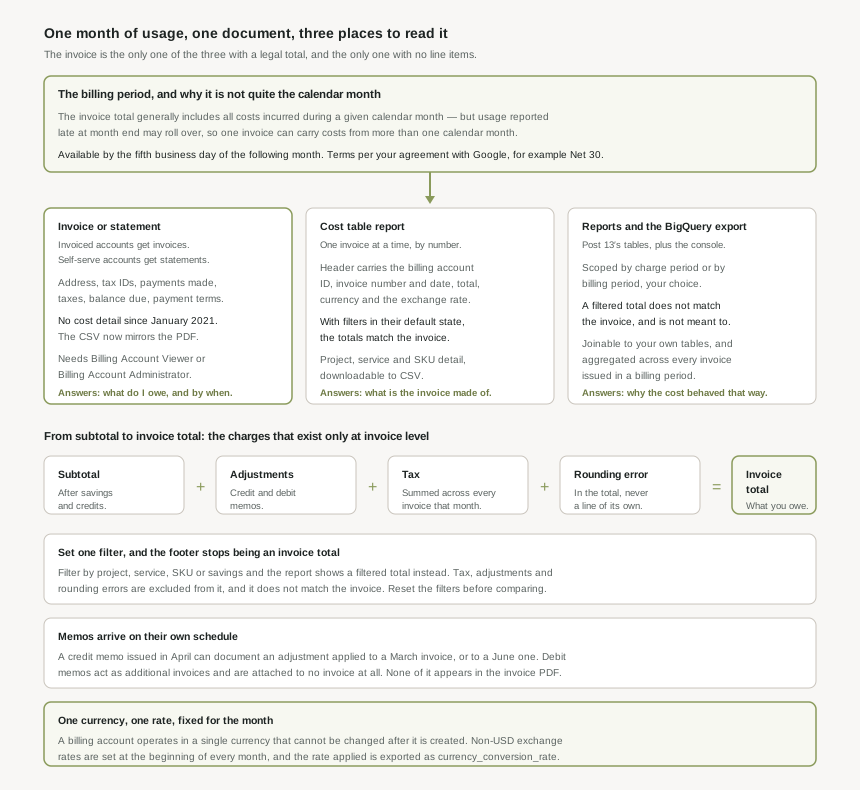
Because the invoice total generally includes all costs incurred during a given calendar month, and generally is doing real work in that sentence. Usage reported late at the end of a month may not make that month's invoice and rolls over to the next one, so a single invoice can carry costs from more than one calendar month.
Correct approachTreat the billing period as an accounting container, not a date range. When the question is about behaviour rather than payment, scope by usage date instead — in the invoice details and the online reports, usage is shown with the actual usage date.
That is the documented behaviour, not a mistake. The month a memo is issued can differ from the month the adjustment is applied to, and a credit memo can be applied to a previous, current or future invoice. Debit memos are stranger still: they act as additional invoices you must pay, and are not associated with a specific invoice at all.
Correct approachReconcile a period on its adjustments, not on its documents. The invoice PDF does not show memo activity, so a process that reads only PDFs will never see the correction that explains the difference.
Architecture
One month of usage produces one document, and that document has a fixed shape determined by something decided long before the month began: what type of Cloud Billing account is paying.
Which document you get, and when
Account type is the fork. An invoiced account accrues costs first and then receives a monthly invoice — or several, when split invoicing applies — paid on terms agreed with Google. A self-serve account is charged automatically and receives a statement instead.
| Account type | Charging cycle | Documents |
|---|---|---|
| Invoiced (terms) | Terms per your agreement with Google, for example Net 30 days | Invoices, debit memos, credit memos and tax memos |
| Self-serve, Postpay threshold | Charged when accrued costs reach an automatically assigned threshold, and the remaining balance on the first of the next month | Statements, debit memos, credit memos and tax invoices |
| Self-serve, Postpay monthly | Charged on the second day of every month for charges accrued during the previous month | Statements, debit memos, credit memos and tax invoices |
None of that is configurable. Google states plainly that you do not get to choose your Postpay charging cycle type and cannot edit it — which makes the charging cycle a property to look up on the payment overview page, not a lever to pull. Payment receipts, unlike everything else in the table, are available for all account types.
An invoice for a particular month should be available by the fifth business day of the following month, and invoices are not generated on weekends or bank holidays — so a month ending near a holiday runs later. There is a second lag inside that one: the PDF is generated separately from the CSV, and the CSV may arrive a day or two after the PDF. A pipeline that fetches both on the same schedule will find one of them missing, periodically, and correctly.
What is actually on it
An invoice carries the legally registered business address, tax IDs, any payments made during the month, taxes for the month, the balance due and the payment terms. Alongside the usage costs it carries the totals of any taxes and adjustments. What it does not carry, since January 2021, is any breakdown of the usage itself.
That absence is the single most important fact about reading one. The invoice is a payment instrument. It is authoritative about the amount and silent about the composition, and every attempt to make it explain itself ends up somewhere else in the console.
Access is a billing-account role, not a project one
Reaching the documents at all requires billing.accounts.getPaymentInfo on the Cloud Billing account, which comes with Billing Account Viewer or Billing Account Administrator. Project-level access grants nothing here, which is the point — invoices include charges for every project linked to the account, so anyone who can read one can read across the whole estate.
For invoiced accounts there is a second door. Full access to the Statement of account and Payments pages in the Google payments center needs admin-level permissions on the associated Google payments profile, which is a separate grant from anything in Cloud IAM. Finance usually has one and platform engineering usually has the other, and each assumes the other's view is the same view.
Why This Architecture Holds Up
A total on an invoice is not the sum of the service costs. Four things sit between them, and three of the four exist only at invoice level — which is why they cannot be reproduced by any query scoped to services or projects.
Subtotal, adjustments, tax, rounding
| Line | What it is |
|---|---|
| Subtotal | The sum of the grouped costs, after savings discounts and credits. |
| Adjustments | The sum of credit or debit memos and other adjustments applied to the billing account due to billing corrections or contractual requirements. They appear when Google needs to modify your account balance, and are rare. |
| Tax | The sum of all taxes reported from all of the invoices for the billing period month. |
| Rounding error | Included in the invoice total but never listed as a separate line item. The exact sum is available in a tooltip beside the total. |
The rounding line is the one worth understanding rather than accepting. The total amount on an invoice is the sum of all unrounded cost line items, rounded once to two decimal places — not the sum of line items each rounded to the cent. Reconciling from a CSV by adding up the rounded column will therefore disagree with the invoice by an amount that grows with the number of rows, which is why Google's own advice for CSV reconciliation is to reset the filters first and use the unrounded cost amounts.
Invoice-level charges are not displayed when the time range is set by charge period, nor when any other report filter is set — projects, services, SKUs, savings options. The footer changes from Invoice total to Filtered total and the tax and adjustments simply leave the calculation. Nothing warns you; the label is the warning. Any screenshot of a billing report offered as evidence about an invoice should be checked for which of the two words it says.
Billing period is not a date range
Setting a report's time range to Billing period (formerly Invoice month) changes what the numbers mean, not merely which ones are shown.
- Only complete months are selectable. Viewing the report on 15 July, the most recent selectable billing period is June. An invoice month in progress is not a thing you can report on, because it is not a thing that exists yet.
- It aggregates across invoices. Billing reports aggregate all invoice costs for the billing period and never by individual invoice, so an account receiving more than one invoice in a month will find that its billing period totals do not map to any single one of them.
- Per-invoice detail lives in the cost table. There, invoices are distinguished by the invoice number appended to the invoice month — two invoices in April 2021 appear as separate selectable documents.
The header is the part that reconciles
Since the September 2020 invoice month, the cost table report carries the document's header: the billing account ID, the invoice number and date, the invoice total, the account's currency, and — from April 2021, for accounts billed in a non-USD currency — the exchange rate applied. From the November 2024 invoice month it also carries a publisher type, distinguishing first-party transactions with Google from third-party ones through a partner.
One property of that header makes it the right thing to reconcile against: it is not affected by any filter set in the report. The table beneath it moves as you explore; the header does not. It is the invoice, quoted inside the analysis tool.
A Cloud Billing account operates in a single currency that cannot be changed after the account is created — a different currency means a different billing account, with everything that implies for project links and history. For non-USD accounts, exchange rates are set at the beginning of every month, so a month's rate is fixed while the month runs. The rate that was actually applied is not something to reconstruct from a market feed: it is exported to BigQuery as currency_conversion_rate in the standard, detailed and pricing exports.
Corrections that arrive after the fact
The awkward part of month-end is that a closed period can still change. Credit memos reduce what you owe for the month the adjustment is applied to; debit memos increase it, and are attached to no invoice. Both can be issued in a month other than the one they affect — an April memo documenting a March adjustment, or a May memo describing a credit to be applied in June.
Two consequences follow for anything automated. Viewing an invoice in the console shows the credit memos applied to it, but memo activity is not shown in the downloadable PDF — so a reconciliation built on PDFs is structurally blind to corrections. And the cost table report includes memos applied during the invoice period but not memos issued and not yet applied, so an adjustment can be visible as a document while being absent from every report of the period it will eventually land in.
The three surfaces, and the question each one owns
| Question | Surface | Why that one |
|---|---|---|
| What do we owe, and by when? | The invoice or statement | The only document carrying a balance due, payment terms and a legally meaningful total. |
| What is that total made of? | The cost table report | Scoped to one invoice by number, with a header that reconciles and detail down to SKU and project. |
| How did we save what we saved? | The cost breakdown report | A waterfall from base usage cost at on-demand prices through discounts, credits, adjustments and taxes to the total. |
| Why did the cost behave like that? | Billing reports, or the BigQuery export | Scope by usage date, group how you like, join to your own data. No reconciliation guarantee, and none needed. |
| What has been paid? | Payment status, transactions, receipts | Open invoices by aging status, and receipts, which are available for every account type. |
The aging view deserves a mention on its own, because it is the only place the platform team sees a commercial risk before it becomes an outage. Open invoices are grouped as not due yet, due soon — coming due in the next 20 days — overdue, at risk, and suspended. At risk is defined as overdue and needing payment to avoid suspension of services. That is a billing page describing an availability event.
Key Architecture Decisions
| Decision | Choose this | Because |
|---|---|---|
| What to send finance for a cost breakdown | The cost table report for that invoice | The invoice has carried no usage line items since January 2021 and no project detail since November 2019. |
| Comparing a report to an invoice | Reset every filter first | A filtered total excludes tax, adjustments and rounding errors, and does not match the invoice. |
| Scoping a question | Billing period to reconcile, usage date to explain | Late-reported usage rolls into the next invoice, so the two are different months by design. |
| Reconciling from CSV | Sum the unrounded cost column | The invoice total is the sum of unrounded line items rounded once, not the sum of rounded ones. |
| Which figure to treat as authoritative | The cost table header total | It is the document's own total and is unaffected by any filter set in the report. |
| Automating invoice ingestion | Do not build it on the PDF alone | Memo activity is not shown in the downloadable PDF, so corrections are invisible to it. |
| Fetching PDF and CSV together | Allow for the CSV lagging | The two are generated separately and the CSV may be a day or two later. |
| Currency | Decide it when the billing account is created | An account operates in a single currency that cannot be changed afterwards. |
| Auditing a non-USD conversion | Read currency_conversion_rate from the export |
Rates are set at the beginning of the month and exported, so the applied rate is a fact rather than a reconstruction. |
| Who gets access to invoices | Billing Account Viewer, deliberately | Invoices span every linked project, so document access is estate-wide access. |
| Watching for suspension risk | The payment status aging view | At risk means overdue and needing payment to avoid services being suspended. |
Closing Thought
The instinct on first opening a Google Cloud invoice is that something has been withheld. A page of totals, no line items, no projects, and a number at the bottom that no report on the account quite reproduces on the first attempt.
Nothing has been withheld. The document was narrowed on purpose — twice, in 2019 and again in 2021 — because it is the wrong shape for analysis and was being used for it anyway. What replaced it is better at that job and worse at being an invoice, which is the correct division of labour. The skill is knowing that the total is the invoice's only claim, and that every other number about that month lives one page across.
#15 moves off billing and onto quotas: the difference between an allocation quota and a rate quota, where each is counted, and why a limit that looks regional is often not.
Official Google Cloud Reference
- Understand your monthly invoice
- Get a Cloud Billing document such as an invoice, statement, or receipt
- Find out your Cloud Billing account type and charging cycle
- Billing reports: view the charges on your invoices
- View and download the cost details of your invoice or statement
- Understand your savings with cost breakdown reports
- Resolve Cloud Billing issues, and understand memos and adjustments
- Currencies available for Cloud Billing accounts
Comments